Search the Community
Showing results for tags 'Games'.
Found 8 results
-
 Hello dear members of MSFN, WinClassic and users of StartAllBack+! First of all, this problem is not related to vanilla Windows 11. It is about a modification that adds the Windows 7 ‘Game Explorer’ feature to Windows 11, which you can find guide from WinClassic forums here. So what is the problem? It's simple. If you are using StartAllBack+ on Windows 11, the ‘Ratings’ (or ‘Performance’) section of the Game Explorer turns into white text. Here is an example of what happens: I posted this bug back in the day on the original thread but I didn't aware that I needed to open a different thread for it because it's not related to vanilla Windows 11 installation. So If anyone is interested or willing to help fix this, your contribution would be greatly appreciated by the community! Please feel free to post here!
-
 After updating the game on December 19th 2022 this issue started occurring. When starting the game normally, it instantly crashes with the error message "EasyAntiCheat has stopped working" The game doesnt start at all, not even the loading screen. When starting the game from steam and selecting "Start MCC (No EasyAntiCheat)" the game works perfectly fine. Event viewer shows the following: Faulting application name: mcclauncher.exe, version: 1.0.0.0, time stamp: 0x62161bfa Faulting module name: mcclauncher.exe, version: 1.0.0.0, time stamp: 0x62161bfa Exception code: 0x40000015 Fault offset: 0x0002297b Faulting process id: 0x1728 Faulting application start time: 0x01d922a7fafee587 Faulting application path: H:\SteamLibrary\steamapps\common\Halo The Master Chief Collection\mcclauncher.exe Faulting module path: H:\SteamLibrary\steamapps\common\Halo The Master Chief Collection\mcclauncher.exe Report Id: 38d96dd7-8e9b-11ed-a9a6-e848499c0603 .net and Visual C++ are fully updated. Game file integrity check (Steam) and OS system file integrity check (sfc /scannow) all passed multiple times. Game was reinstalled multiple times already and its always up to date EasyAntiCheat was also reinstalled manually multiple times, it still didnt work please help
 -
VQ7zk$kzr
-
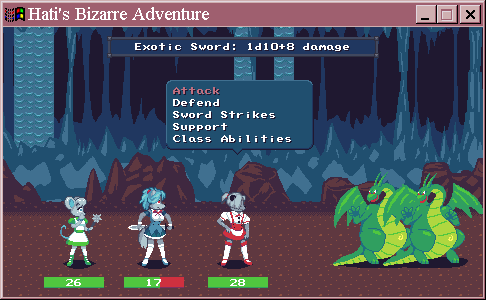
If you are into playing games and making games on old Windows computers, look what's out there: A current game engine, that supports Windows 95! It's called OHRRPGCE. This seems to be the homepage: http://rpg.hamsterrepublic.com/ohrrpgce/Main_Page In the changelog for its current version, it says: ...Windows 95 is supported again!... This thing supports everything, it seems. Also smartphones, Linux and MacOS. It seems their games are found here: https://www.slimesalad.com/ A lot of projects look very amateur and poorly made, but the so called "best" game is something with dogs and mice in strange outfits. I've never seen something like this to be honest. But it is a new game that works on Windows 95. So who says now Windows 9x is dead?
-
(Thread inspired by Dr. Flay's thread: https://forum.vivaldi.net/topic/38561/windows-7-old-games-failing-to-run) Ever since Games Explorer was introduced in Windows Vista, it has caused problems for users with limited access to the internet. Most affected users would have already disabled it by editing GameUX's registry settings or by unregistering the dll (GameUX.dll), but last month Microsoft has taken the domain the Games Explorer system used to phone for game-related metadata and updates out of commission (specifically: "https://games.metaservices.microsoft.com/games/SGamesWebService.asmx"), thus the problem will also show for users which have permanent connection to the internet. Symptoms related to this problem: Game fails to open, but their processes can be seen in the taskmgr The rundll32.exe process related to gameux.dll spikes up to >50% of CPU usage Running a second copy of the game or renaming the game executable works around it Any old game that has been added by Games Explorer itself is affected to this problem, since Windows is using the rundll32.exe process to check the game updates before launching the game. Note that you can't remove said games from Games Explorer itself, only hide it. Even changing the options within the Games Explorer to never check online for game updates and news won't fix this problem. The fix which tackles the problem at its core is to use these registry files provided by user UCyborg (Make sure to read the whole post!): The second fix (or rather a workaround) which is more simpler, but doesn't remove the problem at its core (less recommended than the first one): All you have to do is to open regedit, go to this key: HKEY_CLASSES_ROOT\Local Settings\Software\Microsoft\Windows\GameUX\ServiceLocation Changing the server address in the "Games" value to either '127.0.0.1', 'localhost' or '0.0.0.0' ought to fix it.
-
Well, I know that MSFN is rather devoted to technical things, but we have a gamer's hangout, right? Since there are some topics where we can rather loosely comment IT news, I thought it might be a good idea to start topic where one can share a gaming news, or his impressions on some game/event without starting a new topic, hoping not to break any unwritten forum rule with it Or more, I don't think I'll need a new topic with everything like the one below... Sony announced PlayStation 4 Pro might soon acquire boost mode - which means every PS4 game will run better on stronger hardware, not only the one especially prepared/patched by the devs for the consol's Pro version. https://www.engadget.com/2017/02/03/ps4-pro-boost-mode-beta-software/ For me, devoted PC gamer for years, this is hilarius
-
See: http://www.dosforum.de/viewtopic.php?f=30&t=11599 (in german) It basically shows a sceenshot after D2 crashed, showing a dependency to a w2000-DLL. I have the same phenomenon, and will start a research. Hopefully just a small problem. Any ideas welcome...
-
I'm using the WinXP version on Win98 SE and this is my score after about a couple hundred games. Can you top it? Its d@mn near impossible to get Zero (0), but I'm sure it can be done. I only play in Expert Mode. It brings the most competition. Who want some?
.png.cf62debca6dc1c2730be2e6ef8bbda8d.png.5f5ad64cf426dc44debaee6467d39562.png)
.png.f36c9ef75dd72ae82fe0a1fa0193f65d.png.c0b6c44a8a7d415053461f9fc5b1e9df.png)