Dave-H
Content Type
Profiles
Forums
Events
Everything posted by Dave-H
-
 @NotHereToPlayGames Hi again ArcticFoxie. Still getting my head around configuring 360Chrome 13.5. Do you know if there is an English spell checker that will work with it? 360Chrome doesn't seem the have the inbuilt Chrome spell checker that most references refer to. American English will do, although British would be better! I've looked at the available extensions, but none of them do what I want, which is to highlight mis-spellings as I type in website forms. I'm really missing the spell checker in Firefox 52.9 ESR! Thanks, Dave.
 -
Instagram videos not working in Firefox 52 ESR?
Dave-H replied to Dave-H's topic in Browsers working on Older NT-Family OSes
I have UBO 1.16.4.30 installed on Firefox 52.9. I did try putting a previously recommended filter into it, but it makes no difference. It's - instagram.com##div.ZyFrc[role=dialog]:style(display: block !important) Is there another one I can try? -
I used Presto Opera for years, until they abandoned it, it seemed virtually overnight with absolutely no warning, for the Chromium version. Best browser ever made IMO.
-
Instagram videos not working in Firefox 52 ESR?
Dave-H replied to Dave-H's topic in Browsers working on Older NT-Family OSes
Yes those two video links work in Firefox 52.9 ESR. The problem is not that IG videos have stopped working completely, it's that they have stopped being displayed in the feed. If you click on the comments of an entry in the feed where there is a video missing, when the comments window opens the video plays fine there next to the comments. It doesn't show in the feed though, that's the problem. Sorry, I should have been more specific! -
Oh that is a shame, I've been using it on Firefox for years! I've actually just been testing it on Google Chrome 49, to see if it works there, but I'm not having any luck. I'll investigate alternatives, including the one you use. Thanks, Dave.
-
That's not really a solution, I don't want to remove New Tab Tools, I actually want to use it! Are you saying that it won't work with 360Chrome?
-
@NotHereToPlayGames Hi ArcticFoxie, I'm trying to use an extension called New Tab Tools with 360Chrome 13.5, as I've always used it with Firefox to give me a new tab page with a "speed dial" of shortcuts on it. The new tab page at the moment appears to be blank, and I can't see how to restore the usual Chrome one. Without that I don't think the extension will be any use. It apparently installed OK, but the settings are greyed out, and although I can apparently add sites to the new tab page, I can't see them. I guess the extension modifies the usual Chrome new tab page, so how do I get that back? Thanks, Dave.
-
Instagram videos not working in Firefox 52 ESR?
Dave-H replied to Dave-H's topic in Browsers working on Older NT-Family OSes
In my experience, Serpent 55 appeared to use Firefox Sync, which really got my hopes up, but it refused to actually connect for me. Serpent 52 uses Pale Moon Sync. -
Instagram videos not working in Firefox 52 ESR?
Dave-H replied to Dave-H's topic in Browsers working on Older NT-Family OSes
OK, I've tried with Serpent 52, and yes the Instagram videos (and comments view) work there fine! Unfortunately, Facebook still has the problem that you can't post, text entry doesn't work. I would really like to find a Mozilla-based browser that works properly on everything in XP, but so far no joy. If it could still use Firefox Sync to synchronise with my other Firefox browsers that would be the icing on the cake! 360Chrome still seems the best option at the moment I'm afraid. -
Instagram videos not working in Firefox 52 ESR?
Dave-H replied to Dave-H's topic in Browsers working on Older NT-Family OSes
Thanks, I'll give Serpent 52 a try! -
Instagram videos not working in Firefox 52 ESR?
Dave-H replied to Dave-H's topic in Browsers working on Older NT-Family OSes
It was actually Serpent 55 I tried it on, but yes, exactly the same problem. I haven't tried New Moon. -
My Browser Builds (Part 3)
Dave-H replied to roytam1's topic in Browsers working on Older NT-Family OSes
Happy New Year to you too! I certainly tried all that with Firefox, but it never made any difference to the Instagram videos problem. It has happened before, and a fix was found, but I haven't been able to identify what needs to be done this time. It's some sort of javascript issue I think, which Firefox 52 ESR (and presumably Serpent which is based on it) cannot cope with. It was Serpent 55 which I tried incidentally. I was impressed with it, but as it didn't fix the Instagram problem I think I will stick with 360Chrome for the moment, it works fine there. -
My Browser Builds (Part 3)
Dave-H replied to roytam1's topic in Browsers working on Older NT-Family OSes
Just an observation about the latest Serpent build, it has the same problem now with Instagram as Firefox 52.9 ESR does. No videos are displayed. -
My Browser Builds (Part 3)
Dave-H replied to roytam1's topic in Browsers working on Older NT-Family OSes
Ah, thank you, of course, it's because I'm using ProxHTTPSProxy! That never occurred to me, I completely forgot that I had to configure Firefox to allow for that. You're a star! -
My Browser Builds (Part 3)
Dave-H replied to roytam1's topic in Browsers working on Older NT-Family OSes
It certainly looks like something like that, but everything else is working fine! How can I check that and correct it? -
My Browser Builds (Part 3)
Dave-H replied to roytam1's topic in Browsers working on Older NT-Family OSes
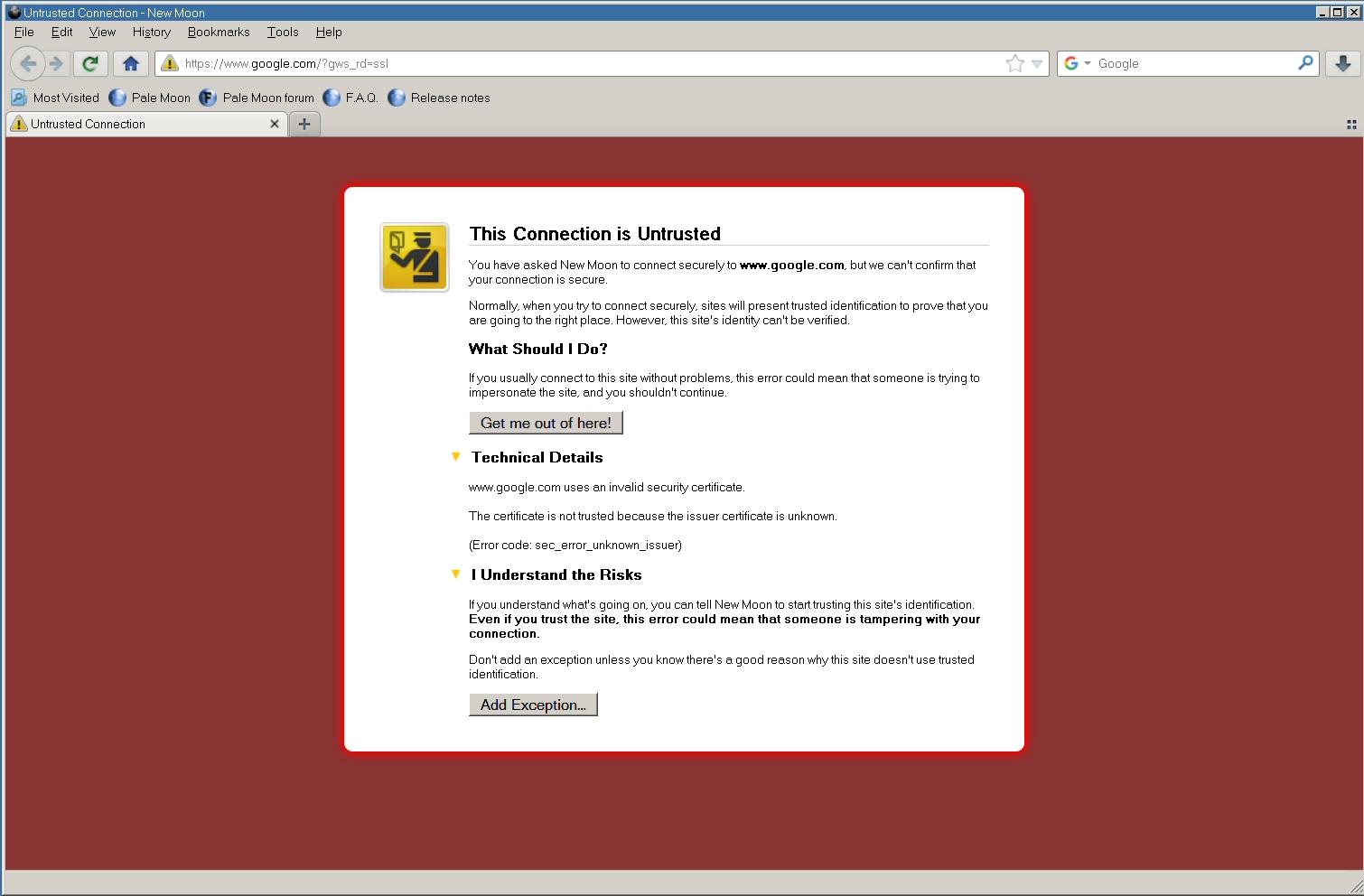
Hi everyone, Happy New Year! I'm just trying out some new browser options, because I fear that my old faithful Firefox 52 ESR is getting near the end of its usability now. I've tried Arcticfoxie's version of 360Chrome, which looks promising, but as someone who has generally always used Firefox, I wanted to try some of the offerings here. I first tried the latest version of Serpent, which I was told some time ago is closest to Firefox, although it's now being discontinued I gather. I also tried the latest New Moon. They both run fine, but they both have the same problem. On virtually every website, I get this - Something is obviously fundamentally wrong somewhere, unless I'm missing something really obvious! I can override the warning on some sites (but not all) and the sites then load, but surely this shouldn't be happening?
-
I did think of that, but it would be a bit ridiculous if 360Chrome couldn't cope with that! I had actually already tried using its 8.3 DOS name E:\DUMPFOLD but that made no difference. Further experiments show that I can use the E:\ root as the destination, and a subfolder of E:\Dump Folder as well, e.g. E:\Dump Folder\Test. Works fine, no problem with spaces then. It seems that the only path I can't use is the one I actually want to use! I'm still wondering if it's because it's configured as the system "My Documents" folder. Perhaps 360Chrome doesn't like that for some reason. I should add that E:\ is a FAT32 formatted drive, so there definitely shouldn't be any permissions problems! Setting the download folder to E:\Dump Folder\Test Folder also works. It's only E:\Dump Folder which seems to be "unwritable"!
-
No, it's a separate fixed disk which is my archive storage drive, where all my pictures and videos etc. are stored. It's connected internally to the motherboard, but via an add-on SATA card. That has never made a difference before, and I can actually use the root of the drive to store downloads, but not the Dump Folder subfolder. E:\Dump Folder is actually also the "My Documents" folder, if that makes any difference. It certainly doesn't to any other programs.
-
Hi @NotHereToPlayGamesAKA ArcticFoxie! I've just decided again to see how your latest version 0f 360Chrome version 13.5 works with my system. After spending some time on the configuration, I'm impressed, it's working very well! No crashes or other malfunctions as yet. One puzzling thing I've come across though is the download folder setting. I don't want to use the default, which is D:\360Down (my XP is installed on drive D:), I want to use my normal temporary file store with is at E:\Dump Folder. Unfortunately, when I try to use it I just get a message saying "Path is not writable. Please Choose another folder". I am very puzzled by this, as that folder is perfectly writeable, I write to it dozens of times a day! All my research on this just points to permissions problems, but we're talking about XP here, permissions don't apply (at least when you've got simple file sharing enabled, which I have). Any idea why 360Chrome can't write to that folder when everything else can? Cheers, Dave.
-
Instagram videos not working in Firefox 52 ESR?
Dave-H replied to Dave-H's topic in Browsers working on Older NT-Family OSes
The Instagram videos aren't working again for me now in Firefox 52.9 ESR. Can anyone else confirm this? Carousel videos are just a white space, single videos don't appear at all, I suspect they've just collapsed to a single line again. -
Thanks, more food for thought! One thing I am now certain of after my experiments with George is that this machine will not work properly with XP in ACPI Multiprocessor mode. I'm having exactly the same problems with his clean installation as I was having with my original installation. Many USB devices are not detected in multiprocessor mode, and the AHCI driver refuses to work as well. Those problems all immediately go away if I switch to standard ACPI mode. What the actual cause is I have no idea, but I suspect it's a resources problem of some sort.
-
Just in case anyone was wondering why I've gone quiet for a while, it's because I'm working off-thread with George King on a Windows XP installation package for (relatively) modern machines like this. There are still a lot of issues with it, at least on my machine, but if I can get a new clean XP install that's as functional as it can be, I'll then know what the intrinsic limitations actually are, eliminating anything that's just being caused by me using an existing and already much modified installation. Where we are at the moment, I'm beginning to think that the only answer to getting all the hardware properly recognised by XP is a modified BIOS, as long as that doesn't break Windows 10! Cheers, Dave.
-
Sorry, I should have said. I can't see any mention of devices like that in Windows 10's Device Manager.
-
Been trying a few graphics drivers today. I'm sure nobody will be surprised to hear that I didn't get anywhere! I found a couple which did recognise the hardware and did install, but they all produced the "device can't start" Code 10 message.
-
Yes there is a touchscreen which works fine on Windows 10. I'm not holding out any hope of it ever working on XP though! Fortunately I have now managed to sort out the mouse, and it's now working on the other USB2 port where I want it. I found that in the list of generic "Human Interface Devices" listed in the Device Manager there was one that if the driver was updated manually from a list, the list included a "HID compliant mouse". I selected that and installed it, and the mouse now works! There was an equivalent entry for a "HID compliant keyboard too" which I also installed. So, we're getting there! The machine is still not performing at its best on XP as it's only using one processor core, and there is still no sound, but it's now pretty usable.