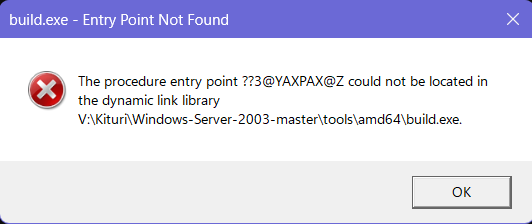
The purpose was for my touchpad controller to turn on from i2cctrl.sys using XP's ACPI.sys.
The conclusion is much clearer, patching the ACPI table of XP OSI versions in memory (to avoid bricking anything) to do what Windows 10 OSI version does too, or else the LPSS controller (for touchpads that use Intel's LPSS controller) would never power on.
I2cctrl.log (before the patch):
[31/05/2026, 01:28 AM] DriverEntry begin
[31/05/2026, 01:28 AM] DriverEntry complete (mask=0x00000009)
[31/05/2026, 01:28 AM] AddDevice: begin
[31/05/2026, 01:28 AM] AddDevice: scanning HWIDs for controller match
[31/05/2026, 01:28 AM] AddDevice: HWID candidate: PCI\VEN_8086&DEV_9DE8&SUBSYS_19611043&REV_30
[31/05/2026, 01:28 AM] AddDevice: matched controller PCI\VEN_8086&DEV_9DE8 (index 5)
[31/05/2026, 01:28 AM] AddDevice: ControllerId assigned = 1
[31/05/2026, 01:28 AM] FindControllerId: match found
[31/05/2026, 01:28 AM] ApplyQuirks: BAR0 NULL -> skipping HW quirks
[31/05/2026, 01:28 AM] AddDevice: complete (Ctrl1)
[31/05/2026, 01:28 AM] PnP: Entered for device FFFFFADF3B87A5A0, MinorFunction=0x18
[31/05/2026, 01:28 AM] PnP: Device FFFFFADF3B87A5A0 recognized as FDO -> routing to FdoDispatch
[31/05/2026, 01:28 AM] FDO: Entered for device FFFFFADF3B87A5A0, Major=0x1B, Minor=0x18
[31/05/2026, 01:28 AM] FDO: Unhandled PnP minor 0x18 -> passing down
[31/05/2026, 01:28 AM] AddDevice: begin
[31/05/2026, 01:28 AM] AddDevice: scanning HWIDs for controller match
[31/05/2026, 01:28 AM] AddDevice: HWID candidate: PCI\VEN_8086&DEV_9DE9&SUBSYS_19611043&REV_30
[31/05/2026, 01:28 AM] AddDevice: matched controller PCI\VEN_8086&DEV_9DE9 (index 6)
[31/05/2026, 01:28 AM] AddDevice: ControllerId assigned = 2
[31/05/2026, 01:28 AM] FindControllerId: match found
[31/05/2026, 01:28 AM] ApplyQuirks: BAR0 NULL -> skipping HW quirks
[31/05/2026, 01:28 AM] AddDevice: complete (Ctrl2)
[31/05/2026, 01:28 AM] PnP: Entered for device FFFFFADF3C28D5A0, MinorFunction=0x18
[31/05/2026, 01:28 AM] PnP: Device FFFFFADF3C28D5A0 recognized as FDO -> routing to FdoDispatch
[31/05/2026, 01:28 AM] FDO: Entered for device FFFFFADF3C28D5A0, Major=0x1B, Minor=0x18
[31/05/2026, 01:28 AM] FDO: Unhandled PnP minor 0x18 -> passing down
[31/05/2026, 01:28 AM] AddDevice: begin
[31/05/2026, 01:28 AM] AddDevice: scanning HWIDs for controller match
[31/05/2026, 01:28 AM] AddDevice: HWID candidate: PCI\VEN_8086&DEV_9DC5&SUBSYS_19611043&REV_30
[31/05/2026, 01:28 AM] AddDevice: matched controller PCI\VEN_8086&DEV_9DC5 (index 4)
[31/05/2026, 01:28 AM] AddDevice: ControllerId assigned = 3
[31/05/2026, 01:28 AM] FindControllerId: match found
[31/05/2026, 01:28 AM] ApplyQuirks: BAR0 NULL -> skipping HW quirks
[31/05/2026, 01:28 AM] AddDevice: complete (Ctrl3)
[31/05/2026, 01:28 AM] PnP: Entered for device FFFFFADF3BEAB040, MinorFunction=0x18
[31/05/2026, 01:28 AM] PnP: Device FFFFFADF3BEAB040 recognized as FDO -> routing to FdoDispatch
[31/05/2026, 01:28 AM] FDO: Entered for device FFFFFADF3BEAB040, Major=0x1B, Minor=0x18
[31/05/2026, 01:28 AM] FDO: Unhandled PnP minor 0x18 -> passing down
[31/05/2026, 01:28 AM] PnP: Entered for device FFFFFADF3B87A5A0, MinorFunction=0x0D
[31/05/2026, 01:28 AM] PnP: Device FFFFFADF3B87A5A0 recognized as FDO -> routing to FdoDispatch
[31/05/2026, 01:28 AM] FDO: Entered for device FFFFFADF3B87A5A0, Major=0x1B, Minor=0x0D
[31/05/2026, 01:28 AM] FDO: Unhandled PnP minor 0x0D -> passing down
[31/05/2026, 01:28 AM] PnP: Entered for device FFFFFADF3B87A5A0, MinorFunction=0x08
[31/05/2026, 01:28 AM] PnP: Device FFFFFADF3B87A5A0 recognized as FDO -> routing to FdoDispatch
[31/05/2026, 01:28 AM] FDO: Entered for device FFFFFADF3B87A5A0, Major=0x1B, Minor=0x08
[31/05/2026, 01:28 AM] FDO: Unhandled PnP minor 0x08 -> passing down
[31/05/2026, 01:28 AM] PnP: Entered for device FFFFFADF3B87A5A0, MinorFunction=0x08
[31/05/2026, 01:28 AM] PnP: Device FFFFFADF3B87A5A0 recognized as FDO -> routing to FdoDispatch
[31/05/2026, 01:28 AM] FDO: Entered for device FFFFFADF3B87A5A0, Major=0x1B, Minor=0x08
[31/05/2026, 01:28 AM] FDO: Unhandled PnP minor 0x08 -> passing down
[31/05/2026, 01:28 AM] PnP: Entered for device FFFFFADF3C28D5A0, MinorFunction=0x0D
[31/05/2026, 01:28 AM] PnP: Device FFFFFADF3C28D5A0 recognized as FDO -> routing to FdoDispatch
[31/05/2026, 01:28 AM] FDO: Entered for device FFFFFADF3C28D5A0, Major=0x1B, Minor=0x0D
[31/05/2026, 01:28 AM] FDO: Unhandled PnP minor 0x0D -> passing down
[31/05/2026, 01:28 AM] PnP: Entered for device FFFFFADF3C28D5A0, MinorFunction=0x08
[31/05/2026, 01:28 AM] PnP: Device FFFFFADF3C28D5A0 recognized as FDO -> routing to FdoDispatch
[31/05/2026, 01:28 AM] FDO: Entered for device FFFFFADF3C28D5A0, Major=0x1B, Minor=0x08
[31/05/2026, 01:28 AM] FDO: Unhandled PnP minor 0x08 -> passing down
[31/05/2026, 01:28 AM] PnP: Entered for device FFFFFADF3C28D5A0, MinorFunction=0x08
[31/05/2026, 01:28 AM] PnP: Device FFFFFADF3C28D5A0 recognized as FDO -> routing to FdoDispatch
[31/05/2026, 01:28 AM] FDO: Entered for device FFFFFADF3C28D5A0, Major=0x1B, Minor=0x08
[31/05/2026, 01:28 AM] FDO: Unhandled PnP minor 0x08 -> passing down
[31/05/2026, 01:28 AM] PnP: Entered for device FFFFFADF3BEAB040, MinorFunction=0x0D
[31/05/2026, 01:28 AM] PnP: Device FFFFFADF3BEAB040 recognized as FDO -> routing to FdoDispatch
[31/05/2026, 01:28 AM] FDO: Entered for device FFFFFADF3BEAB040, Major=0x1B, Minor=0x0D
[31/05/2026, 01:28 AM] FDO: Unhandled PnP minor 0x0D -> passing down
[31/05/2026, 01:28 AM] PnP: Entered for device FFFFFADF3BEAB040, MinorFunction=0x08
[31/05/2026, 01:28 AM] PnP: Device FFFFFADF3BEAB040 recognized as FDO -> routing to FdoDispatch
[31/05/2026, 01:28 AM] FDO: Entered for device FFFFFADF3BEAB040, Major=0x1B, Minor=0x08
[31/05/2026, 01:28 AM] FDO: Unhandled PnP minor 0x08 -> passing down
[31/05/2026, 01:28 AM] PnP: Entered for device FFFFFADF3BEAB040, MinorFunction=0x08
[31/05/2026, 01:28 AM] PnP: Device FFFFFADF3BEAB040 recognized as FDO -> routing to FdoDispatch
[31/05/2026, 01:28 AM] FDO: Entered for device FFFFFADF3BEAB040, Major=0x1B, Minor=0x08
[31/05/2026, 01:28 AM] FDO: Unhandled PnP minor 0x08 -> passing down
[31/05/2026, 01:28 AM] PnP: Entered for device FFFFFADF3B87A5A0, MinorFunction=0x00
[31/05/2026, 01:28 AM] PnP: Device FFFFFADF3B87A5A0 recognized as FDO -> routing to FdoDispatch
[31/05/2026, 01:28 AM] FDO: Entered for device FFFFFADF3B87A5A0, Major=0x1B, Minor=0x00
[31/05/2026, 01:28 AM] FDO: IRP_MN_START_DEVICE -> forwarding + StartCompletion
[31/05/2026, 01:28 AM] PnP: Entered for device FFFFFADF3B87A5A0, MinorFunction=0x08
[31/05/2026, 01:28 AM] PnP: Device FFFFFADF3B87A5A0 recognized as FDO -> routing to FdoDispatch
[31/05/2026, 01:28 AM] FDO: Entered for device FFFFFADF3B87A5A0, Major=0x1B, Minor=0x08
[31/05/2026, 01:28 AM] FDO: Unhandled PnP minor 0x08 -> passing down
[31/05/2026, 01:28 AM] StartDevice: entered
[31/05/2026, 01:28 AM] StartDevice: PnpId captured
[31/05/2026, 01:28 AM] StartDevice: matched controller PCI\VEN_8086&DEV_9DE8 (BAR0 Offsets: CTRL=10 STAT=14 DATA=18 CLK=1C, quirks=0x2 bsod=0x20000)[31/05/2026, 01:28 AM] StartDevice: got translated resources
[31/05/2026, 01:28 AM] StartDevice: MMIO mapped
[31/05/2026, 01:28 AM] BAR0[00] = 0x00000000
[31/05/2026, 01:28 AM] BAR0[04] = 0x00000000
[31/05/2026, 01:28 AM] BAR0[08] = 0x00000000
[31/05/2026, 01:28 AM] BAR0[0C] = 0x00000000
[31/05/2026, 01:28 AM] BAR0[10] = 0x00000000
[31/05/2026, 01:28 AM] BAR0[14] = 0x00000000
[31/05/2026, 01:28 AM] BAR0[18] = 0x00000000
[31/05/2026, 01:28 AM] BAR0[1C] = 0x00000000
[31/05/2026, 01:28 AM] BAR0[20] = 0x00000000
[31/05/2026, 01:28 AM] BAR0[24] = 0x00000000
[31/05/2026, 01:28 AM] BAR0[28] = 0x00000000
[31/05/2026, 01:28 AM] BAR0[2C] = 0x00000000
[31/05/2026, 01:28 AM] BAR0[30] = 0x00000000
[31/05/2026, 01:28 AM] BAR0[34] = 0x00000000
[31/05/2026, 01:28 AM] BAR0[38] = 0x00000000
[31/05/2026, 01:28 AM] BAR0[3C] = 0x00000000
[31/05/2026, 01:28 AM] StartDevice: no LPSS BAR2 resource
[31/05/2026, 01:28 AM] StartDevice: Connecting interrupt:
Vector=417 Level=10 Mode=Level Sharable=1 Affinity=0x000000000000007F
[31/05/2026, 01:28 AM] StartDevice: registry policy loaded
[31/05/2026, 01:28 AM] StartDevice: PWRMBASE (fixed) = 00000000FE0D0000
[31/05/2026, 01:28 AM] PWRMINFO: Universal PWRMBASE = 0x00000000FE0D0000
[31/05/2026, 01:28 AM] StartDevice: PWRMBASE VA mapped at FFFFFADF2B166000
[31/05/2026, 01:28 AM] StartDevice: LPSS BAR2 mapped at FFFFFADF2AE4D000 (PWRMBASE+0xC000)
[31/05/2026, 01:28 AM] StartDevice: === POWER + LPSS DEBUG BEGIN ===
[31/05/2026, 01:28 AM] StartDevice: PWRMBASE VA=FFFFFADF2B166000 PA=00000000FE0D0000
[31/05/2026, 01:28 AM] StartDevice: PMC4 BEFORE = 0xffffffff
[31/05/2026, 01:28 AM] StartDevice: PW_FORCE_ON BEFORE= 0xffffffff
[31/05/2026, 01:28 AM] StartDevice: PW_STS BEFORE = 0xffffffff
[31/05/2026, 01:28 AM] StartDevice: Setting CECE bit (0x80000000)
[31/05/2026, 01:28 AM] StartDevice: PMC4 AFTER = 0xffffffff
[31/05/2026, 01:28 AM] StartDevice: Writing PW_FORCE_ON mask 0x00000006
[31/05/2026, 01:28 AM] StartDevice: PW_FORCE_ON AFTER = 0xffffffff
[31/05/2026, 01:28 AM] StartDevice: Polling PW_STS for PW1/PW2 ON (mask=0x00000006)
[31/05/2026, 01:28 AM] StartDevice: PW_STS FINAL = 0xffffffff (iters=0 timeout=10000)
[31/05/2026, 01:28 AM] StartDevice: LPSS BAR2 VA=FFFFFADF2AE4D000 PA=00000000FE0DC000
[31/05/2026, 01:28 AM] StartDevice: LPSS CLK_CTL BEFORE = 0xffffffff
[31/05/2026, 01:28 AM] StartDevice: LPSS RST_CTL BEFORE = 0xffffffff
[31/05/2026, 01:28 AM] StartDevice: LPSS RST_STS BEFORE = 0xffffffff
[31/05/2026, 01:28 AM] StartDevice: Writing LPSS CLK_CTL = 0x00000007
[31/05/2026, 01:28 AM] StartDevice: LPSS CLK_CTL AFTER = 0xffffffff
[31/05/2026, 01:28 AM] StartDevice: Writing LPSS RST_CTL = 0x00000000
[31/05/2026, 01:28 AM] StartDevice: LPSS RST_CTL AFTER = 0xffffffff
[31/05/2026, 01:28 AM] StartDevice: Polling LPSS RST_STS for bit0=1
[31/05/2026, 01:28 AM] StartDevice: LPSS RST_STS FINAL = 0xffffffff (iters=0 timeout=1000)
[31/05/2026, 01:28 AM] StartDevice: === POWER + LPSS DEBUG END ===
[31/05/2026, 01:28 AM] StartDevice: applying unified quirks (late pass)
[31/05/2026, 01:28 AM] FindControllerId: match found
[31/05/2026, 01:28 AM] ApplyQuirks: begin
[31/05/2026, 01:28 AM] LPSS: clock gate cleared
[31/05/2026, 01:28 AM] LPSS: reset deasserted
[31/05/2026, 01:28 AM] LPSS: functional clock enabled
[31/05/2026, 01:28 AM] LPSS: misc touched
[31/05/2026, 01:28 AM] Quirk: broken clock gate
[31/05/2026, 01:28 AM] BSOD: mask interrupts
[31/05/2026, 01:28 AM] ApplyQuirks: done
[31/05/2026, 01:28 AM] StartDevice: unified quirks applied (late pass)
[31/05/2026, 01:28 AM] StartDevice: === DW-I2C ENABLE DEBUG BEGIN ===
[31/05/2026, 01:28 AM] StartDevice: Ops table present at FFFFFADF2AD87130
[31/05/2026, 01:28 AM] StartDevice: BAR0 BEFORE ENABLE (first 0x40 bytes):
[31/05/2026, 01:28 AM] BAR0[00] = 0x00000000
[31/05/2026, 01:28 AM] BAR0[04] = 0x00000000
[31/05/2026, 01:28 AM] BAR0[08] = 0x00000000
[31/05/2026, 01:28 AM] BAR0[0C] = 0x00000000
[31/05/2026, 01:28 AM] BAR0[10] = 0x00000000
[31/05/2026, 01:28 AM] BAR0[14] = 0x00000000
[31/05/2026, 01:28 AM] BAR0[18] = 0x00000000
[31/05/2026, 01:28 AM] BAR0[1C] = 0x00000000
[31/05/2026, 01:28 AM] BAR0[20] = 0x00000000
[31/05/2026, 01:28 AM] BAR0[24] = 0x00000000
[31/05/2026, 01:28 AM] BAR0[28] = 0x00000000
[31/05/2026, 01:28 AM] BAR0[2C] = 0x00000000
[31/05/2026, 01:28 AM] BAR0[30] = 0x00000000
[31/05/2026, 01:28 AM] BAR0[34] = 0x00000000
[31/05/2026, 01:28 AM] BAR0[38] = 0x00000000
[31/05/2026, 01:28 AM] BAR0[3C] = 0x00000000
[31/05/2026, 01:28 AM] StartDevice: Calling Ops->Enable(TRUE)...
[31/05/2026, 01:28 AM] StartDevice: Ops->Enable returned 0x00000000
[31/05/2026, 01:28 AM] StartDevice: BAR0 AFTER ENABLE (first 0x40 bytes):
[31/05/2026, 01:28 AM] BAR0[00] = 0x00000000
[31/05/2026, 01:28 AM] BAR0[04] = 0x00000000
[31/05/2026, 01:28 AM] BAR0[08] = 0x00000000
[31/05/2026, 01:28 AM] BAR0[0C] = 0x00000000
[31/05/2026, 01:28 AM] BAR0[10] = 0x00000000
[31/05/2026, 01:28 AM] BAR0[14] = 0x00000000
[31/05/2026, 01:28 AM] BAR0[18] = 0x00000000
[31/05/2026, 01:28 AM] BAR0[1C] = 0x00000000
[31/05/2026, 01:28 AM] BAR0[20] = 0x00000000
[31/05/2026, 01:28 AM] BAR0[24] = 0x00000000
[31/05/2026, 01:28 AM] BAR0[28] = 0x00000000
[31/05/2026, 01:28 AM] BAR0[2C] = 0x00000000
[31/05/2026, 01:28 AM] BAR0[30] = 0x00000000
[31/05/2026, 01:28 AM] BAR0[34] = 0x00000000
[31/05/2026, 01:28 AM] BAR0[38] = 0x00000000
[31/05/2026, 01:28 AM] BAR0[3C] = 0x00000000
[31/05/2026, 01:28 AM] StartDevice: === DW-I2C ENABLE DEBUG END ===
[31/05/2026, 01:28 AM] WaitForEnableState: timeout expired (targetOn=1)
[31/05/2026, 01:28 AM] StartDevice: ENABLE FAILED (0xc0000368) -> collecting debug
[31/05/2026, 01:28 AM] StartDevice: PWRM VA=FFFFFADF2B166000
[31/05/2026, 01:28 AM] StartDevice: PWRM [0x00]=0xffffffff
[31/05/2026, 01:28 AM] StartDevice: PWRM [0x04]=0xffffffff
[31/05/2026, 01:28 AM] StartDevice: PWRM [0x08]=0xffffffff
[31/05/2026, 01:28 AM] StartDevice: PRIV VA=FFFFFADF2AE4D000
[31/05/2026, 01:28 AM] StartDevice: PRIV [0x00]=0xffffffff
[31/05/2026, 01:28 AM] StartDevice: PRIV [0x04]=0xffffffff
[31/05/2026, 01:28 AM] StartDevice: PRIV [0x08]=0xffffffff
[31/05/2026, 01:28 AM] StartDevice: ENABLE FAILED (0xc0000368)
HWID=PCI\VEN_8086&DEV_9DE8&SUBSYS_19611043&REV_30
BAR0=PA=00000000FE1FF000 Len=4096
IRQ: Vector=417 Level=10 Mode=Level Sharable=1
[31/05/2026, 01:28 AM] StartDevice: marking HardwareFailure=TRUE
[31/05/2026, 01:28 AM] StartDevice: disconnecting interrupt object FFFFFADF3C2828E0
[31/05/2026, 01:28 AM] StartDevice: unmapping PRIV at FFFFFADF2AE4D000 (len=4096)
[31/05/2026, 01:28 AM] StartDevice: unmapping PWRMBASE VA FFFFFADF2B166000
[31/05/2026, 01:28 AM] StartDevice: unmapping MMIO at FFFFFADF2AE4F000 (len=4096)
[31/05/2026, 01:28 AM] StartDevice: ENABLE FAILED (0xc0000368) -> returning failure
[31/05/2026, 01:28 AM] StartCompletion: calling I2cCtrl_CreateTouchpad()
[31/05/2026, 01:28 AM] CreateTouchpad: begin (auto-enumerate + bind PT touchpad)
[31/05/2026, 01:28 AM] CreateTouchpad: no children -> calling I2cCtrl_EnumerateAcpiChildren()
[31/05/2026, 01:28 AM] EnumerateAcpiChildren: begin for controller HWID=PCI\VEN_8086&DEV_9DE8&SUBSYS_19611043&REV_30
[31/05/2026, 01:28 AM] AcpiOpen: IoGetDeviceObjectPointer failed (0xc0000034)
[31/05/2026, 01:28 AM] EnumerateAcpiChildren: AcpiOpen failed or no ACPI device (status=0xc0000034)
[31/05/2026, 01:28 AM] CreateTouchpad: enumeration produced no children -> NOT_FOUND
[31/05/2026, 01:28 AM] DeenumerateAcpiChildren: begin (NumChildren=0)
[31/05/2026, 01:28 AM] DeenumerateAcpiChildren: done (Deleted=0, Remaining=0)
[31/05/2026, 01:28 AM] PnP: Entered for device FFFFFADF3B87A5A0, MinorFunction=0x09
[31/05/2026, 01:28 AM] PnP: Device FFFFFADF3B87A5A0 recognized as FDO -> routing to FdoDispatch
[31/05/2026, 01:28 AM] FDO: Entered for device FFFFFADF3B87A5A0, Major=0x1B, Minor=0x09
[31/05/2026, 01:28 AM] FDO: Unhandled PnP minor 0x09 -> passing down
[31/05/2026, 01:28 AM] PnP: Entered for device FFFFFADF3B87A5A0, MinorFunction=0x14
[31/05/2026, 01:28 AM] PnP: Device FFFFFADF3B87A5A0 recognized as FDO -> routing to FdoDispatch
[31/05/2026, 01:28 AM] FDO: Entered for device FFFFFADF3B87A5A0, Major=0x1B, Minor=0x14
[31/05/2026, 01:28 AM] FDO: Unhandled PnP minor 0x14 -> passing down
[31/05/2026, 01:28 AM] PnP: Entered for device FFFFFADF3B87A5A0, MinorFunction=0x07
[31/05/2026, 01:28 AM] PnP: Device FFFFFADF3B87A5A0 recognized as FDO -> routing to FdoDispatch
[31/05/2026, 01:28 AM] FDO: Entered for device FFFFFADF3B87A5A0, Major=0x1B, Minor=0x07
[31/05/2026, 01:28 AM] FDO: IRP_MN_QUERY_DEVICE_RELATIONS (Type=0)
[31/05/2026, 01:28 AM] BusRelations: StartDevice not completed -> returning existing children only
[31/05/2026, 01:28 AM] FDO: BusRelations: reporting 0 children
[31/05/2026, 01:28 AM] PnP: Entered for device FFFFFADF3C28D5A0, MinorFunction=0x00
[31/05/2026, 01:28 AM] PnP: Device FFFFFADF3C28D5A0 recognized as FDO -> routing to FdoDispatch
[31/05/2026, 01:28 AM] FDO: Entered for device FFFFFADF3C28D5A0, Major=0x1B, Minor=0x00
[31/05/2026, 01:28 AM] FDO: IRP_MN_START_DEVICE -> forwarding + StartCompletion
[31/05/2026, 01:28 AM] PnP: Entered for device FFFFFADF3C28D5A0, MinorFunction=0x08
[31/05/2026, 01:28 AM] PnP: Device FFFFFADF3C28D5A0 recognized as FDO -> routing to FdoDispatch
[31/05/2026, 01:28 AM] FDO: Entered for device FFFFFADF3C28D5A0, Major=0x1B, Minor=0x08
[31/05/2026, 01:28 AM] FDO: Unhandled PnP minor 0x08 -> passing down
[31/05/2026, 01:28 AM] StartDevice: entered
[31/05/2026, 01:28 AM] StartDevice: PnpId captured
[31/05/2026, 01:28 AM] StartDevice: matched controller PCI\VEN_8086&DEV_9DE9 (BAR0 Offsets: CTRL=20 STAT=24 DATA=28 CLK=2C, quirks=0x4 bsod=0x10000)[31/05/2026, 01:28 AM] StartDevice: got translated resources
[31/05/2026, 01:28 AM] StartDevice: MMIO mapped
[31/05/2026, 01:28 AM] BAR0[00] = 0x00000000
[31/05/2026, 01:28 AM] BAR0[04] = 0x00000000
[31/05/2026, 01:28 AM] BAR0[08] = 0x00000000
[31/05/2026, 01:28 AM] BAR0[0C] = 0x00000000
[31/05/2026, 01:28 AM] BAR0[10] = 0x00000000
[31/05/2026, 01:28 AM] BAR0[14] = 0x00000000
[31/05/2026, 01:28 AM] BAR0[18] = 0x00000000
[31/05/2026, 01:28 AM] BAR0[1C] = 0x00000000
[31/05/2026, 01:28 AM] BAR0[20] = 0x00000000
[31/05/2026, 01:28 AM] BAR0[24] = 0x00000000
[31/05/2026, 01:28 AM] BAR0[28] = 0x00000000
[31/05/2026, 01:28 AM] BAR0[2C] = 0x00000000
[31/05/2026, 01:28 AM] BAR0[30] = 0x00000000
[31/05/2026, 01:28 AM] BAR0[34] = 0x00000000
[31/05/2026, 01:28 AM] BAR0[38] = 0x00000000
[31/05/2026, 01:28 AM] BAR0[3C] = 0x00000000
[31/05/2026, 01:28 AM] StartDevice: no LPSS BAR2 resource
[31/05/2026, 01:28 AM] StartDevice: Connecting interrupt:
Vector=401 Level=9 Mode=Level Sharable=1 Affinity=0x000000000000007F
[31/05/2026, 01:28 AM] StartDevice: registry policy loaded
[31/05/2026, 01:28 AM] StartDevice: PWRMBASE (fixed) = 00000000FE0D0000
[31/05/2026, 01:28 AM] PWRMINFO: Universal PWRMBASE = 0x00000000FE0D0000
[31/05/2026, 01:28 AM] StartDevice: PWRMBASE VA mapped at FFFFFADF2D3AB000
[31/05/2026, 01:28 AM] StartDevice: LPSS BAR2 mapped at FFFFFADF2D9BF100 (PWRMBASE+0xC100)
[31/05/2026, 01:28 AM] StartDevice: === POWER + LPSS DEBUG BEGIN ===
[31/05/2026, 01:28 AM] StartDevice: PWRMBASE VA=FFFFFADF2D3AB000 PA=00000000FE0D0000
[31/05/2026, 01:28 AM] StartDevice: PMC4 BEFORE = 0xffffffff
[31/05/2026, 01:28 AM] StartDevice: PW_FORCE_ON BEFORE= 0xffffffff
[31/05/2026, 01:28 AM] StartDevice: PW_STS BEFORE = 0xffffffff
[31/05/2026, 01:28 AM] StartDevice: Setting CECE bit (0x80000000)
[31/05/2026, 01:28 AM] StartDevice: PMC4 AFTER = 0xffffffff
[31/05/2026, 01:28 AM] StartDevice: Writing PW_FORCE_ON mask 0x00000006
[31/05/2026, 01:28 AM] StartDevice: PW_FORCE_ON AFTER = 0xffffffff
[31/05/2026, 01:28 AM] StartDevice: Polling PW_STS for PW1/PW2 ON (mask=0x00000006)
[31/05/2026, 01:28 AM] StartDevice: PW_STS FINAL = 0xffffffff (iters=0 timeout=10000)
[31/05/2026, 01:28 AM] StartDevice: LPSS BAR2 VA=FFFFFADF2D9BF100 PA=00000000FE0DC100
[31/05/2026, 01:28 AM] StartDevice: LPSS CLK_CTL BEFORE = 0xffffffff
[31/05/2026, 01:28 AM] StartDevice: LPSS RST_CTL BEFORE = 0xffffffff
[31/05/2026, 01:28 AM] StartDevice: LPSS RST_STS BEFORE = 0xffffffff
[31/05/2026, 01:28 AM] StartDevice: Writing LPSS CLK_CTL = 0x00000007
[31/05/2026, 01:28 AM] StartDevice: LPSS CLK_CTL AFTER = 0xffffffff
[31/05/2026, 01:28 AM] StartDevice: Writing LPSS RST_CTL = 0x00000000
[31/05/2026, 01:28 AM] StartDevice: LPSS RST_CTL AFTER = 0xffffffff
[31/05/2026, 01:28 AM] StartDevice: Polling LPSS RST_STS for bit0=1
[31/05/2026, 01:28 AM] StartDevice: LPSS RST_STS FINAL = 0xffffffff (iters=0 timeout=1000)
[31/05/2026, 01:28 AM] StartDevice: === POWER + LPSS DEBUG END ===
[31/05/2026, 01:28 AM] StartDevice: applying unified quirks (late pass)
[31/05/2026, 01:28 AM] FindControllerId: match found
[31/05/2026, 01:28 AM] ApplyQuirks: begin
[31/05/2026, 01:28 AM] LPSS: clock gate cleared
[31/05/2026, 01:28 AM] LPSS: reset deasserted
[31/05/2026, 01:28 AM] LPSS: functional clock enabled
[31/05/2026, 01:28 AM] LPSS: misc touched
[31/05/2026, 01:28 AM] Quirk: no DMA support
[31/05/2026, 01:28 AM] BSOD: force PIO
[31/05/2026, 01:28 AM] ApplyQuirks: done
[31/05/2026, 01:28 AM] StartDevice: unified quirks applied (late pass)
[31/05/2026, 01:28 AM] StartDevice: === DW-I2C ENABLE DEBUG BEGIN ===
[31/05/2026, 01:28 AM] StartDevice: Ops table present at FFFFFADF2AD87130
[31/05/2026, 01:28 AM] StartDevice: BAR0 BEFORE ENABLE (first 0x40 bytes):
[31/05/2026, 01:28 AM] BAR0[00] = 0x00000000
[31/05/2026, 01:28 AM] BAR0[04] = 0x00000000
[31/05/2026, 01:28 AM] BAR0[08] = 0x00000000
[31/05/2026, 01:28 AM] BAR0[0C] = 0x00000000
[31/05/2026, 01:28 AM] BAR0[10] = 0x00000000
[31/05/2026, 01:28 AM] BAR0[14] = 0x00000000
[31/05/2026, 01:28 AM] BAR0[18] = 0x00000000
[31/05/2026, 01:28 AM] BAR0[1C] = 0x00000000
[31/05/2026, 01:28 AM] BAR0[20] = 0x00000000
[31/05/2026, 01:28 AM] BAR0[24] = 0x00000000
[31/05/2026, 01:28 AM] BAR0[28] = 0x00000000
[31/05/2026, 01:28 AM] BAR0[2C] = 0x00000000
[31/05/2026, 01:28 AM] BAR0[30] = 0x00000000
[31/05/2026, 01:28 AM] BAR0[34] = 0x00000000
[31/05/2026, 01:28 AM] BAR0[38] = 0x00000000
[31/05/2026, 01:28 AM] BAR0[3C] = 0x00000000
[31/05/2026, 01:28 AM] StartDevice: Calling Ops->Enable(TRUE)...
[31/05/2026, 01:28 AM] StartDevice: Ops->Enable returned 0x00000000
[31/05/2026, 01:28 AM] StartDevice: BAR0 AFTER ENABLE (first 0x40 bytes):
[31/05/2026, 01:28 AM] BAR0[00] = 0x00000000
[31/05/2026, 01:28 AM] BAR0[04] = 0x00000000
[31/05/2026, 01:28 AM] BAR0[08] = 0x00000000
[31/05/2026, 01:28 AM] BAR0[0C] = 0x00000000
[31/05/2026, 01:28 AM] BAR0[10] = 0x00000000
[31/05/2026, 01:28 AM] BAR0[14] = 0x00000000
[31/05/2026, 01:28 AM] BAR0[18] = 0x00000000
[31/05/2026, 01:28 AM] BAR0[1C] = 0x00000000
[31/05/2026, 01:28 AM] BAR0[20] = 0x00000000
[31/05/2026, 01:28 AM] BAR0[24] = 0x00000000
[31/05/2026, 01:28 AM] BAR0[28] = 0x00000000
[31/05/2026, 01:28 AM] BAR0[2C] = 0x00000000
[31/05/2026, 01:28 AM] BAR0[30] = 0x00000000
[31/05/2026, 01:28 AM] BAR0[34] = 0x00000000
[31/05/2026, 01:28 AM] BAR0[38] = 0x00000000
[31/05/2026, 01:28 AM] BAR0[3C] = 0x00000000
[31/05/2026, 01:28 AM] StartDevice: === DW-I2C ENABLE DEBUG END ===
[31/05/2026, 01:28 AM] WaitForEnableState: timeout expired (targetOn=1)
[31/05/2026, 01:28 AM] StartDevice: ENABLE FAILED (0xc0000368) -> collecting debug
[31/05/2026, 01:28 AM] StartDevice: PWRM VA=FFFFFADF2D3AB000
[31/05/2026, 01:28 AM] StartDevice: PWRM [0x00]=0xffffffff
[31/05/2026, 01:28 AM] StartDevice: PWRM [0x04]=0xffffffff
[31/05/2026, 01:28 AM] StartDevice: PWRM [0x08]=0xffffffff
[31/05/2026, 01:28 AM] StartDevice: PRIV VA=FFFFFADF2D9BF100
[31/05/2026, 01:28 AM] StartDevice: PRIV [0x00]=0xffffffff
[31/05/2026, 01:28 AM] StartDevice: PRIV [0x04]=0xffffffff
[31/05/2026, 01:28 AM] StartDevice: PRIV [0x08]=0xffffffff
[31/05/2026, 01:28 AM] StartDevice: ENABLE FAILED (0xc0000368)
HWID=PCI\VEN_8086&DEV_9DE9&SUBSYS_19611043&REV_30
BAR0=PA=00000000FE1FE000 Len=4096
IRQ: Vector=401 Level=9 Mode=Level Sharable=1
[31/05/2026, 01:28 AM] StartDevice: marking HardwareFailure=TRUE
[31/05/2026, 01:28 AM] StartDevice: disconnecting interrupt object FFFFFADF3C47FA70
[31/05/2026, 01:28 AM] StartDevice: unmapping PRIV at FFFFFADF2D9BF100 (len=4096)
[31/05/2026, 01:28 AM] StartDevice: unmapping PWRMBASE VA FFFFFADF2D3AB000
[31/05/2026, 01:28 AM] StartDevice: unmapping MMIO at FFFFFADF2AE45000 (len=4096)
[31/05/2026, 01:28 AM] StartDevice: ENABLE FAILED (0xc0000368) -> returning failure
[31/05/2026, 01:28 AM] StartCompletion: calling I2cCtrl_CreateTouchpad()
[31/05/2026, 01:28 AM] CreateTouchpad: begin (auto-enumerate + bind PT touchpad)
[31/05/2026, 01:28 AM] CreateTouchpad: no children -> calling I2cCtrl_EnumerateAcpiChildren()
[31/05/2026, 01:28 AM] EnumerateAcpiChildren: begin for controller HWID=PCI\VEN_8086&DEV_9DE9&SUBSYS_19611043&REV_30
[31/05/2026, 01:28 AM] AcpiOpen: IoGetDeviceObjectPointer failed (0xc0000034)
[31/05/2026, 01:28 AM] EnumerateAcpiChildren: AcpiOpen failed or no ACPI device (status=0xc0000034)
[31/05/2026, 01:28 AM] CreateTouchpad: enumeration produced no children -> NOT_FOUND
[31/05/2026, 01:28 AM] DeenumerateAcpiChildren: begin (NumChildren=0)
[31/05/2026, 01:28 AM] DeenumerateAcpiChildren: done (Deleted=0, Remaining=0)
[31/05/2026, 01:28 AM] PnP: Entered for device FFFFFADF3C28D5A0, MinorFunction=0x09
[31/05/2026, 01:28 AM] PnP: Device FFFFFADF3C28D5A0 recognized as FDO -> routing to FdoDispatch
[31/05/2026, 01:28 AM] FDO: Entered for device FFFFFADF3C28D5A0, Major=0x1B, Minor=0x09
[31/05/2026, 01:28 AM] FDO: Unhandled PnP minor 0x09 -> passing down
[31/05/2026, 01:28 AM] PnP: Entered for device FFFFFADF3C28D5A0, MinorFunction=0x14
[31/05/2026, 01:28 AM] PnP: Device FFFFFADF3C28D5A0 recognized as FDO -> routing to FdoDispatch
[31/05/2026, 01:28 AM] FDO: Entered for device FFFFFADF3C28D5A0, Major=0x1B, Minor=0x14
[31/05/2026, 01:28 AM] FDO: Unhandled PnP minor 0x14 -> passing down
[31/05/2026, 01:28 AM] PnP: Entered for device FFFFFADF3C28D5A0, MinorFunction=0x07
[31/05/2026, 01:28 AM] PnP: Device FFFFFADF3C28D5A0 recognized as FDO -> routing to FdoDispatch
[31/05/2026, 01:28 AM] FDO: Entered for device FFFFFADF3C28D5A0, Major=0x1B, Minor=0x07
[31/05/2026, 01:28 AM] FDO: IRP_MN_QUERY_DEVICE_RELATIONS (Type=0)
[31/05/2026, 01:28 AM] BusRelations: StartDevice not completed -> returning existing children only
[31/05/2026, 01:28 AM] FDO: BusRelations: reporting 0 children
[31/05/2026, 01:28 AM] PnP: Entered for device FFFFFADF3BEAB040, MinorFunction=0x00
[31/05/2026, 01:28 AM] PnP: Device FFFFFADF3BEAB040 recognized as FDO -> routing to FdoDispatch
[31/05/2026, 01:28 AM] FDO: Entered for device FFFFFADF3BEAB040, Major=0x1B, Minor=0x00
[31/05/2026, 01:28 AM] FDO: IRP_MN_START_DEVICE -> forwarding + StartCompletion
[31/05/2026, 01:28 AM] PnP: Entered for device FFFFFADF3BEAB040, MinorFunction=0x08
[31/05/2026, 01:28 AM] PnP: Device FFFFFADF3BEAB040 recognized as FDO -> routing to FdoDispatch
[31/05/2026, 01:28 AM] FDO: Entered for device FFFFFADF3BEAB040, Major=0x1B, Minor=0x08
[31/05/2026, 01:28 AM] FDO: Unhandled PnP minor 0x08 -> passing down
[31/05/2026, 01:28 AM] StartDevice: entered
[31/05/2026, 01:28 AM] StartDevice: PnpId captured
[31/05/2026, 01:28 AM] StartDevice: matched controller PCI\VEN_8086&DEV_9DC5 (BAR0 Offsets: CTRL=00 STAT=04 DATA=08 CLK=0C, quirks=0x1 bsod=0x40000)[31/05/2026, 01:28 AM] StartDevice: got translated resources
[31/05/2026, 01:28 AM] StartDevice: MMIO mapped
[31/05/2026, 01:28 AM] BAR0[00] = 0x00000000
[31/05/2026, 01:28 AM] BAR0[04] = 0x00000000
[31/05/2026, 01:28 AM] BAR0[08] = 0x00000000
[31/05/2026, 01:28 AM] BAR0[0C] = 0x00000000
[31/05/2026, 01:28 AM] BAR0[10] = 0x00000000
[31/05/2026, 01:28 AM] BAR0[14] = 0x00000000
[31/05/2026, 01:28 AM] BAR0[18] = 0x00000000
[31/05/2026, 01:28 AM] BAR0[1C] = 0x00000000
[31/05/2026, 01:28 AM] BAR0[20] = 0x00000000
[31/05/2026, 01:28 AM] BAR0[24] = 0x00000000
[31/05/2026, 01:28 AM] BAR0[28] = 0x00000000
[31/05/2026, 01:28 AM] BAR0[2C] = 0x00000000
[31/05/2026, 01:28 AM] BAR0[30] = 0x00000000
[31/05/2026, 01:28 AM] BAR0[34] = 0x00000000
[31/05/2026, 01:28 AM] BAR0[38] = 0x00000000
[31/05/2026, 01:28 AM] BAR0[3C] = 0x00000000
[31/05/2026, 01:28 AM] StartDevice: no LPSS BAR2 resource
[31/05/2026, 01:28 AM] StartDevice: Connecting interrupt:
Vector=385 Level=8 Mode=Level Sharable=1 Affinity=0x000000000000007F
[31/05/2026, 01:28 AM] StartDevice: registry policy loaded
[31/05/2026, 01:28 AM] StartDevice: PWRMBASE (fixed) = 00000000FE0D0000
[31/05/2026, 01:28 AM] PWRMINFO: Universal PWRMBASE = 0x00000000FE0D0000
[31/05/2026, 01:28 AM] StartDevice: PWRMBASE VA mapped at FFFFFADF2D3BB000
[31/05/2026, 01:28 AM] StartDevice: LPSS BAR2 mapped at FFFFFADF2D9C1200 (PWRMBASE+0xC200)
[31/05/2026, 01:28 AM] StartDevice: === POWER + LPSS DEBUG BEGIN ===
[31/05/2026, 01:28 AM] StartDevice: PWRMBASE VA=FFFFFADF2D3BB000 PA=00000000FE0D0000
[31/05/2026, 01:28 AM] StartDevice: PMC4 BEFORE = 0xffffffff
[31/05/2026, 01:28 AM] StartDevice: PW_FORCE_ON BEFORE= 0xffffffff
[31/05/2026, 01:28 AM] StartDevice: PW_STS BEFORE = 0xffffffff
[31/05/2026, 01:28 AM] StartDevice: Setting CECE bit (0x80000000)
[31/05/2026, 01:28 AM] StartDevice: PMC4 AFTER = 0xffffffff
[31/05/2026, 01:28 AM] StartDevice: Writing PW_FORCE_ON mask 0x00000006
[31/05/2026, 01:28 AM] StartDevice: PW_FORCE_ON AFTER = 0xffffffff
[31/05/2026, 01:28 AM] StartDevice: Polling PW_STS for PW1/PW2 ON (mask=0x00000006)
[31/05/2026, 01:28 AM] StartDevice: PW_STS FINAL = 0xffffffff (iters=0 timeout=10000)
[31/05/2026, 01:28 AM] StartDevice: LPSS BAR2 VA=FFFFFADF2D9C1200 PA=00000000FE0DC200
[31/05/2026, 01:28 AM] StartDevice: LPSS CLK_CTL BEFORE = 0xffffffff
[31/05/2026, 01:28 AM] StartDevice: LPSS RST_CTL BEFORE = 0xffffffff
[31/05/2026, 01:28 AM] StartDevice: LPSS RST_STS BEFORE = 0xffffffff
[31/05/2026, 01:28 AM] StartDevice: Writing LPSS CLK_CTL = 0x00000007
[31/05/2026, 01:28 AM] StartDevice: LPSS CLK_CTL AFTER = 0xffffffff
[31/05/2026, 01:28 AM] StartDevice: Writing LPSS RST_CTL = 0x00000000
[31/05/2026, 01:28 AM] StartDevice: LPSS RST_CTL AFTER = 0xffffffff
[31/05/2026, 01:28 AM] StartDevice: Polling LPSS RST_STS for bit0=1
[31/05/2026, 01:28 AM] StartDevice: LPSS RST_STS FINAL = 0xffffffff (iters=0 timeout=1000)
[31/05/2026, 01:28 AM] StartDevice: === POWER + LPSS DEBUG END ===
[31/05/2026, 01:28 AM] StartDevice: applying unified quirks (late pass)
[31/05/2026, 01:28 AM] FindControllerId: match found
[31/05/2026, 01:28 AM] ApplyQuirks: begin
[31/05/2026, 01:28 AM] LPSS: clock gate cleared
[31/05/2026, 01:28 AM] LPSS: reset deasserted
[31/05/2026, 01:28 AM] LPSS: functional clock enabled
[31/05/2026, 01:28 AM] LPSS: misc touched
[31/05/2026, 01:28 AM] Quirk: reset workaround
[31/05/2026, 01:28 AM] Quirk: reset workaround complete
[31/05/2026, 01:28 AM] BSOD: extra reset
[31/05/2026, 01:28 AM] ApplyQuirks: done
[31/05/2026, 01:28 AM] StartDevice: unified quirks applied (late pass)
[31/05/2026, 01:28 AM] StartDevice: === DW-I2C ENABLE DEBUG BEGIN ===
[31/05/2026, 01:28 AM] StartDevice: Ops table present at FFFFFADF2AD87130
[31/05/2026, 01:28 AM] StartDevice: BAR0 BEFORE ENABLE (first 0x40 bytes):
[31/05/2026, 01:28 AM] BAR0[00] = 0x00000000
[31/05/2026, 01:28 AM] BAR0[04] = 0x00000000
[31/05/2026, 01:28 AM] BAR0[08] = 0x00000000
[31/05/2026, 01:28 AM] BAR0[0C] = 0x00000000
[31/05/2026, 01:28 AM] BAR0[10] = 0x00000000
[31/05/2026, 01:28 AM] BAR0[14] = 0x00000000
[31/05/2026, 01:28 AM] BAR0[18] = 0x00000000
[31/05/2026, 01:28 AM] BAR0[1C] = 0x00000000
[31/05/2026, 01:28 AM] BAR0[20] = 0x00000000
[31/05/2026, 01:28 AM] BAR0[24] = 0x00000000
[31/05/2026, 01:28 AM] BAR0[28] = 0x00000000
[31/05/2026, 01:28 AM] BAR0[2C] = 0x00000000
[31/05/2026, 01:28 AM] BAR0[30] = 0x00000000
[31/05/2026, 01:28 AM] BAR0[34] = 0x00000000
[31/05/2026, 01:28 AM] BAR0[38] = 0x00000000
[31/05/2026, 01:28 AM] BAR0[3C] = 0x00000000
[31/05/2026, 01:28 AM] StartDevice: Calling Ops->Enable(TRUE)...
[31/05/2026, 01:28 AM] StartDevice: Ops->Enable returned 0x00000000
[31/05/2026, 01:28 AM] StartDevice: BAR0 AFTER ENABLE (first 0x40 bytes):
[31/05/2026, 01:28 AM] BAR0[00] = 0x00000000
[31/05/2026, 01:28 AM] BAR0[04] = 0x00000000
[31/05/2026, 01:28 AM] BAR0[08] = 0x00000000
[31/05/2026, 01:28 AM] BAR0[0C] = 0x00000000
[31/05/2026, 01:28 AM] BAR0[10] = 0x00000000
[31/05/2026, 01:28 AM] BAR0[14] = 0x00000000
[31/05/2026, 01:28 AM] BAR0[18] = 0x00000000
[31/05/2026, 01:28 AM] BAR0[1C] = 0x00000000
[31/05/2026, 01:28 AM] BAR0[20] = 0x00000000
[31/05/2026, 01:28 AM] BAR0[24] = 0x00000000
[31/05/2026, 01:28 AM] BAR0[28] = 0x00000000
[31/05/2026, 01:28 AM] BAR0[2C] = 0x00000000
[31/05/2026, 01:28 AM] BAR0[30] = 0x00000000
[31/05/2026, 01:28 AM] BAR0[34] = 0x00000000
[31/05/2026, 01:28 AM] BAR0[38] = 0x00000000
[31/05/2026, 01:28 AM] BAR0[3C] = 0x00000000
[31/05/2026, 01:28 AM] StartDevice: === DW-I2C ENABLE DEBUG END ===
[31/05/2026, 01:28 AM] WaitForEnableState: timeout expired (targetOn=1)
[31/05/2026, 01:28 AM] StartDevice: ENABLE FAILED (0xc0000368) -> collecting debug
[31/05/2026, 01:28 AM] StartDevice: PWRM VA=FFFFFADF2D3BB000
[31/05/2026, 01:28 AM] StartDevice: PWRM [0x00]=0xffffffff
[31/05/2026, 01:28 AM] StartDevice: PWRM [0x04]=0xffffffff
[31/05/2026, 01:28 AM] StartDevice: PWRM [0x08]=0xffffffff
[31/05/2026, 01:28 AM] StartDevice: PRIV VA=FFFFFADF2D9C1200
[31/05/2026, 01:28 AM] StartDevice: PRIV [0x00]=0xffffffff
[31/05/2026, 01:28 AM] StartDevice: PRIV [0x04]=0xffffffff
[31/05/2026, 01:28 AM] StartDevice: PRIV [0x08]=0xffffffff
[31/05/2026, 01:28 AM] StartDevice: ENABLE FAILED (0xc0000368)
HWID=PCI\VEN_8086&DEV_9DC5&SUBSYS_19611043&REV_30
BAR0=PA=00000000FE1FD000 Len=4096
IRQ: Vector=385 Level=8 Mode=Level Sharable=1
[31/05/2026, 01:28 AM] StartDevice: marking HardwareFailure=TRUE
[31/05/2026, 01:28 AM] StartDevice: disconnecting interrupt object FFFFFADF3C0C4A70
[31/05/2026, 01:28 AM] StartDevice: unmapping PRIV at FFFFFADF2D9C1200 (len=4096)
[31/05/2026, 01:28 AM] StartDevice: unmapping PWRMBASE VA FFFFFADF2D3BB000
[31/05/2026, 01:28 AM] StartDevice: unmapping MMIO at FFFFFADF2AE3C000 (len=4096)
[31/05/2026, 01:28 AM] StartDevice: ENABLE FAILED (0xc0000368) -> returning failure
[31/05/2026, 01:28 AM] StartCompletion: calling I2cCtrl_CreateTouchpad()
[31/05/2026, 01:28 AM] CreateTouchpad: begin (auto-enumerate + bind PT touchpad)
[31/05/2026, 01:28 AM] CreateTouchpad: no children -> calling I2cCtrl_EnumerateAcpiChildren()
[31/05/2026, 01:28 AM] EnumerateAcpiChildren: begin for controller HWID=PCI\VEN_8086&DEV_9DC5&SUBSYS_19611043&REV_30
[31/05/2026, 01:28 AM] AcpiOpen: IoGetDeviceObjectPointer failed (0xc0000034)
[31/05/2026, 01:28 AM] EnumerateAcpiChildren: AcpiOpen failed or no ACPI device (status=0xc0000034)
[31/05/2026, 01:28 AM] CreateTouchpad: enumeration produced no children -> NOT_FOUND
[31/05/2026, 01:28 AM] DeenumerateAcpiChildren: begin (NumChildren=0)
[31/05/2026, 01:28 AM] DeenumerateAcpiChildren: done (Deleted=0, Remaining=0)
[31/05/2026, 01:28 AM] PnP: Entered for device FFFFFADF3BEAB040, MinorFunction=0x09
[31/05/2026, 01:28 AM] PnP: Device FFFFFADF3BEAB040 recognized as FDO -> routing to FdoDispatch
[31/05/2026, 01:28 AM] FDO: Entered for device FFFFFADF3BEAB040, Major=0x1B, Minor=0x09
[31/05/2026, 01:28 AM] FDO: Unhandled PnP minor 0x09 -> passing down
[31/05/2026, 01:28 AM] PnP: Entered for device FFFFFADF3BEAB040, MinorFunction=0x14
[31/05/2026, 01:28 AM] PnP: Device FFFFFADF3BEAB040 recognized as FDO -> routing to FdoDispatch
[31/05/2026, 01:28 AM] FDO: Entered for device FFFFFADF3BEAB040, Major=0x1B, Minor=0x14
[31/05/2026, 01:28 AM] FDO: Unhandled PnP minor 0x14 -> passing down
[31/05/2026, 01:28 AM] PnP: Entered for device FFFFFADF3BEAB040, MinorFunction=0x07
[31/05/2026, 01:28 AM] PnP: Device FFFFFADF3BEAB040 recognized as FDO -> routing to FdoDispatch
[31/05/2026, 01:28 AM] FDO: Entered for device FFFFFADF3BEAB040, Major=0x1B, Minor=0x07
[31/05/2026, 01:28 AM] FDO: IRP_MN_QUERY_DEVICE_RELATIONS (Type=0)
[31/05/2026, 01:28 AM] BusRelations: StartDevice not completed -> returning existing children only
[31/05/2026, 01:28 AM] FDO: BusRelations: reporting 0 children
[31/05/2026, 01:29 AM] PnP: Entered for device FFFFFADF3BEAB040, MinorFunction=0x09
[31/05/2026, 01:29 AM] PnP: Device FFFFFADF3BEAB040 recognized as FDO -> routing to FdoDispatch
[31/05/2026, 01:29 AM] FDO: Entered for device FFFFFADF3BEAB040, Major=0x1B, Minor=0x09
[31/05/2026, 01:29 AM] FDO: Unhandled PnP minor 0x09 -> passing down
[31/05/2026, 01:29 AM] PnP: Entered for device FFFFFADF3BEAB040, MinorFunction=0x09
[31/05/2026, 01:29 AM] PnP: Device FFFFFADF3BEAB040 recognized as FDO -> routing to FdoDispatch
[31/05/2026, 01:29 AM] FDO: Entered for device FFFFFADF3BEAB040, Major=0x1B, Minor=0x09
[31/05/2026, 01:29 AM] FDO: Unhandled PnP minor 0x09 -> passing down
[31/05/2026, 01:29 AM] PnP: Entered for device FFFFFADF3B87A5A0, MinorFunction=0x09
[31/05/2026, 01:29 AM] PnP: Device FFFFFADF3B87A5A0 recognized as FDO -> routing to FdoDispatch
[31/05/2026, 01:29 AM] FDO: Entered for device FFFFFADF3B87A5A0, Major=0x1B, Minor=0x09
[31/05/2026, 01:29 AM] FDO: Unhandled PnP minor 0x09 -> passing down
[31/05/2026, 01:29 AM] PnP: Entered for device FFFFFADF3B87A5A0, MinorFunction=0x09
[31/05/2026, 01:29 AM] PnP: Device FFFFFADF3B87A5A0 recognized as FDO -> routing to FdoDispatch
[31/05/2026, 01:29 AM] FDO: Entered for device FFFFFADF3B87A5A0, Major=0x1B, Minor=0x09
[31/05/2026, 01:29 AM] FDO: Unhandled PnP minor 0x09 -> passing down
[31/05/2026, 01:29 AM] PnP: Entered for device FFFFFADF3C28D5A0, MinorFunction=0x09
[31/05/2026, 01:29 AM] PnP: Device FFFFFADF3C28D5A0 recognized as FDO -> routing to FdoDispatch
[31/05/2026, 01:29 AM] FDO: Entered for device FFFFFADF3C28D5A0, Major=0x1B, Minor=0x09
[31/05/2026, 01:29 AM] FDO: Unhandled PnP minor 0x09 -> passing down
[31/05/2026, 01:29 AM] PnP: Entered for device FFFFFADF3C28D5A0, MinorFunction=0x09
[31/05/2026, 01:29 AM] PnP: Device FFFFFADF3C28D5A0 recognized as FDO -> routing to FdoDispatch
[31/05/2026, 01:29 AM] FDO: Entered for device FFFFFADF3C28D5A0, Major=0x1B, Minor=0x09
[31/05/2026, 01:29 AM] FDO: Unhandled PnP minor 0x09 -> passing down
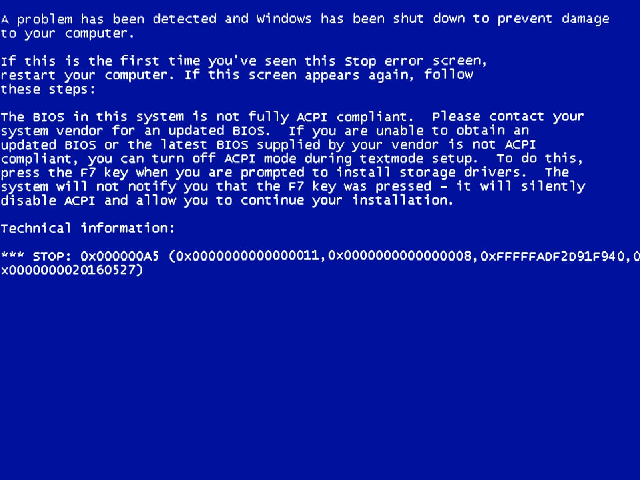
BAD NEWS:
Trying to get ACPI to use PWRMBASE from PMC only if present, leads to BSOD (trying to turn on the LPSS controller for the touchpad to be used on ASUS x509FA, the controller is 9DE9):
BSOD 0xA5 (0x11, 0x08, ..., ...)
D:\Kituri_Programe\Windows-Server-2003-master\base\busdrv\acpi\driver\nt\acpiosnt.c (1 hit)
Line 584: AcpiInitializePmcLpssIfPresent(
D:\Kituri_Programe\Windows-Server-2003-master\base\busdrv\acpi\driver\nt\acpiosnt.h (1 hit)
Line 824: AcpiInitializePmcLpssIfPresent(
With the help of Copilot (AI).
.h:
//
// XP‑only: PMC / PWRMBASE / LPSS bring‑up helper
//
VOID
AcpiInitializePmcLpssIfPresent(
VOID
);
.c:
VOID
AcpiInitializePmcLpssIfPresent(
VOID
)
{
PCI_COMMON_CONFIG pciConfig;
ULONG bytes;
ULONG pwrmBaseReg;
PHYSICAL_ADDRESS pmcPhys;
PULONG pmcBase;
ULONG devEn, devRst;
UCHAR function;
ULONG slot;
//
// Try PMC PCI config (Bus 0, Device 31, Function 0 then 2)
//
RtlZeroMemory(&pciConfig, sizeof(pciConfig));
function = 0;
for (;;)
{
slot = (0x1F << 3) | function;
bytes = HalGetBusDataByOffset(
PCIConfiguration,
0,
slot,
&pciConfig,
0,
sizeof(pciConfig));
//
// If the device does not exist, or not Intel, try next function
//
if (bytes >= sizeof(PCI_COMMON_CONFIG) &&
pciConfig.VendorID == 0x8086)
{
break;
}
if (function == 0)
{
//
// Try function 2 next
//
function = 2;
RtlZeroMemory(&pciConfig, sizeof(pciConfig));
continue;
}
//
// Neither function 0 nor 2 is a valid Intel PMC
//
return;
}
//
// Read PWRMBASE register (offset 0x48) from the same function
//
bytes = HalGetBusDataByOffset(
PCIConfiguration,
0,
slot,
&pwrmBaseReg,
0x48,
sizeof(pwrmBaseReg));
if (bytes != sizeof(pwrmBaseReg))
return;
//
// Mask off low bits
//
pwrmBaseReg &= 0xFFFFF000;
if (pwrmBaseReg == 0)
return;
//
// Map PMC MMIO
//
pmcPhys.QuadPart = pwrmBaseReg;
pmcBase = (PULONG)MmMapIoSpace(pmcPhys, 0x1000, MmNonCached);
if (!pmcBase)
return;
//
// Read LPSS enable/reset registers
//
devEn = READ_REGISTER_ULONG((PULONG)((PUCHAR)pmcBase + 0x5C));
devRst = READ_REGISTER_ULONG((PULONG)((PUCHAR)pmcBase + 0x60));
//
// Enable LPSS I2C #0 and #1
//
devEn |= (1u << 0) | (1u << 1);
//
// Deassert reset for LPSS I2C #0 and #1
//
devRst &= ~((1u << 0) | (1u << 1));
//
// Write back
//
WRITE_REGISTER_ULONG((PULONG)((PUCHAR)pmcBase + 0x5C), devEn);
WRITE_REGISTER_ULONG((PULONG)((PUCHAR)pmcBase + 0x60), devRst);
//
// Cleanup
//
MmUnmapIoSpace(pmcBase, 0x1000);
}
Call in ACPIRootIrpStartDevice():
if (NT_SUCCESS(status)) {
AcpiInitializePmcLpssIfPresent();
}