Everything posted by UsefulAGKHelper
-
Oh, that's terrible. How can this be fixed in Canary?
-
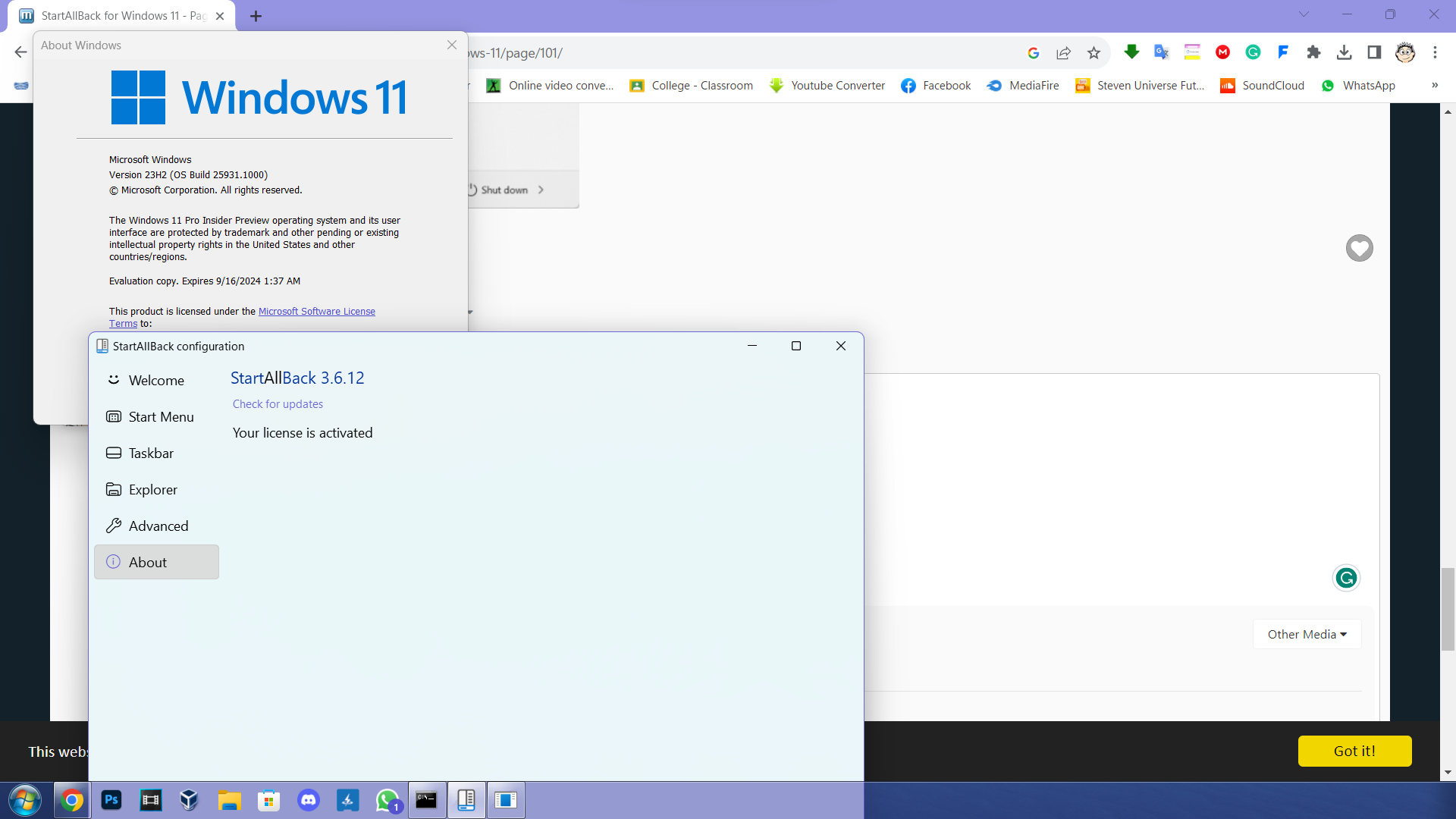
@Tihiy This bug isn't supposed to happen... What happened to the system tray and the clock, why it's gone? When I disable StartAllBack's taskbar, the system tray and the clock show from Windows 11's default taskbar. When I try to use the start menu's search bar, the screen is covered in the Mica effect, as shown in the second screenshot. Please fix this! I am using Windows 11 25931.1000 Insider Preview.
-
@Mov AX, 0xDEAD@Dietmar Can you please tell me the current progress of the ACPI 2.0 driver?
-
Since July 10 (made public since July 11) I have managed to run Windows XP x64 SP2 (built using XP2ESD) from UEFI Class 3 on Coffee Lake Windows 11 laptop on winload.efi 16497 using FlashBoot 3.3n bootmgfw.efi and Windows 7 generic VGA drivers by modifying the contents of mounted devices and enum key. I have used the XP2ESD build which contains the backported generic drivers and ACPI 2.0 drivers (from here) to get this to work. So far I tested acpibit64crack.sys from Dietmar. The fact that I managed to boot XP on such new hardware means that the ACPI 2.0 worked! Touchpad doesn't work because there aren't any working XP drivers for Intel Serial IO I2C Host Controller (9DE8 and 9DE9 in my case) to get the Elan1200 I2C Hid device to install using the backported generic touchpad driver from windows 8. USB XHCI controller and USB 3.0 root hub work without problems so I can use external mouse (for the cursor) and USB wireless adapter (for internet). I don't know if it's caused by ACPI incompatibility but I have tried to backport the Intel Serial IO I2C Host Controller from Windows 7 and it still wouldn't work even with Mov's ntoskrnl emu extender files! I have provided the device manager entries of my XP installation (from the enum key) so you can see the information on the drivers installed in my working XP OS.Useful's-XP-device-manager-entries.txt
-
My point still stands. Btw we should stop going off-topic here.
-
Yes, I did it to be more helpful but keep in mind that It's better when I say what I mean so you can understand me better, that's why I used ChatGPT. Just so you know, English is not my native language, I just used ChatGPT to articulate my speech in an aspiring programmer tone (because that's what I plan to be) so I am taken seriously. I am more interested in getting Windows XP x64 SP2 (using XP2ESD) to boot from UEFI Class 3 because that's what MovAX0xDEAD discussed in the link below. I managed to get XP x64 to the enumeration stage with ntbtlog.txt showing information. If I don't edit the mounted key to add the GUID of XP x64 UEFI Class 3 (GPT) partition on the same host SSD (multi-boot) and set the XP drive letter as C: with the same hex code as GUID (I borrowed mine from my Windows 11), XP won't even get to the device enumeration stage. When I see the "Starting Windows XP" logo, nothing happens on the screen and keyboard (even though patched winload.efi 16497 is used), but there's activity on ntbtlog.txt and on the device manager's enumeration entries, it's stuck on a boot loop. That's progress compared to last time when XP didn't even recognize my main NVME SSD even with backported stornvme and storahci drivers on AHCI mode. If IaStorAC is forced to load at boot as well, no BSOD 0x7B but still stuck to device enumeration mode. It's set to restart at BSOD crash with the boot debugger enabled to force BSOD to appear on NOGUIBOOT if it happens. The responses of ChatGPT are related to the post above this text.
-
I am not ChatGPT, I am a real person! xD I just told ChatGPT to phrase the answer in terms of an aspiring programmer, and I copied the contents here that's all!
-
What ChatGPT said about this:
-
What ChatGPT said about this:
-
XP x64 is based on windows server 2003 codebase, so try to compile bootvid from windows server 2003 source code in 64 bit. In bootdata.c and bootvid.c of W2003 > NT > base > boot > bootvid folder , replace all strings containing "640x480" with "1024x768" using Ctrl+H and try to compile bootvid 64-bit and give the link if there are no compiling errors.
-
The thing is that I tried to compile Bootvid.dll numerous times from the source code but it always gives me errors, even the untouched code. What I tried to do is change the resolution on bootvid.dll from 640x480 to 1024x768. Why? I am trying to force XP's BSOD to show on UEFI mode when a VGA emulator like Uefiseven/FlashBootPro is used for a fake int10h handler, so I can see if the problem is caused by acpi.sys or something else. I can't debug because I have only one functional laptop, btw I don't even have a serial cable. On already installed XP x64 from XP2ESD (with VirtualBox) that I was trying to boot on real hardware, the mass storage controller driver is installed (device manager entry matching real hardware ID is added from edited reg file from host's enum key), USB 3.0 is installed, Int 10h emulator is used, so maybe it's either the ACPI problem or the fact that my laptop's chipset isn't PIIX3. My Chipset is "I/O LPC Controller - 9D84 for Intel(R) 300 Series Chipset Family On-Package Platform Controller Hub", PCI\VEN_8086&DEV_9D84&REV_30, maybe this chipset doesn't support XP, because it uses generic msisadrv driver (service) that isn't included natively on XP.
-
Well Windows XP x64 on my Coffee Lake laptop refuses to boot unless it's on a Virtual Machine. I wish there was a way to implement boot graphics from windows 8 ntoskrnl so we can see the BSOD in case of trying to boot XP x64 on UEFI without CSM (NOGUIBOOT with 16497 winload.efi). Even if I use VGA emulators like VgaShim/UefiSeven/FlashBootPro, XP still won't boot on my UEFI Class 3 laptop. If I was able to see BSOD without debugging on NOGUIBOOT, then maybe I would be able to try to find the cause much easier. I think you should try to create packages that allow users to patch XP kernel files for UEFI support. I also think you should borrow the graphics from windows 8's kernel not for design purposes but for functional purposes of automatically patching the kernel in memory on UEFI mode to force vga.sys and vgapnp.sys to support the GOP/UGA framebuffer just like FlashBoot does, so display with VGA drivers will work just like in CSM mode. This is related to ACPI because if I can't see the BSOD, I can't figure out if the problem is caused by ACPI or other drivers. If I can't even boot an XP installation cleaned up with sysprep from 16497 winload.efi with BCD with VGA Emulator + DisableIntegrityChecks and proper mass storage controller drivers, then the problem may be on XP's kernel. Winload.efi 16497 is capable of booting XP, so I was wondering if there was a way to make it patch XP's kernel into memory automatically to include UEFI support for XP so it can boot effortlessly on UEFI without CSM.
-
@Mov AX, 0xDEAD @Dietmar If you don't mind me asking, what's the current status of the ACPI 2.0 driver for XP?
-
Check this driver with Dependency Walker to ensure that there aren't any missing imports on ntoskrn8.sys.
-
Here's backported VirtIO SCSI driver for XP (both 32-bit and 64-bit versions): https://anonfiles.com/27HeD1meza/virtio_win_0_1_171_win_xp_zip
-
"last" Does this mean that you'll stop making new acpi.sys for Xp Sp2 64-bit? I hope not.
-
@Mov AX, 0xDEAD Regarding UEFI support for XP, I wonder if xp x64 ACPI.SYS can work on my ASUS x509fa, here's my DSDT: dsdt.aml
-
@reboot12 I have patched x64 vbemp vbe30 to fix a BSOD problem on XP x64. This particular bug no longer shows: Access violation - code c0000005 (!!! second chance !!!) vga+0x41ea: fffffadf`c8bff1ea 43c6041f3c mov byte ptr [r15+r11],3Ch Now it loads XP x64. I achieved this by editing hex "43c6041f3c" to "9090909090", and I refreshed the checksum. I haven't tested this patched vbemp driver on UEFI yet, so if you don't mind, can you please debug this on XP x64 from UEFI and send me the debug? I need to ensure that there aren't problems if used from UEFI mode (even tho 16497 winload.exe loads the display (no issues) thanks to this patched vbemp driver without guest additions). XPAMD64.zip
-
@Mov AX, 0xDEAD Out of curiosity, I wonder if you will implement ACPI v3.0 support for windows xp sp3 and windows server 2003 sp2 in the future (from your tool obviously, the patch files that update XP/2003's acpi source code with your patched acpi v2.0).
-
@mina7601 Btw, I'm partially involved in improving some of the designs made by others for the ViStart start menu designs. I'm also open for feedback regarding that btw.
-
File downloaded. I can only debug on virtualbox because I have one computer. If I can add my laptop's DSDT into the bios of the virtual machine then debugging acpi.sys through virtualbox should be possible.
-
@Mov AX, 0xDEAD Out of curiosity, I wonder if the 2.0 acpi driver compiled from your tool can run on XP on computers that lack CSM support (uefi class 3), like my computer in case: System Manufacturer: ASUSTeK COMPUTER INC. System Model: VivoBook_ASUSLaptop X509FA_X509FA System Type: x64-based PC Processor: Intel(R) Core(TM) i7-8565U CPU @ 1.80GHz, 1992 Mhz, 4 Core(s), 8 Logical Processor(s) BIOS Version/Date: American Megatrends Inc. X509FA.306, 24.09.2021 Restart after boot crash is enabled, so if I use the 2.0 acpi.sys compiled using your tool, no crashes but xp (made using XP2ESD with latest backported drivers including nvme, custom acpi drivers and uefi support using vista beta files) still doesn't boot but the boot logo stays that way until I press power button to restart. If acpi.sys had BSODs, it would restart immediately so maybe the acpi.sys works and the problem is caused by something else that hangs at win32k session and yes I use vga emulator (FlashBootPro/UefiSeven) to provide fake int10h handler to try to boot XP on uefi-only hardware (on an older model, xp would boot even without CSM, but on an newer model it refuses to boot, keyboard unresponsive because of possible user-mode BSOD). I know I wouldn't be able to debug using a single hardware but I wonder if I can try to add my host pc's DSDT into virtualbox's bios so I can debug acpi.sys from virtualbox (I know how to start a basic windbg session using windbg preview with virtualbox's serial COM1 port to debug a windows from the virtual machine).
-
Using CFF explorer. To make the driver use the kernel extender, in the import section, rename ntoskrnl.exe to ntoskrn8.sys (obviously ntoskrn8.sys needs to be in the same directory as the driver so it works). If driver is designed for only windows 8 and newer os, Security_cookie (4EE640BB on 32-bit file, 32A2DF2D992B on 64-bit file) can be changed on hex editor to random value (first match only). Save the respective file, re-open the same file and refresh checksum and save again. To check the dependencies of the file, use Depedency Walker to check for missing imports. If there are problems, please post screenshots.
-
Windows once connected to the debugger, it relies on it to run once it's data shows on the debugger, maybe that's why it's slower. Without debugging, it's much faster because it doesn't rely on the debugger. Obviously without the "optimization", BSOD appears. Obviously, you should still debug ACPI.SYS for testing purposes (using commands to get it to boot without BSOD) but if things take too long to work, then you should also try the same without the debugger so it can show the BSOD faster.
-
Yes, I managed to do it using WinDBG preview, you can easily get it from Microsoft Store (for me only the version of windbg from microsoft store works to start debugger on VirtualBox, I don't know why). I got the information from this link: https://github.com/Dump-GUY/Malware-analysis-and-Reverse-engineering/blob/main/WINDBG Kernel%26User Mode Debugging/WINDBG Kernel%26User Mode Debugging.md Here's what I have done so far (serial debugging): For more advice on how to use proper commands to do the debug tests properly on VirtualBox, you can also ask @Mov AX, 0xDEAD and @Dietmar for help. Serial debugging with VirtualBox is what I am familiar. For other types of debugging, you can always ask these two or anyone else experienced with using WinDBG. If BCD is disabled, the following switches for debuging on boot.ini can be found here: https://learn.microsoft.com/en-us/troubleshoot/windows-server/performance/switch-options-for-boot-files#more-information Good luck.