Everything posted by KeyCat
-
I'm running New Moon 28.10.7a1 (260411) and that version works as well.
-
I use this and works fine on 24H2 https://www.sordum.org/9480/defender-control-v2-1/
-
That is doable but you need to install a Xserver like Xming in your XP VM.
-
Thats how I been using it on Linux (Kubuntu 20.24 LTS) before, try this... xfreerdp /u:<user> /p:<password> /app:'calc.exe' /v:192.168.0.169 /cert:ignore Check man pages since there are lots of other command line options....
-
Keep on using Windows 7 SP1 just like I keep on using Windows XP Pro SP3
-
Thanks for sharing! Works fine in New Moon 28.10.3a1.
-
Have been running it since I found it and have not seen any cert errors when using it with Outlook 2K to get TLS 1.3 support.
-
Bumbed into this last night and just wanted to share.... https://hub.docker.com/r/valdikss/oldssl-proxy Tested it on Debian 10 and worked as described and easy to setup. Would be nice to be able to run this on a Rpi but I could only find a x86/x64 Docker image. But setting up the Squid proxy + SSL directly on the Rpi is an option of course. Anyone else tested/using this?
-
Thanks, sent him a PM a few days ago and hope he still visits this site. Being able to run the HTTPSProxy on Linux would be awesome. My guess is that even a Raspberry Pi Zero W for $10 would be fast enough to handle the work for a couple of "legacy XP clients" on my LAN.
-
Also wan't to say thanks to roytam1 and anyone else involved in keeping New Moon updated! I still use XP every day for various reasons and not having a working browser would be a PITA, thanks again!
-
Anyone knows where to find the latest Python source code to this HTTPSProxy, is it available somewhere? Despite my low Python skills I would love to try to get it to run on a Raspberry Pi with latest Python 3.6+ to get support for TLS 1.3.
-
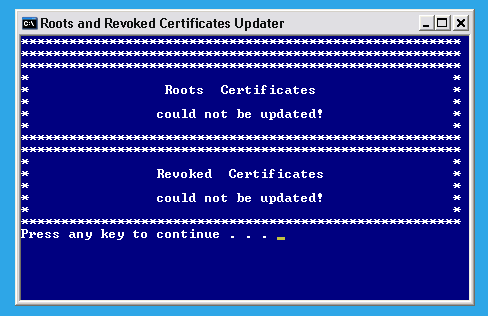
That did the trick! Manually downloaded the *.sst files manually and then ran... updroots authroots.sst updroots updroots.sst updroots -l roots.sst updroots -d delroots.sst updroots -l -u disallowedcert.sst Thanks for the input Dave! Still havent figured out why heinoganda's Cert_Updater 1.6 doesn't run on my XP and there is nothing blocking it? It works fine when tested in W7 and W10... Anyway, I got the certificates updated on my XP by doing it manually as mentioned above.
-
Since I have a few Raspberry Pi's up running already I was wondering if there was a way to use one of them in the same way as ProxHTTPSProxy to get TLS 1.3 support? Searched around a bit for a proxy server on Linux and there are quite a few but was hoping to find a simple one so if anyone have any pointers I'm all ears.
-
Thanks Rainy, will check it out!
-
Hi, Sorry if this is a stupid question but I downloaded "heinoganda's Cert_Updater.exe" 1.6 and tried to update the Root Certificates on my Windows XP Pro SP3 but all I get is the following despite the network working just fine... Are there any specific requirements before running the updater? Any specific services needed to be running? Any help appreciated...