defuser
Content Type
Profiles
Forums
Events
Everything posted by defuser
-
Given "XMS2EMS.SYS", at least, works correctly on my hardware (Unlike 386MAX, which causes a hang when booting). However, this is at the DOS stage. But when you start WINDOWS, at the very final stage, right before the desktop appears, the following message appears on a black background: and then the computer shuts itself down. After a bit of searching on the Internet, I was able to find out that this problem may be caused by the lack of "XMS2EMS.SYS" support for the Global EMM Import Specification (GEMMIS), which is required for transferring control to WINDOWS. Here, for example, something similar is discussed (About the need to add this function to a similar product): https://github.com/Baron-von-Riedesel/Jemm/issues/5 it also provides links to GEMMIS source code sources and examples of open source products where it has already been successfully implemented (for example, DOSBOX). As part of the package " xms2ems.zip "contains its source code in the file "xms2ems.asm". You can download it, for example, here: https://www.minuszerodegrees.net/5170/ram/5170_extended_memory_use.htm or here: http://files.mpoli.fi/unpacked/software/programm/asm/dosutil.zip/ Do you think it will be possible to add support for GEMMIS to XMS2EMS so that you can boot with it on WINDOWS?
-
Features of different versions of TERABYTE PLUS PACKAGE'es.
defuser replied to defuser's topic in Windows 9x/ME
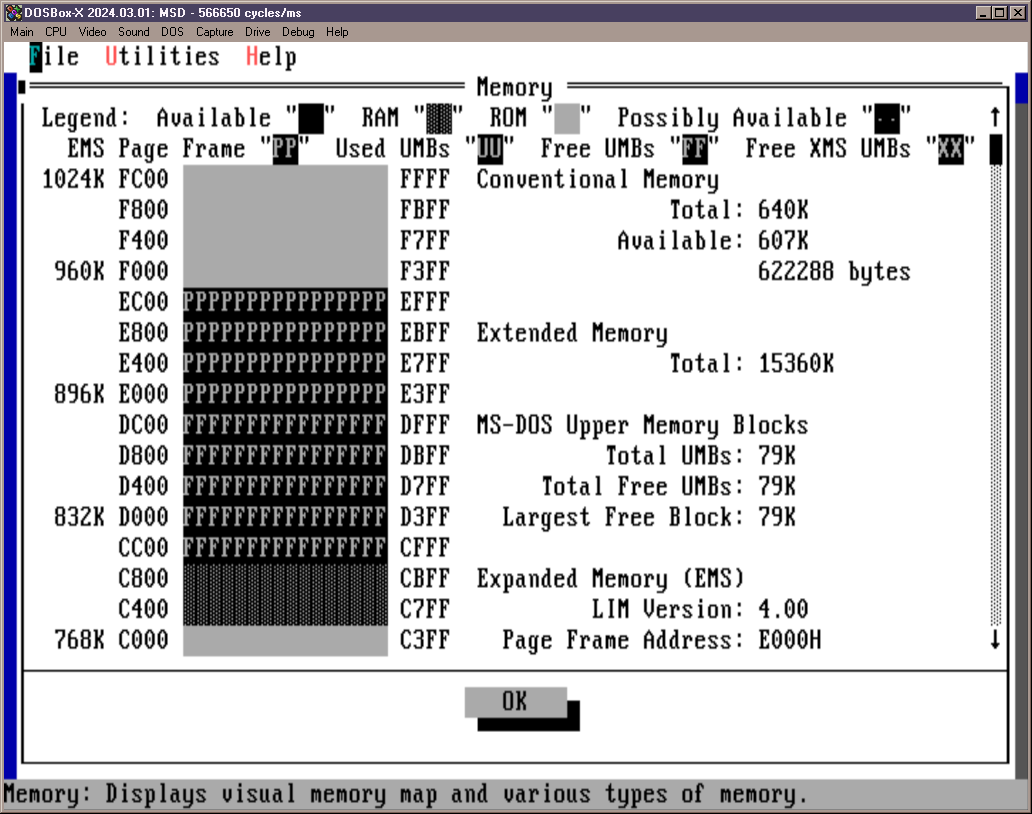
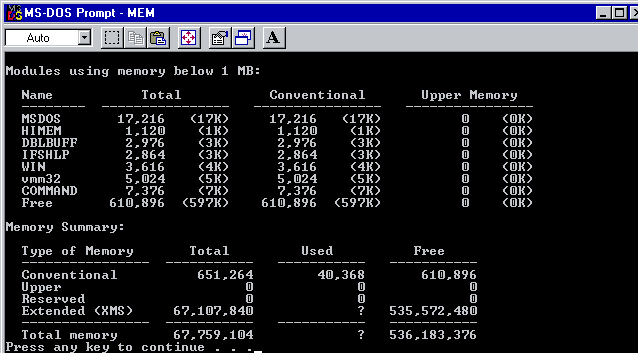
I suspect that this hardware is eating up so much space (video card, first of all). By the fact that under normal conditions, for example, it should be something like this: in this case, I would be able to simultaneously place EMS and HIMEM in the upper memory... Well, in general, okay, the option with different configurations (Game\Working), I quite like it too. Moreover, so far only one such game has come across, for which a rollback was needed IO.SYS, and all the others work. In other words, the situation is quite rare, exceptional, and potentially solvable. If there are no simple obvious paths or updates for IO.SYS, in principle, and so it will do. Thank you all.
-
Features of different versions of TERABYTE PLUS PACKAGE'es.
defuser replied to defuser's topic in Windows 9x/ME
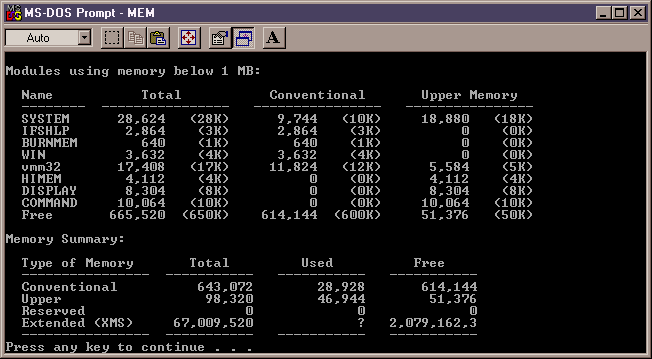
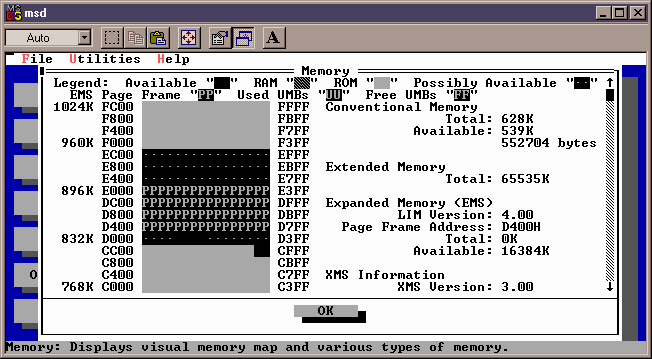
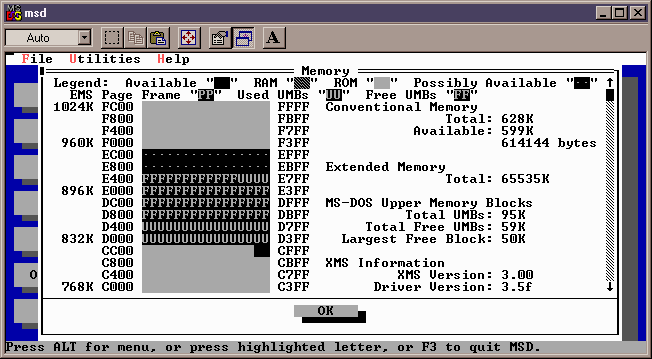
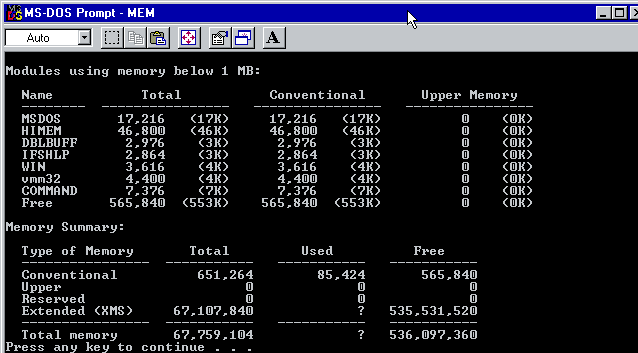
Also, on a tip from MERCURY127, I started digging to the side HIMEM.SYS and I found another solution like this: https://www.mdgx.com/umb.htm#HIR And with it, it really turns out to free up quite a lot of memory and memory. IO.SYS from TBPPlus3 becomes less pronounced: but now there is not enough "EMS" memory. As it turned out, this HIRAM+UMBPCI eats up exactly the same area the amount of memory that WINDOWS normally allocated to maintain EMS. Here it is (Marked "PP"): and after applying HIRAM+UMBPCI, this area is already dealing with them: Accordingly, Windows cannot find the required space (a contiguous free chunk). So EMS it becomes no longer available and the game starts swearing again (and of course it doesn't work). I don't succeed place both at the same time..
-
Features of different versions of TERABYTE PLUS PACKAGE'es.
defuser replied to defuser's topic in Windows 9x/ME
Thank you for your answer, but what can actually be done in this situation? Rudolph's Readme doesn't say much about it a lot has been written: Yes, so far we have to survive just like that. When I roll back IO.SYS up to version 1.3 the game works no complaints. I haven't ventured to work with large disks with this legacy IO yet... This is the configuration purely temporary and only for running this one problematic game. For normal operation, I return IO.SYS version 3.0 is back in place. It's not very convenient, but at least it works. -
Hi. I started the game and it ran out of memory. After looking at what the memory is occupied with, I found that HIMEM.SYS eats up 46KB, while on a clean system (On a virtual machine) about 1KB. I went to look at the difference and found that the culprit of the problem is IO.SYS. As it turned out, this one IO.SYS from the TERABYTE PLUS PACKAGE version 3.0. I have this version 3.0 package installed for a very long time to support large disks and it works otherwise quite stable all this time. I checked previous versions of TERABYTE PLUS PACKAGE and it turned out like this: IO.SYS from TERABYTE PLUS PACKAGE versions 1.0 to 1.3 (Inclusive). IO.SYS from TERABYTE PLUS PACKAGE versions 2.0 to 3.0 (Inclusive). What do you recommend to do in this case? I see a very impressive list of changes there. Can I roll it back IO.SYS before version 1.3? Or are there any other ways to solve the problem? Thank you.
-
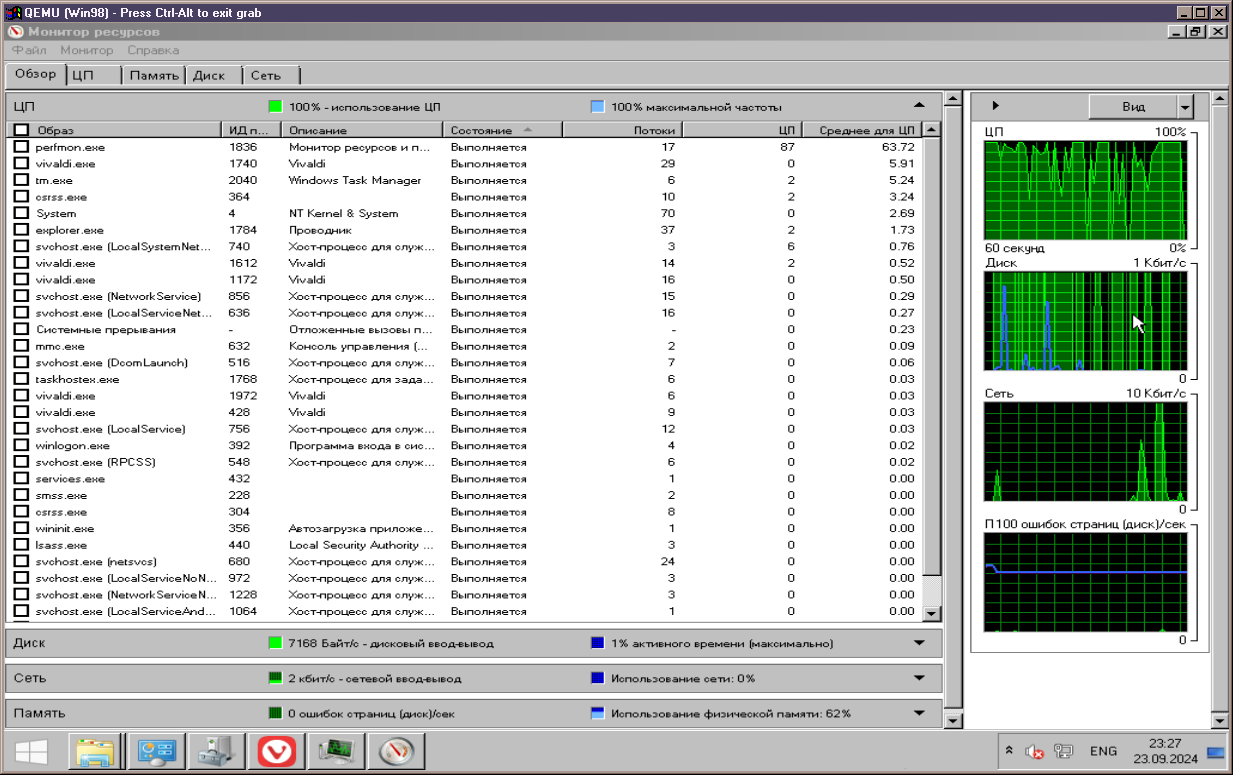
Everything would be fine, but for some reason it constantly loads the processor and periodically accesses the disk: This is rather questionable behavior. Is it possible to use the MultiCore9x SDK to allow the guest OS to manage all CPU cores except the first one (and at the same time redirect all 64-bit memory above 4GB there)? And are there any guest add-ons for this VM at all (Seamless transition, shared folders, dragging files back and forth)? But this module "KQEMU" seems to still not work for me here. I can't even imagine what he still lacks for a full-fledged job.
-
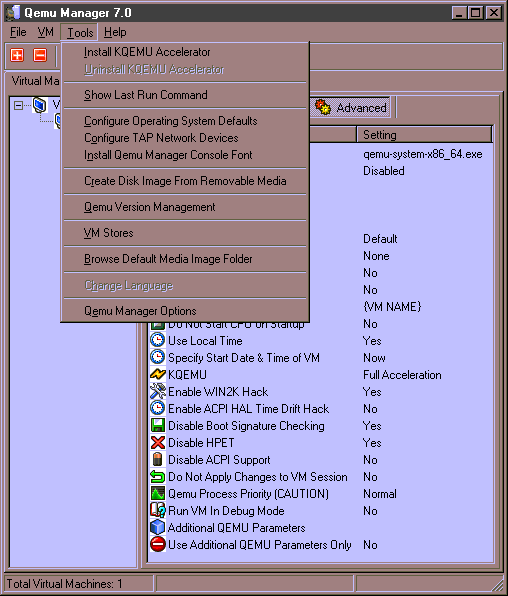
Greetings. Please tell me how to make sure that the "KQEMU" module has actually started and is functioning correctly? I try the standard WINDOWS command "net start kqemu" under Windows 98 and it returns that " Error 2185: The service name is invalid. Make sure you are specifying a valid service name, and then try again.". In the QemuManager menu, the "Uninstall KQEMU Accelerator" item remains INACTIVE after installing this module (In XP, it becomes active). I also selected "KQEMU-Full Acceleration" in the settings. But I still don't feel any difference in the speed of the guest OS. It feels like it's not working... Maybe I didn't take something into account or do something wrong? Do you have this module running on Windows 98?
-
Do you mind if I try to answer this question? I don't really understand it, but... Here are two versions Kernel32.DLL: kernel32_BAD.dll (5.1.2600.2945 (xpsp. 060704-2357)) - the browser crashes with it (On Mega.nz). kernel32_GOOD.dll (5.1.2600.3119 (xpsp_sp2_qfe. 070416-1259)) - it already works fine with it. Comparing the two versions using CFF Explorer showed that in my opinion, there is only one significant difference between them. Only one parameter was added to "Export Directory" : 00000171 00060F58 0170 00006704 GetLogicalProcessorInformation In other places, nothing seems to have changed significantly.
-
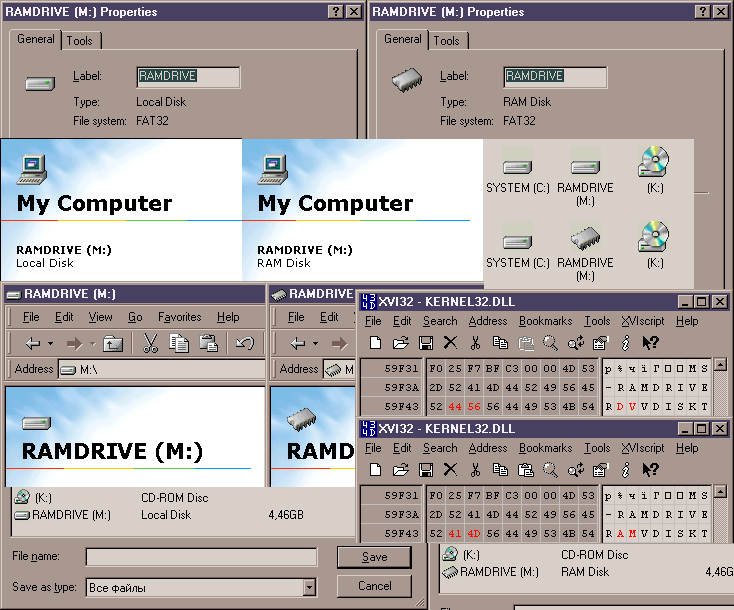
Thank you. It is stored in the same place (in Kernel32.dll)? (Yes, these parameters follow right behind...). You can already make an "RDVDRIVE" and it works! It remains to find and replace "DV" with "AM" in the code, which already looks easy to solve (Although it is no longer critical or significant, because the main goals have been achieved). At the same time, I checked it in WinME and no, alas, both do not work. It seems that since WinME, they have removed this from the code altogether. Although the same "MS-RAMDRIVE" in the body Kernel32.dll for some reason, it is still present. Although I haven't tried with installed service packs. Well, only PSE36 ramdisk for NT4 comes to mind here. I tried to find it in order to test it under XP, but it turned out to be a difficult task. This SDK seems to have been completely lost to history. There is only some information left that such a principle once existed, but the sources themselves can no longer be downloaded: http://web.archive.org/web/19990421095003/http://developer.intel.com/vtune/vtcd/index.htm http://web.archive.org/web/19991007020425/http://developer.intel.com/vtune/pse36/ http://web.archive.org/web/19991008040955/http://support.intel.com/support/performancetools/pse36/sysreq2.HTM If you find this ramdisk and it will work in XP, then you can do something else. Create a disk in XP and then initialize it in 98 using RAMDRV4M, which already provides this feature. You don't need anything extra to do this. Or, which is more correct, but will require some improvements - to upgrade the ramdisk for NT already, giving it similar functionality (This driver was distributed with the source texts, so by combining it with the RAMDRV4M code, this might have been possible). Yes, everything worked out - icons and types changed everywhere: At the same time, after RAM\RDV, you can add any valid characters, in any language, but only so that their total number does not exceed 11. Thus, if you change " RDV " to "PAM", you even get a certain localized construction - "PAMДИСК" => "".
-
And another question - is it possible to get access to the ramdisk ALREADY placed in memory under WinXP? During the XP session, after 98, the information is securely stored there and does not disappear when you return to 98 (I checked). Question - is it possible to reach it directly under WinXP (Read\Write)?
-
Yes, I already tried this, but it didn't work. You tried it and it worked (By the way, this applies to any disk under 98\98SE, but it doesn't work at all in WinME. Just in case I'm doing something wrong)? The options I've already checked are "RAMDRIVE[Three spaces]", "RAMDRIVE[HEX: 00 00 00]", "RAMDRIVE[HEX: FF FF FF]". In the first case, Windows cuts off the last three spaces. It doesn't matter if you do this via the command line ("LABEL M: RAMDRIVE ") or via the disk properties - the result is the same: just "RAMDRIVE" remains and nothing changes. With the second two options, the result is identical (Nothing changes: the disk type and icon remain the same, corresponding to the local disk, but not ramdisk).
-
I was able to find out that "MS-RAMDRIVE" is located in "KERNEL32.DLL". I just changed it to "MS-ROMDRIVE", replacing one letter ("A" with "O") and it worked! In other words, the name is mapped exactly from there. The question now is, is there any way to cut off "MS-" painlessly so that it doesn't affect everything else? Simply deleting these three characters is not an option - the code will shift and the OS will not boot. Is it obvious that some other approach is needed here, or does this issue not have a simple solution?
-
SweetLow, hi, do you know where Windows gets the ramdisk mapping from to the disk name "MS-RAMDRIVE"? With a different name, as shown in the screenshots above, the disk is defined as "Type: Local Disk" and assigned an icon corresponding to the local disk. If you enter the name "MS-RAMDRIVE", the icon changes to microchip and the type changes to "Type: RAM Disk". When it is RAM Disk in "My Computer" it is easy to immediately distinguish it by another icon. And so (By default), it merges with other (Regular) disks, without being distinguished in any way. It would be possible to leave the name "MS-RAMDRIVE", but as I wrote earlier, it is too long and does not fit completely. I would like to make the name "RAMDRIVE" by default and that it would be defined by the system as "MS-RAMDRIVE", assigning it the correct type and icon.
-
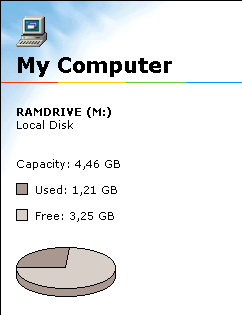
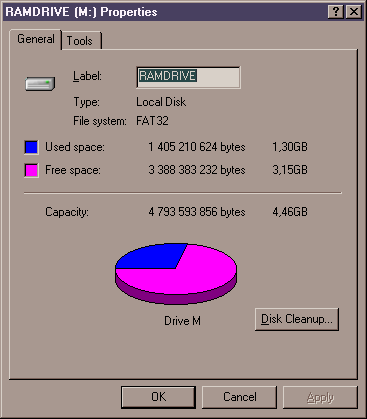
Most likely, some volume is reserved by the built-in graphics. This value can usually be changed in the BIOS. I also have 8GB, but the ramdisk size is different: However, no values in the registry had to be changed. It immediately took up all the available space and was automatically formatted in FAT32. Perhaps, in your case, the crucial role was played by changing the amount of RAM from 6GB to 8GB.
-
I suspect that your problem may be related to the wrong file name. The patch works correctly, even if I execute it like this: D:\PTCHNVSZ>PATCHNVC 1 NVCORE.VXD or even so: D:\PTCHNVSZ>PATCHNVC 1 2 The driver versions that I successfully checked with this patch are 82.69, 81.98 and 77.72. I applied the patch to these files under Windows XP (From there, it's easy to immediately replace the driver files in the target system, so as not to do it under DOS). The patch worked correctly in all cases and there were no more 512MB issues with these fixed versions. Some time ago, I just tested all three versions with a 512MB card.
-
Dell Dimension 2400 I/O ACPI conflicts Win98 SE
defuser replied to alexthetechie1's topic in Windows 9x Member Projects
In the menu settings of the monitor itself, it would also be worth looking for energy-saving functions. -
Dell Dimension 2400 I/O ACPI conflicts Win98 SE
defuser replied to alexthetechie1's topic in Windows 9x Member Projects
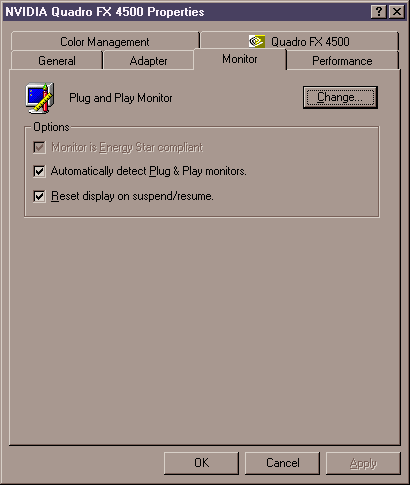
Hmm, then I don't even know, this is some strange, very exotic mistake. I've never seen anything like it. You can then try turning off DDC. And also in the properties of the screen, try to turn off the power saving functions (Maybe they don't work correctly) by removing all three checkboxes and then performing a reboot:
-
Dell Dimension 2400 I/O ACPI conflicts Win98 SE
defuser replied to alexthetechie1's topic in Windows 9x Member Projects
And if you just go in with the usual resolution (Which definitely works for you) and run this shortcut by clicking the mouse, the resolution should change to 1440x900. Does it change so much for you? If so, then there shouldn't be any problems in theory. You just need to add this shortcut to autorun. -
Dell Dimension 2400 I/O ACPI conflicts Win98 SE
defuser replied to alexthetechie1's topic in Windows 9x Member Projects
Hi. I also have the pleasure of encountering the problem of a black screen when logging in. To deal with this, I'm still using a workaround (temporary solution). Added a shortcut to "C:\WINDOWS\Start Menu\Programs\StartUp" that reads as follows: C:\WINDOWS\RUNDLL32.EXE NvCpl.dll,dtcfg setmode 1 1920 1080 32 144 And it works. After logging in, the permission specified in the shortcut is automatically applied and the image appears. In your case, replace the last digits with "1440 900 32 60" or " 1440 900 32 75 "(try this or that). And replace the number "1" at the beginning with the number "2", if the monitor is connected to your second number. At the same time, the specified modes must also be entered in the register: [HKEY_LOCAL_MACHINE\System\CurrentControlSet\Services\Class\Display\0000\MODES\8\1440,900] @="60" "ModeRefreshRateList"="60,75" [HKEY_LOCAL_MACHINE\System\CurrentControlSet\Services\Class\Display\0000\MODES\16\1440,900] @="60" "ModeRefreshRateList"="60,75" [HKEY_LOCAL_MACHINE\System\CurrentControlSet\Services\Class\Display\0000\MODES\32\1440,900] @="60" "ModeRefreshRateList"="60,75" And here you may need to replace "0000" with some value of your own (0000, 0001, 0002, and so on), corresponding to the serial number of the video card you are using. Look up this number at this path in the registry. You can also initially modify the installation INF for the driver by adding these modes there and reinstalling. The disadvantage of this solution is that the "StartUp" folder is processed AFTER logging in. Therefore, if you do not have automatic login configured and you need to enter your username and password manually every time - you will have to do it blindly. I'm not sure, though, if there is an option in 9x to execute a command BEFORE logging in. If this is the case, then in principle you can try to avoid this problem. You can view everything that your monitor supports in EDID: https://raw.githubusercontent.com/linuxhw/EDID/master/Digital/Dell/DELF00A/B10E0A4F3801 Everything in the "Standard Timings:" and "Detailed Timing Descriptors:" sections should be added to the registry or initially registered in INF. Since you are using a modified driver, also check if you have DDC enabled: [HKEY_LOCAL_MACHINE\System\CurrentControlSet\Services\Class\Display\0000\DEFAULT] "DDC"="1" -
A bit offtopic, but for the sake of fairness, I also checked what would happen if a full-fledged CRT monitor (based on Mitsubishi DiamondTronNF) was connected under the same conditions. What it will look like. And here's what came out of it: VGA NV34 with CRT: 320x200 => 640x400@71 Aspect 360x200 => 640x400@71 Aspect 320x240 => 640x480@72 Aspect 360x240 => 640x480@60 Aspect 320x350 => 640x400@70 Aspect 360x350 => 640x400@71 Aspect 320x400 => 640x400@72 Aspect 360x400 => 640x400@71 Aspect 320x480 => 640x480@60 Aspect 360x480 => 640x480@60 Aspect 640x400 => 640x400@72 Aspect 640x480 => 640x480@72 Aspect 800x600 => 800x600@72 Aspect 1024x768 => 1024x768@72 Aspect 1280x1024 => 1280x1024@72 Aspect As you can see, the number of playable modes immediately increased. Moreover, in each case, the aspect ratio is now correct (Which is achieved due to more subtle settings of the monitor itself, which, as it turned out, allow significantly more than the LCD. For example, completely arbitrarily narrow-expand any image horizontally and vertically, regardless of each other). And another thing that immediately caught my eye was that, unlike the LCD, the lubrication was completely lost when driving. Three-dimensional space moves like something real behind glass. There was no such effect on the LCD, and with any settings and connection methods, there was always a barely noticeable smudge when strafing near a wall or any object, which causes noticeable damage to realism. But nevertheless, returning directly to the topic, I managed to find out that this problem has already been encountered and tried to solve it with a hardware DVI cable mod (Which in general is almost the same as I have already done, only without flashing the modified EDID directly to the monitor itself). They also tried to modify the BIOS, but these are all half-measures. This is not flexible, difficult, and requires significant intervention. Therefore, it is difficult to consider all these solutions as full-fledged and easily accessible to everyone. I would still like to find ways to make do with purely software tools.
-
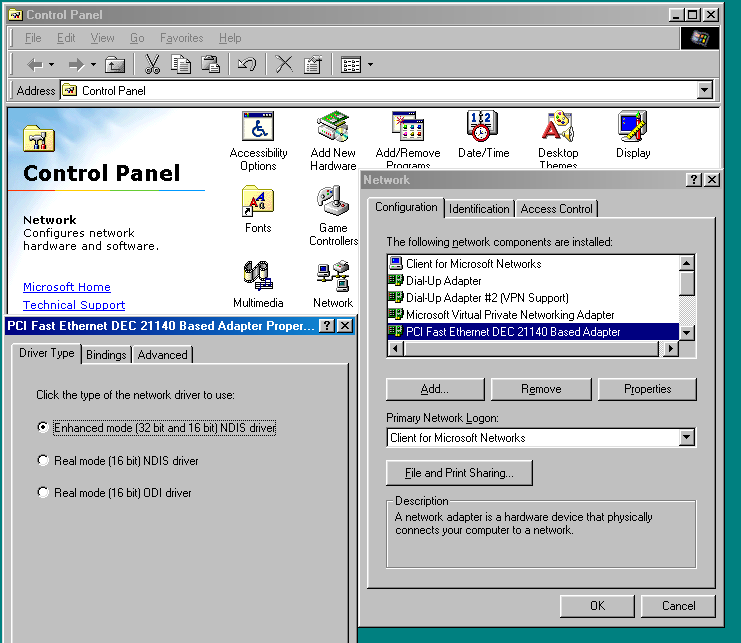
I didn't have to do anything on the 98FE - the network was always configured automatically (Connecting to the router by wire), without user input. But about TCPIPOptimizer is quite fair. Out of the box, the maximum speed was about 512KB, but it was also about the same on the 98SE. After the fix, the download speed of torrents becomes like in XP. True, I have a full proprietary driver package from Intel for the network card. It automatically installs drivers and pulls up all the necessary network system files (and, apparently, missing components), asks for the 98FE distribution. It also appears to be performing the configuration. The only thing is that the user is given a choice of which of the drivers included in the package should be used: - Enchanced mode (32 bit and 16 bit) NDIS driver - Real mode (16 bit) NDIS driver - Real mode (16 bit) ODI driver By default, the first one. And it usually works on compatible hardware, with a few exceptions. And if you have problems, you can switch to the second option, and then to the third (This depends on the overall curvature of the BIOS and available resources, interrupts, and so on). I've tested all three options and they all work well. You also have in the adapter settings (In the network components, in one of the lines "Realtek 8139...", in its properties, there should also be about the same choice). I can say that it was the first option (By default) that turned out to be the most capricious, in terms of compatibility with the new hardware (I had to dance a lot with tambourines to make it work fully), while the second and third worked flawlessly right away (Although they ate quite a lot of DOS memory, which they could not work out correctly some other large programs from auto-loading). Therefore, in the future, I had to make the first option work (Which does not consume DOS memory at all and works best, providing more fine-tuning of the network adapter). However, in everything else for the entire time of their use, there were no complaints (the Internet worked almost the same). I won't say anything for 95, because I don't know, I didn't have any cases. But it should also have such a choice: Try switching over (You will need to insert the CD into the drive and reboot).
-
Thank you for the detailed explanation. I also managed to find out that this patched version crashes when trying to download to Mega.nz not only under Windows 9x\Me, but also on pure Windows XP SP2. The drop occurs exactly in the same place. However, there the problem is successfully solved by installing the update "kb959426" with the parameter "/b:SP2QFE", which actually updates only one file in the system - "KERNEL32.DLL" from version "5.1.2600.2180 (xpsp_sp2_rtm. 040803-2158)" (SP2, August 18, 2004), to version " 5.1.2600.3541 (xpsp_sp2_qfe. 090321-1324)" (SP2 QFE, dated March 21, 2009). After that, it downloads normally (I note that the "RaiseException" is also fixed here, since for the purity of the experiment, the same browser build is actually used as under Win98). It turns out that there are some corrections in KERNEL32.DLL they potentially solve our problem as well. It is worth noting that some later programs were compiled by too new compilers and do not work at all without this fix. At the time of the release of this fix, Windows 98 was already removed from support (so it could not receive it in a timely manner). So this issue is obviously a bit beyond the scope of 9x\Me.
-
Opera 9 also opens up something else, it is ideal for reading off-line MHT pages and archived old sites and simple forums (And it is also very convenient for downloading files, as it has a good download manager, much more convenient than in any modern Firefox or Chrome). Sometimes, in order to reach the site, you need to use an online proxy (This is due to the lack of TLS or switch to HTTP, if supported). Opera 9 does not require KernelEx.
-
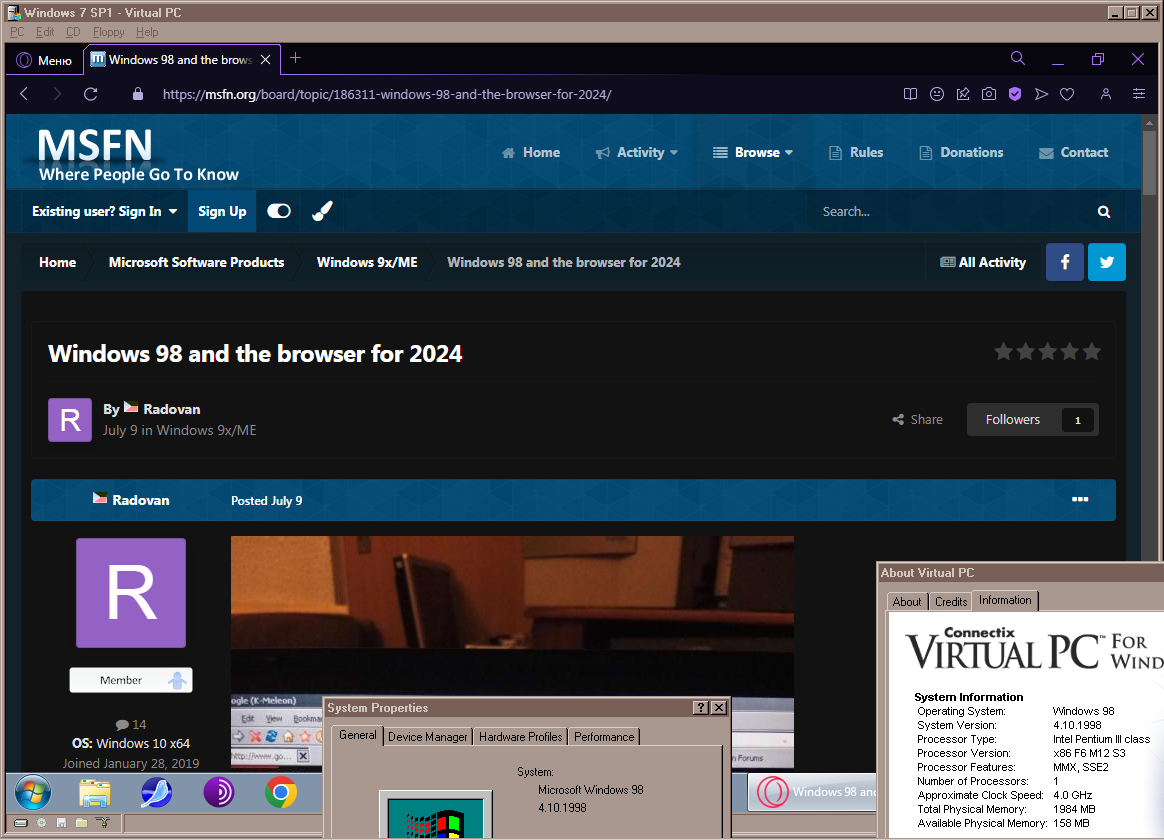
Unfortunately, modern browsers running on Windows 98 don't work without KernelEx. As for KernelEx, schwups has already described everything quite correctly (see above). I have one of the assemblies working like this (According to the instructions from this topic): At least it allows you to open this forum, expanded assets on GitHub, and generally display most sites fairly correctly. But when you try to download something from Mega.nz it crashes at the very last moment (At least on my 98FE right now). Maybe on ME everything is different, I haven't checked it yet, because I haven't had time yet). For these or other reasons, or if you simply do not want to use KernelEx, there is another alternative option that does not require the presence of KernlEx - this is using Virtual PC 5.1-5.2 (Patched 5.2 is faster than anyone else, supports up to 2GB of RAM on guest VMs and is best suited for this application). The fact is that I have only one working PC used at one time and I use, among others, this option also under Windows 98, when you need a modern browser, and I don't want to reboot to another OS (XP+) (So as not to interrupt the current work in another OS): There are no more problems here and everything works correctly. An important caveat is that the processor must support SSE3 (Unfortunately, modern browsers require it), as well as enough memory (So that at least 1GB can be allocated for the needs of the guest OS). During a working session, the VM can be paused or even saved state, so that if necessary, in a matter of seconds, you can restore the guest VM at any time, with browsers, sites in them, and other programs already open inside (I just set a low priority through Process Explorer and it sits in the background and does not interfere). For faster swapping and generally accessing the disk subsystem, you can also use RamDisk64 for the needs of the guest OS. Purely as an option.
-
Try checking just in case in XP on the same computer, if possible. If there is no problem there, you will have to search in more depth for what the problem might be. 98FE itself is hardly directly related to this problem. You can also switch to PIO mode and change the settings for the drive in the BIOS. Usually, there are different options for xDMA, 32-bit mode, and others. Go through all of them. Also check whether the jumpers are installed correctly on the CD drive itself. Third-party patches and drivers are often used for the disk subsystem as a whole under Win9x. I don't know what effect this might have on CD drives or whether ESDI_506\AHCI drivers are associated with it at all, but it's possible that everything and some exotic errors are possible (especially for early devices). So you can still check on the original clean system (Excluding all drives larger than 128GB). PS: I looked at it now and yes, the AHCI driver is directly related to the DVD-ROM drive, which I now have under 98FE. Before that, there was an old PC with an ESDI_506 driver from Rudolph and another drive. The problems you write about were not observed in both cases. If only the CD itself is damaged\dirty and poorly readable. But this is also evident in XP. Therefore, it is worth checking to exclude hardware problems, at least. PSS: The fact that you have a different behavior under DOS, just the same, hints at the drivers... It is also possible to oxidize the contacts on the memory strips if the computer has been idle for a long time.