jaclaz
Content Type
Profiles
Forums
Events
Everything posted by jaclaz
-

In your opinion, what are the best/worst versions of Microsoft Windows?
jaclaz replied to win32's topic in The Poll Center
Very often the issue in these polls/opinions is the exact way people considers the OS. I mean, more often than not an opinion is made NOT (as it should in these kind of polls) on the OS as it comes from the good MS guys, but rather on a heavily re-configured/tweaked/customized/changed/what not OS In the case of Jody, he has a system that is probably very unlike Windows 8 (as conceived and released by the good MS guys) but much more like a "modernized" Windows 7. I mean when passing from Windows NT 3.1/3.51 to NT 4.00 and then to 2000 and then to XP (which remains essentially Windows 2000 with some added bells and whistles) there was not any "shock". From XP to Vista there was some shock, but not on the visual impact of the UI, only at its terrible performances (due to underpowered hardware). From Vista to 7 as well no particular shock. From 7 to 8 . Just have a quick tour here: http://toastytech.com/guis/indexwindows.html and you can quickly relive the experience. jaclaz -
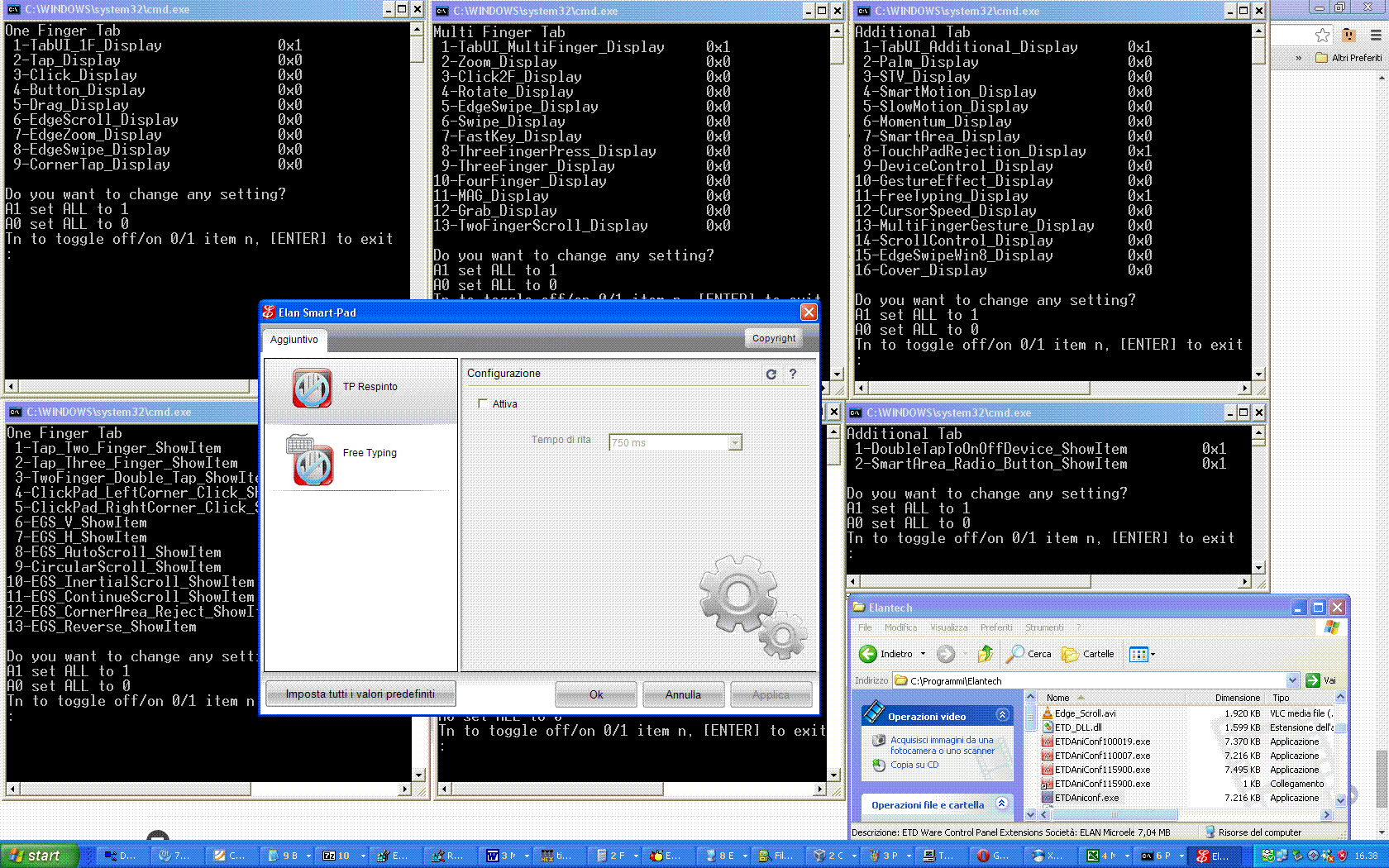
Well, this way (with the batches) we are offering the possibility to customize as much as possible the thingy. The 6 (actually 7) batches are all the same single batch (cleverly written ) with the relevant path/keys/values changed. I am not at all preoccupied by the current .inf, the (very few) differences with the original one from 11.14.14.1 are all marginal and/or "wanted" or "needed", or, if you prefer, there are no notable/meaningful differences in the relevant sections of the 11.14.14.1 and 11.5.20.3 inf's. What we need is only a "sensible" setup (your HKEY_CURRENT_USER\Software\Elantech saved as .reg) at a time when you are satisfied with the available settings (those that work) so that they can be "translated" into the .inf, from which at install time they will go into HKLM and from that become the "defaults" that will be applied in HKCU. Give me some time, I am "mapping" your Default Options.txt and All Options.txt to the corresponding SmartPad and SmartPadDisplay values, but I have to re-organize them to make it readable/translatable to the settings in the .inf. jaclaz
-
Good . Another happy bunny in the basket. jaclaz
-
In your opinion, what are the best/worst versions of Microsoft Windows?
jaclaz replied to win32's topic in The Poll Center
Oh, noes, not again. Vista SP2 was eaten up by Windows 7, SP2 was simply too late: https://en.wikipedia.org/wiki/Windows_Vista#Service_Pack_2 Service Pack 2 for Windows Vista was released to manufacturing on April 28, 2009,and released to Microsoft Download Center and Windows Update on May 26, 2009 but the main original issue with the original release of Vista, 2 and 1/2 years before, was (apart some edges that needed to be rounded) essentially that it was widely installed on largely underpowered hardware. Vista, no matter what Service pack, was, is and will be (extremely) slow on underpowered machines. @aviv00 Server versions do not count , they are usually much better than corresponding "end customer" OS, either in terms of speed/optimization or in features/capabilities. jaclaz -
Yep, good , what I suspect is not that the printer cannot be found, but rather that lpq wants the "real" IP address. what happens (when you are connected) with a batch *like*: @ECHO OFF SETLOCAL SET myLocalIP= FOR /F "tokens=2 delims=:(" %%A IN ('TYPE rndis.txt ^|FIND "IPv4 Address."') DO ( SET myLocalIP=%%A ) IF NOT DEFINED myLocalIP SET myLocalIP= 127.0.0.1 CLS ECHO Local IP is%myLocalIP% ECHO. ECHO Press a key to run command: ECHO lpq -S%myLocalIP% -P HP ECHO. ECHO or press CTRL+C to terminate the batch ECHO. PAUSE lpq -S%myLocalIP% -P HP Of course, you can (should) replace the TYPE rndis.txt with IPCONFIG /ALL jaclaz
-
In your opinion, what are the best/worst versions of Microsoft Windows?
jaclaz replied to win32's topic in The Poll Center
Seemingly unrelated: jaclaz -
127.0.0.1 is "self". Do you have an IP address when tethered (that you have not when not tethering)? i.e. if you run IPCONFIG /ALL when tethered and not tethered do you see any difference? jaclaz
-
Sure. When I say "it's a mess" it is because it's a mess. The "conflicting setting" for "FreeTyping" can be (and it would be logical) "TP_Rejection" but - only as an example - you can have BOTH if you remove other items A little (but not much) of the fault is mine as while experimenting I added a few Registry entries that are not used by ETDAniconf.exe or at least not in the version that we are using (from tp118w7.exe), but this is marginal. The good news (which may also be seen as "bad" news ) are that I managed - in order to simplify the testing - to make it complicated. I put together a set of small batches (see also attached screenshot) as follows: OneFinger.cmd <- SmartPadDisplay settings that affect One Finger Tab MultiFinger.cmd <- SmartPadDisplay settings that affect Multi Finger Tab Additional.cmd <- SmartPadDisplay settings that affect Additional Tab ShowItemOne.cmd <- SmartPad\*ShowItem settings that affect One Finger Tab ShowItemMulti.cmd <- SmartPad\*ShowItem settings that affect Multi Finger Tab ShowItemAdd.cmd <- SmartPad\*ShowItem settings that affect Additional Tab ShowALLItems.cmd <- that can be used instead of the three last ones above Using these it is easy to explore different combinations. Each one works the same way: A0 sets all values to 0 A1 sets all values to 1 Tn toggles the status of item n I couldn't find the effect of value Zoom_STV_ShowItem (it is ONLY in ShowALLItems.cmd) . There are some "conflicts" between the three "main" Tabs keys: TabUI_1F_Display TabUI_MultiFinger_Display TabUI_Additional_Display i.e. - as an example - unless the TabUI_MultiFinger_Display is 0x1, the Additional Tab won't be populated So it is recommended to run in each of them A0 and then T1 to have a "functioning base", before experimenting with setting to 0x1 the various items and watching the effect. Conversely this offers a new (convenient ) way to "start from fresh: 1) delete the HKEY_CURRENT_USER\Software\Elantech\SmartPad key 2) delete the HKEY_CURRENT_USER\Software\Elantech\SmartPadDisplay key 3) Run OneFinger.cmd, (you will see on first run a number of errors, ignore them), A1 (or A0,T1) 4) Run MultiFinger.cmd, (you will see on first run a number of errors, ignore them), A1 (or A0,T1) 5) Run Additional.cmd, (you will see on first run a number of errors, ignore them), A1 (or A0,T1) 6) Run ShowALLItems.cmd, (you will see on first run a number of errors, ignore them), A1 (or A0) 7) Run ETDAniconf.exe and press the Set all default values button The newly made: HKEY_CURRENT_USER\Software\Elantech\SmartPad HKEY_CURRENT_USER\Software\Elantech\SmartPadDisplay will contain all the *needed* values (and those *needed* only) jaclaz Elan_cmds.zip

-
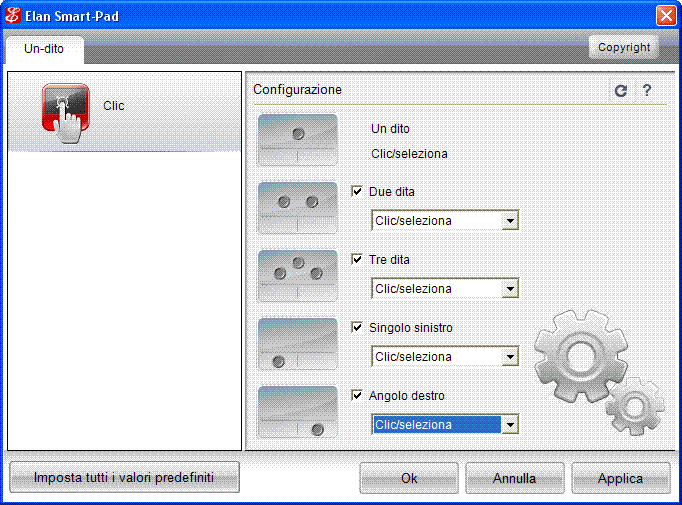
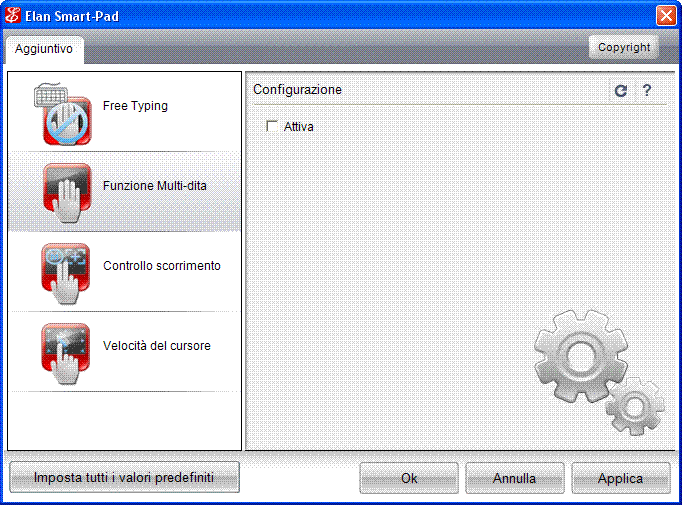
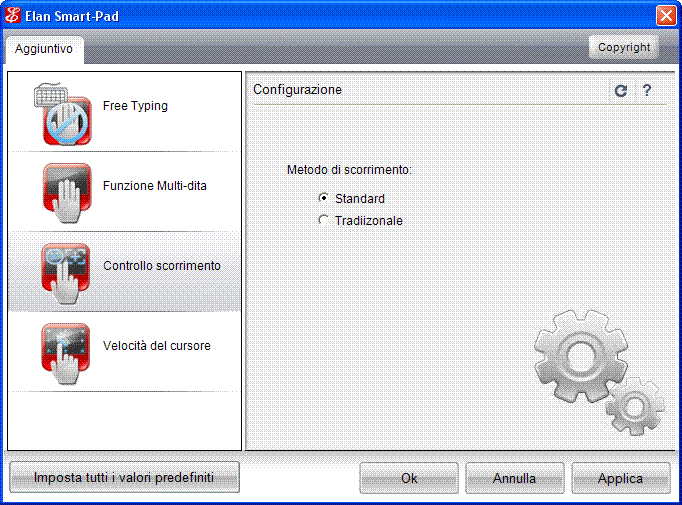
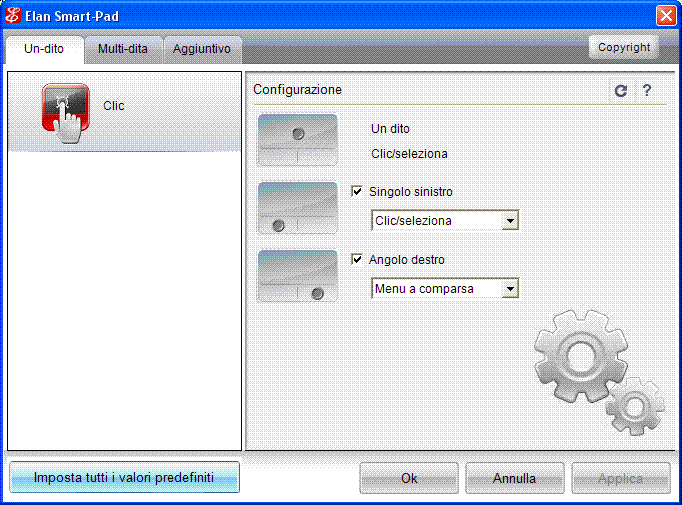
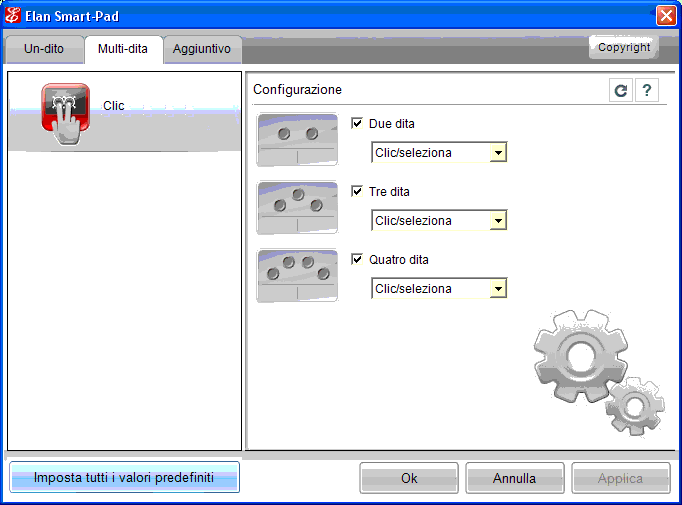
Maybe the multi-finger version doesn't work on your specific hardware because of the way it has (or has not) "embedded" buttons. Anyway, it remains a mess. Look at what I can do here, all settings in \SmartPadDisplay set to 0 except: TabUI_1F_Display=1 Click_Display=1 BUT if additionally: TabUI_MultiFinger_Display=1 Click2F_Display=1 the same settings are divided in the two tabs as in before screenshots. About FreeTyping, here I need: 1) TabUI_1F_Display=1 2) TabUI_MultiFinger_Display=1 3) TabUI_Additional_Display=1 besides of course: 4) FreeTyping_Display=1 If either of 1) TabUI_1F_Display 2) TabUI_MultiFinger_Display are set to 0, nothing is added in the "Additional". It is crazy. In the meantime I checked and these three values: MultiFingerGesture_Display ScrollControl_Display CursorSpeed_Display even if set to 1 do nothing with ETDAniconf.exe version 10.0.0.19 (older) not with the 11.0.0.7 (in use, from tp118w7.exe) but they actually display something in version 11.59.0.0 (from the Z115203-cab). It has to be seen if their settings are actually taken by the ETDctrl.exe 11.0.0.13. The second, third and fourth screenshot are with ETDAniconf.exe version 11.59.0.0. The MultiFingerGesture_Display is a sort of "kill switch" for most (but not all) items in TabUI_MultiFinger_Display, affected settings become grayed out. The ScrollControl_Display switches between "Standard" and "Traditional" The CursorSpeed_Display seems the only useful ones (if it works). jaclaz
-
Naah, that only works on wednesdays (if there is a full moon) . jaclaz
-
Well, what I do here is to import in the Registry: 1) "your" HKCUElantechCleanInstall.reg 2) smartpaddisplay0x1.reg 3) smartpad_ShowItem0x1.reg It should be reproducible there as well. I am attaching a zip with the three files. Cannot say, regmon/filemon on ETDCtrl.exe should show something that is if you manage to replicate this "simple" gesture . Maybe you need (I don't know, just guessing) tap enabled as a prerequisite. If you (say) set ETDmag.exe as target of (say) 3 finger press, it should work, I tried running it by double clicking on the ETDmag.exe and it works, and reads the magnification and sizes set in the Registry by ETDaniconf.exe. jaclaz HKCURegfiles.zip
-
Yep, you should contact Steve about this and possibly find with him a possible solution before requesting a bugfix. Basically what I believe happened is that Steve found a bug in a function that shouldn't IMHO even exist (goto in menues [1]) and yaya initially (correctly) suggested to explicitly set errorcheck on, but later, upon the insistence over this (non-) issue "fixed" it, unfortunately (evidently) fixing it "systemwide". I presume that the only sensible way out would be to revert the change (having goto work normally in batches) and adding a new command mgoto or gotom or gototitle to be used in menues. But doing something like that will make any number of existing menu.lst by Steve6375[2] "incompatible". As said changing a systemwide setting on a goto (making a different branch) might have some justifications, whilst changing it on a call on the goto :eof (please read as "return") is IMHO seriously "wrong". Since (I believe) grub4dos can understand if it is running a menu or a batch, maybe the only possible way out would be *something* that automatically turns on errorcheck to on in goto's ONLY in menues BUT leaves it untouched in batches, no idea if this is possible. jaclaz [1] generally speaking myself and Steve have opposite views about the structure of grub4dos external files, I prefer to have extremely simple menues and (simple or complex) external scripts/batches, while he tries to cram each and every possible options in the menues, there is nothing inherently bad in either approach (though of course my personal opinion is that my approach is better ) and both have their advantages [2] Steve is most probably the most prolific "western" developer of grub4dos related thingies and the unofficial (but official for me) communication officer with the good guys that develop grub4dos (chenall and nowadays yaya) so it is IMHO better (even if not strictly *needed*) to talk with him about the issue and possible solutions beforehand.
-
VIA SATA v220e driver for ASRock 4CoreDual-SATA2 R2.0
jaclaz replied to Feamane's topic in Windows 9x/ME
Well, no. Meaning that the RLoew's is a generic driver, whilst the manufacturer's one is specific. In theory the manufacturer's driver should have the best possible performance on the specific hardware (though in practice it could be slower) but if you are looking for max performance you need to at least try it. jaclaz -
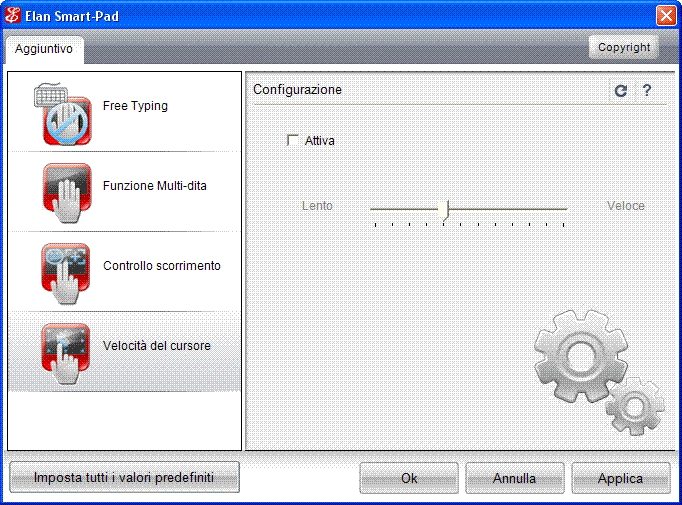
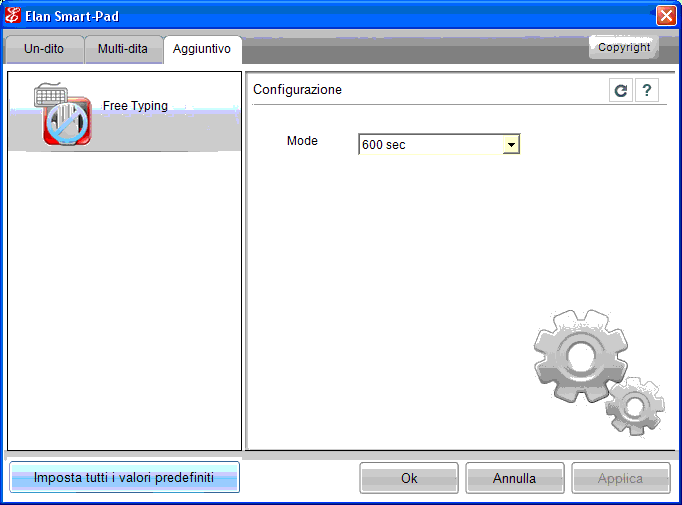
OK. About your notes. The "Button" tab needs - I believe - to be kept for other touchpads that have them. The Magnifier is activated (allegedly) by a "simple" gesture: The definition of "simple" must have changed since last time I checked it on the dictionary. About the "Click" functions (no matter if they work or not) here I can see a number of options for them. Viewing them is triggered by the _ShowItem keys in SmartPad (not In SmartPadDisplay) Then I have an additional "FreeTyping", See images. The "Device Control" is seemingly a setting allowing to have the touchpad always enabled at boot or either disabled or enabled (remembering how it was at shutdown). Still. it seems like a few values in SmartPad do not produce any change in the items displayed: Cover_Display CursorSpeed_Display EdgeSwipeWin8_Display The last one is probably only available in Win8, OK. The first one should be a function related to the opened/closed lid? The second one is strange, maybe it "hooks" on the "normal" Mouse Cursor speed? I am thinking on how to make an easy to use "option panel" jaclaz
-
VIA SATA v220e driver for ASRock 4CoreDual-SATA2 R2.0
jaclaz replied to Feamane's topic in Windows 9x/ME
The driver you need is then the via v-raid software package v6.10c.zip http://download.viatech.com/en/support/driversSelect.jsp From its VIAMRAID.inf: [VIA] %PCI\VEN_1106&DEV_3349.DeviceDesc% = VIAMRAID , PCI\VEN_1106&DEV_3349&CC_0104 %PCI\VEN_1106&DEV_6287.DeviceDesc% = VIAMRAID , PCI\VEN_1106&DEV_6287&CC_0106 %PCI\VEN_1106&DEV_0591.DeviceDesc% = VIAMRAID , PCI\VEN_1106&DEV_0591&CC_0104 %PCI\VEN_1106&DEV_3249.DeviceDesc% = VIAMRAID , PCI\VEN_1106&DEV_3249&CC_0104 %PCI\VEN_1106&DEV_3149.DeviceDesc% = VIAMRAID , PCI\VEN_1106&DEV_3149&CC_0104 %PCI\VEN_1106&DEV_3164.DeviceDesc% = VIAMRAID , PCI\VEN_1106&DEV_3164&CC_0104 %PCI\VEN_1106&DEV_0581.DeviceDesc% = VIAMRAID , PCI\VEN_1106&DEV_0581&CC_0104 %PCI\VEN_1106&DEV_7372.DeviceDesc% = VIAMRAID , PCI\VEN_1106&DEV_7372&CC_0104 jaclaz -
No idea, if it works that way, it works that way. Does it the same on call ? I mean, it does make some sense (even if it is unexpected) a goto is usually a branch and errorcheck may be reset to its default value (on) on a branch, a call/goto :eof should instead keep the same settings. jaclaz
-
VIA SATA v220e driver for ASRock 4CoreDual-SATA2 R2.0
jaclaz replied to Feamane's topic in Windows 9x/ME
Cannot say specifically, but - generally speaking - SATA I/II (without NCQ) is only slightly faster than a "good" IDE. It is very strange however that the driver did not install, particularly if it says that it cannot find the hardware, maybe you have a different issue or it is not the correct driver. Which hardware VEN/PID can you see? Which hardware VEN/PIDs are in the driver .inf? jaclaz -
Yep, that's it, the only thing missing is "sensible defaults" (or if you prefer "useful visible functions"). jaclaz
-
High temperature caution! but the heat sink is cold.
jaclaz replied to Cixert's topic in Hardware Hangout
Sounds more like you have lost *any* thermal contact between the processor and the heatsink, like if the heatsink has moved away from the processor . jaclaz -
No matter if the "Favorites menu" is ever called, the ETDCtrl.exe looks for ETDFavorite.dll and checks the addresses of the four functions in it. This is roughly what I bypassed with the : 00002643: 4C 53 00002695: 90 5E BTW, this is (temporarily) inverting the logic, i.e. if ETDFavorite.dll is present, the ETDCtrl.exe will surely crash. Later it calls the ETDFavorite.dll and this is what I tried to bypass with: 00002292: 90 FF 00002293: 90 15 00002294: 90 1C 00002295: 90 54 00002296: 90 58 00002297: 90 00 then (here) the ETDCtrl.exe runs, but since it doesn't really-really run (because it finds not the hardware) and (here) no icon in the systray is ever created, I have no way to check if there are other calls to ETDFavorite.dll (and those will of course create a crash). jaclaz
-
4C is the correct value, typo . It is well possible that, once the patch is (theoretically) correct, the ETDCtrl.exe does not error out but still doesn't work. If it works, good, if it doesn't we will need to keep the ETDFavorite.dll, it is simply not worth the effort to find more elegant (and more correct/complete) way to patch it. @RainyShadow Waiter, come taste the soup ... https://www.imdb.com/title/tt0094898/quotes/qt1099763 Ah-ha! As said, that program is nice, but it is not suitable for this file and, as a general tool I still prefer CFF explorer (which is a well not suitable for this specific file). jaclaz
-
But this is not the case,, it seems like specifically the suggested program does not (cannot) see the way the .dll is checked/accessed (which is seemingly non-standard), if you prefer, it is more like the usefulness of a bycicle to a fish: https://www.fishonabike.com/guinness.htm jaclaz
-
Naah, there is the whole driver (and its incredible amount of bloat, 123 MB) : https://pcsupport.lenovo.com/cr/en/products/laptops-and-netbooks/lenovo-g-series-laptops/lenovo-g505s-notebook/downloads/ds035770 jaclaz
-
Why not reading? Have you actually tried that program on the specific ETDCtrl.exe? If not, try and tell us how to use it. AFAICU that program is very similar to CFF Explorer and similar tools. jaclaz
-
Yep, that hexedit i correct , but it is not enough, later there is another call to ETDFavorite.dll. Try doing also: 0x2695: 5E -> 90 0x2292: FF 15 1C 54 58 00 -> 90 90 90 90 90 90 Will it work? Hint: use FC /B to check the patching , here I edited ETDCtrl.exe and the original is saved by TinyHexer as ETDCtrl.exe.bak: fc /b ETDCtrl.exe ETDCtrl.exe.bak Confronto in corso dei file ETDCtrl.exe e ETDCTRL.EXE.BAK 00002292: 90 FF 00002293: 90 15 00002294: 90 1C 00002295: 90 54 00002296: 90 58 00002297: 90 00 00002643: 4C 53 00002695: 90 5E jaclaz