halohalo
Content Type
Profiles
Forums
Events
Everything posted by halohalo
-
The latest driver for Intel 82574L is 12.7.28.0. You can find the NDIS63 folder and modify e1q63x64.inf. Windows 10 x64 blocks modified INF file, so you have to enable test mode and nointegritychecks, then disable driver signature enforcement. If you succeed, you can close test mode after installation. It seems that users of 82579LM had same problem and couldn't use WOL from S5, but solved the problem by using Windows 10 compatible driver from Intel. If INF modification doesn't work, I think the only way is to modify the LAN driver.
-
NVIDIA GeForce RTX error code 43 on Windows 10 version 1607
halohalo replied to halohalo's topic in Windows 10
Drivers for workstation GPUs or Windows 7/ 8.1 also block installation. Modifying the INF file can't fix Code 43 error during installation. -
NVIDIA GeForce RTX error code 43 on Windows 10 version 1607
halohalo replied to halohalo's topic in Windows 10
I can turn on HDR by worleydl's hdr-switcher, but I have to edit uhdDisplay.cpp and replace NV_HDR_MODE_UHDBD with NV_HDR_MODE_UHDA_PASSTHROUGH. The switcher can't turn off HDR immediately, and I know nothing about programming, so I compiled another switcher using NV_HDR_MODE_OFF. -
NVIDIA GeForce RTX error code 43 on Windows 10 version 1607
halohalo replied to halohalo's topic in Windows 10
No, I think it is possible to install R435 and later in debug mode temporally, but making a modified driver for test mode is not as easy as R430 and older. If I need to update the driver to R435 and later, it is necessary to debug again before modification. The INF file of 442.01 supports Turing GeForce GPUs on Windows 10 version 1709 and later, but Windows 10 supports ray tracing since 1803. -
NVIDIA GeForce RTX error code 43 on Windows 10 version 1607
halohalo replied to halohalo's topic in Windows 10
I've tested adaptive sync on the LG 27GL850-B monitor. Works in Fullscreen and Windowed: Final Fantasy XIV: Shadowbringers Official Benchmark (445.75, DirectX 11) FurMark 1.21.1.0 (445.75, OpenGL) G-SYNC Pendulum Demo (445.75, DirectX11) Nier: Automata (445.75, DirectX 11) Phantasy Star Online 2 (DirectX 9.0c) PSO2 New Genesis Character Creator (466.27, DirectX 11) Resident Evil 3: Raccoon City Demo (445.75, DirectX 11 and DirectX 12) Works in Fullscreen only: Lost Planet 2 Benchmark (DirectX 11 and DirectX 9) Street Fighter V Benchmark (432.28, DirectX 11) -
I am using version 1607, so I will open the Command Prompt window and use DISM to analyze and cleanup Windows Update files.
-
NVIDIA GeForce RTX error code 43 on Windows 10 version 1607
halohalo replied to halohalo's topic in Windows 10
R410 is obsolete, so I update the driver to 431.98. Now I can play Quake II RTX demo at 20 FPS. FurMark test result: http://www.ozone3d.net/gpudb/score.php?which=825921 -
NVIDIA GeForce RTX error code 43 on Windows 10 version 1607
halohalo replied to halohalo's topic in Windows 10
Finally, I modified nvlddmkm.sys to prevent the unloading process. It also needs to be test-signed. To prevent the drastic performance decrease, I disabled driver signature enforcement before installation. FurMark test result: http://www.ozone3d.net/gpudb/score.php?which=787187 -
NVIDIA GeForce RTX error code 43 on Windows 10 version 1607
halohalo replied to halohalo's topic in Windows 10
When nvlddmkm.sys is loaded, it detects OS version. If I want to install 412.40, I need to replace 3839 with 3FAB, then nvlddmkm.sys will not be unloaded. The second problem is Windows 10 version 1607, because it has strict driver signing rules. https://techcommunity.microsoft.com/t5/Windows-Hardware-Certification/Driver-Signing-changes-in-Windows-10-version-1607/ba-p/364894 GTX Turing GPUs do not support NVIDIA NGX. Besides, I think NVIDIA blocks Pascal GPUs on 1507 by NvBlockTH1Install. USB 3.1 card based on Asmedia ASM1142 works on Windows 2000 with blackwingcat's extended core v16a installed. -
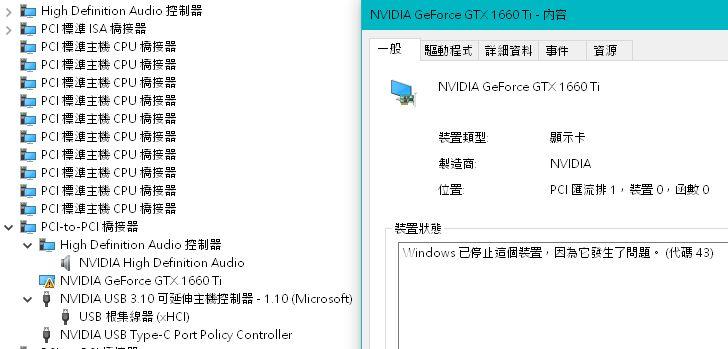
I modified the INF file, and GeForce GTX 1660 Ti displayed Code 43 error on Windows 10 version 1607 Test Mode. GeForce RTX GPUs support Windows 7, 8, 8.1, and Windows 10 version 1709 or later. But Quadro RTX GPUs support 1607. Now I am sure the installation is not blocked by the INF file. The driver for NVIDIA USB Type-C Port Policy Controller can be found in PPC folder. I also checked the INF file in AMD Radeon software 19.7.1, and I think Radeon RX 5700 GPUs may support 1607.

-
It's a copy paste bot.
-
KB4132216 causes failed installation/uninstallation of CU
halohalo replied to halohalo's topic in Windows 10
I think the wcp.dll you found in 14393.0 folder is a delta backup. It is not a complete file, so you can't find detailed information. -
KB4132216 causes failed installation/uninstallation of CU
halohalo replied to halohalo's topic in Windows 10
Just like KB4494440, KB4503267 also requires the same SSU. Apparently Education edition is blocked by wcp.dll. However, if you check update.mum in CU, you will find that Education edition is not completely blocked. -
It is necessary to fix security vulnerabilities in nvlddmkm.sys, and make sure the driver works on Windows 7, 8.1, 10 (1507~1709). Besides, the release notes mention that NVIDIA display driver constrains Total Available Graphics memory to just below 4 GB for GeForce GPUs with 2.75 GB or less of video memory. .
-
NVIDIA released R390 U10 for 64-bit version of Windows. The release notes didn't mention support for 32-bit Windows, so I think this is the end.
-
KB4132216 causes failed installation/uninstallation of CU
halohalo replied to halohalo's topic in Windows 10
Since kb4494440, kb4498947 replaces kb4132216. -
AMD offers 32-bit version of Radeon Pro Software for Enterprise 18.Q4.1 which supports WDDM 2.4.
-
Nvidia released R390 U9. I edited nv_dispwi.inf and it works with GeForce GTX 960.
-
Because Radeon Software 18.10.1 does not support 32-bit Windows, 4gamer.net (a Japanese video game website) asked AMD, and AMD confirmed that Radeon Software support for x32-bit Windows operating systems has been moved to a legacy support mode. https://www.amd.com/en/support/kb/faq/pa-120 https://www.4gamer.net/games/022/G002212/20181018086/ The final Radeon Software for 32-bit Windows is 18.9.3. And Nvidia released R390 U8 at September 2018.
-
1607 reached end of service on April, so you can upgrade to different version. If your laptop has a Clover Trail processor, you can apply servicing stack update KB4132216 before installing cumulative update KB4467691. Besides, Microsoft released a security update KB4465659 for SSU.
-
KB4132216 causes failed installation/uninstallation of CU
halohalo replied to halohalo's topic in Windows 10
Install KB4132216, then find the latest wcp.dll and change its ownership and permissions. Copy old wcp.dll to replace the latest one, then restore the ownership and permissions. I am using Windows 10 x86, so there is only one wcp.dll (x86) in KB4132216. -
KB4132216 causes failed installation/uninstallation of CU
halohalo replied to halohalo's topic in Windows 10
Official 1607 ISO file contains KB3199986 SSU, and it is compatible with KB4103720 and old Flash Player security update. Anyway, I solved the problem by replacing the latest wcp.dll with old one. The installation of KB4284833 is successful. -
The latest servicing stack update KB4132216 causes failed installation/uninstallation of CU on Windows 10 Home. Installation of KB4284880 failed at 99%. Installation and uninstallation of KB4103720 also failed at 99%. The latest Flash Player security update is compatible with KB4132216.
-
KB4025338 is not compatible with Home edition 1507
halohalo replied to halohalo's topic in Windows 10
The security update for Flash Player (kb4038806) is compatible with Home edition 1507. I rolled back to 1507. Because 1511 turns on Windows Update automatically and installs updates and outdated drivers in the background, despite having turned off Windows Update service. -
KB4025376 is compatible with Home edition, but an error message appeared when I tried to install KB4025338. It seems that KB4032695 is the last cumulative security update compatible with Home edition 1507.