Everything posted by DrStrange
-
https://github.com/valinet/WinCenterTitle/tree/glass Leave out the . after glass
-
nm
-
Hello Azarino Thanks very much for your reply I've played around with Aero7X Reset (Clear subtheme)- and System Transparency by Prisoner7. While I have no problems adjusting transparency amounts in my system, I have not been able to introduce any blur into the window title bars and taskbar like you have in your screenshot. The amount of transparency and blur you have would be ideal for me. Could you perhaps tell us what settings you use in this theme (Colours, Transparency, Textures and Fonts) and in System Transparency - Prisoner for the blur effect? Could you mention any other info that could help - do you use a start menu replacement, what are your Windows 10 Colours settings, what settings have you enabled in the WindowBlinds general settings and what is your Windows 10 build version?
-
Also very very glad to hear bigmuscle is still working on this soft. I currently use Windows 8.1 with StartIsBack in it's Windows 7 skin and a Windows 7 Aero Glass theme. I tried WindowBlinds in Windows 10 2004 with the closest Windows 7 Aero Glass themes I could find, but it doesn't play well with StartisBack or Open Shell as I wasn't able to get the transparency and colour to be the exact same as I have in Windows 8.1.
-
Hi, I'm trying to get the titlebar in my Windows 8.1 windows exactly the same color and transparency as the titlebars in Windows 7 so using a previous Aeroglass GUI version (just has System, Theme & Appearance and Glass Colors tabs) I have the following set: Theme & Appearance tab: Glass Reflection Intensity: 0% Blur effect radius: 4 Glass geometry radius: Win 7 style Caption glow effect mode: Use Theme settings Glass colors tab: Automatically compute from desktop background: unchecked Color balance: 39% Opacity: 22% I use Aero8 Glow theme by MrGrim01. Titlebars look pretty similar to those Windows 7 Could other users suggest ideal settings? Thanks.
-
I believe if you create a text file in the symbols folder, and rename one dwmcore.pdb, and the other uDWM.pdb, these will serve as dummy files, and you can store the originals elsewhere or delete. You should be ok then. Thanks but doesn't work. It still downloads and replaces those dummy files I created Create the dummy files then make them read only so they are not replaced. This worked for me.
-
@KaddirB You say that Aero Glass works fine in your PC (including auto executing after a reboot?). Have you tried exporting the Aero Glass task in your PC (select Aero Glass task right click and export). This creates a .xml file. Give it a name. Copy it to your laptop. Delete the existing Aero Glass task on your laptop. Then right click Task Scheduler Library in the Task Scheduler in your laptop, choose Import Task and select your .xml file. If you have a link to schtasks.exe in your startup folder delete that so it doesn't interfere with the scheduled task. I am assuming that Aero Glass is in C:\AeroGlass in both your PC and laptop? If not, Aero Glass on your laptop needs to be in the same folder as on the PC for the .xml file to work. Before you do this, compare the Aero Glass tasks in your PC and laptop for any differences. You might see something set correctly in the PC task that appears incorrect in the laptop task. If so, try changing it in the laptop task and this saves you copying it over. if you don't see any differences, copy it over anyway. Reboot laptop. See if it autostarts. All above -Task Scheduler must be run as admin. Or try my task attached. My Aero Glass is in C:\AeroGlass. Queued implies that you have another instance of aerohost.exe running. When the task is queued, do you see aerohost.exe running in task manager? Aero Glass Task.xml
- 90 replies
-
- 64bit
- Aero Glass
- Issue
- Not
-
Tagged with:
-
@ BJFox, This VS has 4 themes, only one of which (AeroByDesignUpdate1.msstyles) currently supports Win 8.1 update 1. Check to make sure this is the one you are using. The author states he will be updating soon, so hopefully all 4 themes will fully work with Update 1. I have tried several themes since update 1 came out and unless they are updated to work with update 1, the context right click on tiles does not work.
-
It is rumoured that Microsoft will bring back the start menu with Windows 8.2. Regarding advanced startup, hold shift key down, go to the arrow beside the shut down button and advanced startup is the the last menu item.
-
Hi, I'm just a little confused about the Symbols. I have a licensed copy of Aeroglass 1.2.1 without a Symbols folder on Windows 8.1 and its working fine. When I go to install the Windows 8.1 update do I need to temporarily create the Symbols folder? Then if BM decides to update Aeroglass for Windows 8.1 update so symbols are hardcoded into Aeroglass (as he has done in the past), I can delete the Symbols folder? Reading dhjohns post from page 38 would suggest that I do need to make a Symbols folder?
-
-
I just want to confirm, with regard to posts about safe mode a few pages back, that safe mode (not Command Prompt) on a clean install of Windows 8.1 (when enabled from Charms Bar) works with Aero Glass v1.1 installed. (I have been unable to test it on my current installation as I think my current installation is corrupted due to me changing file permissions in C:\Windows. I do get a completely black screen when I am in safe mode (not Command Prompt) in my current installation. If I move the mouse I can see the words Safe Mode appear in the four corners of the screen. Then they disappear when I release the mouse. So perhaps I have a problem with the display. I also tried enabling Safe Mode from msconfig in this installation - the PC would ALWAYS restart to a black screen (so I assumed I was in Safe Mode) making it permanently unbootable as I couldn't see anything.) So I did a clean install of 8.1 on another drive and installed Aero Glass immediately after and got into Safe Mode (not Command Prompt) without any problem. Aero Glass, as bigmuscle rightly points out, will not work in safe mode (not Command Prompt) as the Task Scheduler service cannot run in safe mode.
-
Thanks. Works perfect with shortcuts on desktop. Licence purchased.
-
The start menu is responsive but there are no recent programs in it, just a blank space. Once I close the invalid shortcut window, then the recent programs come back. As a hopefully temporary solution, I put the icons into a folder on the desktop, and I don't get the invalid shortcut window. SysInternals Autoruns report attached. AutoRuns.zip
-
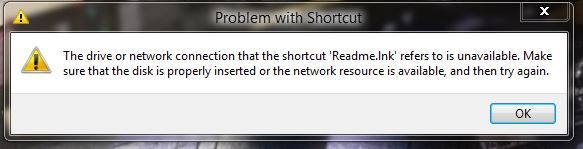
I have a few shortcut icons on my desktop that point to a Truecrypt container (drive letter Z: ) that I mount/dismount when needed. Since installing StartIsBack+, every time I boot up I get this window for each icon that points to Z: I have to click OK or close each window. How do I keep these icons on the desktop and stop the windows appearing?
-
-
I think ralcool means for you to replace Users in his example with SYSTEM so that your PC creates an account called SYSTEM to try and workaround your localization problem with СИСТЕМА. If this account is created, you would need to ensure it has the same rights/permissions as СИСТЕМА and that aerohost.exe is using the SYSTEM account.
-
After I have attached a file, when I click "Add to Post", nothing happens. I have tried this in IE and Firefox. I have to manually add it using
-
-
BM, Thanks for the DebugBuild as I was getting the black box like illuziOn and others. I run Win 8.1 x64 up to date on a desktop PC with Aero 8 Glow v2 theme using default settings. I only have EnableLogging in HKLM\SOFTWARE\Microsoft\Windows\DWM so unsure what TextGlowMode value would be. Debug log attached (same WICImageFactory error as illuziOn) debug.log
-
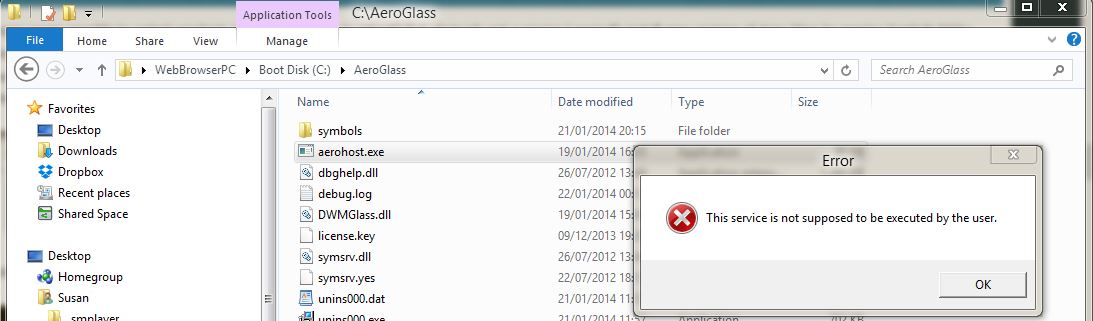
It no longer seems possible to restart aerohost.exe without having to reboot? It is obviously not a service. I normally install new versions of Aero Glass by moving Symbols folder and licence.key out of AeroGlass folder, delete Aeroglass folder then install new version and move Symbols folder and licence.key back to AeroGlass folder, stop aerohost.exe and dwm.exe then restart aerohost.exe and dwm.exe. I guess I will leave Symbols folder and licence.key in AeroGlass folder when installing any future new versions. Aero Glass works great when I reboot. Thanks for this app. BTW, when I first installed I got the watermark, but the last few reboots, there is no watermark and I did not make any hacks to remove it.

-
I'm getting this same error, and while I can manually run aerohost.exe and get it to work, it doesn't run when I log in. What am I doing wrong? Did you check Task Scheduler? If the task to start aerohost.exe is missing or the task details are incorrect, recreate/amend it and see if aerohost.exe starts at boot up.
-
-
I got this message "ERROR: cannot create a file when that file already exists" while installing RC3. I had already ended aerohost.exe and dwm.exe, deleted minidump.dmp, debug.log, moved symbols folder out of the Aeroglass folder and left licence.key as is then copied the RC3 files over the RC2 files. There is nothing in the new debug.log to say which file gave the error. RC3 was working when install.bat completed but I decided to reboot because of this error but nothing appears broken.
-
http://glass8.berlios.de/win81.html > you still need to manually download symbols for udwm.dll, dwmcore.dll and dwm.exe else it won't work . These need to go in to a folder called symbols in your AeroGlass folder. For more info, search the thread, as NoelC suggests. If you donate, Aero Glass will download them automatically.