Leaderboard




Popular Content
Showing content with the highest reputation on 03/22/2026 in all areas
-
unfortunately MSVC doesn't provide in this fine-grain level of instruction set emitting, only IA32(CMOVcc required, implies i686/cyrix6x86mx), SSE, SSE2, AVX can be specified.2 points
-
Some more success! Widget parser is now working correctly to establish correct line out pin, mixer pin and DAC to obtain playback path. Analog only, digital is skipped. Automatically checks and sets the connections. Automatically sets stream and channel settings. Automatically sets volume based on 0dB step level. Automatically enables EAPD if required. Automatically applies PCI patch if required (on 0280 codec). Tested and working on Realtek 0280 codec, Realtek ALC272 codec, and IDT 92HD75B3X5 codec - All installed from scratch and produce sound automatically, no config required. IDT codec note that may be of use to @Drew Hoffman - I found this particular IDT codec provides the output amp caps from the AFG node rather than the DAC node which Realtek does. I read DAC first and if output amp caps are zero I fall back to reading the AFG and applying 0dB to the DAC. Unsure what other codecs do it this way. Next step I will integrate auto headphones with jack detect, then look into microphones. Any other suggestions?1 point
-
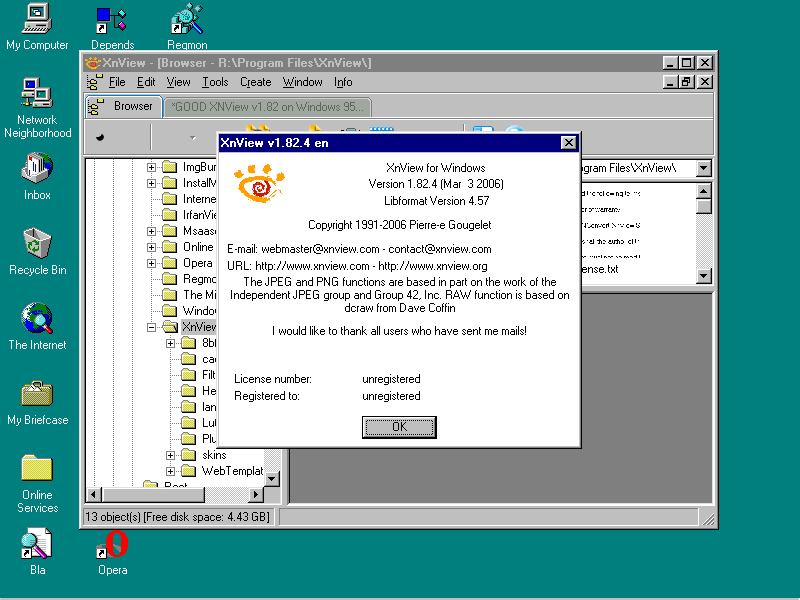
Because I can't stand if 'things' are not working, I first checked the missing Export KERNEL32.DLL:InterlockedCompareExchange. It seems it is NOT available on Windows 95. Then I went down: highest version working on my installation is xnview v1.82.4. Version 1.90/ 1.90.1 and 1.90.2 didn't work: Invalid Page Faults in KERNEL32.DLL.
 1 point
 -
We all know where this is going to go. Please get back on topic.1 point
-
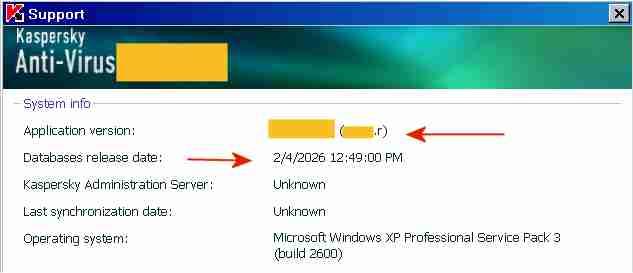
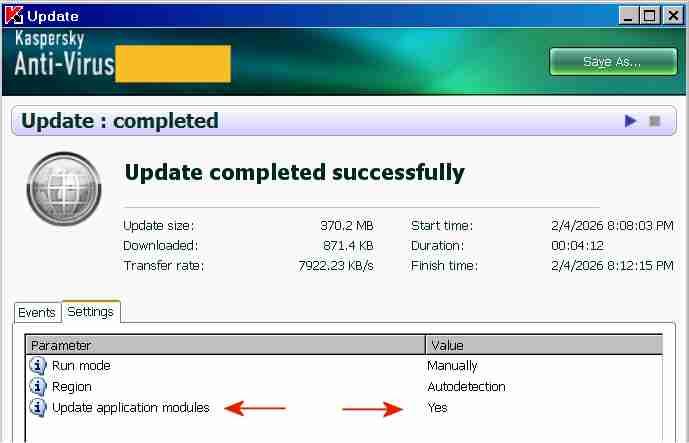
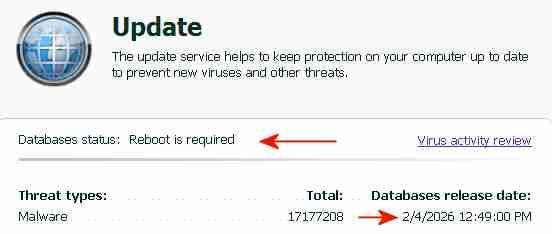
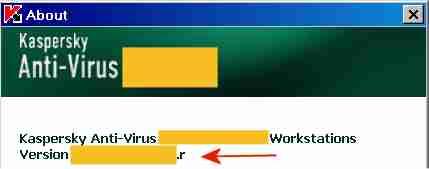
The "AutoPatches" for My Ancient Version of Kaspersky I succeeded in updating both the application modules and the signatures of My Ancient Version of Kaspersky with a single combined update, without a license key and without activation. By installing the final AutoPatches, My Ancient Version of Kaspersky has been updated to the ultimate final version, with the most recent program file digitally signed OK 26May2014. The screenshot above indicates the final AutoPatch "r" next to "Application version" and the Database release date "2/4/2026". Once knowing how-to, preparing future combined updates will be quite easy. The term "AutoPatches" by Kaspersky corresponds roughly to the term "Hotfix" by Microsoft. The screenshot above indicates "Update completed successfully" and "Update application modules: Yes". The signature updates were from a Kaspersky Lab update server, the application updates ("AutoPatches") were from my personal archive. Signature updates and application updates ("AutoPatches") were combined into a single update folder. The screenshot above indicates signatures of 2/4/2026 and the message: "Database status: Reboot is required". This message "Database status: Reboot is required" is displayed by My Ancient Version of Kaspersky when the update of the application modules via AutoPatches is pending. A tiny red square is added to the Kaspersky icon in the System Tray, indicating that AutoPatches are pending. During the reboot after the update, the Kaspersky driver updates and installs the program files contained in the AutoPatches and updates the registry, completely hidden and invisible to the user. StartUp Organizer, for example, which I use as a watch dog, does NOT notice any changes before, during and after the reboot. After rebooting and AutoPatching, the Kaspersky icon in the System Tray looks normal again, without a tiny red square. The successful installation of the AutoPatches is indicated in the About screen above by the display of "r" [=version of the AutoPatches] next to the Version (Note: the About screen is displayed by right-clicking on the Kaspersky icon in the System Tray -> About) and in the Support window (1st screenshot, at the top of this posting). Also, LastSuccessfulUpdate in the registry contains a hex value (Unix timestamp), which confirms that the update was successful. Furthermore, virus-checking with the updated application module and the new signatures works fine. The installation of the final AutoPatches plus a signature update of My Ancient Version of Kaspersky had faced three challenges: 1) The files of the final AutoPatches were removed from the Kaspersky Lab update servers and are most likely not available anywhere in the internet. 2) Kaspersky Lab does not provide license keys for My Ancient Version of Kaspersky anymore, which would permit multiple updates. My Ancient Version of Kaspersky is an unexpiring trial version and can only be updated once. An initial update with the final AutoPatches followed by a second update with current signatures is therefore not possible. Only one update is possible, either an update of the signatures from the Kaspersky Lab server or an update of the application module from my personal archive, but not both.. 3) The digital signature of the .xml file in the subfolder \index\ in the update folder impedes the combining of AutoPatches and current signatures into a single update folder. Before August 2019 the online updates from Kaspersky Lab of My Ancient Version of Kaspersky had consisted of three sub-folders: \AutoPatches\, \bases\ and \index\. After August 2019 no sub-folder \AutoPatches\ is created when downloading updates. The sub-folder \AutoPatches\ contained updates of the installed application modules, \bases\ contained the signature updates and \index\ contained only a .xml file validating \AutoPatches\ and \bases\. The .xml file in \index\ contains at the end a string which is an encoded digital signature generated using the private signing key of Kaspersky Lab. Changing text in the .xml file without updating the signature at the bottom will result in the error message "Invalid file signature" when trying to update. The final release of December 2012 of My Ancient Version of Kaspersky had been updated by several sets of "AutoPatches" supported by Kaspersky until 2017, identified by a letter of the alphabet appended to the build number of Kaspersky Anti-Virus. The last AutoPatch for My Ancient Version of Kaspersky is "r" and contains for example an updated basegui.dll, digitally signed OK 26May2014. The AutoPatches for My Ancient Version of Kaspersky were available from the Kaspersky Lab update servers until about 2018. When I tried to update in August 2019, all files of the AutoPatches for My Ancient Version of Kaspersky had been removed from the Kaspersky Lab update servers and My Ancient Version of Kaspersky could not be updated to release "r" (about 26May2014) anymore. The application modules of My Ancient Version of Kaspersky consequently remained those of the final release of December 2012, without any AutoPatches applied.. In addition Kaspersky Lab removed the text string which identified My Ancient Version of Kaspersky, from the digitally signed .xml file in \index\ downloaded from Kaspersky. Kaspersky Lab must have decided by August 2019 to definitely stop supporting My Ancient Version of Kaspersky, because they removed the application update files from their update servers and made it generally impossible to update the program with AutoPatches by removing the string permitting updates of My Ancient Version of Kaspersky from the digitally signed .xml in \index\. The final AutoPatches, including "r", probably also improve the Protection Components of My Ancient Version of Kaspersky. I have used My Ancient Version of Kaspersky only as an on-demand scanner, I have no need for the Protection Components. Nevertheless, I may eventually add the Protection Components to the installation, for further testing and to see whether activation is required to get the Protection Components to work. According to the User Guide of My Ancient Version of Kaspersky, if you select "Activate later" after installation, "you will have access to all the application's features, except for updates (only one application update will be available)".
1 point
-
Using palemoon-28.10.6a1.win32-git-20220521-d849524bd-uxp-1e871780f-xpmod.7z no problems here. This is the certificate you need: Maybe you can import it from another browser or use my for you exported certificate: https://www.mediafire.com/file/iak4kxtgsw6k5r3/openmptorg.crt/file Cheers, AstroSkipper1 point
-
The website virustotal.com works with its new interface in 360Chrome v11 (and presumably higher, not tested!). And for old browser only the minimal interface: https://www.virustotal.com/old-browsers/. Therefore a lot of extensions and access to VirusTotal api too will have been broken. Cheers, AstroSkipper1 point
-
If using Mypal 29 or any other old browser you have to access VirusTotal from now on by this special link: https://www.virustotal.com/old-browsers/ This is a minimal interface for browsers that do not support full-fledged VirusTotal. The interface of Virustotal has apparently changed the last days as many other sites too. I hate that. Cheers, AstroSkipper1 point
-
Maybe this is what you are looking for: Virus Total Scanner. It's a desktop tool which uses Virustotal as a scan engine and displays its results. Windows XP is still supported. Here is a link: https://securityxploded.com/virus-total-scanner.php Cheers, AstroSkipper1 point
-
Hi @NotHereToPlayGames, I already recommended 360Chrome too. So keep cool and don't be sad! And by the way one example does not mean anything! A lot of modern sites do work in Mypal 68. But in 360Chrome too, of course! I don't use 360Chrome v13 or higher, only v11 due to my hardware limitations. The versions v13 and higher are resource hogs. So, no way for me. Cheers, AstroSkipper1 point
-
Try Mypal 68! It's really great and works well with modern sites which don't load in old browsers. Did you try New Moon 28 or Serpent 52? Maybe they are enough for you. But it depends on your OS and your hardware conditions too. Cheers, AstroSkipper1 point
-
If I had one wish and it was possible, I would desire support of XUL based extensions in Mypal 68. Then we could install add-ons from both worlds. Truth be told, I miss a lot of my old beloved extensions and in many cases there is no reasonable substitute among web extensions. In the past I created some custom buttons using Javascript, but no chance to get them work in more recent Firefox versions or in Mypal 68. But as I already said it's just a wish which will probably never come true. Cheers, AstroSkipper1 point
-
Hi @kuja killer, first of all ProxHTTPSProxy and HTTPSProxy are not my programs. The creators are @heinoganda and @Thomas S., two members of MSFN who haven't been here for a long time. All information about these proxies you can find in my article "ProxHTTPSProxy and HTTPSProxy in Windows XP for future use" here: In this article a lot of your questions will be answered. You can use these proxies with any browsers, but that doesn't always make sense. Both proxies provide TLS 1.2 protocol where it is missing, for example in IE8. Read first post and you will understand! By the way my project is ProxHTTPSProxy's PopMenu 3V1 which is described in this post: The goal of this thread is to ensure that these proxies will do their job in the future. That's the reason why I maintain them. Regarding to your problems you have to use more recent browsers like Mypal 68 or one of the 360Chrome editions. You can't solve your problem using one of these proxies. But as already mentioned read my article and a lot of your questions will be answered! Cheers, AstroSkipper1 point
-
You're welcome!1 point
-
And one additional tip. For better overview delete all unnecessary entries in config.ini! Keep only entries of sites you really use! @heinoganda added a lot of sites, maybe to his needs. The config.ini of HTTPSProxy is nearly empty comparing to ProxHTTPSProxy's one. Cheers ,AstroSkipper1 point