Leaderboard


Popular Content
Showing content with the highest reputation on 02/16/2026 in all areas
-
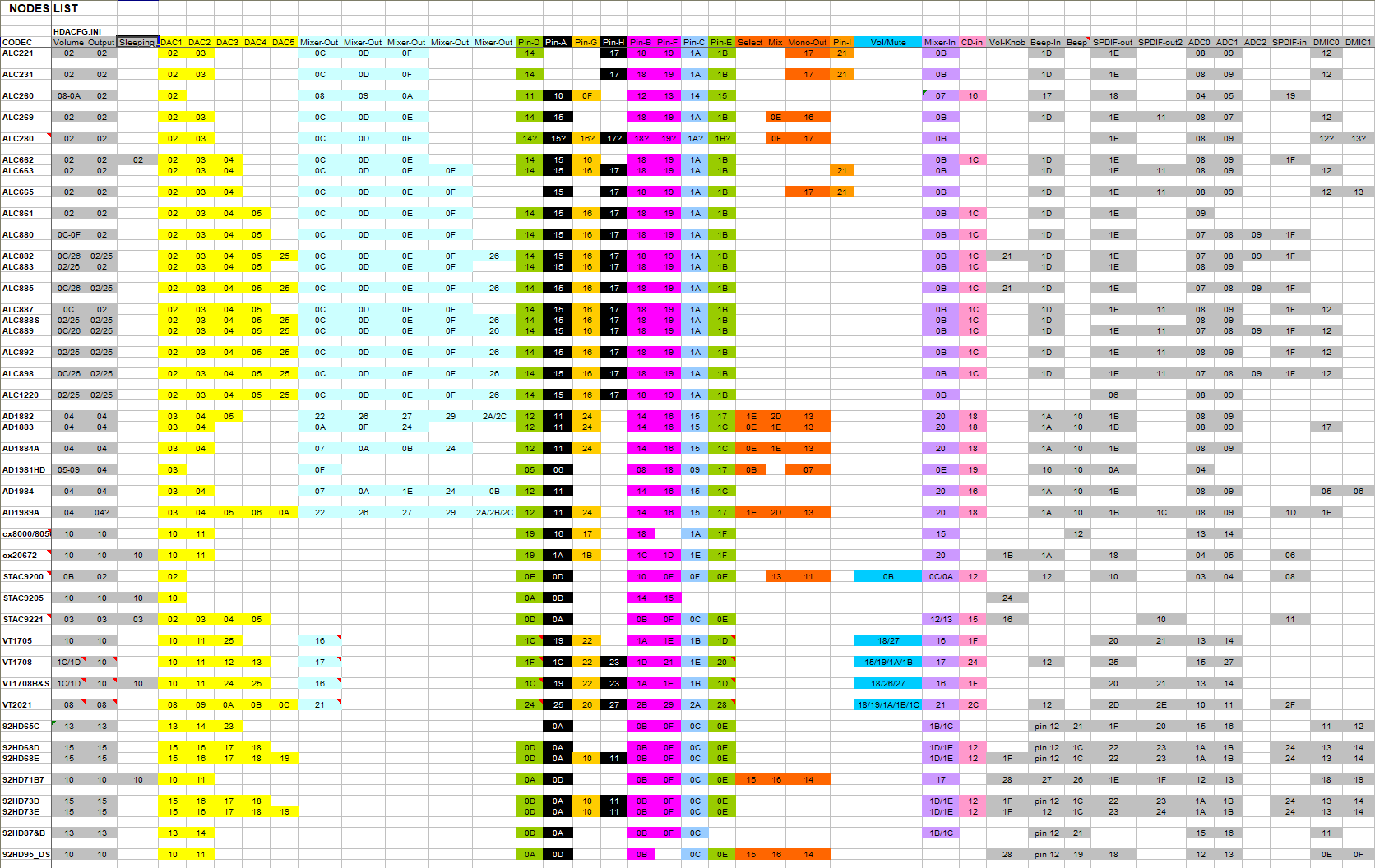
Thanks for the WPCREdit image. I think it is time to try pcipatchB=$7900 in HDACFG.INI If you look at address 79h, you can see this is the default in (most?) Intel High Definition Audio Controllers: 08h Because pcipatchB can address ONE Byte only (78h-79h is a Word), so we have to use 79h to set the 'No Snoop' Bit11=0 (it is all in this thread). Lately I asked Copilot again about your Intel High Definition Audio Controller 8086:0F04. This time the answer was going into the 'usual' direction. So it is worth a try, but as always: writing to PCI-devices is at our own risk, if any! I would say in your case: if anything does not 'feels' or 'sounds' right, immediately Power down your machine and reset pcipatchB to its original value (I believe pcipatchB=$0000). Best start without HDAICOUT.HDA and set all three Widgets mentioned in HDACFG.INI to $2 and for now Verbinterface=$1 and wait times to $100 for now. Listen with headphones if you can hear anything, even the slightest 'pop' or 'tic'. Do not use Windows Sounds only, but play some CD-quality music file too. I would like to see HDALOG.TXT and HDACFG.INI (to check). About Verbinterface=$0 giving other response values: I thing your problem is with your High Definition Audio Controller! About ALC3220: is commonly seen as equal to ALC280. I have no ideas about Stream 5. About the Source Code of Watler's driver: when I started with Watler's driver I bought a German book 'Turbo Pascal & Delphi fuer Kids' from Hans-Georg Shumann, including a full version of Delphi on CD-ROM. I once managed to compile HDA2.DLL, but I had no real problem to solve... So I never tried to learn more of Delphi. While I was writing these lines, you recompiled HDA2.DLL already for 'Codec index', so it seemes you are much better equiped in this respect. I will look into it soon. ******************************************************* I made new quasi-universal versions of HDAICOUT.HDA, one for each 'Codec index'. I used your idea to set IN/ OUT together, so all highest four bytes at once in case of the Volume Verb. It would nice if you can give it a try. Lately I wrote all the Codec info in my HDAWIN16 folder to my Nodes List. This gives a broad generalisation, from which I selected the DAC's and Pin's to sent Verbs to. See the print-screen, saved in png-format. I raised the number of Nodes/ Widgets to 2Fh, but only Power up and Volume/ Unmute Verbs are sent to all. Connection Select Verbs sent only to common Pin-D/ Mono-out Nodes/ Widgets (Channel0). This time I included EAPD for all selected Pin-widgets, and GPIO is pre-set as Output for max 8 pin's. GPIO needs THREE SET Verbs, look at my comments in the new HDAICOUT.HDA. I added two commented out SET Verbs (xx is the Node number) to their relevant section: ;$0xx707C0;AC_VERB_SET_PIN_WIDGET_CONTROL;hp_amp_out_enable ;$0xx20011;AC_VERB_SET_STREAM_FORMAT;48kHz_16-bits Further at the beginning/ end of each section the relevant GET Verbs for debugging are added (now commented-out). If I counted right, total number of sent Verbs will be 230, so there is not much room to sent more Verbs, for debugging with GET Verbs, or sending other SET Verbs/ Adresses. Best disable some Select Verbs in that case. HDAICOUT.HDA.ZIP: latest version in
 1 point
 -
Please stop being "combative". It feels like you are trying to "start a fight". Why? The "impatience" I can live with. If this is "combative" in nature, the moderators can keep track of how often that is the case.1 point
-
I've not as much experience, with Win98SE (I assume that is what you are using). Maybe NUSB3.3 would have worked better? If you are using Win98FE, then you'll need an older version (Nusb3.2). Alternatively, you can search for sweetlow's USB2.0 Win98 driver; I don't have a link handy, right now.1 point
-
I offered MMX, SSE, SSE2 optimized opengl32, for machines like this. The softgpu only offers mmx (win95), with the other supplied opengl option requiring features not available on these older CPUs. But, the performance wasn't wonderful. There is a better option, and I'm sure some at MSFN have heard of it before. TitaniumGL doubles the performance of older Mesa OpenGL releases [6.5.4-7] (asm optimized for MMX, SSE, and SSE2). This is also true, if not more true, when using the SoftGPU provided opengl. TitaniumGL is meant to provide a conversion of opengl to direct3d, on machine that have hardware acceleration. But, when no hardware accel exists, it falls back on its own software rendering. I've tested its software rending, and it does double the performance. It can also be paired with Wine3d, like the Mesa opengl, included with softgpu. In the TitaniumGL download, it includes supporting files for Modern Windows, Win9x, and ReactOS. The modern release does not work with Win9x (even with KernelEx). The Win9x version works great. The ReactOS version works in Win9x, with KernelEx (maybe without it, as well), with a potential minuscule increase in performance (not verified, and hardly detectable; if real). Be sure to get the modern release of TitaniumGL, as the older ones floating around are half the performance. Also, be warned, don't get too excited. While the performance is doubled, that might not mean much in a less powerful machine. My Pentium-M 1.2Ghz machine still did not achieve real playable results with "Unreal Tournament GOTY Edition". At windowed 400x300, it really came close (Titanium -> Wine3d [haven't to tested opengl patches for UT]). But PSCXR went from unusable to usable windowed @640x480 (better @600x440) with graphics performance settings enabled, on the opengl plugin. For those using multiple core supporting versions of windows, the software (and hardware) renderer supports using these other cores. I assume, for hardware accelerated systems, the extra cores are utilized to increase performance of the opengl > direct3d translations. It has been noted, on machines with weaker GPUs, that the software renderer can outperform hardware "opengl (maybe not with wine3d)" acceleration (providing enough cores are available [support for 32 cores]). Again, it would be nice if a hack could achieve access to other cores, on bare metal Win9x installs. SIMD95 might improve performance, on CPUs that provide AVX (SSE/AVX for Win95) however it is intended for Virtual Machines. Not an excellent update, but I thought it worth mentioning. A nicely capable Core Solo (bare metal Win9x install) would probably provide a low expectation, but usable, software rendering experience. This might pair well the the emerging potential for HDA audio support (un-accelerated [emulated], like AC97).1 point
-
Disregard... It's definitely not tied to Supermium...1 point
-
Process Explorer https://learn.microsoft.com/en-us/sysinternals/downloads/process-explorer It is portable also. Manually using taskkill https://learn.microsoft.com/en-us/windows-server/administration/windows-commands/taskkill1 point