All Activity
- Past hour
-
Important to note, I got a severe eye strain by just staring at the desktop! It's simply fatiguing. Watching photos via Nero 9 isn't, but looks like it bypasses the rendering to DX9, therefore they look somewhat similar to Vista's and not fatiguing.
-
Well, following the suggestion, I tried to use Windows 7 on a Kaby lake system, and Windows 7 renders everything much blurrier than Vista. Films and texts look like over-blurred hell! Those that are going to argue, you just forgot the crispiness of Vista and even XP! So not useful even for such simple tasks for me.
-
 The "Trinity Desktop" is working great. But reverting this machine to Win10 LTSB 2016.
 - Today
-
*Mistake*. Running the "Desktop Profiler" rendered this install UNUSABLE. CPU pegged at 100%. Mouse movement skips (ie, disappears then reappears offset in the direction you attempted to move). Motherboard fan locked at noisy-fast. et cetera... Reinstalling and SKIPPING the "Desktop Profiler" (which, yeah, I kind of knew but did anyway).
-
Yes, apparently it has to do with the switch from icu63 to 78. I wrote on December 25th: "Latest RT's releases 20251225: These can't start anymore with the roll back of only XUL.dll 20250531 and mozsqlite3.dll (nss3.dll) 20250531. Now ICU78 and mozjs.dll have to be swapped to previous version 20251220, too. So this procedure makes less and less sense in the future." More in-depth investigations are pending.
-
The Desktop Profiler is taking FOREVER. Way way *way* longer than it did on another computer. So reading while I wait. And this seems like a NO-BRAINER to me (though I read OFTEN, even here at MSFN, on [unrealistic] expectations of 1080p on these older machines).
-
Annoying as H#LL !!! I really HATE screensavers kicking in at only 6 minutes !!! but anywhooo...
-
Although Q4OS is needing to use an OLDER wireless USB adaptor.
-
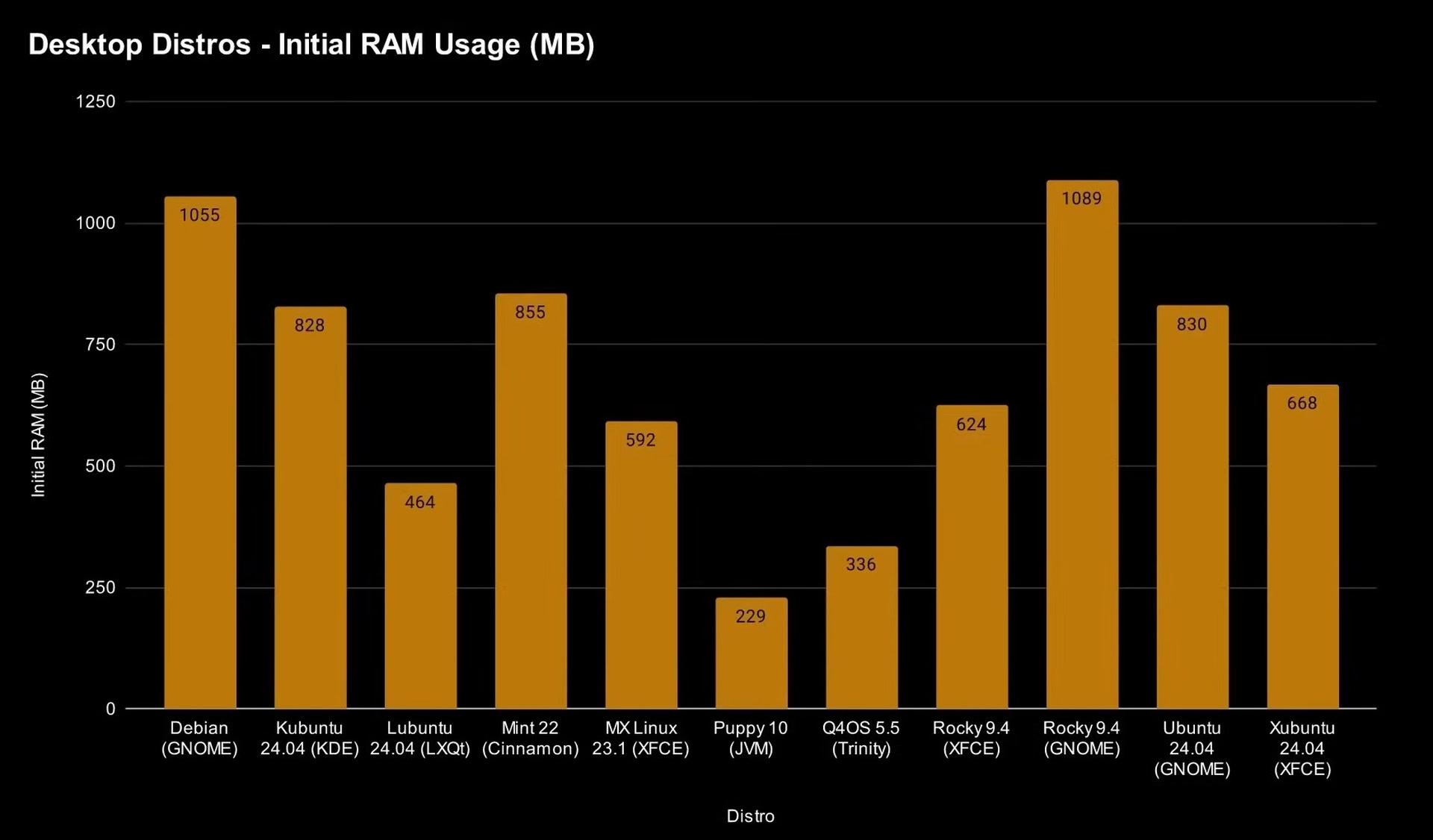
Q4OS - inline with expectations as far as under 800 MB RAM but this is *BEFORE* running the "Desktop Profiler".
-

Native (WDM) HD Audio driver for Windows 98se/Me
isolar replied to Drew Hoffman's topic in Windows 9x/ME
Thanks Drew, more than happy to provide any info that can help. What you suggest is happening seems logical here, i'm not 100% sure how the HDA.SYS driver functions and what verbs it sends on enumeration (could you please advise?), but definitely when I rename HDA.SYS to HDA.BAK then sound stops. Renaming back to HDA.SYS - sound returns again. Deomsh has advised possibly your driver enumerates GPIO pins which I am not touching in the HDAICOUT file.. yet.. but currently investigating. And/Or nosnoop bit set on audio controller.. also under investigation but this is brand new info for me . The main mystery is how HDACfg.ini maps codec $2 instead of $0 (Codec $2 is HDMI audio out.. so Watler's should be doing nothing to get sound possible here). Chipset I am struggling to identify due to the nature of this motherboard (without installing Win8+ that has drivers to identify).. it is a Lenovo S20-30 with Lenovo Edonis 2A1 motherboard, Baytrail-M CPU Intel Celeron N2840 and Valleyview integrated graphics. The audio controller is Intel 8086 0F04. Codec is Realtek HD Audio 10EC 0280. For chipset if you know any hardware identifier progs that work on win98SE and can identify newer chipsets then I will be happy to try. Currently HWInfo32 shows 'unknown' chipset. Wishing you a speedy recovery and hope to hear from you soon! -
Thanks Deomsh, great to be back with you again! I am looking into these options now. 1)I have WPCREdit 1.4 and have located the registers for the HD Audio device 8086 0F04. How can I tell (if it exists) which bit is nosnoop and what to set it to? 2)I have currently sent verbs (via HDAICOUT) to map all of these except GPIO. Suspect number 1.. I will investigate further and let you know findings. 3)Side thought.. what does PCIPATCHB do and how can I tell if I should adjust it? Current verb list is (please advise if ordering of verbs could be wrong?): No double reset or power verbs - I had these in initially but found on reset that the codec sets power states to D0 - this seems to happen when Hoffman's driver is disabled too so not included. $01470C02 - Enable EAPD on Lineout $00C3B000 - Unmute Audio Mixer $0143B000 - Unmute LineOut $00270610 - DAC stream and channel set to stream 1 channel 0 (stream 1 as HDA specs say stream 0 is reserved as unused) $00220011 - DAC stream 48khz 16bit 2 channels $00C70100 - Audio Mixer connected to DAC $01470100 - LineOut connected to Audio Mixer $01470740 - LineOut Output enabled SleepingWidget=$01 (AFG) VolumeWidget=$02 (DAC - DAC at reset has volume set to 0dB so simply unmuting Audio Mixer and LineOut should still produce 0dB?) OutputWidget=$02 (DAC - is this correct?) Thanks hope to hear from you soon!
-
Win7 is a no-go. Unable to find wireless network drivers. I suppose it is possible that one of my older USB adaptors will work but they are too slow and were replaced for a reason.
-
At the moment I have the following picture: - the latest version of IceApe that works properly: http://o.rthost.win/hbl-uxp/iceape.win32-20250531-id-656ea98-ia-c642e3c-uxp-4cb39ffa48-xpmod.7z - the latest version of IceApe that still works, but no longer supports restoring the previous session, as well as the "Recently Closed Tabs" feature: http://o.rthost.win/hbl-uxp/iceape.win32-20251220-id-656ea98-ia-c642e3c-uxp-b9f12b43c6-xpmod.7z - all subsequent versions currently available seem to be completely broken (they do not start): http://o.rthost.win/hbl-uxp/iceape.win32-20251225-id-656ea98-ia-c642e3c-uxp-fd19819276-xpmod.7z http://o.rthost.win/hbl-uxp/iceape.win32-20260110-id-656ea98-ia-c642e3c-uxp-3e9ca11775-xpmod.7z http://o.rthost.win/hbl-uxp/iceape.win32-20260117-id-656ea98-ia-c642e3c-uxp-aace8fa8c0-xpmod.7z http://o.rthost.win/hbl-uxp/iceape.win32-20260131-id-656ea98-ia-c642e3c-uxp-6ee9e34e29-xpmod.7z Is this happening to you now?
-
CPU overhead gained by using 720p over 1080p.
-
1080p but avc1 instead of av1. Some "breathing room" for cpu multitasking, but not much. "h264-ify" userscript:
-
CPU drop at change from 2160p/vp9 to 1080p/av1. No extensions. No lagging, but no CPU overhead for multitasking.
- Yesterday
-
Test video at 2160p, VP9, no extensions - https://www.youtube.com/watch?v=KLuTLF3x9sA Laggy as H#LL (obviously), all cores pegged to 100%.
-
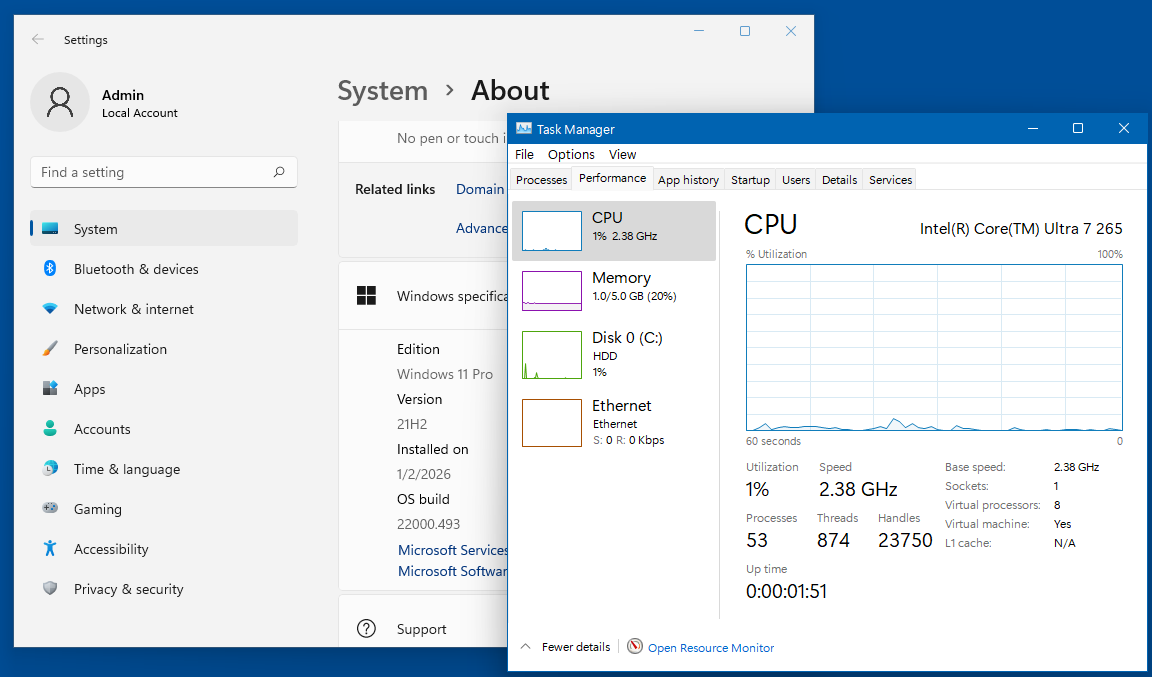
Here is my Win11 -- only 0.9 GB of RAM used at startup, but yeah, it did bump up to 1.0 when I opened the "about" screen. That seems very much in-line with the "more-capable" versions of Linux. "Apples to apples" here is 11 with all AI removed since Linux doesn't have these AI features, so not really "fair" to compare Linux-without to Win-with. And yeah, it's a GOOD THING that there is no AI and the end-user doesn't have to jump through hoops to remove/disable.

-
My wi-fi is pretty fast. Yeah, I'm only on a 500 Mbps ISP but my wi-fi connects anywhere from 300 all the way to the full 500. Two TV's are currently streaming news so that does bring me down a tad during these screencaps. At any rate, this is PLENTY FAST ENOUGH for YouTube "watchability".
-
In 10, my test-case browser is not going to be the same as my test-case browser when I install 7. Mainly because 10 has MORE AVAILABLE and 7 will be "limited" to something like e3kskoy7wqk or r3dfox. While some may consider this to not be "apples to apples", that is not my goal here, I want to know if 7 or 10 is "better" for YouTube. And that will determine which OS *stays* on this 'junk hardware'. Should still be "very close" (e3k-needs-easier-name has a HIGHER version of Chromium as I write this).
-
I opted to install 10 first. Admittedly, I fear that to be a mistake because I will very likely end up with 10 so I should have done it last.
-
I may revisit Q4OS. I actually suspected from the get-go that I made a *MISTAKE* when *not* selecting the TRINITY desktop. I did not screencap, but Q4OS ate up 6.5 GB of only 8 GB RAM. That was on a DIFFERENT computer, but still, that's one helluva lot of RAM consumption just for the desktop!
-
 Hi, I am going to build from scratch a Lan driver for XP SP3 for any i219. I use Ndis5.1 original from XP, not Ndis6 from Vista, win7 etc. Just now, for the very first time, I get this my lan driver startet under XP. Oh crazy..what a hard work with Windbg Dietmar 0: kd> !devnode 8b5e8ee8 DevNode 0x8b5e8ee8 for PDO 0x8b51ccf8 Parent 0x8b5e9998 Sibling 0x8b5e8dc8 Child 0000000000 InstancePath is "PCI\VEN_8086&DEV_15B8&SUBSYS_15B81849&REV_00\3&11583659&0&FE" ServiceName is "i219" State = DeviceNodeStarted (0x308) Previous State = DeviceNodeEnumerateCompletion (0x30d) StateHistory[07] = DeviceNodeEnumerateCompletion (0x30d) StateHistory[06] = DeviceNodeStarted (0x308) StateHistory[05] = DeviceNodeStartPostWork (0x307) StateHistory[04] = DeviceNodeStartCompletion (0x306) StateHistory[03] = DeviceNodeResourcesAssigned (0x304) StateHistory[02] = DeviceNodeDriversAdded (0x303) StateHistory[01] = DeviceNodeInitialized (0x302) StateHistory[00] = DeviceNodeUninitialized (0x301) StateHistory[19] = Unknown State (0x0) StateHistory[18] = Unknown State (0x0) StateHistory[17] = Unknown State (0x0) StateHistory[16] = Unknown State (0x0) StateHistory[15] = Unknown State (0x0) StateHistory[14] = Unknown State (0x0) StateHistory[13] = Unknown State (0x0) StateHistory[12] = Unknown State (0x0) StateHistory[11] = Unknown State (0x0) StateHistory[10] = Unknown State (0x0) StateHistory[09] = Unknown State (0x0) StateHistory[08] = Unknown State (0x0) Flags (0x000000f0) DNF_ENUMERATED, DNF_IDS_QUERIED, DNF_HAS_BOOT_CONFIG, DNF_BOOT_CONFIG_RESERVED CapabilityFlags (0x00002000) WakeFromD3
 -
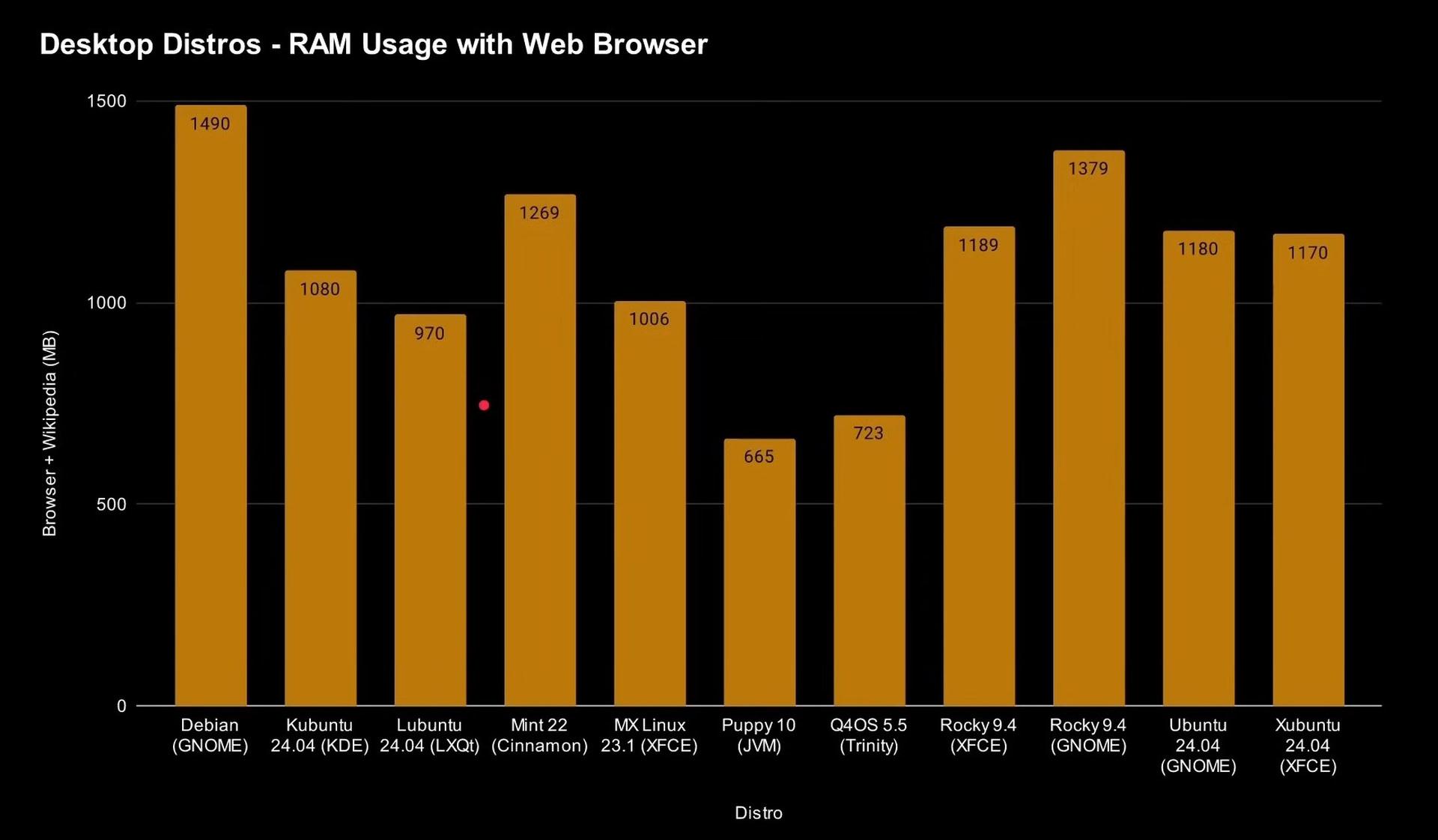
 Hello NotHereToPlayGames, MSFN certainly is no forum for Linux experts. Nevertheless here are some charts for you. Contrast these charts with M$ Windows11 !! (By Gary Sims & Andy Walker)
-
Chromium 146.0.7679.0 still have MV2 support --enable-features=AllowLegacyMV2Extensions --disable-features=ExtensionManifestV2DeprecationWarning,ExtensionManifestV2Disabled,ExtensionManifestV2Unsupported in shortcut.