All Activity
- Past hour
-
Thanks for posting this! For wifi, one can use penetwork instead to adjust wifi. https://www.penetworkmanager.de/
-

YouTube under Windows XP - Downloaders, players and browser support
nicolaasjan replied to AstroSkipper's topic in Windows XP
Well, the page loads here with Vorapis (slowly...), but the video doesn't. Bugs regarding the Vorapis project can only be discussed on Discord. Playing the video using the Open With extension and MPC-HC 2.2.1 from Maroc works very well though. Maroc is no longer active on the My Digital Life Forums and his link to Windows XP compatible MPC-HC has expired. I have preserved it in my Dropbox. Link (portable). Be sure that FFmpeg, yt-dlp and QuickJS are in your path. - Today
-

YouTube under Windows XP - Downloaders, players and browser support
user57 replied to AstroSkipper's topic in Windows XP
the new format has beaten up h264, jpg or jpg2000 maybe the other in between like jxr or jpg with 10 and 12 bit (instead of 8 bit) these are 3 common makers for the new h.265 format AOM (265) HEIC (265) AVC (265) SVT (265) smaller makers (rav1e, dav1d, kvazaar)? but a must say now is that these perform all same-ish if you look at these they perform almost equal: https://user-images.githubusercontent.com/968944/195860125-aa639dca-43ba-426c-b11c-31945e4c0b41.png and again: https://user-images.githubusercontent.com/968944/195952805-6e8a4f96-f2db-453f-857f-5fbcd583aef7.png the most tests on youtube dont show the encoding speed, slower actually means better the reason for this is that the algo, routines, methods (whatever we call all of them) for fast speeds are skipping the routines that create more pixels a must say for the 2 graphs above not the best settings are used ! (he use slow - there are 3 above that - slower, veryslow and placebo) so a very common problem you face on youtube is that either the encode time is not set to the best or the settings are not set to the best while the comparision then compares the images still side by side (like this is the absolution to compare this things) that i pointed out here, i often not even wanted to have the box for the speed: https://msfn.org/board/topic/185879-winxp-hevcheifheic-image-encoderdecoder then supposingly there is a format maker the claims to be better then h265 VVC (suppose to be h.266) but the compares then are often again not on the set to the maximum so in relation to this post - it would not be that important what maker exactly is used it could be either way - just one from the h265´s the decoders useally are not that cpu intense, the VLC player seems to can handle this problem sidely said the real comparison would begin if these encoders are set the maximum -

Win10 LTSC IoT lag issues. How to resolve?
NotHereToPlayGames replied to DeathAdderSF's topic in Windows 10
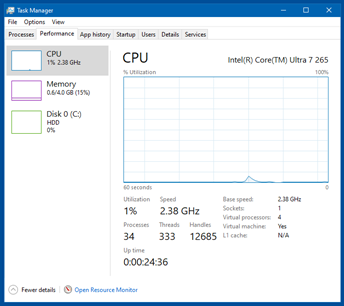
This is my Phase 4. This is equivalent to where my WinReducer EX-100 process gets me in terms of cutting out all of the bloat but not in terms of how much disk space the installation consumes. As in all previous screencaps, TWO of the processes are technically VirtualBox processes. So my tweaking gets an as-is Win10 from 90 (100+ at startup, settles to 90) all the way down to 30 !!!
-
Win10 LTSC IoT lag issues. How to resolve?
NotHereToPlayGames replied to DeathAdderSF's topic in Windows 10
Recap: there are only THREE items in ALL of Phase 3 that "might not" be for 'everybody'. 1) sc.exe config Spooler start= disabled -- replace disabled with auto if you install a printer 2) sc.exe config WpnService start= disabled -- breaks "Open Network and Internet settings" but does not break internet connection, breaks various "toast notifications" 3) sc.exe config WpnUserService start= disabled -- breaks "Open Network and Internet settings" but does not break internet connection, breaks various "toast notifications" Phase 4, on the other hand, "definitely" (intentionally!) breaks some of Win10. Actually VERY minor, I'll post that later. But again, ALL of Phase 3 should be FINE for "the average user" (even including #2 and #3 above, but "mileage may vary"). -

How port sdbus.sys & sdstor.sys 6.3.9600 for WinXP 64-bit?
reboot12 replied to reboot12's topic in Windows XP 64 Bit Edition
i.e. regular SD cards and not an eMMC drive ? -
 Possible it fails, it's one first Windows 8.0 betas with this support. And last one which can be ported. Only Generic SD was tested on both XP x86 and x64.
 -
How port sdbus.sys & sdstor.sys 6.3.9600 for WinXP 64-bit?
reboot12 replied to reboot12's topic in Windows XP 64 Bit Edition
Maybe your ported drivers Generic_SD+MMC_6.2.8056.0 are OK but on Dell Wyse 5070 need also other driver e.g. GPIO to initialize eMMC before ??? I've already asked somewhere (MDL Conversation or github Issue) but you didn't answer - have you tested your 6.2 eMMC drivers with any eMMC disk under XP 32/64-bit ??? I mean exactly the eMMC drive, not the SD card reader + SD card I've already tried testing eMMC on 3 computers but only on one was I successful: Asus Transformer laptop/tablet with UEFI32 - I couldn't boot WinXP 32-bit so I couldn't test the eMMC driver Dell Wyse 5070 - WinXP does not detect the eMMC drive (I don't know why) Dell Wyse 3040 - your drivers work with eMMC drive under WinXP 64-bit -
 After all the drama surrounding MSFN, Google has gone and made things even worse. YouTube no longer runs at all within browsers on older, low-performance hardware like my P4. The Vorapis script can no longer play videos on my hardware in New Moon 28 and Serpent 52 on Windows XP. For some reason, the h264 codec can no longer be used in the same way as before. So I’ve removed all scripts and extensions from these browsers. They’ve become useless to me. I now only use VLC with my youtube.lua script. I search on YouTube using the 3D YouTube Downloader, which can of course also download videos and audio files. And naturally, I’m using the latest version of my ‘ytBATCH for Windows XP’ (version 1.7).
 -
program to compare folder contents
NotHereToPlayGames replied to chermany4ever's topic in Windows 11
I used to use Directory Opus for syncing files between internal HDD and external archive HDD. But note that it isn't free but does offer a free trial to see if if works for you. Mine is a very old version and I've not bothered to see if it migrates to Win10 with my current (old) license. -
Win10 LTSC IoT lag issues. How to resolve?
NotHereToPlayGames replied to DeathAdderSF's topic in Windows 10
Phase 3, Step 2: Save the below as a <name>.reg and double-click to add to registry. -
Win10 LTSC IoT lag issues. How to resolve?
NotHereToPlayGames replied to DeathAdderSF's topic in Windows 10
Phase 3, Step 1: Save the below as a <name>.bat file and Run as administrator. -
Win10 LTSC IoT lag issues. How to resolve?
NotHereToPlayGames replied to DeathAdderSF's topic in Windows 10
Guide for Half Baked Phase 3: TWO steps. Next two posts. -
When it goes to PoFx.... function then it's more like end of journey. They are too complex to easily solve them..
-
Many times these modified versions come with tweaks and third-party apps. I'm used to it so the first thing I do is disable and delete anything I don't need... to free up space! Indeed, my friend.
-
Win10 LTSC IoT lag issues. How to resolve?
NotHereToPlayGames replied to DeathAdderSF's topic in Windows 10
Here's where my Phase 3 gets me:
-
To be perfectly honest, one of the primary reasons that I tweak and optimize myself is because one of Conan's releases that I was testing PUNCHED ME IN THE FACE with an uncalled for SOLICITATION to purchase a LICENSE for StartIsBack/StartAllBack. A never-asked-for and nowhere referenced on his website that his builds INCLUDED a *third-party* BUNDLE that I do not want, did not ask for, will NEVER use BECAUSE of that UNSOLICITED punch in the face! "To each their own."
-
That's certainly curious. Boycotting the boycotter. In my case, one of the things I'm heavily looking for with these modified versions is minimal space usage. There are many available these days, most for gamers. Many deliver incredible results compared to the official versions. But again, when I tried to "clean up" a Windows 11 myself, couldn't get it below 5gb. So when I found that, for example, Windows X-Lite Atomic 11 takes up about 2.7gb freshly installed... I could not resist! I have to use it. Don't wanna invest time to research what I can and can't delete. I trust Conan and his years of experience.
-
Hi guys. Couple months ago finally got tired of struggling with XP and I'm now using Windows 11 (X-Lite). Have folders with a lot of files that I sync frequently and every now and then I like to do a thorough comparison to ensure consistency. The program I've always used for this task is FreeFileSync and it works very well. Problem is, when you compare for content many folders and the total size exceeds 500gb total comparison time can be around... 6 hours! That's why, as always, did some research on other programs that might offer an intermediate solution. Tried many of the well-known alternatives like WinMerge and Beyond Compare. Saw that when comparing files they offer other methods -that I understand don't involve opening the files- which, in theory, should save time. At first I thought I'd found the solution but finally -after some testing- realized that the time they took was almost the same: around six hours. I was hoping to find some program that would give reliable results improving the wait time. Since I haven't found one, thought I'd ask. Perhaps one of you has found a solution? Most of the files I compare are video and music. Again, I've tried MANY of these programs but when the comparison goes beyond name/date/size the times increase far beyond what I'd like.
-
I only use 11 on one of my laptops but also inside a VM here on my primary workhorse. Tweaked, of course. I prefer (heavily!) to tweak myself and kind of "boycott" things like X-Lite. X-Lite is VERY GOOD. I just DO NOT TRUST IT for my use. Not to be misread, I don't have any reason to not trust it, I just trust MY OWN tweaked OS's far far FAR better.
-
No probs! Attached below dbgview logs for those 3. Looks like it does find the speaker on the AD1981HD machines but rolls over to headphones as the output. The AD1981HD codec has a power node $14 which handles the sum mixer and connects to all pins. Using Watler's driver and setting EAPD to $02 on node $05 works to power the speaker. There is talk on the linux threads about an inverted EAPD on this codec but I could never figure out how it is inverted and works for me like normal. To my knowledge none of these machines use GPIO for audio out or jack detect. Probably unsolicited response required to switch between LineOut and Headphones on the ALC887. AD1981HD_6710B_DBG_INSTALL.LOG AD1981HD_NC8430_DBG_REBOOT.LOG ALC887_AMD-K30BF_DBG_REBOOT.LOG
-
I'm super surprised that most of the programs worked right out of the box in portable mode. And since I only have 4gb of ram, it's really convenient for me to use all those x86 programs 'cause they use almost no ram and take up very little space. They do the job just as well as ever, giving me the results I need. Windows 11 is proving to be robust, predictable in its downsides and unpredictable in its upsides.
-
Of course, u'd have to adjust the scripts to ur drives before u run them
-
Agreed! I've stopped fighting with XP also, almost two years or so now. It's been a GIANT godsend !!! I run Win10 LTSC and everything just runs a HELLAVUALOT better !!! With VASTLY better memory management !!! An outright GODSEND.
-
Hello tekkaman. A little late but since I see your thread: a couple months ago wanted to finally stop fighting with XP and I'm using now a modified version of win11 (x-lite) and what I can tell you is that 80% of the programs that I used daily in XP worked perfectly in portable mode. Something I couldn't achieve even with win7. I just copied the .exe files and most of them worked. The program that I always used to do what you asked for is KillProcess -from Orange Lamp- which allows you to kill any program and also edit a list of programs to kill automatically if one of the list were to run. The version I use is 2.44. It is very effective and lightweight.