All Activity
- Today
-
@Damnation Here comes next try, good luck Dietmar https://www.upload.ee/files/19631358/DEV_0A16_5445_OpenBSD79_STRICT_v5_F000_FIRMWARE_GUARDS.zip.html
-
@Damnation Here comes next try, good luck Dietmar https://www.upload.ee/files/19631358/DEV_0A16_5445_OpenBSD79_STRICT_v5_F000_FIRMWARE_GUARDS.zip.html
-
@Dietmar Back to the same location in memory as before with the OpenBSD edits. https://ibb.co/6779ck9F I suppose I'll need your help to get intel LAN debugging setup and running to solve this.
-
@Dietmar Is it just me or is MSFN running really slow right now?
-
@Dietmar Sorry it took me so long to reply, I finally got around to testing your first set of binary patches. Here is the result with the DESKTOP patch https://ibb.co/4ZykW8pr This seems to have the BSOD occurring at the same memory address as the original. Here is the result with the FALLBACK version https://ibb.co/XxWXGvmr This still returned a 0x50 BSOD but this time pointing to igxpdv32.dll I'll try out your OpenBST STRICT patch and report back.
-
@Damnation Hi, I take the Source Code from OpenBSD 7.9 and look for the difference between the Desktop HD 4400 and the Ultra Low Power HD 4400 with DEV_0A16 in this Panasonic notebook. And I found. Here is a first try with the modded driver Intel 5445 Dietmar https://www.upload.ee/files/19629828/DEV_0A16_5445_OpenBSD79_STRICT_v4_LPTLP.zip.html
-
 Maybe you try port AHCI IA-64 driver 8086 2922 (QEMU) from Server 2008 Longhorn beta Itanium for WinXP Itanium ? I extracted working driver: https://www.mediafire.com/file/hykr33hr2vnoiey/AHCI_IA-64_srv_2008.zip/file
 -
 Yeah you're right. So, in the long run will Windows 2000 KernelEx be completely abandoned since there will be no more modern 32-bit software anymore?
 -
Not really. I tried all the suggestions to no avail. Plus, it happens with a fresh installation. Surely things couldn't get corrupt that fast? c
- Yesterday
-
Does this help: https://www.thewindowsclub.com/pfn_list_corrupt-windows
-
This is driving me insane! After years as a holdout, I've finally decided to upgrade to Windows 10, because there was some software I wanted to use which wasn't compatible with 7 (I subsequently discovered a workaround, but I wanted to forge ahead with 10 anyway). However, no matter what I do, 10 will eventually begin crashing with the stop code "PFN LIST CORRUPT" almost constantly, to the point where it's no longer usable (this morning, it happened when I moved the mouse!) I've tried fresh installations. I've tried not installing any programs. I've tried installing to an NVMe SSD. I've tried installing to a spare SATA SSD. I've tried spare, known-good RAM, and I've tested it (it passed). I even tried rebuilding my whole d*** computer (Dell OptiPlex 7050 SFF) with all new hardware. As it happens, the motherboard died shortly after this stop code began appearing, so I thought it might've been a precursor to that, but no. The exact same thing happens with the new motherboard. What the h*** is going on? I've never had this kind of problem with Windows 7! c
-
Hello I just wanted to get some tips and tricks to be aware of when installing Windows XP onto an SSD. Things that I should be aware of? Pros or Cons? Things that I should pay attention to, to keep my machine stable? Settings to make sure to turn on or off? Newer software to install to help make the process smoother? I'm thinking of either cloning the OEM drive of my computer, to make access to all of the hardware more seamless or using one of those XP Integral images.
-
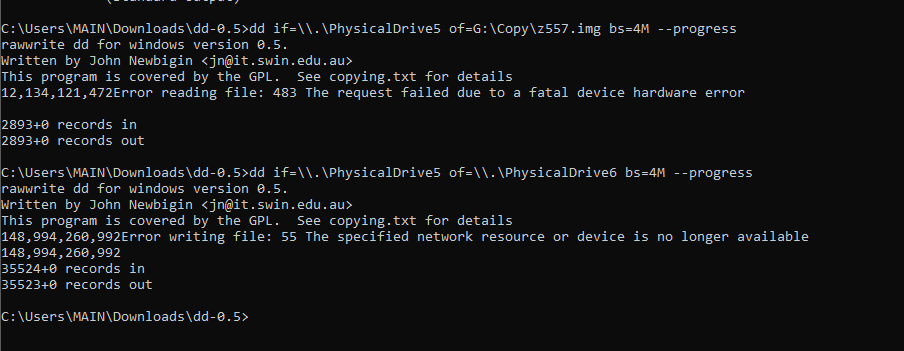
Thanks for that. I wanted to give you an update to where I'm at now... In the attachment, you can see, I first tried to backup the image and kept getting an error. It's an old Maxtor SATA drive. So I'm unsure if the issue is age or the HDD temps (it was super hot when I was doing this). Then I just F it and tried to clone it. It ran into an error, but when I went into disk management, the drive I tried cloning it to, shown as offline and the minute I made it online, it was identified the same way as the Maxtor drive. I put the drive into the computer and it basically loaded with zero issues. I got curious and put the system recovery disk in to see if it would stop me and it didn't. It imaged it as if it was the Maxtor drive. So, clearly (I'm not confident it's that clear) something is in that Maxtor drive's registry that fooled the computer into thinking my replacement drive (a WD Black Velociraptor drive) was the same thing. I'd still like to figure out what is needed to properly get the recovery disk to see the right information as I may eventually want to upgrade to an SSD. I do appreciate your help on this though. You've given me the best advice so far.

-
Clonezilla - unlike what the name suggests - doesn't really make "clones", it tries (and often - but not always - succeeds) to create a "working copy", it has internal "I know it better than you do" provisions to "adapt" the copied contents to the new disk. Not that I am familiar with latest versions, maybe this has changed and there is the possibility to make a real 1:1 copy. See: I would suggest a "pure" dd (or similar), likely this (it depends on specific OS and version) might be slower, but surely it will work. The procedure might be a little different if you are running Windows (XP or similar), what may happen is the overwriting of the Disk Signature (that instead you want to preserve/clone). Basically, the moment a NT system finds that two connected disks have the same signature, it silently changes the signature of one of the two (and which one might be "random", so you risk changing the disk signature of the "original", for newer versions some things have changed, though: To be on the safe side, you should first save (to fille) a dd-like copy of the first absolute sector (MBR) of the original disk. Then connect the new disk. Then dd directly the whole original disk to the new one. Then disconnect the original disk and re-apply to the new disk the saved MBR. On Windows, I would use Clonedisk: https://labalec.fr/erwan/?page_id=42 though nice and GUI it needs however a little bit of familiarity with the available options. Or (good ol') dd for Windows: https://reboottools.com/programs/dd-for-windows/ Otherwise, on *any* Linux the plain dd is just fine.
-
 Some info on missing exports for gom player 2.1.43.5119 on a windows 95 osr 2.5 fully updated system: . gom.exe - user32.dll - - AnimateWindow, GetMonitorInfoA, MonitorFromRect . gomx.dll - d3d9.dll - Direct3DCreate9 . libavcodec.dll - kernel32.dll - InterlockedCompareExchange, InterlockedExchangeAdd . Mpeg2DecFilter.ax - kernel32.dll - IsDebuggerPresent. USER32.dll - ChangeDisplaySettingsExA, ChangeDisplaySettingsExW
 -
Xnview classic 2.13 full version support on windows 95
cov3rt replied to cov3rt's topic in Windows 9x/ME
I decided now to try to make Irfanview 4.44 work as an alternative, but faced many unexpected results, like no fully working autohotkey 1.0.48.5 / autoit 3.1.12.1 scripts, and almost half of the plugins in the package do not work. I did mention in my other thread on patch9x that i was able to work around the SSE2 instructions problem so it will at least open regular jpeg/jpg files, but there are still many things unresolved for my purpose of using the program. I do not plan on trying to make most of the non working ones work, i did several attempts with ghidra with chatgpt but was not able to get anything to work yet. My main focus is webp.dll which currently does not work. You can use some older versions for some of the plugins and they'll work, like jpeg2000.dll version 4.3.3.0, but a good remainder of plugins still do not work. Here is what's missing for unpacked webp.dll checked on a fully updated windows 95 osr 2.5 system: kernel32.dll missing exports ( implicitly dependent modules ): EncodePointer DecodePointer GetModuleHandleExW IsDebuggerPresent IsProcessorFeaturePresent SetFilePointerEx InitializeCriticalSectionAndSpinCount - Last week
-
@Damnation I just bought this Panasonic at Ebay, but from Germany. It will be here in coming week and then fun starts Dietmar Comparison: Damnation's CF-53 Mk4 vs. my CF-53 Mk4 DAMNATION MINE MODEL CF-53 Mk4 CF-53 Mk4 CPU Intel Core i5-4310U Intel Core i5-4310U 2.0 GHz / 3.0 GHz Turbo 2.0 GHz / 3.0 GHz Turbo PLATFORM Haswell-U / ULT Haswell-U / ULT GRAPHICS Intel HD Graphics 4400 Intel HD Graphics 4400 GPU DEVICE ID DEV_0A16 DEV_0A16 DISPLAY 14" 14" 1366 × 768 1366 × 768 RAM 16 GB DDR3 4 GB DDR3 STORAGE 256 GB SSD 320 GB HDD WEBCAM No Yes / offered DVD Yes DVD Multi WLAN Yes Yes BLUETOOTH — Yes LAN Gigabit Ethernet Ethernet USB 3.0 2 2 USB 2.0 2 2 VGA Yes Yes HDMI Yes Yes RS-232 Yes Yes SELLER OS Windows 10 Pro Windows 10 Pro / Win 7 MARKET Canada Germany KEYBOARD North American German EBAY ITEM 256347295953 144515309431
-
Thank you very much. would clonezilla be a preferred disk cloning software or do you suggest something specific for cloning the drive?
-
It is difficult to say what (stupid) provision there might be that prevents you from restoring/recovery, Usually it is not very sophisticated (i.,e. it doesn't interrogate the hard disk for make/model as that would be a problem in manufacturing assembling lines when a batch of different make/model disks is provided and of course there would be the need to re-create different Recovery Discs for different batches). So, generally speaking the check is done: 1) on Disk's Signature (on the MBR) 2) on Disk's Signature AND MBR boot code 3) on some values in the MBR partition data 4) on some other "hidden" sector or partition A test that costs little (only some time and patience) would be, since you have the original hard disk AND the recovery disc work fine on it would be to make a forensic (dd-like) clone of the old hard disk on the new hard disk (same size or bigger) and see what happens with it. I wouldn't overdo it, at least for the test, i.e. if the original hard disk is a 250 GB, one, a clone on a 250 or 320 GB disk has more chances to work than a clone on (say) a 1 TB disk.
-
@Damnation I make a try, just to fake the mobile GPU with its Desktop variant. Because both drivers are really different Dietmar https://www.upload.ee/files/19625445/Panasonic_CF53_HD4400_0A16_5445_binary_patch.zip.html
-
@Dietmar I hope you had a nice holiday. I have XP drivers 5445 and 5449 that list the DEV_0A16 in the INF file. I had a look through the CF-53 BIOS and couldn't find anything related to the GPU memory allocation. It might be a hidden option but I don't know how to check for one. I've reimaged it back to windows 10 for now, I'll do a reinstall of XP tomorrow before we start debugging. Do you want me to send you the XP drivers I have for DEV_0A16?
-
@Damnation It is a mistake. The industrial IEI WAFER-ULT-i1-i5 has no vga driver for XP Dietmar PS: Until now, I do not find a single board with VGA DEV_0A16 that works under XP SP3.
-
fix it by explorer patcher
-
hi @tihiy please restore and improve context menus its not works on last version of windows 11 i fix it by explorer patcher but its not works when i install startallback
-
please restore and improve context menus