All Activity
- Past hour
-
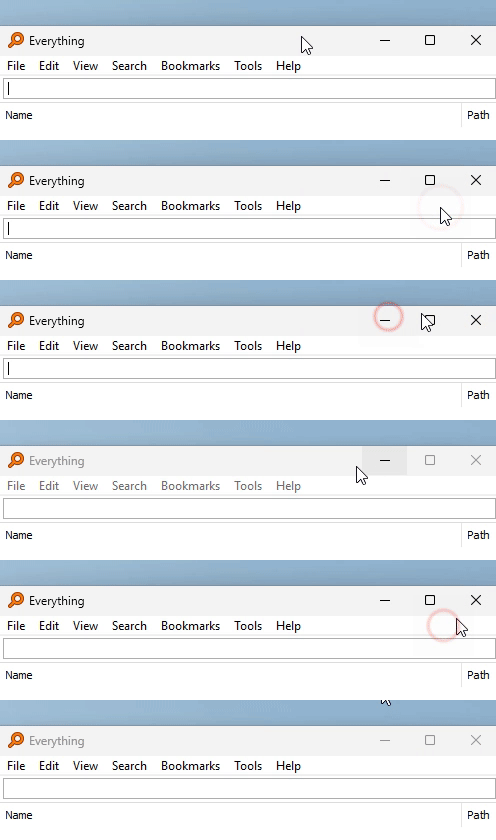
There's another strange issue I have run into with StartAllBack. With many programs that have a menu bar below the titlebar, if you click an empty portion of that menu the titlebar stops reacting until focus is manually changed somewhere else, like you click on an actual menu item or click somewhere outside the program window. Happens for example in Notepad++, Everything (from Voidtools), partially in Sysinternals Process Explorer. Process Explorer is special, it still shows the hover effects, though with a lag, but the buttons don't react.

-
 I got everything to my liking. The AV receiver in the living room is my only truly awesome surround sound receiver. But I don't watch "everything" from the living room. :) With the combination of OS-level EQ (Equalizer APO + Peace GUI) coupled with browser-level compressor (Volume Limiter), I am now greatly satisfied with my streaming experiences. Whether in the living room with Dolby Atmos 7.2 fed from HDMI or whether in the computer room with nothing but a three-speaker left/right/subwoofer fed from a 3.5mm (1/8") phono jack. Whether background audio while sitting at the bill-pay computer or streaming anything from YouTube, Pluto, Plex, Tubi, Netflix, Hulu, Disney+, Paramount+, or Comcast/Xfinity. And I no longer have to stub a toe running for the remote's volume buttons when a loud scene breaks out or two people start whispering for no reason whatsoever, nobody else is on the set, why whisper?
 -
Finally got more around banging head to wall with this. It seems it cant be simply made to work on 95. Was thinking could R. Loew dllhook used with Windows 98/SE version of kernel32.dll to work around some of the limitations, or is there other way to do it? If I try simple way just copying kernel32.dll from Windows 98 into Pidgin program folder and renaming it kernel98.dll, then using hex editor to change all references inside Pidgin file from kernel32 to kernel98.dll it results error in kernel32 that it was meant for newer version of windows. I have no idea how dll checks for kernel build version and how to spoof it.
- Today
-
 I am very interested in both since I have none of them. Can you upload them in any way?
 -
 I also have an installation file for 'Microsoft .NET 4.0.30320 Full'.
 -
Definitely KB2890375. That is recorded as being installed in my system registry. KB2890573 isn't mentioned in the registry at all, so can't be installed on my system. I have a hotfix installation file for 'MS Visual C++ 2010 SP1 (10.0.40219.473)', so that's presumably what I have installed.
-
 ... Well then, not wanting to "burst anyone's bubbles" , but, perhaps, Adlice's "idea" of WinXP support is just what has been confirmed so far by your (and AstroSkipper's) tests: on-demand manual scans, only (i.e., you still need a Win7+ OS and a paid-for licence for real-time-protection to be effective); on a side note, Adlice's homepage doesn't breathe much confidence to me ; it appears they couldn't be bothered to change the copyright year to the current value: https://www.adlice.com/roguekiller/ And, FWIW, the support forum (intended to help users of the "free" version) has been turned into read-only mode: https://forum.adlice.com/index.php?topic=3890.0
 -
My .NET Framework 4 is version 4.0.30319. Where does yours come from? Do you have a link or the installation file?
-
Do you really mean KB2890375 and not KB2890573? The latter is already in my archive and can still be downloaded. It is of version 10.0.40219.457.
-
 But you wrote you have an AV receiver already, do you mean it's very cheap, not suitable and with outdated codecs? What exacrly am I not comprehending?
 -
Then search for an extension that downsamples everything to 44.100, the muffled, highly compressed CD sound from the 1980s. It will compress the hell out of those loud bangs, it will reduce the dynamic range. I'm afraid my consultations are nowhere near those @D.Drakerwould have given, also afraid there will be no other replies since the forum looks pretty much dead without him, and the people still left simply have no such hardware
-
My C++ 2010 is version 10.0.40219, with a KB2890375 update installed. My .NET Framework 4 is version 4.0.30320, with numerous updates applied.
-
@Dave-H What are the version numbers of your latest Microsoft Visual C++ 2010 Redistributable and Microsoft .NET Framework 4 installations? I assume I might have a problem there.
-
Thanks for posting a screenshot! And that definitely means that there is some kind of problem in my POSReady partition. But at the moment I don't have any clue what kind it is.
-
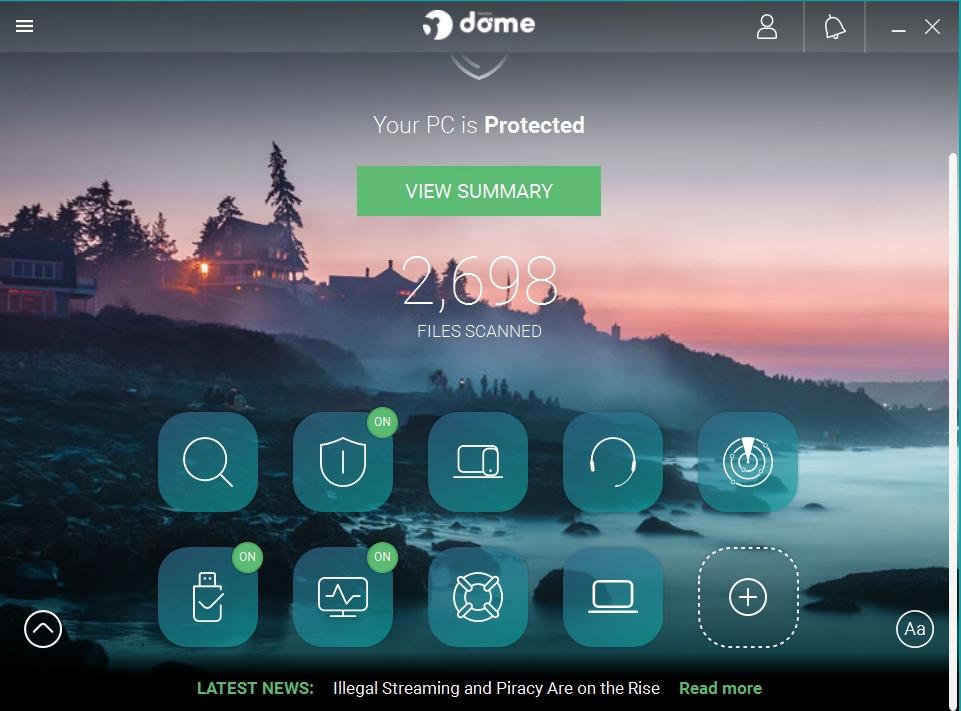
I'll wait and see if you get a response from them before perhaps trying RogueKiller again. If they say what is the last version which should work with XP, and whether it still gets pattern updates, then we can go from there. This is my Panda Dome interface - I do have all the POSReady updates installed BTW.
-
Today, Panda Dome 18.07.04 has been automatically updated to version 20.02.01 on my Windows XP partition. At the moment, no significant delay when starting the computer. So, you have installed Panda Dome, too. How does your main interface look like? Can you post a screenshot? On my POSReady partition, no interface background images are shown, quite unlike my partition without POSReady updates. I think that there is some kind of problem in my POSReady partition.
-
Tha's why I suggested to try first version 15.0.0. If this version doesnt work either, you can forget about the 15 version series and try the 14 one.
-
OK, moving on...... I've now installed Panda Dome 21.01.00. Looks good, it installed with no problem and appears to be all working fine. No initial signs of it slowing down the system startup, which is a relief. It does look as if there's no free trial of the paid versions, unfortunately, which means that I won't be able to check whether real-time scanning works without paying.
-
Well 15.8.0 didn't work either, same issue, driver not loaded. According to the changelog, that version should definitely work with XP. I guess all we can do is wait until they respond to @AstroSkipper's support request. As it is at the moment, it's fine on XP for manual scanning, but if you want real-time protection, no versions that have been tried appear to work.
-

Native (WDM) HD Audio driver for Windows 98se/Me
Deron416 replied to Drew Hoffman's topic in Windows 9x/ME
With the Alpha-014 version, I'm experiencing the following blue screen error at WindowsMe startup: File name: HDA(01) + 00000B83 Error: 0E: 0028: FF0824A3 - Yesterday
-

My Browser Builds (Part 5)
roytam1 replied to roytam1's topic in Browsers working on Older NT-Family OSes
thats ICU update, I wonder if upstream encounter same issue or not, or I "enbugged" when backporting pre-NT6 changes. from Bad Request URL above, some dates becoming "Invalid Date" and I need a minimal code to reproduce it. -
I assume that the ransomware protection won't work in any RogueKiller version under Windows XP. Same as it was in Malwarebytes Premium 3.5.1.
-
Here is a short interim report. Panda Antivirus Free 18.07.04 was also installed without any problems and has been running flawlessly so far. Let's see how long that lasts.
-
I prefer the principle of interval nesting when testing programme versions for compatibility.
-
Already done that! I'm now going to try version 15.8.0 which has the most recent changelog entry which mentions XP. "Fixed issues on Windows XP". So presumably that version did work!