Skip to content
View in the app

A better way to browse. Learn more.

MSFN

A full-screen app on your home screen with push notifications, badges and more.

To install this app on iOS and iPadOS
  1. Tap the Share icon in Safari
  2. Scroll the menu and tap Add to Home Screen.
  3. Tap Add in the top-right corner.
To install this app on Android
  1. Tap the 3-dot menu (⋮) in the top-right corner of the browser.
  2. Tap Add to Home screen or Install app.
  3. Confirm by tapping Install.

Davi Pietro

Member
  • Joined

  • Last visited

  • Country

    Brazil
  1. Where can I get the MSCF.sfx file?
  2. Any news on the project
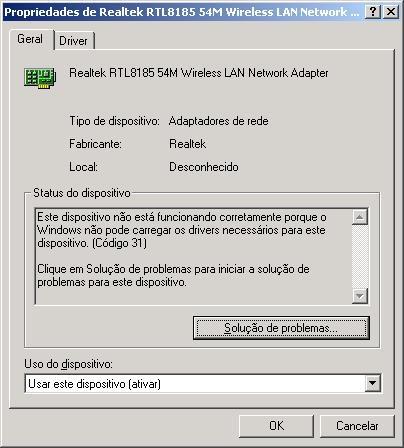
  3. I reinstalled the driver now and got error 10 instead of error 31
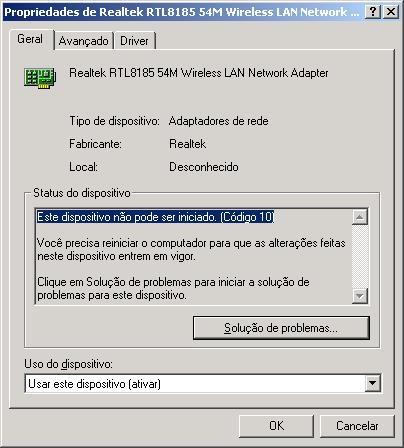
  4. I have a computer that was running Windows 98 SE and has a realtek rtl8185 wifi card and when trying to install the driver it was not installed. I recently updated to windows 2000 and I was able to install the driver but got error 10 in device manager. I researched a bit and found some updated drivers in the Windows Update catalog, but when I installed the drivers, I got error 31. Could someone help me? Sorry if the grammar is wrong, I can't speak English
  5. I have a doubt: when this project is done it will be multilingual

Account

Navigation

Configure browser push notifications

Chrome (Android)
  1. Tap the lock icon next to the address bar.
  2. Tap Permissions → Notifications.
  3. Adjust your preference.
Chrome (Desktop)
  1. Click the padlock icon in the address bar.
  2. Select Site settings.
  3. Find Notifications and adjust your preference.