




Everything posted by N1K
-
This is working, but only if I'm not positioned in the root of the drive...but your next sentence gives a total answer. That's it! It works like a champ! Thx for this useful link.. I do aplologize, I thought you were just foolin' around B) Thank You very much KevinMo, you gave me the answer I needed!
-
It's not working for me either!
-
Unreal Torunament 2004, playin for PST clan (www.parasite-lost.com)
-
I think that M$ apps such as M$ Office puts temp installation files in it... BTW. topic should be move to Win2000 section if I'm correct..
-
Well, if you don't know how to help and you don't know the answer please refrain from posting..thx
-
Gyzmo, my dear countryman, this ain't workin'
-
I'm grateful for ur reply and help, but I wonder, have you ever used Total Commander and tried ur suggestions before u post them I would like to use it without some third party app like the one u suggested, if it isn't possible that it ain't matter. Thx anyway mate
-
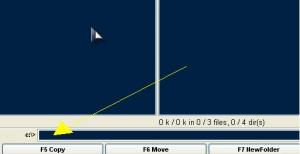
Thx for reply but ur solution positions me to location shown on the picture, and typing the network location there windows explorer opens in typed location...
-
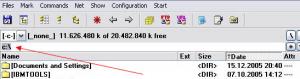
Thx for the reply, but what I ment was, for example, I'm browsing through file system in Total Commander, files, folders etc. and now I want to connect to a network share which is not mapped, so I need to position myself in the UNC field shown in the picture with a keyboard shortcut to be able to write the path..I can postion myself with the mouse, but I would like to do it mouseless 'cause every other thing can be done through keyboard shortcuts...
-
I would like to know if it's possible to use keyboard shortcut to position cursor in this field shown on the picture attached...? Thx in advance..
-
Did you deleted ur windows profile whic resides in c:\documents and settings\"name of the profile" After that log in again with ur username and new profile will be automatically created... It's not a Firefox profile issue, I was thinking of windows profile..
-
Most important thing is that it is fixed
-
Have you used some kind of third party apps like window blinds or something like that?
-
-
As far as a now there will be no new file system, NTFS will be used in Vista. Vista will be easier for install than any M$ OS before, probably unattended installation will be a piece of cake too..
-
New generation of Windows Server OS will be called Longhorn. So this name still will be used..
-
No way, 512Mb of run will be enough..
-
Well, infomation said here is correct and it should work, but if you still have troubles puting an OEM infro pic you can use third party app which is free.. Try with this.. LINK
-
I think this should do the trick:
-
Did you tried what I said to you?
-
Try to delete this extension from File Types options then it should re-register itself and it should work..
-
I made a clean install on one machine and it works like a champ, only sound drivers are missing... Tommorow I'll install it on VMware, I'll give you result here
-
Thx for the info...
-
10 gigs should be more that enough for Vista installation....
-
Could you be more specific, for what do you want to create a password?

