jaclaz
Content Type
Profiles
Forums
Events
Everything posted by jaclaz
-

A Multiple Partition USB Stick with Multi Boot OS
jaclaz replied to Markymoo's topic in Multi-Boot CD/DVDs
Maybe had you spent a few minutes actually READING this thread before posting, you might have found yourself the answer, please READ these two (and possibly the WHOLE thread): jaclaz -
The Solution for Seagate 7200.11 HDDs
jaclaz replied to Gradius2's topic in Hard Drive and Removable Media
Jaclaz, how can you tell? I did not find any match in this forum neither in google for "process effect list". Furthermore Jamesblond stated he has a LBA0 error. Is it necesarry to spin down in this case at all? At least Gradius description for LBA0 starts immediately with partitioning. Until now my understanding was that spind down is necessary to break the infinite loop of bsy drives (however since mine always failed busy, I have no expericene with LBA0). I had some private conversation with JamesBlond in german language and it seems to me that his dirve has a problem whenever it really needs to access the platters. This might be a physical problem either in mechanics or electronic hardware, or wrong calibration values if the data recovery people made some changes for fun. If one of the latter is correct the role of the data recovery company is very doubtfull (considering the quote versus actual costs for recovery of a drive with physically defect mechanics). I am not getting it. What is the point you (or JamesBlond) are trying to raise? As said before it is possible (technically) that a recovery data firm "locks" the drive (intentionally or by mistake): What the i365 guys wrote has not necessarily a connection with "mechanics problems". I don't remember any actual quote posted by JamesBlond, so cannot give my personal opinion on this. jaclaz -
Booting windows on multi-partition USB flash drive
jaclaz replied to galapogos's topic in Multi-Boot CD/DVDs
I have the usual feeling that there is a mix up between WHAT you want/need to do and the HOW to do it. You don't normally have a USB stick with multiple partitions of which one is an emulated CD-ROM partition. It is more likely that you have a U3 or similar USB stick. The controllers on these sticks can be set to have TWO LUN's (i.e. TWO devices) the first "CD-like" and the second "HD-like". If this is the case, you don't have a "partition" that emulates a CD-ROM , you have a device that emulates a CD-ROM and all the other partitions are on the second device, which emulates a hard disk. Usually on U3 devices the CD-ROM like LUN "prevails", so what one normally does is to use a bootable .iso in it containing a multibootloader or bootmanager, like grub4dos, then this latter once booted allows to choose which of the partitions on the "other" LUN or device . Since it costs nothing to have the same bootmanager on the Active (Primary) partition of the "other" LUN or device,even if the second device is "chosen" by BIOS it won't make any difference and you will still be able to boot the whatever you want to boot. If you are positive that you are NOT having the setup described above, please detail HOW you managed to get that USB stick partitioned/formatted as you initially described. jaclaz -
The Solution for Seagate 7200.11 HDDs
jaclaz replied to Gradius2's topic in Hard Drive and Removable Media
Yep, and this means that it is affected by *something else*, and obviously the "next failure prediction" deriving from issue A cannot be taken into account at all because the drive fails earlier than expected because of issue B. In other words we have a theory that may (or may not) apply to a given problem but that SURELY won't apply to ANOTHER problem. jaclaz -
The Solution for Seagate 7200.11 HDDs
jaclaz replied to Gradius2's topic in Hard Drive and Removable Media
I don't think anyone will like what jaclaz may say. jaclaz has the impression of looking at a bunch of headless chickens running around. corkyblue (with very little of due respect ) seems like been panicking, which is EXACTLY what is not advised. His friend seems like being EITHER well beyond "our" level of knowledge OR a completely unexperienced n00b pretending to be an expert. NEITHER seems like having read (or understood) the main parts (let alone the trivial ones) of the FGA and of the read-me-first. Bloubul, this time with ALL due respect , seems like having forgotten (hint,hint) how Nokia hacking literature actually recommends having the phone battery FULLY charged before attempting anything with those phones. All in all, jaclaz has very little to say as the amount of confusing, probably misleading and definitely partially incorrect info corkyblue posted is simply overwhelming. @ corkyblue This reply makes NO sense: The BIOS "comes into play WELL BEFORE *any* OS. It DOES NOT matter which OS you have installed on your PC, a disk drive is EITHER seen in BIOS or it is NOT. Known possibilities are: no detection from BIOS (i.e. being NOT accessible because constantly in BSY state) having 0 capacity (LBA0) having a "random" capacity (different from it's real one) Basically, posting on this thread ONLY makes sense IF you are in condition #1 OR #2 above, you seem like being in condition #3 or a "strange" mix between #1 and #3 . The firmware "ZZ7L" DOES NOT exist (AFAIK). As I see it there are two possibilities, the problem on your hard disk is seemingly outside the scope of this thread and beyond "our" knowledge and EITHER: it really had this "unknown" problem this problem was caused (intentionally or by mistake) by the recovery company Now, maybe we can try and help, BUT you need to start trying to cooperate by: replying to questions EXACTLY provide EXACT descriptions of what you are doing/you did AVOID going off on a tangent ( I do challenge you to find ANYWHERE on this thread suggesting AIDA as a test method) Let's start again from scratch, OK? FORGET about the drive, just do a loopback test on the adapter (Binary, it either works or it does not). Try powering it "with molex" and WITHOUT powering it, you should "see" the difference. Report. jaclaz -
You are welcome. Please note how the bootsector you are now using has TWO fixes, the first one actually needed, the second one probably not. Now that the DATA is OK, you could generate a new bootsector (with bootpart or by booting to Recovery Console and running bootfix or whatever), and have also the CODE "kosher" (the one you have now has disabled CHS addressing). The above is not *needed* of course, what I would advice is to check the copy of the bootsector (Sector 6 on FAT32 volumes) is "in sync", you never know when (and IF ) you may need it . jaclaz
-
About the IDE, yes, it is possible, and you have been told how to do it. About the HAL it is also possible, but depending on the actual "before" HAL and "after" HAL it may be tricky. I would rather use the BOOT.INI capabilities of "forcing" a HAL - at least for testing. As cdob pointed out other drivers (essentially the chipset ones) may get in the way. My personal advice is: I think everything is possible what you want to do though possible is VERY complex (and prone to problems) if you are doing it in order to "save" your previous install it would be much easier to buy (used) a motherboard identical to the one you have if you are doing this for fun/research it is allright, if not ANY other solution, the above or the "in place upgrade one" will be faster ad safer In theory there is no difference between theory and practice, but in practice there is. jaclaz
-
Hmmm. cannot say. XP has not this kind of protection (that you may have in Vista and later) some BIOS protection? Make sure you know which drive letter the partition has, (it should be C:) and assuming you unzipped the bootsector_mod.dat to the same drive then run dsfi (part of the dsfok package: http://members.ozemail.com.au/~nulifetv/freezip/freeware/ to copy the bootsector file to the drive like (open a command prompt, navigate to where you unzipped the DSFOK package and type): dsfi \\.\C: 0 512 C:\bootsect_mod.dat [ENTER] Or check the hex editor settings, it is possible that it has a "read only or "fake-write" kind of setting. The note by cdob about Lenovo was because this brand often has a "queer" BIOS that "sees" devices as having a 240 heads geometry, but since grub4dos (which should use the BIOS info) finds 255, this latter should be the "right" geometry. jaclaz
-
The Solution for Seagate 7200.11 HDDs
jaclaz replied to Gradius2's topic in Hard Drive and Removable Media
Sure, three months is something intended as "NOT IMMEDIATELY" and "NOT TOMORROW" it may also depend on the number of (other) problems the drive may have AND by the actual number of entries written to the log. Just as an example if a "good drive" writes just one entry in the log at each boot, if some other events writes at each boot other three events, and you boot once daily, you will reach a multiple of 256 earlier, like 256/4=64 days, that do sound a lot like two months. Some hypothesis explaining the three months (or 106 reboots) possibilities: jaclaz -
Just for the record, you don't need /Y when using copy from within a batch: http://ss64.com/nt/copy.html jaclaz
-
The Solution for Seagate 7200.11 HDDs
jaclaz replied to Gradius2's topic in Hard Drive and Removable Media
That should mean that you did not manage to spin down. See here: http://vermeulen.ca/computer-harddrives.html Try if this changes anything. WHICH guide/method are you following? I don't recall any "v4" command in the guides used jaclaz -
You seemingly miss some basic info. The CurrentControlSet Registry hive does NOT "really" *exist* when the Registry is not in use. It is a redirection created on-the-fly at boot, based on the contents of HKEY_LOCAL_MACHINE\SYSTEM\Select between (normally) ControlSet001 or ControlSet002 or (more generally) of ControlSetnnn. The fix-ide plugin, had you took some time to listen to cdob and actually have a look at it, contains a batch file which can be used allright, though the accompanying .reg is hardcoded to ControlSet001 (anyway the most common one). You are asking about a rather complex (and potentially dangerous) thing, and you need to take some time to understand how it works. If you use the traditional method you need to actually mount the offline Registry into an existing Registry hive (usually HKLM and giveit a name. When you export the hive it's path will have the name added. As well when you import the .reg into an offline mounted Registry, you need to have it's contents with the path you mounted the offline Registry under a hive name (and it's better if it is the SAME name as the above ). The name used in the batch is HKLM\SYSTEM_00. jaclaz
-
The general idea is that there are two basic kinds of Databases: "flat" "relational" As seen before a spreadsheet can be used for a "flat" one with no problem, and using VBA it is actually possible to link a spreadsheet to a "data source". The spreadsheet is more a WYSIWYG kind of approach. Database have a functional difference, whihc is that you have DATA (that you fdon't actually "see") which you interrogate through a Query and that generates a Report. An extremely simple form of "flat" database with Query (actually Filters) and Reports is the integration between Word and Excel when you use the "mail merge" feature: http://office.microsoft.com/en-us/word-help/create-and-print-mailing-labels-for-an-address-list-in-excel-HP010243267.aspx If you go through the above, you should get the general idea, and then making it through Access should be easy enough, once you also go through this: http://office.microsoft.com/en-us/access-help/create-mailing-labels-in-access-HA010007352.aspx?CTT=5&origin=HP010243267 jaclaz
-
There is no apparent reason why the MBR and bootsector could not work. I mean, in the MBR there is one single 0C type partition, Active 0/128/1 -1024/254/63 8064/31219776 (the CHS and LBA are "balanced") The partition starts on a fractional head (128) and this may be a problem for the "title XP on internal HD MBR " BUT the bootsector has a "right geometry" of 255/63 (after the fix) and has a "right" 31219776 filesystem size., with the "right" sectors before 8064, which should allow the " title XP on internal HD bootsector" to work anyway. You can try removing CHS check from the bootsector, i.e. change bytes at offset [0xE6], [0xE7], [0xE8] and [0xE9] to 0x90: http://www.911cd.net/forums//index.php?showtopic=21702&st=129 i.e 0F824A00 to 90909090 I am attaching a pre-modified bootsector. Try fixing the bootsector as per above and try again the three menu.lst entries.... (or tey typicg in the command line, I just reviewed them and they seem allright to me, but you never know) When entering the commands: The only other possibility I can think of is that (for whatever reason) one of the "other" sectors involved in the booting is missing or corrupted. http://mirror.href.com/thestarman/asm/mbr/ntFAT32BR.htm Do the following: File->Disk->Open Drive Choose \\.C:\ (\\.\PhysicalDrive0, partition 1) Make sure you: Load 0x10 sectors at the time Start sector 0 Select All/Copy/Paste to new/Save as bootsectorall.dat Compress the file into a zip and post the .zip. As soon as I can find some time I will anyway test your MBR and bootsector in a VM to see if I can see anything I missed... jaclaz bootsect_mod.zip
-
With all due respect I doubt it. Is it possible that there are TWO errors? Do the following: File->Disk->Open Drive Choose \\.C:\ (\\.\PhysicalDrive0, partition 1) Make sure you: Load 0x1 sectors at the time Start sector 0 Select All/Copy/Paste to new/Save as bootsector.dat File->Disk->Open Drive Choose \\.\PhysicalDrive0 Make sure you: Load 0x1 sectors at the time Start sector 0 Select All/Copy/Paste to new/Save as MBR.dat Compress the two files into a zip and post the .zip. jaclaz
-
Maybe if re-instate the "u" where it should be.... Point #1 http://www.avolites.com/jokes/queen.htm jaclaz
-
For the record a DNS is a Domain Name Server, basically a directory of IP addresses. You give it (example) www.google.com and you get: http://network-tools.com/default.asp?prog=network&host=www.google.com 74.125.227.48 with majorgeeks.com you get: http://network-tools.com/default.asp?prog=network&host=www.majorgeeks.com 74.86.201.220 If you go in your browser and input http://74.86.201.220 .... There are thousands of DNS around, each (theoretically) an exact copy of every each other, usually your ISP gives you one specific address of (his) DNS, DNS are synchronized periodically, in the case of an address change it is very possible that some ISP ones take one or more days to update it. jaclaz
-
Single quote or double quotes? maybe "javascript" is behind the green glass door and we didn't even suspected guessed that .... jaclaz
-
Yes http://homepages.tesco.net/J.deBoynePollard/FGA/questions-with-yes-or-no-answers.html ... and besides the simple and good ol' way cdob described, there are newer ways: http://reboot.pro/11212/ http://reboot.pro/11312/ jaclaz
-
I see TWO more: make the "C:" or "main OS partition a logical volume inside extended (NT based systems were MADE to reside on Logical volumes) make a rotating set of partitions using grub4dos or similar software The first one is "kosher" along MS guidelines and should be the actual "standard" IMHO, compare with: The second one, though interesting and what not is a bit "risky" and I do not suggest it for a "final user": http://reboot.pro/7138/ Additionally, I would ALSO experiment with the HP_TOOLS partition to see if it can be made into a Logical Volume inside extended (this depends mainly on the HP code to "look for first FAT32 partition with lable "HP_TOOLS" ) jaclaz
-
I would try a DNS LOOKUP first, or try using a different DNS, like the google one: and see what happens. @Sophy It is also possible that you have some "strange" leftovers, like cookies, cahched pages and what not, try clearing them and try again. jaclaz
-
@myselfidem Very good findings , though some aspects of the HP_TOOLS are frightening - to say the least. , an attempt to translation follows . In a nutshell what the EFI related document is saying is : there is a new interesting technology called EFI that overcomes some BIOS limitations and also allows to put loads of unneeded bloat on a system, BUT we are not actually using its functions fully: but rather ADDED it to an otherwise normally BIOS driven PC, just for the fun of it: Since we are the HP guys and cannot do things in a plain, common, standard way, we have made up our own standard: (WHY?) (WHICH ones? Do they include Logical volumes inside Extended or other "partition formats" which BTW in English are called "filsesystems"? If you are so critical about the EFI platform developers stop whining and contribute a dedicated filesystem!) We have added 2 (TWO) apps to the EFI: Which translates to: HP QuickLook 2 or later versions Since our users are NOT the kind of those that are familiar with this kind of PIM application (and that ALREADY have these same functionalities perfectly set on their smartphone) and are NOT actually the kind that use daily PIM applications (which are ALL in the above category by now) we are trying to induce the few ones that don't use a such apps currently (because they use an old fashioned 0.05 Kg pocket paper contact/schedule book to learn how to use a PC as a smart 2 Kg pocket contact book.) . In any case since actually booting the Windos 7 on this PC takes so long we decided to have it booting something else, perfectly unuseful, but quicker. HP System Diagnostics Since using memtest+ or similar apps would be too easy, we decided to reserve 1 Gb for some software that does the same (only worse but marked HP) Oh, no sorry, they are (3) THREE, we missed listing: Which translates to: We are putting in a time bomb as most people will manage in no time to: update the BIOS FAIL to update the hidden into the HP_TOOLS partition copy of it that will replace automatically the new one at any glitch Which translates to: Since NOONE should actually use the last two apps, we made getting into them almost impossible, but we left the HP_TOOLS visible so that any demented user can wipe it easily by mistake. How BIOS launches EFI applications We weren't able to find a way to NOT having filenames hardcoded somewhere, and since we were late on schedule we took the shortcut of using volume label to identify a partition. Now, the best part: Hmmm. Questions: Do they bundle a Partition Magic license? How many internal harddisks does a notebook have? How many internal harddisks with a System partition (whatever it is) does a notebook have? Some Captain Obvious must have has contributed to the above. jaclaz
-
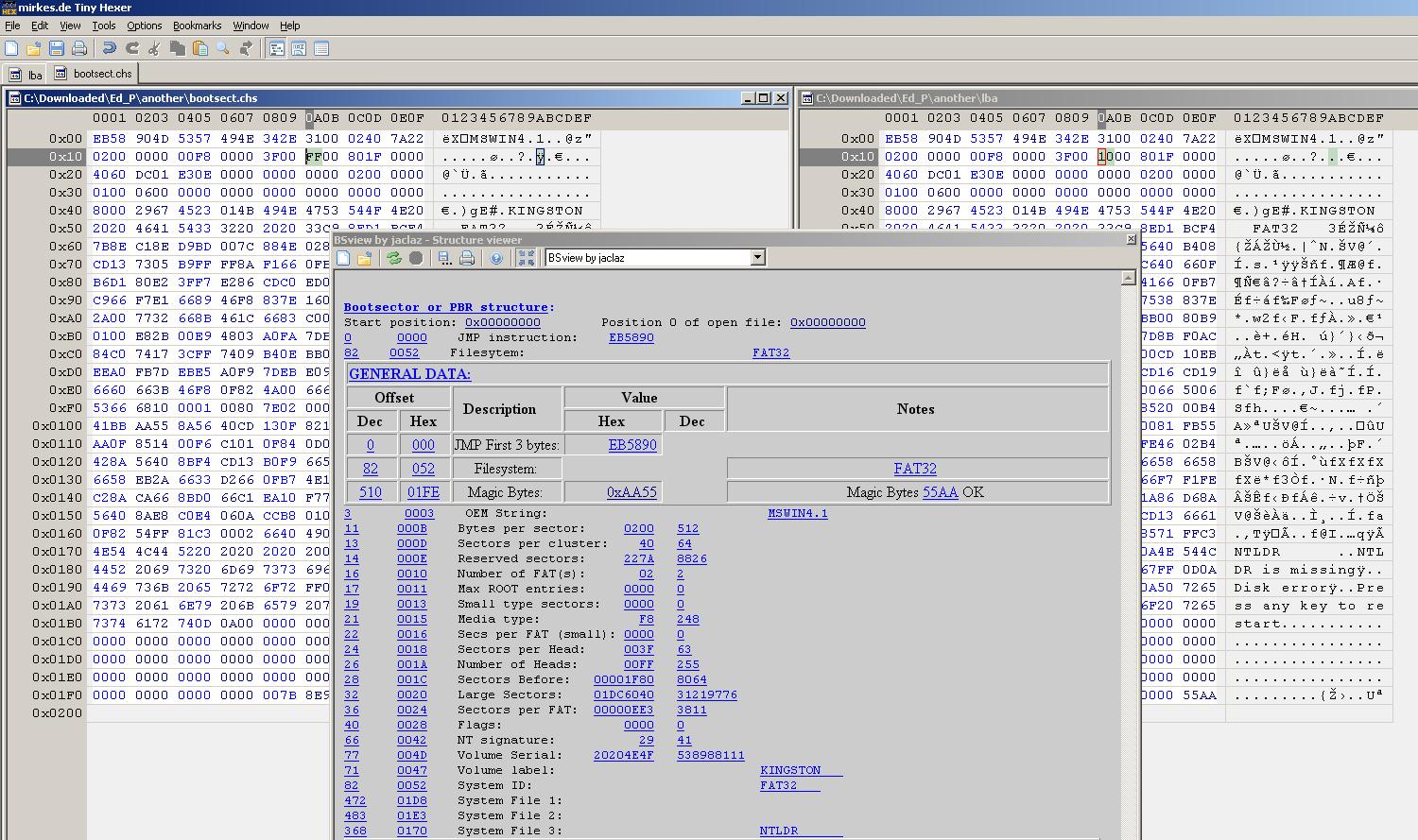
I am getting old I probably gave you some wrong instructions. But the results are ALMOST right. Problem is that bootpart "fixes" wrong CODE, whilst in your case the problem is some wrong DATA. The problem (quite strange I have to tell you) is that somehow the filesystem was made with a "wrong" CHS geometry of 16/63 (instead of the "right" 255/63) Please get tinyhexer: http://reboot.pro/8734/ You want to, once you have it installed and running in the XP, and: File->Disk->Open Drive Choose \\.C:\ (\\.\PhysicalDrive0, partition 1) Make sure you: Load 0x1 sectors at the time Start sector 0 Are you familiar with the way a disk editor works? Anyway, check in the below screenshot, you should see the same thing as it is on the RIGHT side window (byte at offset 0x1A with value 10). You need to select it and overwrite this value with the value you see in the LEFT side windows (byte at offset 0x1A with value FF). (you don't need the BSview structure viewer, I used it in the screenshot only to better illustrate the issue) Alternatively, if you are not confident with this approach, I can make the corrected bootsector and give you some instructions on how to write it from command line. Temporarily add to the stick a new menu.lst as follows: color black/cyan yellow/cyan timeout 30 title XP on internal HD direct ntldr map --unhook map (hd0) (hd1) map (hd1) (hd0) map --hook root (hd0,0) chainloader /ntldr title XP on internal HD bootsector map --unhook map (hd0) (hd1) map (hd1) (hd0) map --hook root (hd0,0) chainloader +1 title XP on internal HD MBR map --unhook map (hd0) (hd1) map (hd1) (hd0) map --hook rootnoverify (hd0) chainloader +1 So that you don't need to re-type the sets of commands. Right now only the first entry will work.. After the fix BOTH the other ones should. jaclaz

-
This is "queer", can you run just BOOTPART [ENTER] and post the output? As a general idea, if I ask you to provide something, it is because I would like to have it : You may need an additional switch, the LBA one: I.e.: BOOTPART WINXP LBA BOOT:C: [ENTER] Try doing another thing. RUN: BOOTPART WINXP C:\bootsect.chs [ENTER] and: BOOTPART WINXP LBA C:\bootsect.lba [ENTER] Compress both C:\bootsect.chs and C:\bootsect.lba into a .zip archive and attach the .zip to your next post. jaclaz
-
Got them. No MBR copy, though. Basic info Gathered from the posted images: NTFS System <no drive letter> 199 Mb 208662528 NTFS <NO LABEL> C: 277,90 Gb 298389073920 NTFS Recovery D: 19,90 Gb 21364731904 FAT32 HP_TOOLS <no drive letter> 103 Mb 104161280 At first sight the 199 Mb partition is "queer", AFAIK the RTM makes a 100 Mb one and only the Beta used the 200 Mb sized one. Someone more familiar with 7 may correct or confirm the above. What is inside the HP_TOOLS partition? When does it "come into play"? jaclaz