Everything posted by Radimus
-
typically that is due to a bad/ not active NIC. Some NICs will not auto detect/install until the chipset drivers get updated. I join the workgroup, let setup complete, auto admin logon, and then run a netdom script to rename and join the domain... netdom join newname domain oupath ladmin lpass dadmin dpass netdom renamecomputer oldname newname ladmin lpass dadmin dpass /force /reboot:10
-
lots of apps have uninstallers... as many as have silent installers. SOME of which are even listed in the registry in the HKEY_LOCAL_MACHINE\SOFTWARE\Microsoft\Windows\CurrentVersion\Uninstall key a /S or /Q is usually sufficient for many of them to be silent...
-
basically, I have an unattended CD, where the drivers are copied to the machine ($oem$\$1\Drivers\etc) but I install the hotfixes and other apps from (%cdrom%\Patches\Switchless2\*.msi) Needless to say the cd isn't available especially for every user. I can put them locallay, but I'd prefer not to... especially as it os only that one (so far)
-
my problem with calc plus is that it want's the msi after I install it through runoneex.cmd... any ideas?
-
you can also try http://www.microsoft.com/globaldev/outreac...s/calcplus.mspx
-
verify firewall settings also [HKEY_LOCAL_MACHINE\SOFTWARE\Policies\Microsoft\WindowsFirewall\DomainProfile\Services\RemoteDesktop] "Enabled"=dword:00000001 "RemoteAddresses"="localsubnet"
-
try... http://www.microsoft.com/downloads/details...&displaylang=en
-
A man is flying in a hot air balloon and realizes he is lost. He reduces height and spots a man down below. He lowers the balloon further and shouts: "Excuse me, can you help me? I promised my friend I would meet him half an hour ago, but I don't know where I am." The man below says: "Yes. You are in a hot air balloon, hovering approximately 30 feet above this field. You are between 40 and 42 degrees N. latitude, and between 58 and 60 degrees W. longitude." "You must be an engineer," says the balloonist. "I am," replies the man. "How did you know?" "Well," says the balloonist, "everything you have told me is technically correct, but I have no idea what to make of your information, and I am still lost." The man below says, "You must be a manager." "I am," replies the balloonist, "but how did you know?" "Well," says the man below, "you don't know where you are, or where you are going. You have made a promise that you have no idea how to keep, and you expect me to solve your problem. You are in the exact same position you were in before we met, but now it is somehow my fault."
-
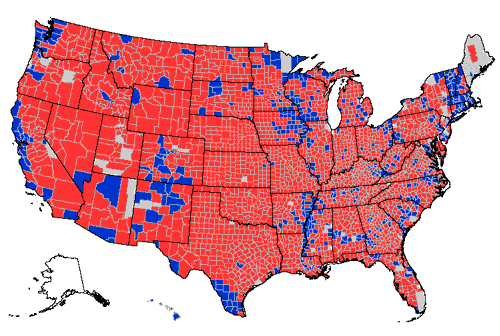
my daughter put a lock code in her phone and after a certain number of failed attempts to guess the number, it locked also. The ONLY solution was to go to the carrier and get a new SIM cardfunny... contains offensive language however. can potentially offend everyone. http://slate.msn.com/id/2109217/here is a pic for you from http://www.usatoday.com/news/politicselect...4/countymap.htm
 I'm speaking of 2 that were deleted yesterday and some others that have been deemed too hot by the mods. The pile on of Anti-Bush can go for days, but is anyone posts a different opinion, it is then deleted. Lets not say anything positive about our president or government... nope, they all have to be negative or it vanishes. With regards to this thread, I don't have any problems with it, other that the pile on is starting again.you know.. I have a few things to say on this and several other posts that seem to vanish around here. Anti-US or Anti-Bush posts will run here for days and weeks with all kinds of people piling on, But as soon as someone poses a PRO-US or PRO-Bush, the thread is either locked or deleted. it isn't fair, it doesn't have to be, but it is very obvious. For the Anti-Bush US citizens here, look at the election results and realize that you are in the minority (a close one, but it has almost always been close), The Republicans won the Presidency, more of the House, more of the Senate, and more Governorships. Your opinions have been weighed, measured, and you been found wanting... have a nice day. For the non-US Anti-US or Anti-Bush... I don't care, and as a surprise, most of us don't care either... If we did, perhaps the UN wouldn't be as immaterial to us as it is. We all know you'll come knocking the next time you have a problem...I've started to use the guide as well... converting to a 3 cd install (XP+patches, MSO+patches, Apps+reg). Using your guide it only took a day of testing (about 5 or 6 CD builds) All is going well, I'm going back and rebuilding the iexpress packages that use /qn to use /qb-! I like the progress bars and since the batch windows are suppressed with cmdow...Can someone help convert the statement below into a runonce statement. FOR /f %%f in ('dir/b/s %CDROM%\Hotfixes\Type1\*.exe') DO Start /wait "" "%%f" /z /n /o /q Or should I just put it in a batch file and run the batchI use shortcut... in a batch file. @echo off rem set t= FULL PATH TO EXE rem set n= FULL PATH TO LOCATIOON OF SHORTCUT rem set d= WORKING DIRECTORY OF SHORTCUT rem set a= ARGUMENTS OF SHORTCUT rem set i= ICONFILE rem set X= ICONINDEX rem start /wait shortcut.exe -t %t% -n %n% -d %d% -a %a% -i %i% -X %x% -f set t="%ProgramFiles%\netmeeting\conf.exe" set n="%ALLUSERSPROFILE%\Start Menu\Programs\Accessories\Communications\Netmeeting.lnk" set d="%ProgramFiles%\netmeeting" start /wait shortcut.exe -t %t% -n %n% -d %d% -f set t="%Windir%\System32\VCdControlTool.exe" set n="%ALLUSERSPROFILE%\Start Menu\Programs\Accessories\System Tools\Virtual CD Control.lnk" set d="%USERPROFILE%\Documents" start /wait shortcut.exe -t %t% -n %n% -d %d% -f set t= "%Windir%\bginfo.exe" set n= "%USERPROFILE%\Start Menu\Programs\StartUp\BGInfo.lnk" set d= "%Windir%" set a= "%Windir%\bginfo.bgi /timer:0" start /wait shortcut.exe -t %t% -n %n% -d %d% -a %a% -ffree.... must be free....crack... bad form on the BBS , you will be flogged Besides DVD-Shrink is much betterdon't worry about SN... apply it when you need to make a connection to itthere is also PDFCreator... which does the same thing. I believe it uses /S as it's silent installany ideas?start /wait "" PhotoshopCS\Setup.exe /s /sms /f2c:\Photoshop.log make sure that the info in abcpy.ini is correctstart /wait "" Leech\LeechGet_2004_RC5Ver1001520.exe /VERYSILENT /SP- TASKKILL /F /IM leechget.exe Del "%allusersprofile%\Start Menu\Programs\LeechGet 2004.lnk" Del "%allusersprofile%\Desktop\LeechGet 2004.lnk"