Everything posted by BenjaminKalytta
-
Did you select "[x] Use current logged on user"? Just try %ThisProfile% instead. But I'll fix this. It should also point to the right path. Benjamin
-
Please, just try to find it out by your self next time. You forgot to create a 2.0 sub command here. Benjamin
-
WIHU compares yor new dirkey.exe version (in your case 2.0.2.4019) with the installed one. file.0.0 = %programfiles%\Dirkey2\dirkey.exe?>2.0.2.4019 Will compare file version of old dirkey.exe with new dirkey.exe. So WIHU will compare if new version 2.0.2.4019 is greater than old version. Here some comparison results with > operator: Old New Result 2.0.2.4018 2.0.2.4019 TRUE 2.0.2.4019 2.0.2.4019 FALSE 2.0.2.4019 2.0.2.4020 TRUE 2.0.2.4020 2.0.2.4019 FALSE This mean, if versions of both files are same, this item will be striked out. Only if specified version is greater this item will be installed (will not be striked out) It's only an interpretation thing. Benjamin
-
None of them I think. This could be a problem in file version resource. Please just send my your Abilon.exe so that I can test it. Benjamin
-
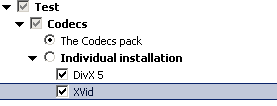
I think you mean this situation. (see attached image) Situation in WIHU generally is as follows: -As soon as a parent item isn't selected, none of it's childs will be called. In your case, "Individual Installation" Subitems may be selected, but it wont be installed later because it's parent "( ) Individual Installation" isn't selected. benjamin

-
@kalavera: No sorry, you're wrong. It is only showed if "[x] use currently logged on user" is selected and when 2th dialog is loaded. Benjamin
-
Hi everyone, many thanks for supporting my WIHU tool the last months. Many things were added based on your suggestions here. Of course there are many things that could/should added in future, and I also willing to implement this, but the next months my study semester continues. I've to learn something which isn't possible if Im working on WIHU. Believe it or not, the last months I was working nearly the whole day on WIHU. It contains of about 8000 lines of source code now. I've to do a little break now. But I encourage everyone here to actively modify the source, add new features and so on. As long as your feature is usefull for mostly here, I'll add this to my source tree. However, I'll continue to fix critical bugs at this time. best regards Benjamin Kalytta
-
No it isn't as easy as you think. And also it isn't wanted. Take this example: (x) Option 1 [x] Sub Item 1 [ ] Sub Item 2 ... ( ) Option 2 ( ) Option 3 May be you decided to unselect "Sub Item 2". "Sub Item 2" could have hundreds more items which you manual selected. If you then select "Option 2" entire work selecting subitems from "Option 1" is in vain. This is mostly unwanted! Benjamin
-
Is intended and wont be changed. Of course, it will only be showed if this is selected. Just try it out. Selection isn't possible from UI, but in ini file it should be possible. It's the user responsibility. benjamin
-
Date: 21.09.2004: Version 2.1.11.1 Bug reported fixed in 2.1.10.7 was still there. It is fixed in this version. Please note, meaning has changed: file?! returns true if the file doesn't exists yet file?= check for file existence otherwise Date: 21.09.2004: Version 2.1.10.7 file.x.n didn't work as expected. Use file.x.n = filename?! for checking file existence and file.x.n = filename?= for file non existence Date: 19.09.2004: Version 2.1.10.6 Many bugs were fixed. Date: 18.09.2004: Version 2.1.10.4 command.x will not longer started directly. File extension will be used to read correpsonding shell\command\open from registry. It's not any longer necessary to prepend interpreters executable like msiexec.exe /i before actual command. [users.operation] will no longer be supported. Date: 11.09.2004: Version 2.1.10.3 Some bugs were fixed. %USERPROFILE% now points to correct path. Date: 06.09.2004: Version 2.1.10.1 Warning hint from 2.1.9.1 was extended and will also be showed during ini loading. If /autoexit or /autoinstall is specified this warning will be showed for 10 seconds and will close it selfs if nothing is selected during this timeout. locked.x key was added to lock a software entry, i.e. preventing a user from select/unselect an item. To lock entire subtree just specify locked.x=1, inherit
-
@kalavera: There is btw. no switch which forces reboot. There is only a switch /NoRestartChange which disables "[x] Restart" Checkbox. So I wont change behaviour here. Other thing is fixed now. Default timeout is 10 seconds if /AutoInstall or /AutoExit is specified. Benjamin
-
@kalavera: Ok I'll see what I can do Btw. I can only show a hint when loading install.ini if /autoinstall is not 0 because WIHU then must not be interrupted in any way. (Or I'll use auto closing message boxes which closes it selfs after particular timeout ) Benjamin
-
@presende: Just try developer build 2.1.10.0. locked.x is possible. locked.0=1, inherit causes subitems to inherits locked.x settings from it's parent. Comparison interface will be entirely rewritten later. condition.x=<expression> whereby <expression> could be file.version("path\filename")<operator>"<data>" file.date("path\filename")<operator>"<data>" file.exists("path\filename") file.size("path\filename")<operator>"<data>" reg.value("HKLM|HKCU:Key")<operator>"<data>" reg.value.exists("HKLM|HKCU:Key") reg.key("HKLM|HKCU:Key")<operator>"<data>" reg.key.exists("HKLM|HKCU:Key") whereby each expression can be combined by & or | which means AND comparison and OR comparison respectively. <operator> can be either =, !, > or < Usage example could be: condition.0=file.version("%systemroot%\system32\wmp.dll")>"1.2.3.4" & file.date("%systemroot%\system32\wmp.dll")="01.12.2004" if.0=lock, unselect ? unlock, select if.0=<if true> ? <if false> BUT I don't know if I am able to do such complicated expressions because I've no experience in such script specific things. may be some one could help me here @kalavera: Please forget [users.operation], this will be removed on future version. You are right, it will only be checked if this is changed in WIHU UI. No, because you can also set /Nocancel switch. benjamin
-
No that's not possible and also not necessary because if option one isn't selected also it's subcommands will never be executed. benjamin
-
None of them Yes Im so stupid sorry Reason is, it will not be logged on any more. The one and only user whos get logged on is the primary user if one is selected. Benjamin
-
It's fixed now. Benjamin
-
Sorry, bug is fixed now. Benjamin
-
Hmm, I don't really understand your problem here. Do you think default user profile folder will be copied to new user folder? If yes, this was never done in WIHU, also not in version 2.1.6.0. The only thing that will be copied from "Default User" folder is ntuser.dat. Edit: Since profile loading and initialization is not done by windows any more (by logging on new user) it could indeed a problem in this new version ... I've to copy entire "Default User" folder than which isn't done right now. Benjamin
-
@presende: Thx for suggestion, some things sounds really good. But I think I've to make a little development break because I've to learn something for my next study semester which continues in october. I'll repeat: everyone is welcome to modify my source, I'll provide this on my web site in next days. Benjamin
-
Date: 05.09.2004: Version 2.1.9.3 Bug in User profile creation was fixed. Only ntuser.dat was taken from "Default User" profile directory. Warning hint from 2.1.9.1 was extended and will also be showed if a user got disabled. Date: 05.09.2004: Version 2.1.9.1 Added warning hint if user tries to delete currently logged on user. Date: 05.09.2004: Version 2.1.9.0 Many bugs were fixed User Account Interface was improved. Existing User Secletion dialog was added.
-
@kalavera: Yes I understand your explanation, but I wont prevent this because the user who is using WIHU is responsible for bewaring not to enter invalid data. Your install.ini is OK. Edit: Ok I'll show a hint message. Benjamin
-
@booster: As I wrote: After 3. you may edit it's name -> rename. Benjamin
-
Thx. It's better this way because the dialog contains a hint for the user what to do etc. Yes this is coming soon. No, as I said each operation can be done by ordinary user account now. There is no need also to show this ... btw. in next main release I'll remove this user.operations because it's senseless to add 2 features with the same operations. No, there will be no extra interface to rename administrator only. This can be done with existing interface. Sorry but I don't understand what you want to say. benjamin
-
So I released version 2.1.8.0. Please take a look at the changelog for details. Following image will show how to "undelete" a previous deleted user within WIHU user interface which was specified as deleted in install.ini. To modify an existing account from within WIHU UI please follow these steps: 1. Create a new account, specify existing name 2. Press "OK". This new user will then be initialized by current account settings like user comment, user full name, user profile etc. 3. ... now this user is ready to edit. Benjamin
-
@mister_no: Which version did you use? And when does this happen? Benjamin