-
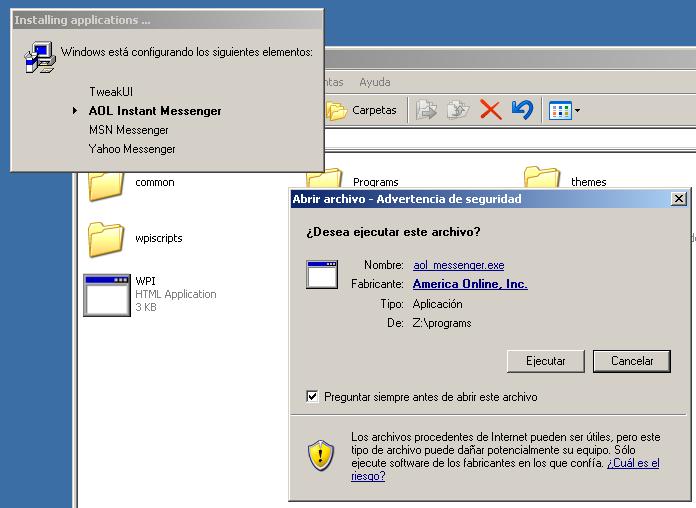
when WPI opens up press F3 to Toggle Config Wizard. Here is a list of Hotkeys. "Alt-A" Select All. "Alt-B" Show Extra Buttons. "Alt-C" Toggle Config Wizard. "Alt-D" Select Defaults. "Alt-Enter" Begin Install. "Alt-G" Toggle Global Variables Window. "Alt-H" Toggle Theme Wizard "Alt-K" Toggle Network Wizard. "Alt-M" Toggle Manual. "Alt-N" Select None. "Alt-O" Toggle Options Wizard. "Alt-T" Toggle ToolTips On/off. "Alt-W" Toggle About WPI. "Esc" If the screen is not the main install screen, will return to the main interface. Otherwise you will exit WPI. "F1" Toggle Manual. "F2" Toggle Options Wizard. "F3" Toggle Config Wizard. "F4" Toggle Network Wizard. "F6" Toggle Theme Wizard "F12" Toggle About WPI.
-
i think it works on linux because its a little more complicated to install software then on windows. I dont think there would be much demand to have something like that on windows.
-
i had the same problem with windows media player but it was the sound drivers. The ones from windows update would not work so i just loaded the drivers for windows xp and it solved my problem.
-
download from here: Microsoft Office System 2007 Beta 2 http://fileforum.betanews.com/detail/Micro...07/1148403176/1 if this is what you guys are talking about.
-
no its not possible but you might want to look into IconX... it might be possible to do what you want with it.
-
i had that problem too... what i did is just delete temp files then it worked fine.
-
I use winrar and make a sfx archive and add this to comments Path=.\%programfiles%\MyProgram SavePath Silent=1 Overwrite=2 Shortcut=P, MyEXE, DestFolder, "Description", "ShortcutName" Shortcut=<DestType>,<SrcName>,<DestFolder>,<Description>,<ShortcutName> Create a shortcut to unpacked file. DestType is one character wide field, which can have the following values: D Create a shortcut on Desktop S Create a shortcut in Start Menu P Create a shortcut in Start Menu/Programs T Create a shortcut in Startup folder SrcName is a name of archived file. DestFolder is a folder to create a shortcut in. If it does not exist, it will be created by SFX archive. Description is a text string describing a shortcut. ShortcutName is a name of .lnk (shortcut) file created by SFX.
-
what skin is that?
-
If that is the real size Im going to have to change programs because i dont think that burning software should be that big...
-
if its the original cd you can boot from it... it doesnt matter if its upgrade... the only thing with the upgrade cd is that it will ask you to insert previous version of windows to confirm that you had it....
-
I get the same error... I think it has to do something with NLite because it used to work just fine.
-
thanks... worked great
-
I’m trying out WPI but before running .exe files I get this warning… How can I disable it or bypass the warning? Screenshto included
-
the worst motherboard would have to be anything by PC-CHIPS.
-
Does it take long when you boot into safe mode?