Everything posted by aknott
-
I see sevarals error in your runonceex.cmd this one : REG ADD %KEY%\002 /VE /D "Disk Keeper Pro 8" /f REG ADD %KEY%\002 /V 1 /D "%SystemDrive%\Install\Apps\DiskKeeperPro8\setup.exe /s/v"/qn REBOOT=Suppress" /f should be REG ADD %KEY%\002 /VE /D "Disk Keeper Pro 8" /f REG ADD %KEY%\002 /V 1 /D "%SystemDrive%\Install\Apps\DiskKeeperPro8\setup.exe /s/v\"/qn REBOOT=Suppress\"" /f for directx9 the flags are : /install /silent for OFFICE2003 you should try /qb- instead of /qb+ for NERO use : /SN=XXXX-XXXX-XXXX-XXXX-XXXX-XXXX /WRITE_SN /SILENT /NO_UI /NOCANCEL /NOREBOOT replacing XXXXXXXs by your SN of course MEDIA PLAYER use the full EXE (not the extracted one ) and use /Q:A /R:N for the others i don't see anything
-
Yes u can do it
-
there is another way to replace the drives icons try this : [HKEY_LOCAL_MACHINE\SOFTWARE\Microsoft\Windows\CurrentVersion\Explorer\DriveIcons\Y\DefaultLabel] @="yourlabel" [HKEY_LOCAL_MACHINE\SOFTWARE\Microsoft\Windows\CurrentVersion\Explorer\DriveIcons\Y\DefaultIcon] @="c:\windows\system32\shell32.dll,0" in this example the drive X will be updated and the 0 is the first icon of the shell32.dll file replace the X by the letter of your choice or add the letters you wanna modify
-
@ gandalf le vert I do not have neither icq nor msn sorry but we can continue here if you need... or maybe in a new thread open a new one to ask about your problem...
-
here is my cmdlines.txt for xplode (precision, the xplode.exe and all its plugins are in the $oem$ folder) [COMMANDS] .\xplode.exe hope it helps..
-
use regmon from sysinternals
-
did you tried here
-
nice link thanks..
-
If it can help here are my xplode.xml windows inf. <window width='400' position='200,64' fixmain='0' /> <windowmode>GUIinstall</windowmode> <colours> <header fore='#FFFFFF' /> <footer fore='#FFFFFF' /> <progress border='#000000' back='#FFFFFF' fore='#008800' fore2='#00FF00' /> <main fore='#FFFFFF' current='#FFFF00' description='#FFFFFF' overlay='#00000000'/> </colours> and i run it from the cmdlines.txt without any problem...
-
what kind of message do you get from excel when trying to open vba project?
-
5 secondes to find it in the msfn forum here what about the search button
-
go to the download archive on xplode.viodfx.com you''ll see it here
-
If you need them, switches for installing the recovery console is <cdromsource>:\i386\winnt32.exe /cmdcons see also winnt32.hlp for other switches
-
U ca use alse filezilla server on http://sourceforge.net/projects/filezilla/ I use it it is easy to setup and administer
-
Hi just go on the office xp administrator update and you'll see everything you need for that
-
sorry i don't know have the same motherboard but don't use the raid controler only the 'single sata'
-
I had the same problem for the uxtheme.dll during installation of the SP2 on a XP already patched with the SP1 and having a patched uxtheme.dll for SP1 I extracted the UPDATESP2.exe file and put the uxtheme.dll inside the i386 folder to update it during and not to patch in cmdcons after the update the update did not accept the patched one, I had to give him the original file (found in other folder (a copy before replacing it was a good idea)) I think the following: the patched file of uxtheme.dll for the SP1 had the same size of the original but in the SP2 it's not the same size I explain in SP1 the original was 203 264 octets and the patched too in SP2 the original is 219 648 octets and the patched is 218 624 octets so, i think that, during the setup, the SP2 checks the sizes its own files in the layout.inf file(under the ip folder for XP PRO or the ic folder for the XP HOME ) check it you'll see the size of the uxtheme.dll (expanded and not .dl_) I think it see that your file does not comply with the size it waits for maybe the same problem for the two other files? by the way, after the SP2 update, the resulting uxtheme.dll was the SP1 one and not the SP2 one, It did not replace it, I had to put it under the CMDCONS IF someone could confirm my idea or not it will be interresting
-
for the first question I have no answer for the second the two methods are OK but if you have a cdrom under the hand, make directly an unattendet with sp2 slipstreamed you'll win time it's not better it's just more quickly
-
did u try to use AdminPawword in clear mode (not encrypted) with EncryptAdminPassword = No
-
sorry but i missed to say something : you must see the ref.chm inside the deploy.cab linked on this page there is info in it about a oobeinfo.ini file for disabling the HELP PROTECT YOUR PC welcome screen and a lot of more for the winnt.sif I have to say I haven't tested it yet
-
if it works on yours it's ok, i was sure (after seeing many posts and www sites) that you had to put a password in the DefaultPassword string just for the comprehension is the "No Password User" the real string you use or it means a username ? If I'm wrong happy to learn something new
-
to remove a value in a reg file do like that [THE_KEY] "thevalue"=- the - means to remove the value to remove a whole key (be carefull) just use that [-THEKEY] here, the - means to remove the key hope it helps
-
may a suggest you to do a search inside this forum there are plenty of samples for installation flags for a lot of applications... like here
-
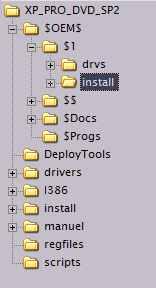
it seems you miss some info in your winnt.sif in the unattended section because of a bug in winXP unattended you need this information OemFilesPath="..\$OEM$" if your $OEM$ folder is a the same level than the i386 folder like this CDROM- ----------$OEM$ ----------i386 for the install dir it must be like that BTW you don't need the 'cause those are the default values so... see the root tree bellow the selected install folder in this image should be the same as the one your runonceex search for during the setup this will become the %SYSTEMDRIVE%\install folder you need
-
it 's because you missed some files in the root folder of your cd those : -win51 -WIN51ip -WIN51ip.SP1 if you slipstreamed the SP1 -WIN51ip.SP2 if you slipstreamed the SP2 and if you slipstreamed a SP2 over a cd splipstremed by SP1 you need both but regards of your message it asks you for the CD ROM Windows XP Professionnal without any SP mentionned so it must be the WIN51.ip