All Activity
- Past hour
-

Flash 9 not working on NT 4.0? (consolidated thread)
reboot12 replied to ironman14's topic in Windows 2000/2003/NT4
I mean specific examples, give me links for test. -

Flash 9 not working on NT 4.0? (consolidated thread)
Leokids123 replied to ironman14's topic in Windows 2000/2003/NT4
Any Flash Site that doesn't require Flash 10 or 11 will work,i guess... -

Native (WDM) HD Audio driver for Windows 98se/Me
MERCURY127 replied to Drew Hoffman's topic in Windows 9x/ME
Huanazhi X99-TF (C612 chipset) Intel Wellsburg PCH - High Definition Audio Controller [B1] PCI\VEN_8086&DEV_8D20&SUBSYS_72708086&REV_05 RealTek ALC887 HDAUDIO\FUNC_01&VEN_10EC&DEV_0887&SUBSYS_10EC0887&REV_1003 hda.sys driver is loaded, no crashes, 9x system see audio device, try play, but no any sounds. on win10 with standart hdaudio.sys sounds ok. - Today
-

Native (WDM) HD Audio driver for Windows 98se/Me
SweetLow replied to Drew Hoffman's topic in Windows 9x/ME
Check that you handle only YOUR interrupts and pass all other to system. You have to check some bit(s) responsible for indicating IRQ in controller register(s). Ok, I will try to do standard sequence Disable Controller - Reboot - Run DbgView - Enable Controller, But as it hangs probability to success not high. -

Native (WDM) HD Audio driver for Windows 98se/Me
Drew Hoffman replied to Drew Hoffman's topic in Windows 9x/ME
Huh. Are you able to get kernel debug prints on that system by any methods? Try the version in the hdac\buildchk folder in the download. Does it hang on installation or just on the first reboot? If it lets you install and then hangs on restarting you might be able to get some debug output with DbgView, otherwise you really have to have a hardware serial port and the newest laptops I know with that are on Dell Latitude E series which have one on some docking stations. One possible issue is that the driver is not currently designed to be able to load for multiple devices and the PCH on that laptop will have HDMI display audio as well as the HDA bus. There might also be issues with IRQ sharing with the USB controller but if that's the case I'm not sure how to fix the problems. I know you are experienced with Windows Driver development so maybe you would have some suggestions. -
 On XP only GDI rendering is working. I will try to use DirectWrite. 139 x64 on vanilla Vista SP2 has one missing function in shell32. Use some wrapper from e.g. Supermium or just use x86 (recommended, because x64 still have memory bug) Edit: DirectWrite from Supermium working! I can't get working hardware acceleration, even with disabled blacklist and D3D9... All api-ms-win-crt, p_advp32.dll, pwp_shd.dll, p_ole.dll, pwrp_k32.dll, ucrtbase.dll - that's the files needed for working dwrite.dll from Supermium.
 -
Native (WDM) HD Audio driver for Windows 98se/Me
SweetLow replied to Drew Hoffman's topic in Windows 9x/ME
Intel Sunrise Point-LP PCH - High Definition Audio Controller + Realtek ALC236 (Intel Core Gen 8 Notebook) (and HDMI Audio codec on the same HDA controller too). After installation of driver: With Normal boot temporary hangs on during the boot and then reboot. With Logged boot just hangs on with these last lines in BOOTLOG.TXT: [000FF0E5] INITCOMPLETE = mmdevldr [000FF0E5] INITCOMPLETESUCCESS = mmdevldr [000FF0E5] Loading PNP drivers of WDM Sample Driver for HD Audio (PCI\VEN_8086&DEV_9D71&SUBSYS_84A6103C&REV_21\BUS_00&DEV_1F&FUNC_03) JFYI, on this system CSM programs all PCI devices to one IRQ11. -
Broadcom NetXtreme II 5708 Windows NT 4.0 driver
reboot12 replied to ruthan's topic in Windows 2000/2003/NT4
Yes, I wrote about this on vogons: https://www.vogons.org/viewtopic.php?p=1386342#p1386342 -

Broadcom NetXtreme II 5708 Windows NT 4.0 driver
ruthan replied to ruthan's topic in Windows 2000/2003/NT4
Yeah, but description is really misleading, there is this text for NetXtream at the top : BCM5700, BCM5701, BCM5702, BCM5703, BCM5704, BCM5705, BCM5714, BCM5715, BCM5718, BCM5721, BCM5722, BCM5723, BCM5751, BCM5752, BCM5753, BCM5754, BCM5755, BCM5756, BCM5761, BCM5764, BCM5780, BCM5782, BCM5786, BCM5787, BCM5788, BCM5789, BCM57760, BCM57761, BCM5762, BCM57765, BCM5901, BCM5906) so its wrongly guesting that it works in all OSes mentioned under it, there is not list per OS.. so its at least misleading and i even checked inf, but there is not classic list with names of devices.. As i wrote 5703 in NT4 too - NetExtreme I line, at least with different drivers. Maybe even 5721 PCI-E is even working in Win9x.. but in WIn9x / Win 2000 you can use USB lan / USB wifi adapters when you got into problems.. in NT4 probably not. -
Broadcom NetXtreme II 5708 Windows NT 4.0 driver
reboot12 replied to ruthan's topic in Windows 2000/2003/NT4
Soogie and other Broadcom drivers work OK. Some Broadcom chips are simply not supported. I tried modifying the PCI Device ID in the .inf files but it doesn't help. Only the BCM5722 chips works with Soggie and other Broadcom drivers. P.S. I also have an old IdeaPad S10e netbook with an integrated Broadcom and the Soggie WinNT 4.0 drivers work OK - Yesterday
-
Broadcom NetXtreme II 5708 Windows NT 4.0 driver
ruthan replied to ruthan's topic in Windows 2000/2003/NT4
My memory is not working well, but im like 95% sure that i already tried these.. Soggies drivers - they failed more than once for me, it could be about skill, but i doubt it.. Because you can download lots of drivers which claims that support HW X,Y,Z and some old OS, but nobody tested them and they worked worked, its very easy edit inf and add some new option.. There are also drivers which simply claim NT suppport na never is mentioned lowest supported OS, so in theory they should work on NT, WIn2000.. but they never do, its often because some MS driver kit helper version, which rely on specific OS features.. -
Well Uniprocessor means Uniprocesor means not more multicore usage, or its still fine for multicore cpus? I have now 2 cpus in this machine. For me another PCI and PCI-X cards are working fine, even this one is half working, it just not keeps working after reboot.. It would probably need some HEX ASM magician to find out why.. Or find some old thread where someone fixed it, or find another card, which has good NT4/Win9x/Win2000/WinXP/Win7 driver and working with SBEMU in MS-DOS.
-
Copy the FOLDER NAME, delete the FOLDER, then create a *FILE* with the same exact NAME but *without* any file extension. Windows will not allow a FOLDER and a FILE by the same exact NAME. The presence of the FILE *prevents* the folder of the same name from being created. ie, you will never have to delete the folder ever again because it cannot be created.
-
hmm trying to get a view do you use a kernel extender ? some are partial functional and use the same folder what software you are using ? if you turn off many of them and limit the software, would be something the OS in this case xp has background activity for the system - but first would be the software to be turned off you know how to handle a file logger ? maybe microsoft´s filemon a lot of these files are not cookies - your search is for changes - activity also caused changes like stats, or that deskop.ini is not a cookie file https://www.techbloat.com/what-is-desktop-ini-on-windows.html
-
https://github.com/andrew-hoffman/WDMHDA This audio driver now functions well in VMWare and VirtualBox, and may work on some real hardware with an Intel controller and Realtek audio codec. More testing and work is still needed. Any compatibility reports would be appreciated.
-
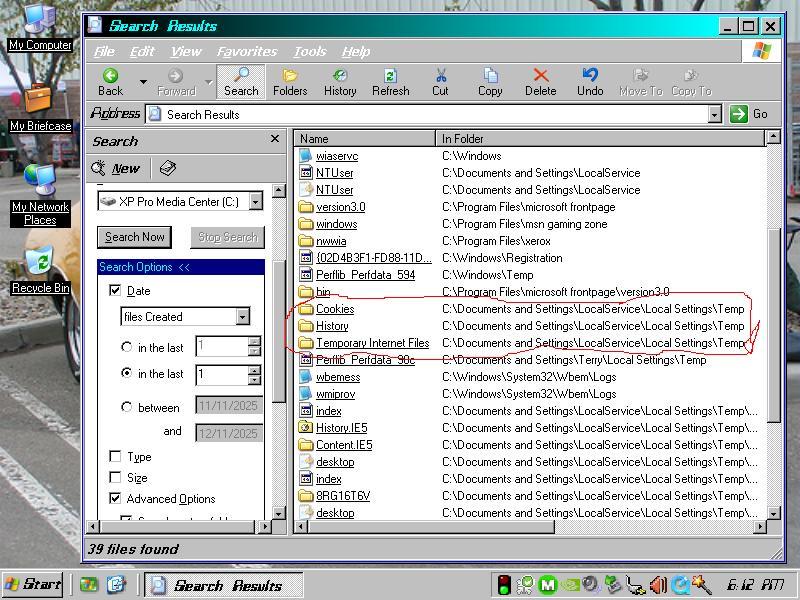
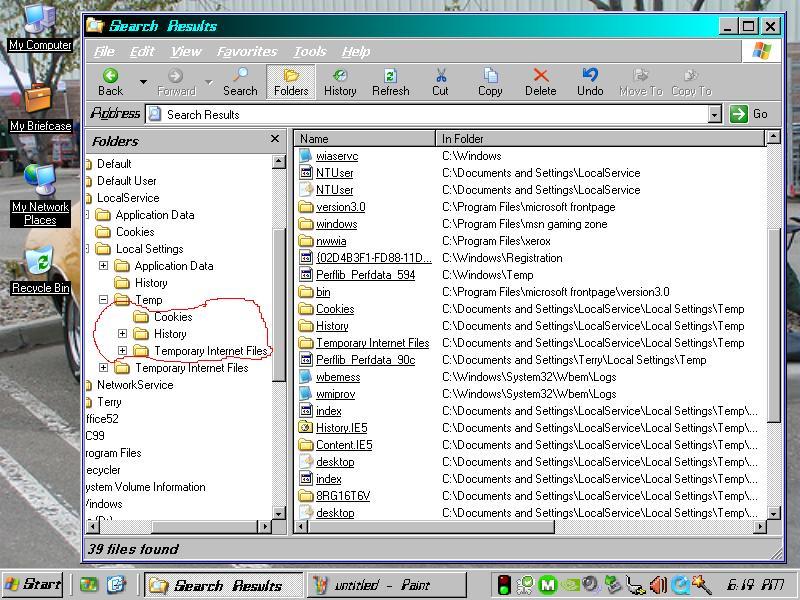
I've had this strange folder behaviour in XP Pro MCE for some time and I'm trying to correct it. Although it's currently Media Center Edition, it was doing this when it was only XP Pro so I hope no one minds me posting this in the XP forum. I added the MCE ability later. Anyway, here's what's happening. The system creates extra Cookies, History and Temporary Internet Files folders in C:\Documents and Settings\LocalService\Local Settings\Temp. Those folders already exist under C:\Documents and Settings\LocalService\Cookies and C:\Documents and Settings\LocalService\Local Settings\History and Temporary Internet Files. That's where they're supposed to be. So I'm trying to figure out why they're being duplicated in C:\Documents and Settings\LocalService\Local Settings\Temp which is not where they're supposed to be. I checked the registry for any LocalService\Local Settings entries but nothing looked wrong. Yet, something is telling Explorer to create those folders there. I can delete them but they are re-created on every boot. The snapshots show 2 views of this. Anyone have any ideas? Thanks.

-
Is it possible to install Win NT 4.0 on LGA775 chipset?
reboot12 replied to PowerPC_7455's topic in Windows 2000/2003/NT4
I use WinNT 4.0 on Haswell with NVIDIA 6200 TurboCache + 71.84 driver. HAL must be Standard PC (HAL.DLL) -
@ruthan Change HAL to standard Uniprocessor. I am using WinNT 4.0 on Haswell and I also had the problem and no PCI card works when HAL is MPS. After changing to standard HAL - all cards work OK :-)
-
Broadcom NetXtreme II 5708 Windows NT 4.0 driver
reboot12 replied to ruthan's topic in Windows 2000/2003/NT4
@ruthan Yea, on WinNT 4.0 works only some Broadcom chips. I bought several PCIe cards and only the third one worked: https://www.vogons.org/viewtopic.php?p=1383896#p1383896 BCM57782 - not work BCM5761 - not work BCM5722 - work OK I use this driver: 10.62.1.2 from https://soggi.org/drivers/broadcom.htm#NetX -
I recently started a topic, there are 2 replies 0 views: PowerStrip on Windows NT 4.0 SP6 There are also 0 views on other topics:
-
It is.
-
@modnar PowerStrip 3.7x runs on WinNT 4.0 but requires a supported graphics card - I test PCIe NVIDIA 6200 TurboCache with DVI-HDMI cable. For the program to work, you need to delete or rename the nvgpio.dll file to nvgpio.bak I use NVIDIA driver 71-84-winnt4-international.exe. PowerStrip detects and write EEPROM EDID without any problems - unless it is write-protected, of course. It can only program 128 bytes EDID: P.S. Only PowerStrip 3.85 can program EDID 256 bytes but under WinXP - tested same NVIDIA 6200 graphics card but only with vga.sys driver. The NVIDIA driver cannot be installed !!!
-
Is the problem with int 13h during the part of the booting process before the driver even loaded?
-
https://github.com/e3kskoy7wqk/Chromium-for-windows-7-REWORK He made few reworked versions. It also can support XP and Vista without extended kernels
-

released: bug fix for win32k.sys/fsg_RunPreProgram
Start Me Up replied to Start Me Up's topic in Windows 2000/2003/NT4
Sorry for the misunderstanding, but I am looking for updates that I haven't listed, yet. There should be something like 10 or 20 different versions of win32k.sys. But I know only the 3 I listed.