




Everything posted by Tomcat76
-
Running build 20260214 since yesterday. All appears fine. Will update to 20260221 in a few days.
-
With "enlarges by a large background area" he means that a lot of blank padding is added to the bottom of the page (in addition to the page automatically scrolling down). I have the same problem sometimes. I don't use dark mode. I have had the problem with the page scrolling down automatically after selecting text for several years using both Serpent 52 and MyPal68. It seems to happen when the selection includes punctuation marks as well as anything that has additional HTML elements (italic text, code, different colors, etc.).
-
I have already mentioned a long time ago that I'm ocasionally met with an "exception breakpoint" application error for basilisk.exe when Serpent 52 is getting sluggish and I try to restart the browser. But in recent builds, this error message is preceded by another error message: nsAppShell:EventWindow: basilisk.exe - Application Error The exception Breakpoint A breakpoint has been reached. (0x80000003) occurred in the application at location 0x1000fba6. Click on OK to terminate the program Click on CANCEL to debug the program A similar (same?) problem was previously reported by @XPerceniol back in December 2021: https://msfn.org/board/topic/182647-my-browser-builds-part-3/page/74/#comment-1209106 I kept returning to build 20260117 because of this. Since I don't update Serpent frequently, the first version I know that exhibits this problem for me is build 20260228. The most recent build I have tried is 20260815. To pinpoint the exact version the nsAppShell:EventWindow error starts to appear, I have been running build 20260131 for over a week and it hasn't crashed with the nsAppShell error. Next, I will try builds 20260214 and 20260221. The changelogs for builds 20260214, 20260221 and 20260228 don't show anything obvious that might cause this for me, but I admit I don't understand some of the entries.
-
Thanks for that. I'm posting from MyPal 78.0.3 now. 👍 I actually tried the useragent override before, including another one that covers challenges.cloudflare.com, but I had them set to Mozilla/5.0 (Windows NT 10.0; rv:109.0) Gecko/20100101 Firefox/115.0 I set them to Mozilla/5.0 (Windows NT 10.0; rv:78.0) Gecko/20100101 Firefox/78.0 now and it works. BTW... For some reason, I was unable to select the code text in your message in both Serpent and MyPal so it was a bit challenging to get this going. After releasing the mouse button, the page would scroll to the bottom and the text got unselected. Now, the text doesn't get unselected but the scrolling still happens most of the time. I seem to remember having come across this issue before and may have mentioned it a few years ago.
-
Posting this from Serpent, with a lot of difficulty. I want to say that the site actually seems to look good using the latest MyPal68 build 78.0.3 (which has more up-to-date engines), but I can't login because the dreaded Cloudflare is getting me stuck in an infinite "Verify you're human" loop.
-
@AstroSkipper I noticed the same when trying out .8b earlier. The HideTabbarWithOneTab script stopped working. Reading through your posts above, I was thinking about updating the script but there were other problems too: - fonts on this forum look fatter and are harder to read (enforced font-smoothing?) - MediaFire pages are next to empty (I checked the link to the HideTabbarWithOneTab.uc.js download) ...so I reverted to .5b just like I did after briefly meddling with .7b.
-
You'd need at least Outlook 2013. Also, Outlook 2013 and Outlook 2016 require registry edits to force-enable ModernAuth: https://learn.microsoft.com/en-us/exchange/troubleshoot/administration/modern-authentication-configuration From what I read, it also only works over IMAP and you need the auto-account-setup wizard as opposed to the old-style one in Control Panel. An app password is still required for POP3, in which case Outlook 2007 should work too. Edit: someone mentioned it still wouldn't work for them until they allowed Office to update itself.
-
The question is: will getting the paid version insure that all settings are preserved? I don't mind paying 44.77 Euro Moneys for a 3-year subscription, but not when it has bugs like that. Also, it's unclear to me what will happen if I "forget" to extend the subscription in time. Will the program delete all but the main identity? Will it remove every email account created after the second? +1. I'm curious to see what'll come out of it.
-
-
Yes, I just came across the announcement on Google's site while searching for email providers that don't enforce OAuth.
-
I'm in the same boat as BAW30s, using Outlook Express to access my Hotmail account. I'm also using it for my Gmail account for which I had to enable 2FA so I could use app passwords (which took over 6 months to set up because of my insistance to use authentication over a land line so I could use my mobile number for another Gmail account). I already had to switch to webmail for my ISP-provided accounts and those associated with my websites in 2022/2023 as they offered neither app passwords nor an alternative incoming mail server after they disabled basic authentication. I got MS-blocked almost 2 weeks ago, contrary to some here. It wasn't until yesterday, though, that I finally found out what's going on as I didn't receive the notification I was supposed to get. Somebody (can't remember who or where) suggested that, next to the alternate incoming mail server we already had to use (pop-legacy.office365.com), we should also use an app password. So I enabled 2FA and created an app password, but it still wouldn't connect. Another app password didn't do the trick either, nor did changing the incoming mail server to pop.office365.com or the new default outlook.office365.com. Why can't MS support app passwords used in Outlook Express when Gmail can? The most frustrating part is that I changed all my online subscriptions to Hotmail. Maybe I should've used a Gmail account instead, but I don't like how its spam engine works or that they don't fancy mailing lists too much (it's easy to get blacklisted by them). Like BAW30s, I had my eyes set on OE Classic a long time ago already as it looks like OE and supports identities (the paid version does), but the shortcomings outlined in this thread make me hesitate. I will look into the other ones mentioned here.
-
This post is old, but I wanna answer it in case someone else is wondering. ASP (like PHP) is a server-side scripting language. When you visit an ASP page with your browser, you will only get the HTML output from that ASP page. The Wayback Machine gets the same HTML output when it crawls a website. The query string is not part of the file name. In order to allow you to download these as separate files, the WBM encodes the question mark as well as the special characters in the query string so they can be part of the file name. Renaming them is not an option (the decoded query string can't be part of the file name). Even if you could, that wouldn't allow a link to "splash.asp?page=3" to work, as it requests splash.asp (passing it the parameter "page=3"). Supposing that the WBM also saved "splash.asp" without the fluff, it still wouldn't know what to do with the parameter; you'd need the original document which has all the parameters and variables defined, which nobody can access or read except for the server it originally resided on. The files in your screenshot are nothing more than static HTML files at this point. You really only have one option: 1) give the files a name that's more meaningful to you (without special characters) 2) update the links inside the files
-
I donated on September 25 by clicking the Donate Now button and following the wizard, and it isn't showing up either. The only difference from previous donations, is that I did it from a different browser (and a different IP address) which triggered a security check from Paypal. I don't care if I'm mentioned anywhere; I'd just like to know if my money was received.
-
Just to be clear... I'm in no position to allow or disallow anything. The original project was owned by TommyP. I can observe and give comments, as time permits. Also, HFSLIP started out as an updater/slipstreamer for Windows 2000. Support for Windows XP and Server 2003 was added later. While I was on the project, I always made sure every release was compatible with all supported operating systems; I never focused on one OS alone.
-
This is embarrassing, haha. I installed refined-h264ify on Serpent a couple of weeks ago. Either way, installing it on Mypal seems to fix the playback issues for me. I'm just blocking VP9 and 60fps videos.
-
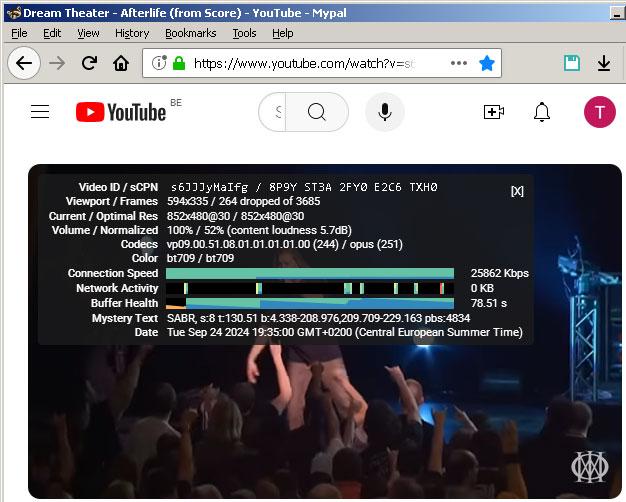
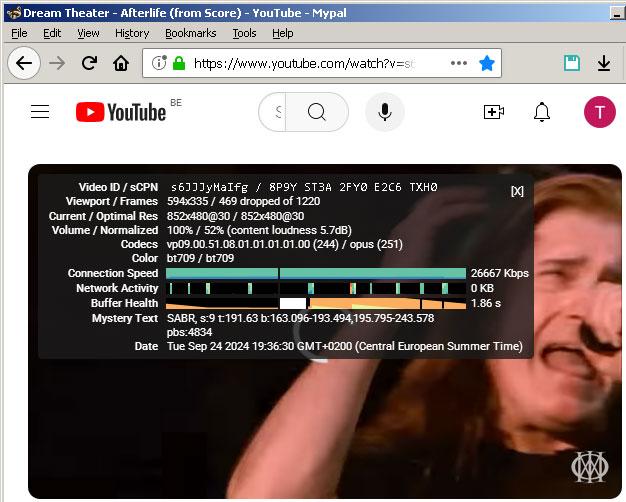
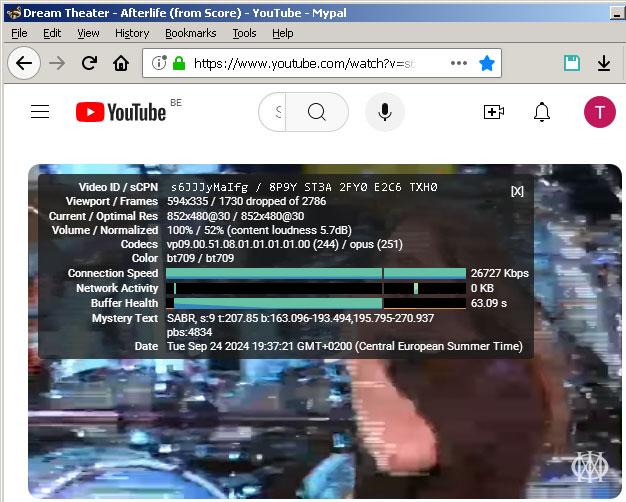
No In the first image, the video is playing (at 480p). In the second and third image, the video stopped playing. The video skipped ahead several times during playback. https://www.youtube.com/watch?v=s6JJJyMaIfg
-
Thanks. I doubt it's relevant, but I'll post my specs just in case... Core i5-650 4GB DDR3 RAM (2x 2GB) Asus GT710-SL-2GD5 2GB video card (nVidia driver version 368.81) onboard VIA audio chip Realtek gigabit LAN
-
Working with version 68.14.4b for a while now, I was wondering if other people are having problems playing back Youtube videos. I can only play YT videos fluently if I lower the quality to 240p. Anything above that, the video will either: 1) occasionally skip ahead by a couple of seconds 2) suddenly stop buffering as if the connection got lost; the video will continue to play for a little while but then halts, showing a white spinning circle forever 3) (rarely) the picture will freeze for about 10 seconds, but the audio keeps playing; eventually, the picture will catch up again I didn't have this problem using version 68.14.2b (not that I recall). Could this have something to do with the removed functionality? Serpent 52 (if it doesn't freeze up or crash visiting a Youtube video page) plays the same videos fluently at high resolutions.
-
-
-
I haven't used any tools to measure the speed, but I did notice a significant speed bump compared to Serpent 52 as well, especially on Youtube. Yes. For me, that includes Classic Theme Restorer, Downloads Window and Session Manager. Also, the Open in browser extension doesn't run properly: I get two dialog boxes asking me what to do. In Serpent (which uses an older version) it's only one. To be fair, though, that's Mozilla's doing. They switched to Web Extensions which have much less control over the UI.
-
It's a combination of things. If it isn't supposed to work, then why are these instructions all over the web? This is what I use: @namespace url("http://www.mozilla.org/keymaster/gatekeeper/there.is.only.xul"); /* Hide single tab -- works */ tab:only-of-type{display:none !important;} /* Hide Open new tab button when only one tab is present -- doesn't work in MyPal 68 */ tab[first-visible-tab="true"] + .tabs-newtab-button{display:none !important;} /* Reduce the minimum height of the tab bar to 0 so that it collapses when empty -- works */ #tabbrowser-tabs, #tabbrowser-arrowscrollbox, #tabbrowser-tabs > .tabbrowser-arrowscrollbox{min-height:0 !important;}
-
Thanks for the suggestion. It works, in the sense that it always hides the button. It does the same with ".toolbarbutton-1" removed. I only want it hidden when there's only one tab. When there are multiple tabs, I want it back. Basically, I want to mimic the behavior of the "Hide tab bar with only one tab open" addon. It's weird, because the following should normally do the trick: tab:only-of-type ~ .tabs-newtab-button.toolbarbutton-1{display:none !important;} I observed the same issue with: tab[first-visible-tab="true"] + .tabs-newtab-button{display:none !important;} and tab:only-of-type ~ .tabs-newtab-button{display:none !important;} Oh well... Maybe I'll get used to the lone "+" button... :-)
-
I wanted to give my 2 cents after using MyPal 68.14.2b for two months (and updating to 68.14.4b today). I initially jumped the gun because the troubles I had with Serpent 52 kept getting worse, especially using YouTube and Facebook. S52 freezes trying to load a YT video page. If I'm lucky, I can watch one video. Sometimes it helps to minimize the browser right after clicking the link to a video and wait a bit, but not always. MyPal worked like a charm on YouTube so I'm now using it when I want to browse on that site. I did come across a few problems, though. 1) After a couple of weeks, when I try to open MyPal, all I get is the title bar and the border that goes around the interface. Everything inside is 100% transparent (I can see my desktop). At first, I thought it might have something to do with leaving HW acceleration on, but disabling it didn't prevent the issue from returning. The only way to get around this when it happens, is to restart the computer. 2) As mentioned earlier, unresponsive script errors using every Amazon site. I didn't observe the error message using 68.14.4b yet, but the site is still exceptionally sluggish compared to Serpent 52. It takes 20-30 seconds before I can properly interact with the page. 3) Rendering bugs related to flexbox: the contents of flexboxes are displayed too far to the left in certain circumstances. I have observed this problem on webpages, but also in the titles of browser tabs. For example, when the tab bar starts to condense tab width when there are too many, the titles on some tabs are displayed more to the left causing the left part of the first letter to be cut off. Other example: I have a private website where I created "fake" buttons next to each other using DIVs that have a 20px gap in between them. Using CSS gap to space the buttons, the button text is displayed too far to the left. I had to resort to the old-fashioned way of using a 20px left-margin on the child DIVs except on the first to work around it. Another site I frequent a lot shows tiny balloons over icons when there are new messages; the count is supposed to be centered in the balloon, but it's shown more to the left in MyPal 68. Serpent 52 renders flexbox correctly, as does FF 115.14.0 ESR on Windows 7. Did Mozilla screw this up around FF68? Edit... Forgot to mention... 4) I've been trying to hide the tab bar when only one tab is open. I succeeded in removing the single tab, but the "+" button to open a new tab stays put. I know the code to reach it has changed over the years, but none of the code I found online seems to work in MyPal 68. Some of the code I tried: tab:only-of-type ~ * {display:none !important;} tab[first-visible-tab="true"] + .tabs-newtab-button{display:none !important;} Any idea how to reach it?

-
Indeed. I compared it to Firefox 47.0.2. With FF47, the link first leads to your post, scrolls up a bit and then scrolls back down to your post. With Serpent 52 (2024-05-10), the link leads to your post, scrolls up a bit and stays there. I mistook mina7601's post for yours. I received a few more errors from Session Manager that were a bit more elaborate: This operation failed due to a file access error: Component returned failure code: 0x8007000e (NS_ERROR_OUT_OF_MEMORY) [nsIScriptableUnicodeConverter.convertToInputStream](NS_ERROR_OUT_OF_MEMORY) This allowed me to do some further digging and I found an old thread on the MozillaZine Forums. Morac, the creator/maintainer of the Session Manager addon, suggested a user who experienced the exact same error message to change some settings related to disk caching: browser.cache.disk.smart_size.enabled;false browser.cache.disk.capacity;1048576 The smart size is set to true by default, which tells the browser to choose a disk cache size relative to the installed RAM. The second setting is set to 256000 (bytes) by default in Serpent, though I used to have it increased to 350000 if I remember correctly. I also changed the max_file_write_size of the Session Manager addon from the default 20 to 15. This is based on a suggestion by Morac in the same thread to someone who was unable to save further sessions. I handpicked the value of 15 as Morac didn't mention a specific alternative value. So far, this seems to have remedied the problems I've been having with Session Manager in the latest builds of Serpent, but it's possible some of the fixes weren't necessary.
