



-
Try 3.9.23 version Seems to work for me, Win + number
-
I use this key [HKEY_CURRENT_USER\Software\Policies\StartIsBack] "NoUpdate"=dword:00000001 Seems to be good
-
That's it, disabling UAC opens both prompts in admin mode For those who disable it, it would be helpful if the no admin "shortcut" were removed
-
SAB adds Terminal, since I uninstalled it, it must be replaced by PowerShell (or Command Prompt) And when UAC is disabled, the no admin option should still open as admin, I suppose.
-
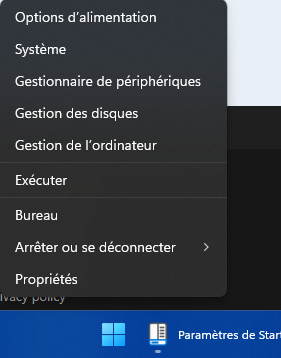
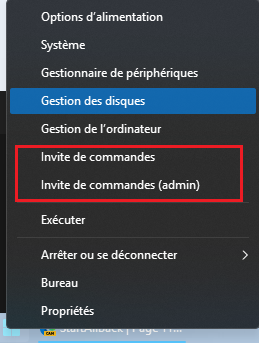
It seems (I don't remember) SAB add Powershell in WinX menu, right click in the start menu And I added the registry key to replace Powershell with Command Prompt Enhanced taskbar enabled : Enhanced taskbar disabled : But the 2 Command Prompt (Admin and no Admin) open CMD as administrator Is it due to SAB ? If anyone could try (or Powershell, it must be the same thing) Thanks
-
Microsoft added the blue color to this progress bar with dark mode. I saw this in the Insider builds, it seems they added it in the latest CU. MS is gradually removing the ugly green.
-
Weird, I don't have this problem with Windows 10 Explorer
-
Fixed with latest beta, thanks so much And with the latest beta, when you download a file and then go to another web page while it's downloading, the download progress bar in the taskbar is also present on the website. does not appear if you stay on the download page I didn't notice if this was the case with previous versions.

-
Just uninstall it and reinstall it on the new PC I had deleted the registry key too.
-
Do you have screenshots of your settings ? SAB isn't disabled (in the Advanced tab) ?
-
Yes, same, until I use the address bar
-
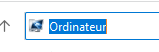
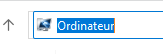
A small display bug occurs when clicking in the address bar with 3.9.15 I hadn't noticed before. 3.9.12 : 3.9.15 : Slight gap between the "bands" on the left (no problem with the search bar) Thanks PS: The blue outline is normal when clicking in the address or search bar Do you have the same thing ?
-
It's good with 3.9.15 Thanks so much


-
Thanks for the info, no need to test
-
Yes, it's the bar under the icon (same location as the progress bar). It's true that with older versions of SAB, it was more noticeable (we're still using 3.9bb on Windows 11 24h2, which haven't been updated for some time) For this and especially for the progress bar which is much more beautiful
