Everything posted by valkyre
-
-
4.2
-
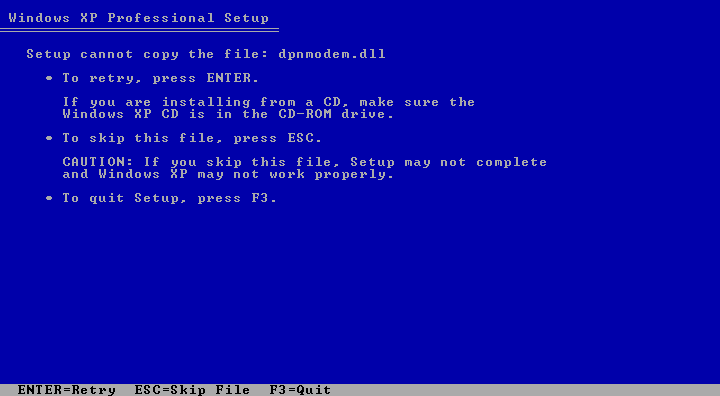
Not in my case. It compalins about DX9 files such as dpnmodem.dll not being found or corrupted during the inital setup. It also complains a few more times during setup.
-
Is it possible to remove a slipstreamed version of DirectX 9 from a Windows XP CD, allowing a slipstream of SP2 to install a fresh copy of it? Any help would be GREATLY appreciated.
-
By the way, the files it complains about are: dpnmodem.dll dpnwsock.dll winntbbu.dll wmsdmoe.dll wmstream.dll ICFGNT.DLL
-
Back when I slipstreamed my XP CD with SP1, I also slipstreamed a newer version of DirectX9. Now that I'm trying to slipstream SP2, it's giving me a couple of errors during the initial blue screen setup, complaining that it can't find or copy these files. They're DirectX files, and not too many people, in fact none that I know, have had this problem, which leads me to believe that it's directly related to me having slipstreamed a new DirectX version over my SP1 CD. Does anyone know how I could fix this? By either removing directx and reinstalling it through the SP2 slipstream, or some other kind of workaround. Help! I've been having this problem for a few months now!
-
I'll try that, thanks.
-
It has to do with SP2 being slipstreamed. My already existing SP1 slipstreamed CD, and ISO image work just fine. When I slipstream SP2 into my SP1 CD, it gives me this error. Burnung speeds don't matter, seeing as how I'm using ISO's under VMWare Workstation to test them.
-
I'm still having this problem.
-
I just slipstreamed SP2 into my unattended XP install, and now I've run into problems. During the initial blue screen setup process, it gives me errors about how certain files are missing or corrupt, like the dpnmodem.dll file. The only thing I can think of is that I used an existing unattended XP install that already had SP1 in it when I slipstreamed SP2. I also had DirectX 9 slipstreamed into the CD, as well as the 10MB pre-SP2 rollup hotfix, so I'm guessing that's what's causing the files to show up missing or corrupt. Any ideas? I'd really like to get SP2 slipstreamed.