ceo54
Content Type
Profiles
Forums
Events
Everything posted by ceo54
-
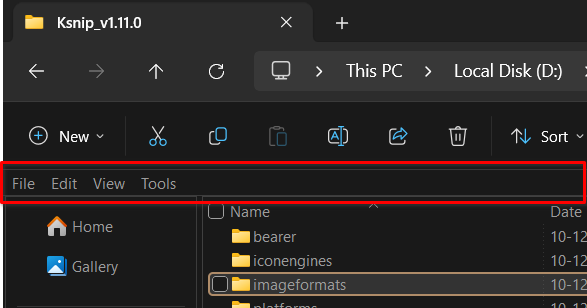
Hello, On Windows 11 Explorer, enabling the legacy command infrastructure (via StartAllBack or Open-Shell) causes Explorer to permanently instantiate a top command surface. Once this happens, reverting to stock Win11 binaries does not remove the bar — Explorer continues to allocate the command host, which is then rendered using the Win11 WinUI CommandBar. Key observations: The bar is not drawn by StartAllBack or Open-Shell Swapping Win10 explorerframe.dll breaks the nav pane but does not remove the bar shellstyle.dll hacks (height=0) no longer apply This confirms the surface exists independently of explorerframe and classic theming I’m not trying to stop legacy commands from being registered — I’m looking for a way to suppress or collapse the WinUI CommandBar host (height/visibility/layout), even if the surface itself still exists. Does anyone know: which component owns the WinUI CommandBar layout for Explorer? or whether it’s possible to force-collapse it (analogous to shellstyle hacks in Win7–10)? Any pointers (symbols, classes, binaries) would be appreciated.

-
Thank you for the response. I'm aware of the OEM licensing forbids the execusion of SetupComplete but I'm not aware of client os, could you please expand ? Any non-business will be client OS that means essentially any client image. This doesn't seem right.
-
Thank you for the response. I selected the OEM folder on the ready page yet my SetupComplete.cmd never ran. Any ideas ?
-
@JFX Thank you for the update. This program is so essential, I can't image install without it. Thank you for making it. One question, I used the $OEM$ folder with SetupComplete.cmd inside but it never ran, Like the drivers/unattend dedicated tabs, can we also have dedicated tabs for SetupComplete, Firstlogon.cmd etc where we could specify the locations of the files and program make them available to Windows setup ? Thank you for your great work. Highly appreciated.
-
Thank you for the response billmcct. I searched the WD website and found the old version of the driver from 2011, installed it and it did not solve the issue. I also got one from Windows update that seemed identical to the one downloaded from WD website.
-
Yes, I would but the issue is the "safely remove the device" option is non-existent in explorer and systray option is grayed out and I don't want to just pull it out without first properly stopping the HDD. It has important data on it I can't afford to lose.
-
Hello @Cocodile Thank you for the response. The device is fine, SMART reports no issue, I can transfer files to/from device without any issues. Furthermore, the same HDD doesn't have problem on another Windows 8.1 PC.
-
Hello, For some unknown reason I am seem to be missing the driver for WD passport 25E1 external drive. Device manager -> https://i.postimg.cc/3NV1X1t8/Capture.png This has not happened before I'm not sure how the driver went missing. Can anyone has any idea how to resolve this or maybe share the relevant .sys file from driverstore folder ? Any help will be greatly appreciated.
-
Many thanks for the support @Dixel but this library caused another issue. When I launch Opera, it won't come up and crashpad debug log says not a valid win32 app. I downloaded api-ms-win-core-localization-obsolete-l1-2-0.dll and renamed it to api-ms-win-core-localization-l1-2-2.dll and now it seems to be working. Haven't tested youtube/download/upload or MB pages yet but will test and report back. Many thanks to @yoltboy01 @Dixel @mjd79 & @UCyborg for the kind help. You guys rock. Edit: Everything seems to be working normally, except for the scrollbars. When I move the scrollbars to move page up/down, browser gets resized instead.
-
I looked everywhere but strangely couldn't find it. I don't know what went wrong, can't believe a system dll is not available on the web.
-
Thanks. Yeah, my system is updated till September 2023 (only October updates are not installed) Okay I tried the steps as shown in the video for Opera but unfortunately the result is the same. When I copy DWrite.dll and launch Opera, it complains about missing api-ms-win-core-localization-l1-2-2.dll I think this is some kinda runtime library so I installed all C++ runtimes, 2005-2022 to no avail. I already have .Net 3.5 and 4.8 so I'm out of ideas. Also, it's kinda weird to be not able to find a Windows .dll online. I looked everywhere but couldn't find this api-ms-win-core-localization-l1-2-2.dll Nonetheless, thank you for the help, Your support is highly appreciated. Nonethe
-
Thank you from the core of my heart for helping me out here. I'm sorry but I did as instructed and when I launched Opera from the shortcut with --no-sandbox flag enabled, it complained about missing api-ms-win-core-localization-l1-2-2.dll I looked around on the dll sites but couldn't find this library. Any other ideas ? No matter what becomes of it, I'm truly grateful to you.
-
Yeah, I understand it needs to be modded and accompanied with some libraries from Windows 10 but I'm no techy and I can't do it on my own, I need help.
-
Latest Opera working for everyone except me :crying:
-
Ah! apologies, I just used the last PM thread we had and didn't notice that you left the conversation. Creating new PM thread now.
-
HI, I've sent you a PM. Please check, if possible. Thanks.
-
Yeah, I swapped DiscardVirtualMemroy with VirtualAlloc but it crashes as soon as it's started.
-
Thank you for the response. I already changes DisableVirtualAlloc and running with --no-sandbox flag but it doesn't work. Doesn't even start. Any other ideas ?
-
It doesn't work for me with Windows fully updated. May I ask had you patched it or does it works straight otta the box ?
-
Ah! so basically, you close the door on the users like me. What's the abuse incident that you talk about ? Is it possible to do it in PM ? Once I can get one version working, I will be able to do it on the future releases myself. And thanks for putting up this topic.
-
This is very helpful, thanks. As for the Topic, I see no download links for the ported version 96. How do I do this ? Any help will be greatly appreciated.
-
What version of .Net does the tool requires ? I tried running it on my Windows 10 2019 LTSC and it complains that I don't have .Net 3.5 installed. Any help will be greatly appreciated.
-
Yeah, updates will be on Catalog site but they will not install without an ESU subscription. Once that is installed, updates will normally install.
-
Server 2012 Extended security updates are supported till October 2026 and with a bypss tool for certain SKU's like professional should work on client workstations. Now we have to find the ESU bypass tool.
-
I have said this before and gonna say this again, when things are broken at the root they can't be corrected up top. The very idea Windows 10 is built upon is flawed and no amount of improvements are going to fix it. The worst part in Microsoft forcing the vendors to remove the support for Windows 7 and 8.1 I already can't find the 8.1 drivers for my 7th gen notebook. Microsoft is also forcing the game makers to abandon Windows 7 and 8.1 Lot's of newer games only available on Windows 10. Current system will live for who knows what but eventually I'll have to move too. But having said that let's hope they can at least get those basics right with telemetry, forced updates etc but that's too much to ask as well. Never gonna happen. Best bet, heavily customized Windows 10 build over whatever the improvements Microsoft can introduce. Completely remove the updates, component store, catroot, Microsoft account, XBox related binaries and services, UWP apps, store, BITS etc then tweak it the way we use to tweak 7 and 8.1 and as a last step just compromise with what you have. Bottom line is Windows 10 is never going to be Windows 7. Bitter fact and may humanity never forgives Microsoft for doing this and Google for giving all the ideas and paving the way for it. Microsoft had to kill Goggle before it becomes a serious competition on computer OS's is why Windows 10 is like what's it like.