
DrWho3000
Content Type
Profiles
Forums
Events
Everything posted by DrWho3000
-
it hasn't No, it used to i have gone thru the about:config, still playing Side one here another silly one was I was getting flagged with red wavy line for a incorrect spelling, so i was adding to dictionary then realized i can turn of spell check
-
Can someone help me please When Firefox crashes it doesn't restore my previous tabs open it , used to (wait a few seconds) , till i had to a fresh install when it crashed and I reopened FF the restore box would come up, it doesn't anymore. Even a normal close with FF set to remember my browse and tabs it doesnt it is greyed out and No history even thought it is set to I have sessionstore-backups folder with 2 files in there is no file(s) sessionstore.js Recovery.js.Recovery.bak Previous.js sessionstore.bak sessionstore.bak in profile folder I have closed FF & reopened, still no tabs & greyed out "Restore Previous Session". I closed FF again is there any files I need or amendments to about config thnx EDIT.................. I have found a sessionstore.js in "some old profile folders although its not in others can I copy the sessionstore from a old profile in to my new one
-
 This is what I Have In FF About:config --------------------------------------------------------------------- Name Product Type Value --------------------------------------------------------------------- gmp-eme-adobe.abi string x86-msvc-x86 gmp-gmpopenh264.abi string x86-msvc-x86 gmp-gmpopenh264.lastUpdate integer 1495400516" gmp-gmpopenh264.version string 1.6 media.eme.enabled boolean TRUE media.gmp.decoder.enabled boolean TRUE media.gmp.storage.version.observed integer 1 media.gmp-eme-adobe.abi string 17 media.gmp-eme-adobe.abi string x86-msvc-x86 media.gmp-eme-adobe.autoupdate boolean FALSE media.gmp-eme-adobe.enabled boolean TRUE media.gmp-eme-adobe.forceSupported boolean TRUE media.gmp-eme-adobe.forcevisible boolean TRUE media.gmp-eme-adobe.lastUpdate integer 1512748679 media.gmp-eme-adobe.version string 17 media.gmp-eme-adobe.visible boolean TRUE media.gmp-manager.buildID string "20180621064021" media.gmp-manager.lastCheck", integer 1537098990 media.gmp-widevinecdm.forceSupported boolean TRUE media.hardware-video-decoding.failed boolean FALSE media.mediasource.ignore_codecs boolean TRUE media.mediasource.webm.enabled boolean TRUE mediasource.enabled boolean TRUE ----------------------------------------------------------------------------------------- Is there anything I should add to this (that " I maybe missing) , or anyone know of more mods Can Someone shed some light on these ------------------------------------------------------------------------------------- general.appname.override user set string Netscape general.appversion.override user set string 5.0 Windows general.buildID.override user set string 0 general.oscpu.override user set string Windows NT 6.1 Pretty sure this overrides the Operating system to say you have different general.platform.override user set string Win32 general.productSub.override user set string 20100101 -------------------------------------------------------------------------------------- setting this general.useragent.override.myspace.com;Mozilla/5.0 (Windows NT 6.2; rv66.0) Gecko/20100101 Firefox/66.0 turns out. Javascript is capable of detecting your browser- without using the above info seems java script can still read what you have and send,,,, maybe this is why I can't use Netflix if I say I have different So, set the following: general.XXX.override where XXX is the name of the specific object code you want to set. For example, on my system javascript:navigator.platform is "win32", so to change this, I'd create a new string: general.platform.override and set it to "Linux i686". MAKE SURE NEW STRINGS ARE LOWERCASE!!! Windows XP Defaults: javascript:navigator.appCodeName "Mozilla" javascript:navigator.appName "Netscape" javascript:navigator.appVersion "5.0 (Windows; en-US)" javascript:navigator.buildID "20100611143157" javascript:navigator.oscpu "Windows NT 5.1" javascript:navigator.platform "Win32" javascript:navigator.plugins (plugin array) javascript:navigator.product "Gecko" javascript:navigator.productSub "20100611" javascript:navigator.vendor javascript:navigator.vendorSub Notice that the buildID, productSub are dates. If this the case so it would be 11th june 2010 what would 143157 be is it a build number ? This could be of interest Browser browser.cache.disk.enable - boolean false browser.cache.offline.enable - boolean false browser.search.suggest.enabled boolean false browser.sessionstore.privacy_level integer 2 dom.storage.enabled boolean false general.appname.override string Netscape general.appversion.override string Windows 5.0 general.buildID.override string 0 general.oscpu.override string Windows NT 6.1 general.platform.override string Win32 general.productSub.override string 20100101 A Side Note Has anyone tried to see if the latest ESR will work on XP apart from 52.9.0 and 52.9.1
 -
It appear the Netflix does alot deeper sniffing if i have general.useragent.override;Mozilla/5.0 (Windows NT 6.2; rv:66.0) Gecko/20100101 Firefox/66.0 having above set then general.useragent.override.netflix.com/gb;Mozilla/5.0 (Windows NT 5.1; rv:50.0) Gecko/20100101 Firefox/50.0 I get Netflix system requirements for HTML5 Player and Silverlight You can use our HTML5 player or the Silverlight plug-in to watch Netflix TV shows and movies on PCs running Windows XP or later, and Intel-based Macs running OS X Tiger (v10.4.11) or later. You'll find a complete list of requirements below for HTML5, Silverlight 4, and Silverlight 5. HTML5 Silverlight 4 Silverlight 5 there is this Operating Systems and Browsers Operating System Internet Explorer 11 Internet Explorer 10 Internet Explorer 9 Internet Explorer 8 Internet Explorer 7 Firefox 12-52 Safari 4-11 Chrome 12-44 NOTE Firefox versions only upto 52 but setting general.useragent.override;Mozilla/5.0 (Windows NT 6.2; rv:66.0) Gecko/20100101 Firefox/66.0 back to general.useragent.override;Mozilla/5.0 (Windows NT 6.2; rv:52.0) Gecko/20100101 Firefox/52.0 Netflix will allow me to play videos So it apears with Netflix there is deeper sniffing as I do have Silverlight 5.1 and sure I have HTML5 even tho it didnt fall back to it even with all the gmp strings in place and have Primetime Decryption in aswell I've noticed (unless I'm wrong) that reporting a browserabove 62 breaks Youtbe.com I'm sure it used to work reporting 66 also where I had No sidebar on utube there is now one also about:sync breaks aswell unless it is set to 52 what would be the override prefrence for this
-
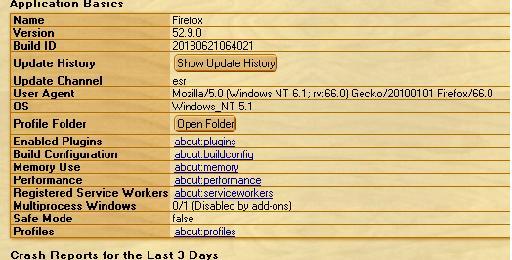
@VistaLover @Mathwiz thank you for your patience and understanding it is appreciated very much, must of had a mind block (which sometimes happens tales a while for somethings to sink in) overload of info, . the old saying can;t see woods for the trees . I literally unpicked everything and broke it down and went thru everythin bit by bit and low n behold it now works having general.useragent.override;Mozilla/5.0 (Windows NT 6.1; rv:66.0) Gecko/20100101 Firefox/66.0 (as the main one) then general.useragent.override.instagram.com;Mozilla/5.0 (Windows NT 6.1; rv:56.0) Gecko/20100101 Firefox/56.0 instagram now indeed works and not get broken i'm trying a few other websites that either sniff or breaks due to browser version being sent is wrong. . I can say creating a new (user set string) general.oscpu.override (Value) Windows NT 6.1 does indeed send your OS as (Window 7) instead of 5.1 (XP) going here http://useragentstring.com and herehttp://browserspy.dk/os.php I may play with these general.appname.override - (user set string) Netscape sends the name of browser general.appversion.override - (user set string) 5.0 (Windows) not sure general.buildID.override - (user set string) 0 browser build general.platform.override - (user set string) Win32 says wether is is 32 or 64 bit general.productSub.override - (user set string) 20100101 this says when the browser was built might have a further play to fool about:support to fool it i have latest stuff fool it it is a newer browser, and build, so 20130621 is 21st june what the others is unsure 064021 more so the OS version instead of telling me its Windows_ NT 5.1 instead 6.1 i would belive the build ID is when it was builr unless about support reads from the PC and not browser then a no go Once again thank you to all who helped get this in his skull Now this interesting https://www.whatismybrowser.com/guides/the-latest-version/firefox according to this there is Firefox Extended Support Release 60.6.1 yet I can't get my FF to update (which appears to be for Windows 7 (32 bit),Windows 7 (64 bit),Windows 8,windows 10,Mac OS X,Linux this is only a passing thought, I used to play with hex editors years ago changing a program say from a trial or shareware install to a full install or changing a program to say it was diffrent wonder it this is possible to do with FF fool they system you have a new version

-
Right I went right back to begining undoing what I did the config files and recreated the config-prefs.js and config files with correct script in each putting in correct folders made sure there was No double entries in the Prefs file restarted FF went to about :config it was clear, then tried to create a new string general.useragent.override.whatismybrowser.com; but this still came back and set as user set and not as default (as shown in someone else's image i did notice a few posts back there is this Components.utils.import('resource://gre/modules/UserAgentOverrides.jsm').UserAgentOverrides.init(); which is different to another post // needs to start with a comment line Components.utils.import("resource://gre/modules/Services.jsm"); Services.obs.addObserver(function (aSubject, aTopic, aData) { var chromeWindow = aSubject; chromeWindow.setTimeout(function () { Components.utils.import("resource://gre/modules/UserAgentOverrides.jsm", chromeWindow); chromeWindow.UserAgentOverrides.init(); }, 1000); }, "browser-delayed-startup-finished", false); so which of those 2 js is right I have done No other mods to prefs apart from the media and gmp strings/booloeans ot to make addons/extenrions appear I Did come across these -------------------------------------------------------------------- general.appname.override - (user set string) Netscape general.appversion.override - (user set string) 5.0 (Windows) general.buildID.override - (user set string) 0 general.oscpu.override - (user set string) Windows NT 6.1 "(Possible ro sppof your OS)" general.platform.override - (user set string) Win32 general.productSub.override = 20100101 general.appversion.override = 5.0 (Windows) general.oscpu.override = Windows NT 6.1 general.platform.override = Win32 general.buildID.override = 20100101 it appears these are hidden so will not appear in a search in about:config -------------------------------------------------------------------------- to further spoof I would presume this one general.oscpu.override - (user set string) Windows NT 6.1 will spoof your OS None of these are present in FF If you visit here http://browserspy.dk/ this site will reveal just how much sniffing there is and what can be seen by sites ================================================== On trying a new string general.oscpu.override;Windows NT 6.1 then going here http://browserspy.dk/os.php it does indeed spoof your OS version, tried it with and without and got 5.1 and 6.1
-
I musr still be missing something, as I followerd guide and created a file config-prefs.js with pref("general.config.obscure_value", 0); pref("general.config.filename", "config.js"); and placed in the C:\Program Files\Mozilla Firefox\defaults\pref then a config.js with // needs to start with a comment line Components.utils.import("resource://gre/modules/Services.jsm"); Services.obs.addObserver(function (aSubject, aTopic, aData) { var chromeWindow = aSubject; chromeWindow.setTimeout(function () { Components.utils.import("resource://gre/modules/UserAgentOverrides.jsm", chromeWindow); chromeWindow.UserAgentOverrides.init(); }, 1000); }, "browser-delayed-startup-finished", false); placed inside C:\Program Files\Mozilla Firefox But when i try to create a UA string it is still set as user set instead of default i tried putting useragent.override.whatismybrowser.com;Mozilla/5.0 (Windows NT 6.1; rv66.0) Gecko/20100101 Firefox/66.0 inside the file config-prefs.js but alto it appears in about:config straig away with out manually putting in, it still show as user set NOT as default I have checked for any "possible" mistakes I "may" have made I have made correct files in right places, have I missed something should any mods be made to C:\Documents and Settings\Administrator\Application Data\Mozilla\Firefox\Profiles\q65xjekw.default-1556195193171 there isn't any of other files mention in both my ff folders usually i am ok in picking up, but maybe a numpty here lol is ther ea sting or boolean I need to amend from true to false or vice verse to force from bevoming user set to default ?
-
I'm still not sure where to do the ssauo's is it in the about: config or in one of the config files i created and put in the relevant folders . if i have this set to general.useragent.override;Mozilla/5.0 (Windows NT 6.1; rv:67.0) Gecko/20100101 Firefox/67.0 i can get to alot of sites but some if not a few get broken you cant reach unless its a lower version, i encountered this earlier regardless of browser version or OS verssion stated. if I do general.useragent.override;Mozilla/5.0 (Windows NT 6.1; rv:53.0) Gecko/20100101 Firefox/53.0 i can get to most but odd one no go but if i if I do general.useragent.override;Mozilla/5.0 (Windows NT 6.1; rv:53.0) Gecko/20100101 Firefox/53.0 in the main one then a new string as general.useragent.override.whatismybrowser;Mozilla/5.0 (Windows NT 6.1; rv66.0) Gecko/20100101 Firefox/66.0 still reportss as out of date then as another string so there is 2 i have a few general.useragent.override set to 67, can't figure this out i'm sure i followed guide properly doing the 2 txt files and put in right folders this what shows
-
how do you set the Status to default instead of user set in Firefox I;ve noticed if you have this general.useragent.override Mozilla/5.0 (Windows NT 6.1; WOW64; rv:66.0) Gecko/20100101 Firefox/66.0 it breaks this https://accounts.firefox.com/settings you can't get to it same as instagram but setting back to Mozilla/5.0 (Windows NT 6.1; WOW64; rv:53.0) Gecko/20100101 Firefox/53.0 you can get to your firefox settings account .if I set browser to 53 then do this general.useragent.override.whatismybrowser;Mozilla/5.0 (Windows NT 6.1; WOW64; rv:66.0) Gecko/20100101 Firefox/66.0 it still reports as out of date what am i doing wrong
-
is there a way around with FB vids, to view inline on newsfeed instead of some going to the expanded theatre mode and NOT play or do i see some seem to have sound, some not is this to do how it was encoded, frame or the css/js ??
-
@heinoganda In the mse antimalware folder i seem to have a file(s) called offreg.3416.dll in my other PC it is offreg.3068.dll C:\Documents and Settings\All Users\Application Data\Microsoft\Microsoft Antimalware\Definition Updates\{CF4ECBC1-A885-4A52-AE58-72C12130D7E9} what is this file I dare not delete is in case it is needed I noticed only 2 of 4 files actually have updated .... mpasdlta.vdm ... ....mpavdlta.vdm ..... I did use option 1 in the updater 1.7
-
@Dave-H they now all have a delete button, when i did a refresh, altho all the extentions and plugins was there, they wasn't installed correctly, when doing so the remove/delte icon appeared
-
Works for me fine, tried it as soon as I got it, then scan, left it for 2 days to let MSE complain it was 2 days ago updated fine thnx for this @heinoganda
-
(FIXED) How to watch Amazon Prime Video on Windows XP
DrWho3000 replied to sdfox7's topic in Windows XP
damn I was hoping there just "might or maybe" a way of installin widevine cdm or have WMF reckonised i have got in FF browser already there media.decoder-doctor.notifications-allowed; string MediaWMFNeeded,MediaWidevineNoWMFNoSilverlight,MediaCannotInitializePulseAudio,MediaCannotPlayNoDecoders,MediaUnsupportedLibavcodec media.gmp-widevinecdm.enabled;true boolean media.gmp-widevinecdm.visible;true boolean all set to default i did try to initialise the webGL but no go, (unless this is for these 3d graphics cards) I did hope in some way there would be a round this thanks for clarifying this, so stuck with Primetime decryption going here https://www.youtube.com/html5 i got all the ticks in blue so have 264 html5 webm etc I have shockwave/flashplayer ,, shockwave for Director ,, silverlight ,, Windows Presentation Foundation ...Microsoft® DRM .. Windows Media Player Plug-in Dynamic Link Library ... OpenH264 Video Codec provided by Cisco Systems, Inc. as plugins can Directshow be used instead of WMF ??? -
what do I have to do now to create SSUAOs i have done the 2 config files and put in the default folder and Firefox directory
-
(FIXED) How to watch Amazon Prime Video on Windows XP
DrWho3000 replied to sdfox7's topic in Windows XP
i tried doing a general.useragent.override.www.amazon.com with Mozilla/5.0 (Windows NT 6.1; WOW64; rv:68.0) Gecko/20100101 Firefox/68/0 with all the the other mods i partially get to Amazon Music but get a white splash screen saying ....................................................... Playback Disabled Please enable playback settings for your browser. ......................................................... it seems Amaxon can still dig deeper into your browser/PC i'm sure I did get onto it once before also on prime video I getDigital Rights ErrorYour web browser is missing a digital rights component. In your web browser's address bar, type about:addons, press Enter, and then on the left, click Plugins. For the Widevine Content Decryption Module, select Always Activate, and then refresh the video's page and try watching the video. . is Primetime Decryption different to Widevine ?? yet I ve the Primetime decription activated and widevine in the folder yet it is a no go how do i get the widevine to appear in firefox addons and activated the version I have of widevine is 1.4..8.903 and 1.4.8.1008 -
that's briliant, I didn't spot mistake in override corrected and it works looks like I will have to forgo instagram (no great loss) ... tried followig your guide for SSUAOs Create the following text file pref("general.config.obscure_value", 0); pref("general.config.filename", "config.js"); rename it to "config-prefs.js" (make sure no hidden .txt extension is present) and place it inside <FirefoxInstalDir>\defaults\pref\ (a file named "channel-prefs.js" should already be there by default) but I can't find in any of the firefox folders a file config-prefs.js or config.js where is the firefix install folder
-
i tried and did what you said this is what i have general.useragent.overide Mozilla/5.0 (Windows NT 6.1;rv:53.0) Gecko/20100101 Firefox/53.0 ( is this format right ) but whatismybrowser still reports as 52 when I first did it, it worked ok, but doesnt seem to want to after a firefox reset i even tried doing Mozilla/5.0 (Windows NT 6.1; rv:66.0) Gecko/20100101 Firefox/66.0 still does same whatismybrowser reports as 52 is there a space between ; and rv even going to exteme general.useragent.overide;Mozilla/5.0 (Windows NT 6.1;rv:67.0) Gecko/20100101 Firefox/67.0 shows above
-
Can someone help me in about:addons of Firefox, I don't see a delete icon only a disable or change, yet it is there in my other PC FF browser is there something missing from the config can't upload a pic as it won't let me
-
I did gather that , I do use AdblockPlus with elementhiderhelper with loads of filters, yet it didn't seem to work on there
-
managed to get it on webproxy afte clicking download 2 or 3 times, it eventually served it up well tried the updater and it installed latest ide's ok
-
clicking on downlooad here I get a 403 error and the webproxy takes me else where and wnats me to update flash, which flashplayer is upto date how do we get to the file
-
can someone help I have this string ggeneral.useragent.overridepreference; Mozilla/5.0 (Windows NT 6.1; rv:70.0) Gecko/20100101 Firefox/70.0 yet on what is my browser it says it is out ouf date, have I got it wrong i tried Mozilla/5.0 (Windows NT 6.1; WOW64;rv:60.0) Gecko/20100101 Firefox/60.0 no go is there another change I need to make to make it report 53 or 54 it did seem to report ok upto date until I did a FF reset, now it doesn't this is what I have general.useragent.overide;Mozilla/5.0 (Windows NT 6.1; rv:53.0) Gecko/20100101 Firefox/53. 0 general.useragent.overridepreference;Mozilla/5.0 (Windows NT 6.1; WOW64; rv:60.0) Gecko/20100101 Firefox/60.0
-
I think I found the problem it doesn't like this string in the prefs so I reset it user_pref("general.useragent.override", "Mozilla/5.0 (Windows NT 6.1; rv:60.0) Gecko/20100101 Firefox/60.0"); this is a string not a boolean after doing a FF reset a few times add back in different prefs some had that string missing and I could get into Instagram, adding it in it refused to let me in, removing again back in I removed this and it let me back in
-
how do I do that please sure I never did that before