deomsh
Content Type
Profiles
Forums
Events
Everything posted by deomsh
-
Impressive development. Sad the legal status of the source code is not declared by Watler. I mailed him about a week ago, no answer so far (last contact I had was in 2022 anyway). But maybe you can describe and share some code snippets how you dealt with the timing issues? I do not fully understand what you said about using the Immediate Command interface (Verbinterface=$0 in HDACFG.INI). That audio is more responsive without HDAICOUT.HDA is a known fact, also the shorter the better. What I think I understand you only needs setting EAPD (besides what is set by Sleeping Widget, OutputWidget and VolumeWidget in HDACFG.INI). Is this true for Headphones too? Unlike the setting in the codec dump seems to be not active on your Pin Widgets with headphones amplifier (EAPD as seen in HDAICIN.TXT earlier). BTW is Widget 0x1E your headphone output? Your latest HDAICIN.TXT is very good, (almost) a full codec dump. I suppose you cut some lines by hand? If not, Node 002 is missing twice. I do not fully understand the differences in F05 responses. In what cases appears D3 exactly (or really only with Verbinterface=$0 ?), and if, how does it 'goes away' then? Sending Verb 705 still needed? Also: does boot with or without a charger make any difference, (with and without reset Verbs)? Further your earlier setting of SleepingWidget=$1, I remembered this can (sometimes?) activate all widgets. About Volume: why not set to the max gain available and use [Volume] in HDACFG.INI to lower? Also set if WAVEOUT.EXE is used, so last setting is saved.
-
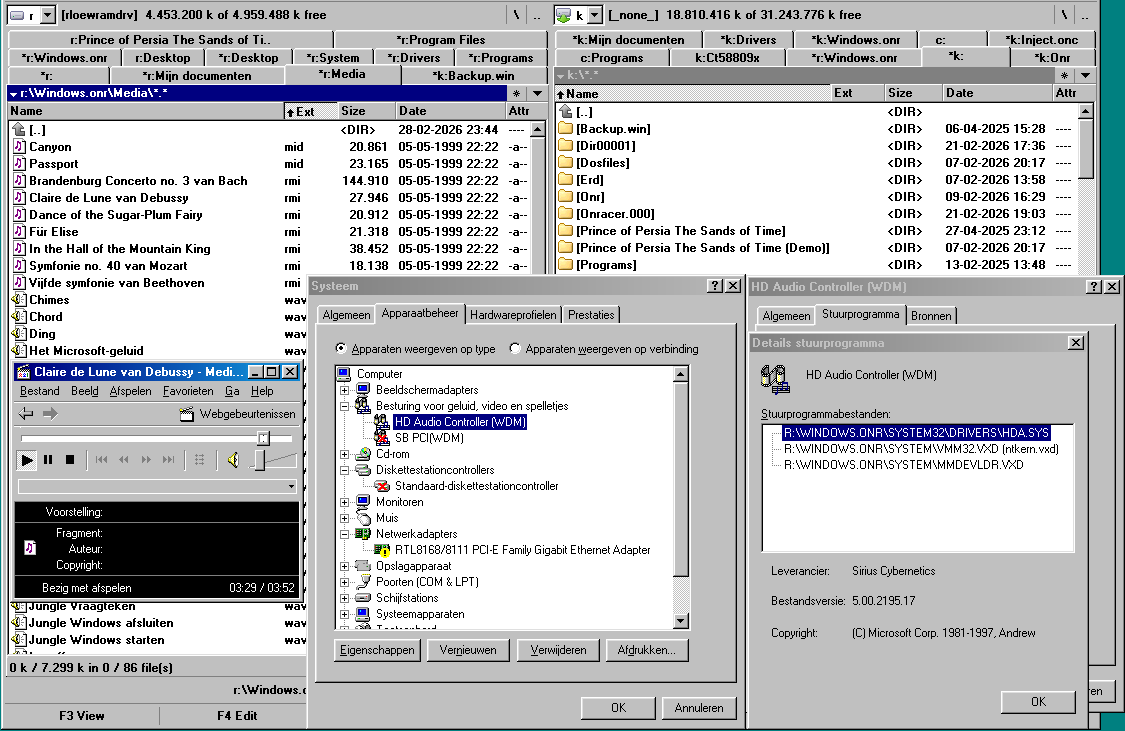
Great, this driver-version, it is actually working on Asrock 960GM-GS3 (SB710/ ALC662). I tested wav, mp3, mid and rmi: all GOOD. Volume sliders are working and mute in Mplayer2 too (not available currently with Master Volume). I installed from Device Manager, Master Volume only popped up on Taskbar after disabling and enabling again. Dxdiag: all tests succeeded (only software buffering available), including MIDI Mapper. I checked playback speed with my stopwatch, seems to be correct.

-
I just tested Alpha-017.2 with Asrock 960GM-GS3 on SB710/ ALC662. Same as Alpha-016/017.1: first one or two notes of music seems to be heard, then repeat these endlessly. Different tone for different music. Sound started only after disabling Master Volume and enabling again. No response on this volume slider, nor in volume slider of mplayer2. Mute button in mplayer2 did not work either. BTW no other sound drivers active.
-
Nice output. I compared with the Codec Dump, only difference is EAPD in PIN 0x17 (in your case) and some different PIN Defaults (can be programmed anyway). No Jack Colors decoded? Strange Node 0x16 was not identified with Verb 'F000C', but from other responses it is clearly a PIN Widget.
-
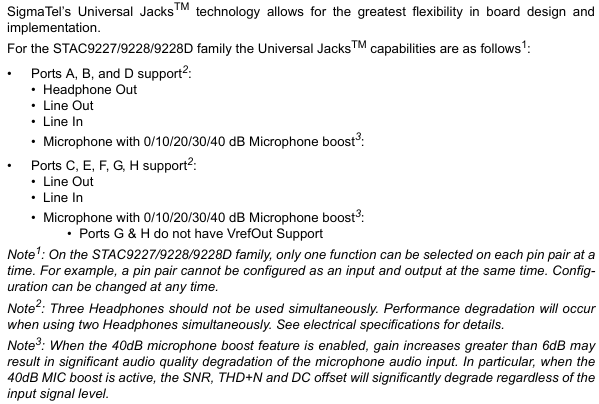
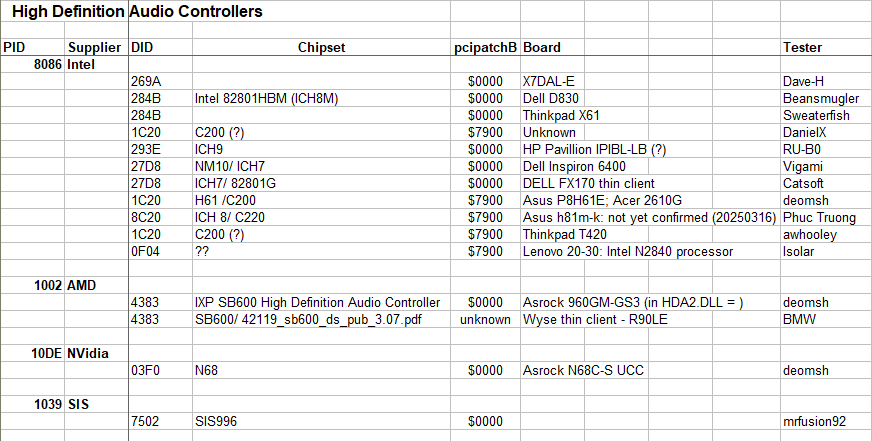
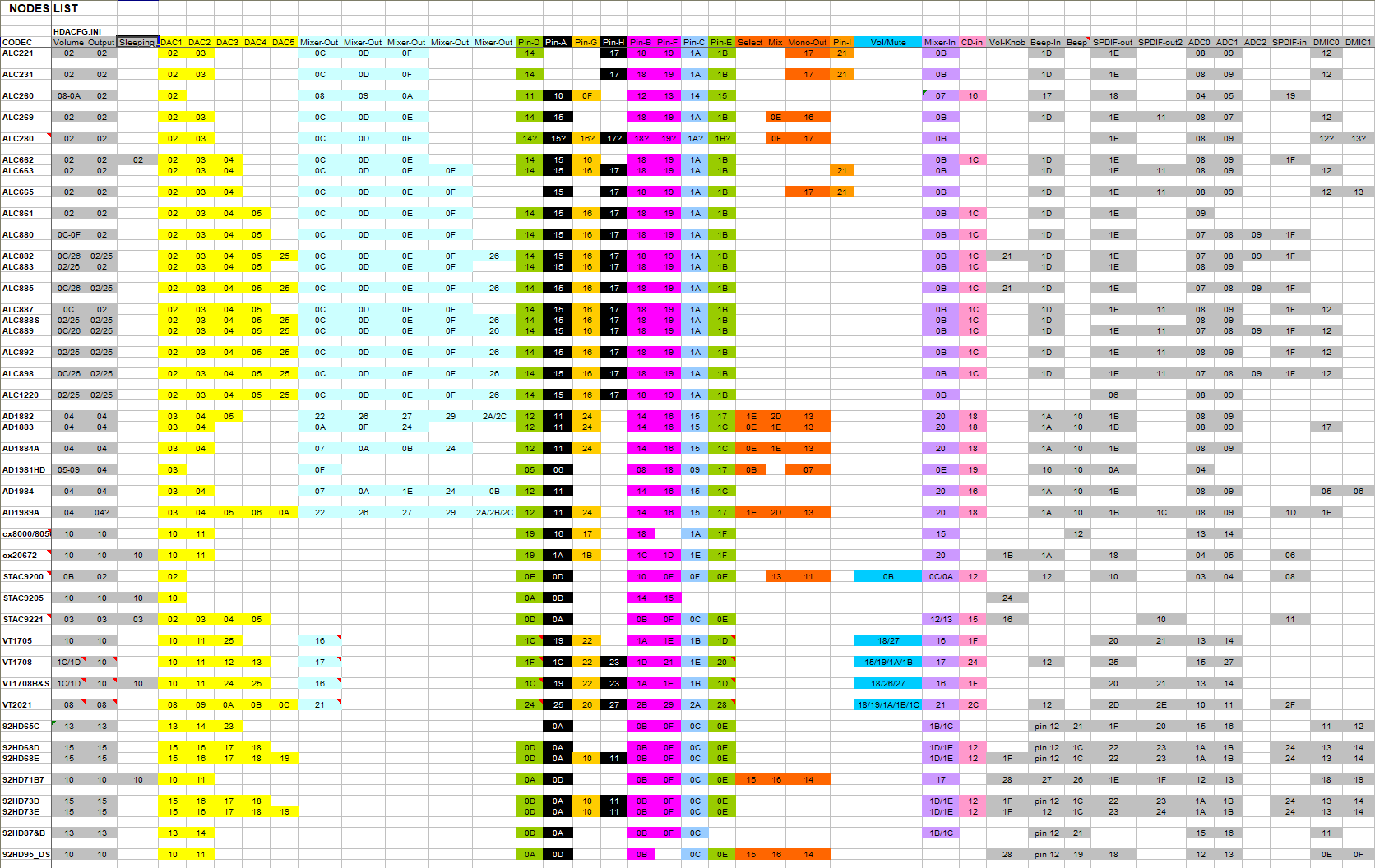
I extended my list in Excel: BTW DID of Realtec codecs are most of time the same as their model number, but not always! About my suggested Line/Headphones Playback path: the actual wiring of a codec can be quite different. This is from a Sigmatel datasheet: Sorry about the confusion, ment is two lines needed: $01270610;AC_VERB_SET_CHANNEL_STREAMID;01 $01224011;AC_VERB_SET_STREAM_FORMAT;44.1kHz_16-bits My list is 'used with HDA2.DLL' only. You can expand with ALSA (Linux) or other information. Here is an overview of HDA-controllers, but full list will be about 80-120 Dev's (AI-guess): https://wiki.kolibrios.org/wiki/Intel_High_Definition_Audio?utm_source=copilot.com BTW as you can see YOUR controller is not mentioned. I'd like to get your output from ALC280, so I can compare with the codec dump. Still many question marks in my list. As an example what I expect: this is my list I made yesterday for VIA VT1705, after I managed to install Windows98SE on Asrock N68C-S UCC (earlier I used my eight years old Windows 3.1 installation). VT1705.ZIP P.S. About the 256 verb-limit: I believe this is HDA-Spec, see Chapters 3 & 4 of Intel's High Definition Audio Specification.
-
About EAPD: Inverted EAPD is luckily rather uncommon. Here are is an example: https://lxr.missinglinkelectronics.com/linux+v6.15/sound/pci/hda/patch_analog.c I extended my investigation up to 70 documented codecs to generalise for 'common' DAC's and PIN-widgets. I also added (most of the time theoretical) VolumeWidget/ OutputWidget and Line/ Headphone Playback path. My conclusion is that DAC Widget $12 must be added twice to my latest version of HDAICOUT.HDA. So 255 lines now, but I still reach the Get Verb at the end according to HDAICIN.TXT (from my notes for personal use): BTW greyed-out Mixer-In means NO loopback functionality found. About Wait 1 & 2 settings: This make sense. 'Modern' computers are incredibly fast. About VOLUME: There is an example in this thread where low volume setting was needed: https://msfn.org/board/topic/178295-audio-driver-for-realtek-hd-audio-hardware-testing-thread/page/16/#findComment-1186989 About NOSNOOP: Good! But try to fix documented/ tested cases only About TO FIX: - $001F0005 is still needed to populate some entry in HDACFG.INI. I tried myself to skip if NID <> 1, but I failed. - Using Get Verbs to 'determine max volume and automatically set to 80% or thereabouts' is a good idea. Did you play 'HDA bauble poker' with your HDADRV9L already? - Setting left and right volume separate will give more control, the GET Verb is not combined! So why? You have enough space, unless you ment the hardcoding of HDAICOUT.HDA in HDA.PAS? - I am curious about 'microphone', what do you mean with 'record'? Do you want to play karaoke?
-
True or False? USB2 + Win 98 + Intel 915 = Impossible
deomsh replied to waltah's topic in Windows 9x/ME
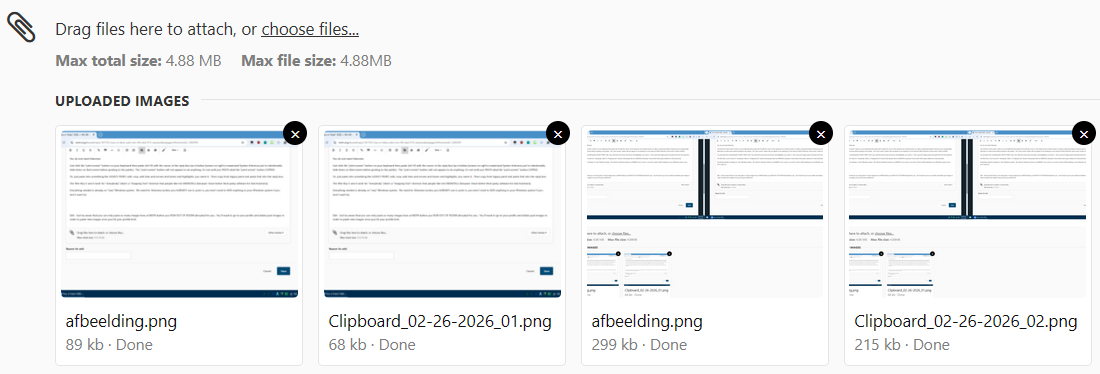
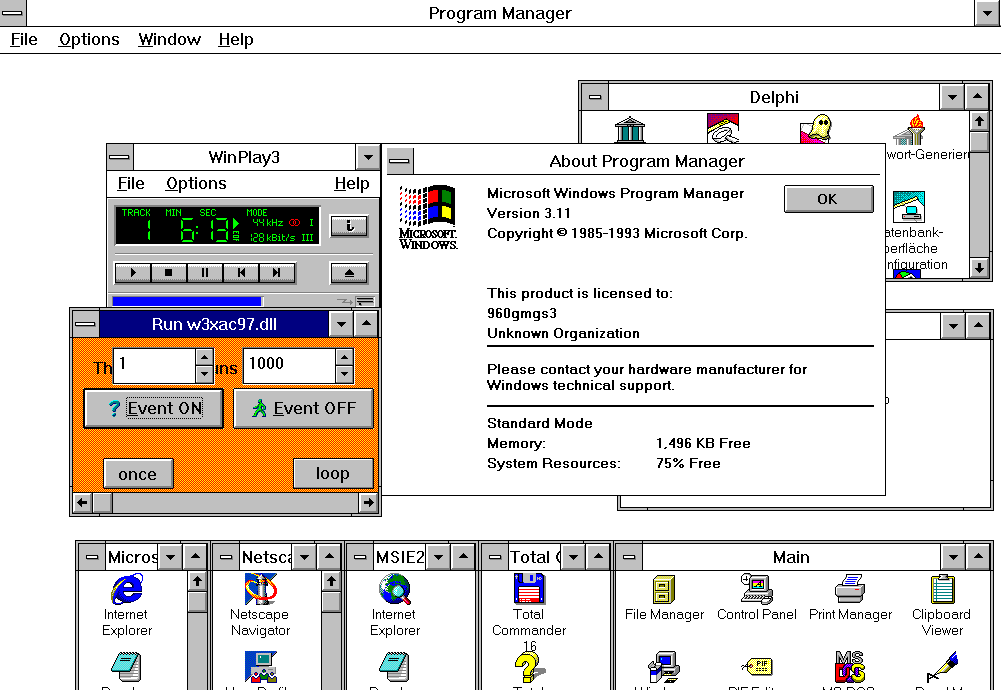
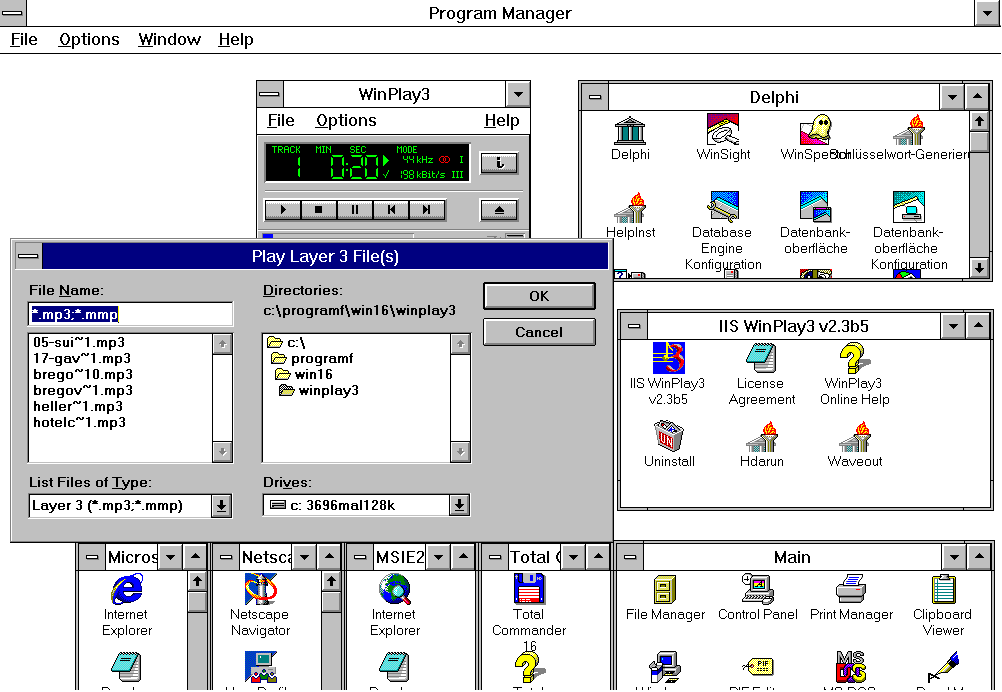
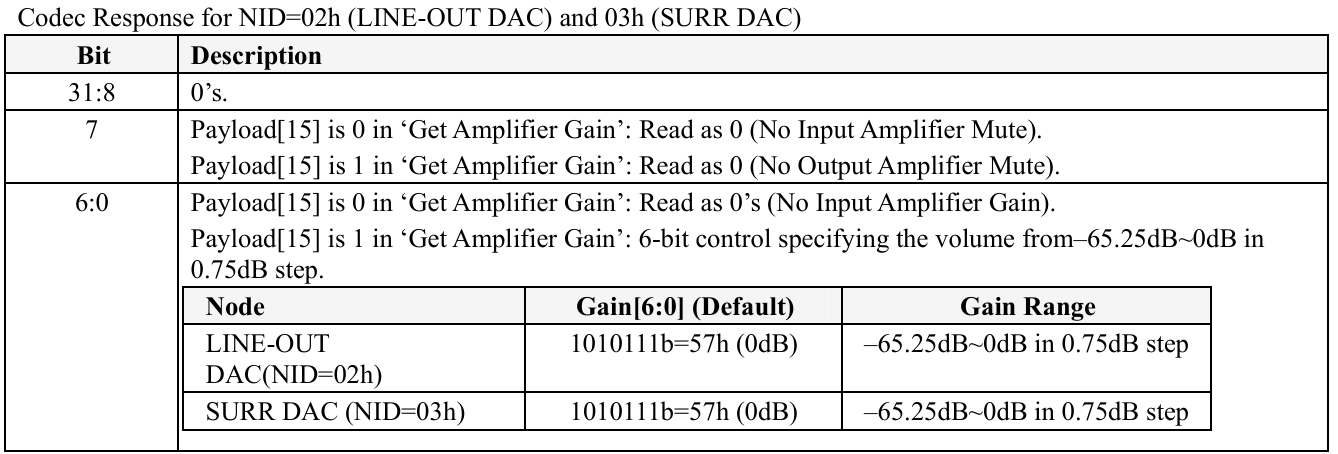
True you can directly paste (see 'afbeelding' below), but filesize with Irfanview is more economical with highest compression (see Clipboard_xxx.png below). About using Windows-Key+Shift+S you are missing the point: pasting a full print-screen is most of the time unreadable if containing chars, with Windows-Key+Shift+S you can select without using some extra tool like Paint (even without Irfanview). In my opinion this is a good and easy Windows 10 tool for daily use. Sadly Windows 11 gives some dialog after the mouse-selection, with long waiting time going away to make next print-screen selection. If not included in the OS used, there will be numerous snipping tools available. About IrfanView: of course this is not an advise to install such a tool, I just described my method to post pictures on MSFN. To be fully clear: for me 'Description' is not the same as 'Prescription'.
-
True or False? USB2 + Win 98 + Intel 915 = Impossible
deomsh replied to waltah's topic in Windows 9x/ME
My method (using Windows 10): select on screen with your mouse after Windows-key+Shift+S, paste in Irfanview, save as *.png, than drag the file into your post where the cursor is currently. -
I used version 9J. I compared 9J/9K/9L in case of HDALOG.TXT (on Asrock 960GM-GS3 with HDA controller 1002:4383 and codec 10EC:0662): 1) With HDAICOUT.HDA all log's are equal on Windows 3.1 without [VOLUME] setting in HDACFG.INI (written if WAVEOUT.EXE was used). The driver always sent '7F' to VolumeWidget set. On Windows 3.1 responses to GET Verbs sent further good, but on Windows 98SE intermittendly the response to Verb 001F2000 was OR the wrong 'Board_Implementation_ID' OR even zero's (on Windows 98SE with version 9K/9L). Seems also different on how 'cold' or 'hot' my system was; 2) Without HDAICOUT.HDA all log's are almost always equal in size, but intermittendly the response to Verb 001F2000 was or the wrong 'Board_Implementation_ID' (on Windows 3.1) or even zero's (on Windows 98SE with version 9K/9L. Version HDADRV9J seems to be a little 'better', not fully sure). So I think I have timing-problems too, especially on Windows 98SE without HDAICOUT.HDA (needed on my system tested anyway). I also found if the 'right' VolumeWiget is set in HDACFG.INI the volume setting in HDAICOUT.HDA is overruled (on HDADRV 9J/9K/9L). But with WAVEOUT.EXE volume setting can be adjusted and is written into HDACFG.INI. Also overuled in case of OutputWidget: always 44.1kHz 16-bits. But I think the codec will switch to the right frequency if needed? Both tested with sending GET Verbs with AHDA17 version O (INTELHDA.EXE). About Mytimer=$0 This setting in HDACFG.INI was added by Watler in case after a DOS-session sound was 'gone', and/ or in case of problems with virtual memory. So especially useful in case of Windows 3x Standard mode (no virtual memory). Although he said the default setting (Mytimer=$1) should work on Windows 3x Standard mode, on my system/ installation I always needed HDARUN.EXE in this case: Verb 707: On my system payload '0C' introduced noise, that's why I always use '40' as default, but this can simply be changed in HDAICOUT.HDA. Using Input's (payload '20' ) only make sense on codecs with a loopback function, most of the time a Mixer Widget and/ or a Selector Widget. I only used the analog CD-in port, no problems with Vref experienced (maybe not supported?). Unless you want to re-write HDA2.DLL to cover the recording part (currently playback only). About hard-coding HDAICOUT.HDA inside HDA.PAS: It should be possible, but you will loose the flexibility of HDAICOUT.HDA. In case of EAPD: there exist codecs with inverted EAPD (I believe some Lenovo laptop's!). From a more 'overall' perspective it would be more useful to concentrate on the 'controller part' and the codec-identification. But of course: it is all up to you!
-
Good to hear the report can be of use to your investigation. The polling saved in HDALOG.TXT has always been like this. Good catch $000F0005 (from my notes): I just tested my eight years old Windows 3.1 installation on Acer Veriton M2610G (8086:1C20 and 10EC:0662). Only Standard mode worked, but sound is still quite good (HDARUN.EXE is needed on Windows 3 Standard mode). With HDAICOUT.HDA the file HDALOG.TXT started as usual: $000F0000=$10EC0662 $000F0004=$00000000 $000F0005=$00000000 $000F0000=$10EC0662 $000F0002=$00100101 $000F0004=$00010001 $001F0011=$40000002 $001F2000=$1025C000 $001F000F=$0000000F $001F000A=$000E0160 $001F000B=$00000001 $00224011=$00000000 $00270610=$00000000 $00270500=$00000000 $0023A07F=$00000000 $0023907F=$00000000 And without HDAICOUT.HDA (not needed on this system if Widgets in HDACFG.INI are 'good' - further only needed $pcipatchB=$7900): $000F0000=$10EC0662 $000F0004=$00000000 $000F0005=$00000000 $000F0000=$10EC0662 $000F0002=$00100101 $000F0004=$00010001 $001F0011=$40000002 $001F2000=$1025C000 $001F000F=$0000000F $001F000A=$000E0160 $001F000B=$00000001 $00170500=$00000000 $00C707C0=$00000000 $00C3B000=$00000000 $00C3B000=$00000000 $00D707C0=$00000000 $00D3B000=$00000000 $00D3B000=$00000000 $00E707C0=$00000000 $00E3B000=$00000000 $00E3B000=$00000000 $00F707C0=$00000000 $00F3B000=$00000000 $00F3B000=$00000000 $010707C0=$00000000 $0103B000=$00000000 $0103B000=$00000000 $011707C0=$00000000 $0113B000=$00000000 $0113B000=$00000000 $012707C0=$00000000 $0123B000=$00000000 $0123B000=$00000000 $013707C0=$00000000 $0133B000=$00000000 $0133B000=$00000000 $014707C0=$00000000 $0143B000=$00000000 $0143B000=$00000000 $015707C0=$00000000 $0153B000=$00000000 $0153B000=$00000000 $016707C0=$00000000 $0163B000=$00000000 $0163B000=$00000000 $017707C0=$00000000 $0173B000=$00000000 $0173B000=$00000000 $018707C0=$00000000 $0183B000=$00000000 $0183B000=$00000000 $019707C0=$00000000 $0193B000=$00000000 $0193B000=$00000000 $01A707C0=$00000000 $01A3B000=$00000000 $01A3B000=$00000000 $01B707C0=$00000000 $01B3B000=$00000000 $01B3B000=$00000000 $00224011=$00000000 $00270610=$00000000 $00224011=$00000000 $00270610=$00000000 $00270500=$00000000 $0023A032=$00000000 $00239032=$00000000 So the starting GET Verbs are fully equal. Good to note: without HDAICOUT.HDA there seems to be a rather huge selection of Widgets that are unmuted now (twice!) and all set as output with activated headphone amplifier too. Also DAC-related Verbs are sent twice instead of once (with HDAICOUT.HDA). But thanks to the fourty versions of HDA2.DLL Watler made me for testing, I have no problems finding the right codec on my (available) systems. I can't remember if this really has been a problem. At least on version 8G my codec was correctly identified. Main difference with the version just before I had to test (HDADRV8e) where two new functions: 'function HDA_init(busnu,funnu:word;name:longint):boolean;' and 'function Scan_PCI_HDA_cards:boolean;'. Still there in HDADRVJ with some (minor?) changes.
-
Nice experiments, you seem to be equipped for this task. Last week I did a quick reading of my Turbo Pascal/ Delphi kid's-book to grasp the structure/ syntaxis of pascal, but the HDA-controller parts of HDA.PAS are far out of my reach however (and no Problem-to-Solve). In the past I once did a full reading of Intel's High Definition Audio Specification, but later I limited myself to the Verb-parts. A few months ago I had to learn and compile nasm, with help of mrexodia I got acess to pi (from pi.ai) in Ubuntu on Virtual Box. Although I think it is not a good idea to try to let AI do the job, AI can be quite helpful for teaching and analysis. I asked pi to write a compliance report of HDA.PAS. No problems found on the Verb-level, but lot's controller related. Maybe you can use it, only about ten pages. HDA_Compliance_Report_HDA.PAS_[pi].rtf
-
Sound is good with Alpha-017.1 on Acer Verotin M2610G with 8086:1C20 and 10EC:0662. All DirectX tests (only sofwarebuffering available) oke, except MidiMapper (HRESULT = 0x80004005). Volume-slider in Windows 98SE default Mediaplayer is working too.
-
I tested my latest quasi-universal version of HDAICOUT.HDA (Codec index=$0). First I didn't reached the GET-Verb at the end, according to HDAICIN.TXT. But if I deleted all commented-out lines, everything was fine. It seems the total number of lines was to high, so it seems commented-out lines are counting too. Tested on all three latest versions of HDA2.DLL: HDADRVJ, HDADRVK and HDADRVL. All HDALOG.TXT files stayed nice small. Except for two lines I moved all commented-out lines AFTER first few lines of a section, and the section with Connection Select Verbs is moved to the end, because these are less important (most of the time default setting already?). HDAICOUT.HDA.ZIP
-
Just tested Alpha-017.1 with Asrock 960GM-GS3 on SB710/ ALC662. Same as earlier, still looks like only first two 'tones' are played (different 'tone' for other music file).
-
Interesting workaround, but you must know your 'Codec index' beforehand. Did you try with code in your post before to set both 'i := 200' instead of 'i := 50' in the 'while (...) do' loops? Currently I can not say anything about the legal status of the code of HDA2.DLL, I never asked Watler. BTW better add original version number to your code, in your case probably HDADRVJ?
-
I tested Alpha-017 with Asrock 960GM-GS3 on SB710/ ALC662. Same as Alpha-016: first one or two notes of music seems to be heard, then repeat these endlessly. But volume is much lower now. I played a bit with the settings from the HDA.INF, no differences (found in HKLM\System\CurrentControlSet\Class\MEDIA\0018\Settings\ on my system, if I remember well). Following settings ment: HKR,Settings,SkipControllerReset,0x00010001,0 HKR,Settings,SkipCodecReset,0x00010001,0 HKR,Settings,UseAltOut,0x00010001,0 HKR,Settings,UseSPDIF,0x00010001,1 HKR,Settings,UseDisabledPins,0x00010001,0 HKR,Settings,UseDmaPos,0x00010001,0 Same results after full reboot (cannot return from exit to MS-DOS, driver gives yellow exclamation mark in Device Manager).
-
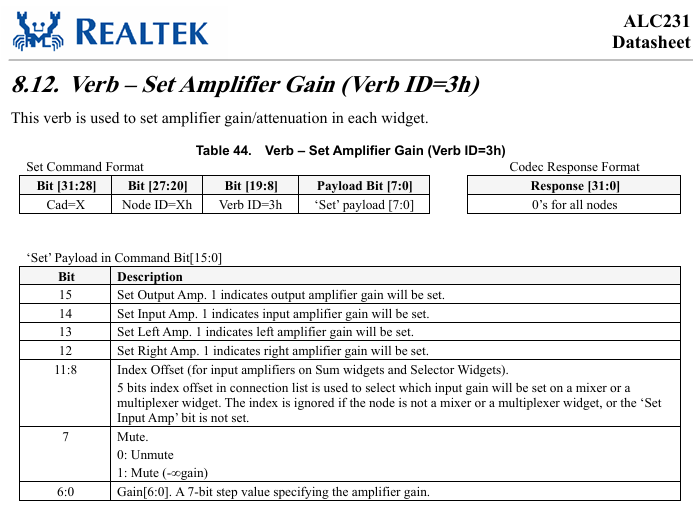
Nice experiments, I am glad pcipatchB=$7900 did the trick. Earlier I hesitated because your chipset is (still) unknown, but your print-screen of 8086:0F04 seemed to justify an experiment without further documentation. About Verbs needed: the three Widget entries in HDACFG.INI will sent Verbs too. I am puzzeld why the response of the SET Verbs '$0023A07F and $0023907F' value is still 7F (if I understood you well!), *somehow* I expected the max value returned. I looked into Intel's 'High Definition Audio Specification', the relevant information seems to be (Section 7.3.3.7): "Gain is a 7-bit “step” value specifying the amplifier gain, the actual dB value of which is determined by the “StepSize,” “Offset,” and “NumSteps” fields of the Output Amplifier Capabilities parameter for a given amplifier. After codec reset, this “Gain” field must default to the “Offset” value, meaning that all amplifiers, by default, are configured to 0 dB gain. If a value outside the amplifier‟s range is set, the results are undetermined." (bold by deomsh) I am not fully-fully sure anymore if the codec dump with max 57h steps is all the info needed to predict the maximum value, but you can try with HDAICOUT.HDA sending $0023B07F and next time $0023B057 and use your ears if there is any volume difference (best with headphones in my opinion). Also you can study the codec dump and/ or the Datasheet of ALC231 again: The bold part of the quotation above suggests there can be *some* problems if Amplifier Gain (= volume) is set out of range, which supports earlier experiences mentioned in this thread. Nice to hear Verb 3Fxxx is working, I used this inside (and mentioned you too) in my latest quasi-universal version of HDAICOUT.HDA. In Intel's 'High Definition Audio Specification' I find a corroboration (Section 7.3.3.7): "If both bits are set, both amplifiers are set; if neither bit is set, the command is effectively a no-op. Any attempt to set a non-existent amplifier is ignored." This only gives no clue about the input amplifiers of IN/ OUT Pin Widgets, if the Pin Widget set to OUT. If still activated there can be noise introduced, but without loopback to the Playback Path set, I expect no real problems. About Power states: no Sleeping Widgets is *good* in case of HDA2.DLL, maybe less in case of your battery... About Selection Nodes: Realtek codecs seems to set them to the default Playback Path. Same for 'open' Mixer inputs (in this respect ALL my earlier versions of quasi universal HDAICOUT.HDA where based on experiences with Realtek codecs). About fixing 'Codec index': can you share your lines please? I assume in Watlers HDA.PAS.
-
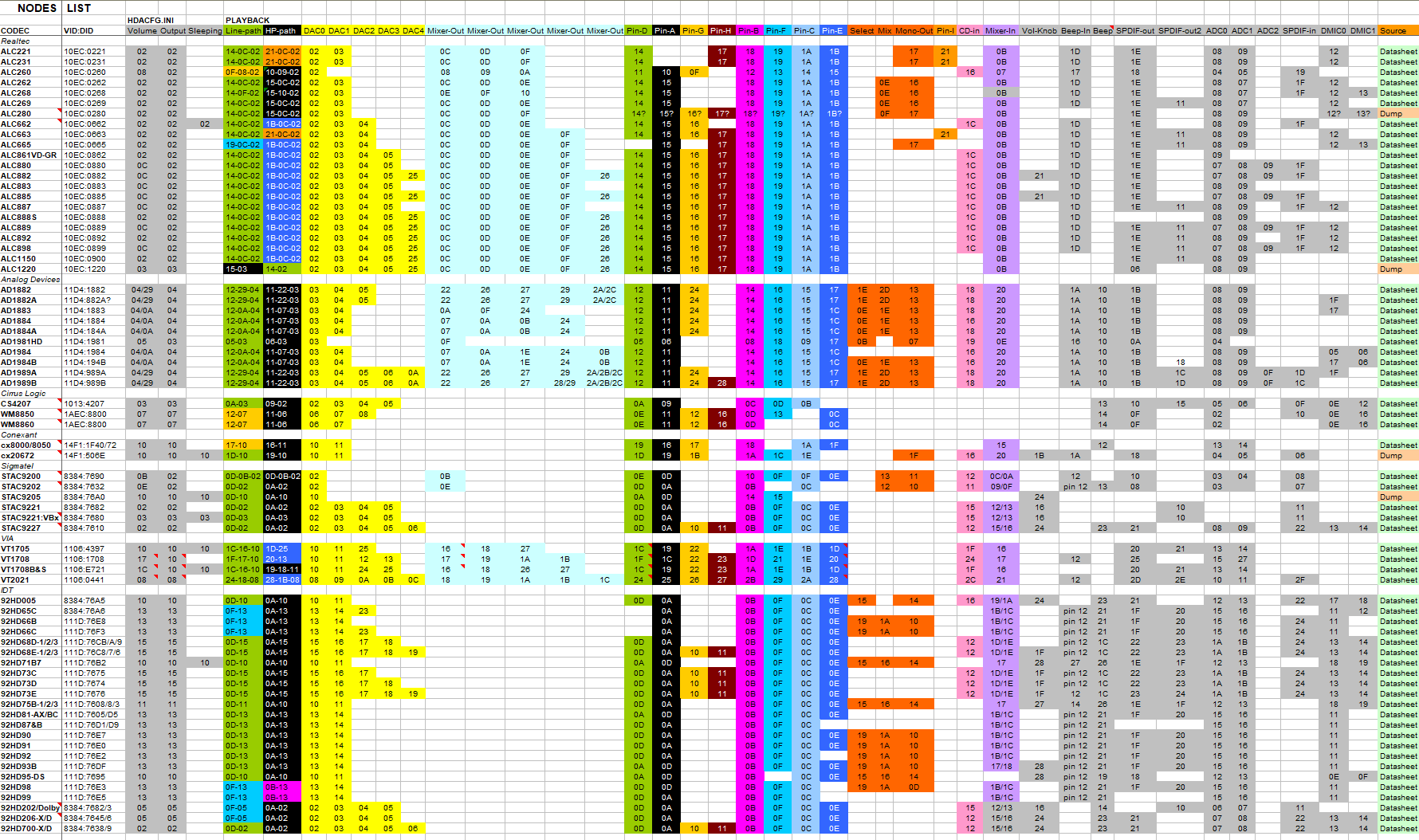
I asked Watler in August 2017 for help, running Windows 3.1. That time the actual version was Hdadrv6. Until December 2017 I had to test numerous versions, up to HDADRVJ. The only update regarding No Snoop was the SB600 HDA controller in my SB710 chipset. But luckily he added 'pcipatchB' to HDACFG.INI... Next a print-screen of my current list (ment for personal use): Watler was willing to develop his HDA-driver further, but he run out of machines to test. Now and then he has been 'seen' on www.win3x.org. Sadly he had to close his win3x forum (conforums stopped). But just before closing I managed to save most of the forum on the Wayback-machine: http://win3x.conforums.com/index.cgi?board=Pascal&action=display&num=1502071336 I had to test Interfaces too, maybe there is something 'into it' you can use with your timing problem?
-
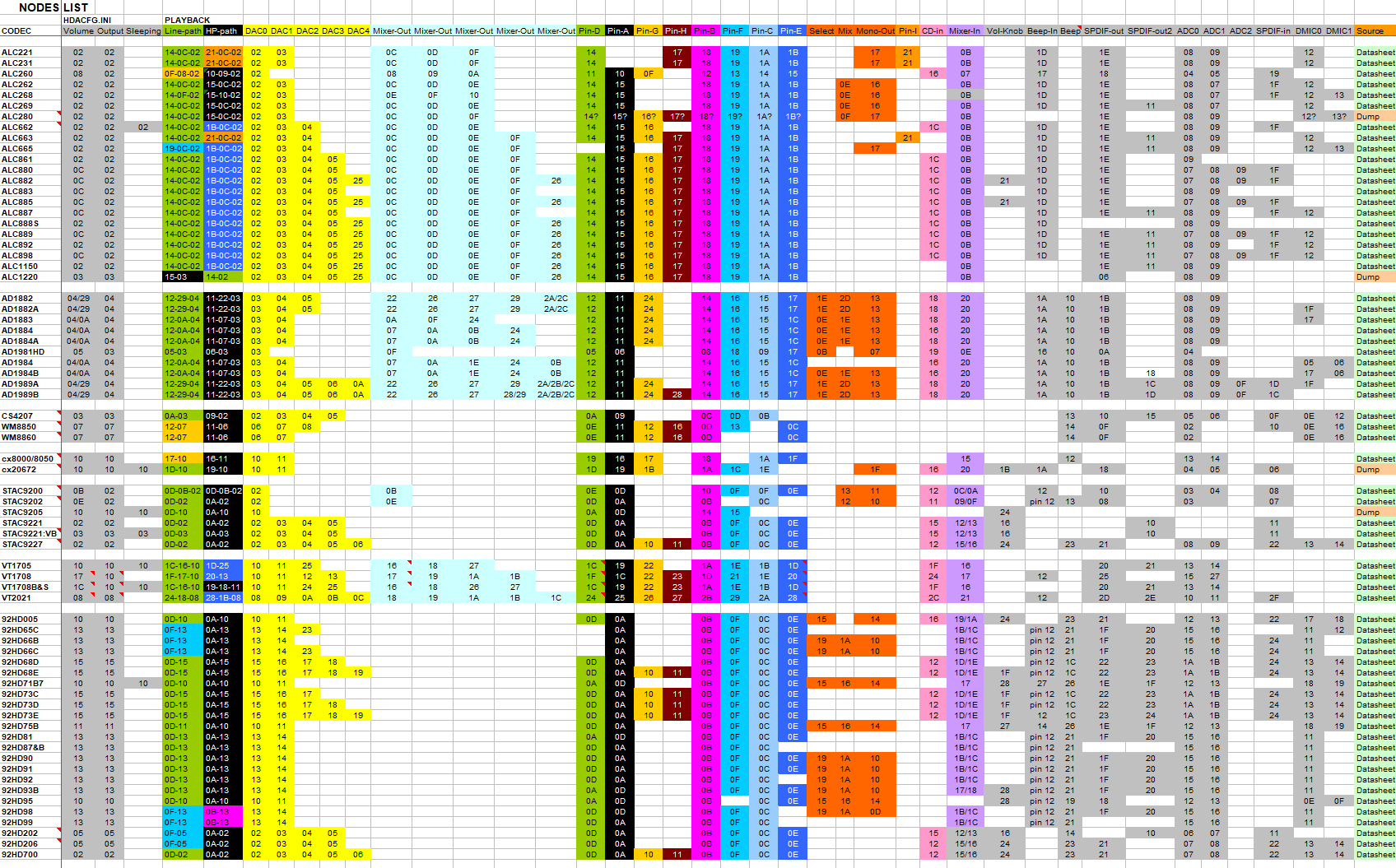
Thanks for the WPCREdit image. I think it is time to try pcipatchB=$7900 in HDACFG.INI If you look at address 79h, you can see this is the default in (most?) Intel High Definition Audio Controllers: 08h Because pcipatchB can address ONE Byte only (78h-79h is a Word), so we have to use 79h to set the 'No Snoop' Bit11=0 (it is all in this thread). Lately I asked Copilot again about your Intel High Definition Audio Controller 8086:0F04. This time the answer was going into the 'usual' direction. So it is worth a try, but as always: writing to PCI-devices is at our own risk, if any! I would say in your case: if anything does not 'feels' or 'sounds' right, immediately Power down your machine and reset pcipatchB to its original value (I believe pcipatchB=$0000). Best start without HDAICOUT.HDA and set all three Widgets mentioned in HDACFG.INI to $2 and for now Verbinterface=$1 and wait times to $100 for now. Listen with headphones if you can hear anything, even the slightest 'pop' or 'tic'. Do not use Windows Sounds only, but play some CD-quality music file too. I would like to see HDALOG.TXT and HDACFG.INI (to check). About Verbinterface=$0 giving other response values: I thing your problem is with your High Definition Audio Controller! About ALC3220: is commonly seen as equal to ALC280. I have no ideas about Stream 5. About the Source Code of Watler's driver: when I started with Watler's driver I bought a German book 'Turbo Pascal & Delphi fuer Kids' from Hans-Georg Shumann, including a full version of Delphi on CD-ROM. I once managed to compile HDA2.DLL, but I had no real problem to solve... So I never tried to learn more of Delphi. While I was writing these lines, you recompiled HDA2.DLL already for 'Codec index', so it seemes you are much better equiped in this respect. I will look into it soon. ******************************************************* I made new quasi-universal versions of HDAICOUT.HDA, one for each 'Codec index'. I used your idea to set IN/ OUT together, so all highest four bytes at once in case of the Volume Verb. It would nice if you can give it a try. Lately I wrote all the Codec info in my HDAWIN16 folder to my Nodes List. This gives a broad generalisation, from which I selected the DAC's and Pin's to sent Verbs to. See the print-screen, saved in png-format. I raised the number of Nodes/ Widgets to 2Fh, but only Power up and Volume/ Unmute Verbs are sent to all. Connection Select Verbs sent only to common Pin-D/ Mono-out Nodes/ Widgets (Channel0). This time I included EAPD for all selected Pin-widgets, and GPIO is pre-set as Output for max 8 pin's. GPIO needs THREE SET Verbs, look at my comments in the new HDAICOUT.HDA. I added two commented out SET Verbs (xx is the Node number) to their relevant section: ;$0xx707C0;AC_VERB_SET_PIN_WIDGET_CONTROL;hp_amp_out_enable ;$0xx20011;AC_VERB_SET_STREAM_FORMAT;48kHz_16-bits Further at the beginning/ end of each section the relevant GET Verbs for debugging are added (now commented-out). If I counted right, total number of sent Verbs will be 230, so there is not much room to sent more Verbs, for debugging with GET Verbs, or sending other SET Verbs/ Adresses. Best disable some Select Verbs in that case. HDAICOUT.HDA.ZIP: latest version in
-
Aha, a Puzzler. Earlier I doubted if I would give you my debug-version of HDAICOUT.HDA so early, possibly disturbing you in your own development. I am more of a Problem Solver: if there is some problem I wake up, if it is solved I loose interest. 1) Not neccessarily, I'd like to see a picture of 8086:0F04 from WPCREdit in 8-bits mode. Please remove HDA.SYS fully in Safe mode before, switch off your machine and wait two minutes before next boot. I also like to know your EXACT chipset, or at least your model number. 2) There is no HDAICOUT.HDA in case of ALC231 in my collection, has been never asked for on msfn. I just downloaded the datasheet in the past, don't know why anymore. 'SPK-OUT+ and SPK-OUT -' will be just electrical characteristics, as such say nothing about GPIO. But you can try the two GPIO settings in the debug version of HDAICOUT.HDA which I commented out. First three SET-Verbs are needed to set GPIO [0], second three for GPIO [1] (NOT their combination). Maybe better rearrange, I made a reconstruction with help of Copilot, I only 'did' GPIO once, with awhooley in another thread: In case of GPIO [0]: $001F1700;AC_VERB_GET_GPIO_DIRECTION;0=input;1=output $001F1600;AC_VERB_GET_GPIO_MASK;0=inactive;1=active $001F1500;AC_VERB_GET_GPIO_DATA;0=GRND;1=High $00171701;AC_VERB_SET_GPIO_DIRECTION;0=input;1=output $00171601;AC_VERB_SET_GPIO_MASK;1=active $00171501;AC_VERB_SET_GPIO_DATA;0=GRND;1=High $001F1700;AC_VERB_GET_GPIO_DIRECTION;0=input;1=output $001F1600;AC_VERB_GET_GPIO_MASK;0=inactive;1=active $001F1500;AC_VERB_GET_GPIO_DATA;0=GRND;1=High In case of GPIO [1]: $001F1700;AC_VERB_GET_GPIO_DIRECTION;0=input;2=output $001F1600;AC_VERB_GET_GPIO_MASK;0=inactive;2=active $001F1500;AC_VERB_GET_GPIO_DATA;0=GRND;2=High $00171702;AC_VERB_SET_GPIO_DIRECTION;0=input;2=output $00171602;AC_VERB_SET_GPIO_MASK;2=active $00171502;AC_VERB_SET_GPIO_DATA;0=GRND;2=High $001F1700;AC_VERB_GET_GPIO_DIRECTION;0=input;2=output $001F1600;AC_VERB_GET_GPIO_MASK;0=inactive;2=active $001F1500;AC_VERB_GET_GPIO_DATA;0=GRND;2=High And so on: their are 8 bits available, so in case of your five GPIO's theory - as far I understand this subject currently - predicts payload '1F' will activate all five together (as Output). Response from the tree GET-Verbs in your HDAICOUT.TXT showed no GPIO-pin's where active! 3) I cannot rule this out, the bit's are indeed different in case of the SET-Verb: In case of DAC's and Mixers this will do no harm. Don't know what happens with Pin-Widgets. I assume: if they can be set as IN/ OUT, probably they will only 'listen' according their initialization with Verb 70720 (Input) or Verb 70740 (Output). I will think about it, could be more economical in case of HDAICOUT.HDA. Sleeping Widget) As you can see in HDALOG.TXT the driver *somehow* skips looking into CODEC Index=$0 too soon. This is known behavior, sadly there is no option in HDACFG.INI to force CODEC Index. But you still can try Verbinterface=$0 (Immediate Command interface, Verbinterface=$1 is the default: CORB/ RIRB). Volume) True, but it is all about setting bit's. As long 'Bit 7' is zero, everything is fine. Setting '7F' was one of my Verbs in my quasi-universal HDAICOUT.HDA: set Volume to max in case of a Volume Widget, or opening output's in other cases. Later I learned '7F' was too high on some codecs, so I lowered the payload to '3F', or even ' 1F'. Vendor Defined Widgets) I was maybe to fast. At least in Datasheet of ALC231 there is some setting mentioned in case of Node/ Widget 20h: Vendor Defined Audio Widget. Seems to be related to some Audio Processing (maybe related to noise reduction?). I am not sure, never tried such an approach. About testing) beter use bigger WAV-files in Sound Recorder or Mediaplayer or mp3 (in case of mp3 some (software-) codec is needed, like the one in DirectX 9.0c). Always use normal CD-quality to avoid switching frequencies, that's why I set you back to the default with '$00224011;AC_VERB_SET_STREAM_FORMAT;44.1kHz_16-bits' About Output Pin) Use headphones too, try always all your Jack's. About your HDAICIN.TXT's) The following '4011' responses are 'good': sent $002A0000; got $00000000 ticks=0000001E sent $00224011; got $00000000 ticks=00000023 sent $002A0000; got $00004011 ticks=0000001E and sent $003A0000; got $00000031 ticks=00000023 sent $00324011; got $00000000 ticks=0000001E sent $003A0000; got $00004011 ticks=0000001E But in HDAICIN2.TXT: sent $003A0000; got $00000031 ticks=0000001E sent $00324011; got $00000000 ticks=00000023 sent $003A0000; got $00000000 ticks=0000001E sent $003B8000; got $00004011 ticks=0000001E is strange, seems to be a delayed response. So better try more wait times. $400 is much higher than the default of $100. Did you try to go down to $50, $25., $10 or $5? I also found DAC_3 (probably headphone default, or for Surround sound?) was not set to Stream 1: sent $003F0600; got $00000000 ticks=0000001E sent $00370610; got $00000000 ticks=0000001E sent $003F0600; got $00000000 ticks=0000001E In case of ALC231 it looks like DAC_3 is related to Stream 2. So maybe sending '$00370620' instead? In case of the Pin-widgets I saw '1A' seems to be Input only, so can be probably left out: sent $01AF0700; got $00000020 ticks=0000001E sent $01A70740; got $00000000 ticks=0000001E sent $01AF0700; got $00000000 ticks=0000001E In case of EAPD I saw EAPD was already active on Pin Widget 15h, according to your earlier investigation this is your headphone widget: sent $015F0C00; got $00000002 ticks=0000001E sent $01570C02; got $00000000 ticks=00000023 sent $015F0C00; got $00000002 ticks=0000001E Further testing: try without the both Codec Reset lines too. If you want to post HDAICIN.TXT files again, better give them more descriptive names, or write a 'header' inside.
-
You have the Real Spirit! 1) Comparing 8086:0F04 only with WPCREdit with and without HDA.SYS will do no harm... 2) True according to 'sent $001F0011; got $40000005', but these are number of pin's only. Unknown if they are used in your laptop and how. I searched for ALC280 with GPIO. They are mentioned in https://lxr.missinglinkelectronics.com/linux+v4.9/sound/pci/hda/patch_realtek.c BTW look at ALC269 too. But most of the time mic-LED or mic-headset related? I also found a codec dump of 10EC0280: https://github.com/yehia2amer/Dell-Precision-T7610-Workstation-Hackintosh-Guide/blob/master/Linux ACPI %26 Sound Dump/asound/codec_dump.txt with 5 GPIO's mentioned. To me it seems almost equal to Block Diagram in Datasheet of ALC231 I have in my collection (ALC269 is a bit different). 3) I didn't mention verb '3F', only as payload in: '3B03F' (channel 0 L+R). I am not sure if your idea of '3Fxxx' is a good verb. For inputs I use 37xxx and for outputs 3Bxxx (both L+R together, more economical in HDAICOUT.HDA). About Sleeping Widget: if HDA2.DLL identifies the wrong codec (you mentioned Codec index $2 - probably your HDMI codec), I have seen earlier in this thread the codec is fully set by HDAICOUT.HDA, while the three Widget settings in HDACFG.INI where not working anymore, and WAVEOUT.EXE neither. Volume: no, there is only one Volume setting per DAC, so if there are 0x57 steps (87 decimal), max will be 57 (hex), so even above 3F (hex)! Power: if you used F0500 you are right if reponse was all zero. Still strange in case of a laptop. But: while debugging I would always Power up all nodes/ widgets. Better test without the two Reset Verbs too. Vendor Defined Widgets: always unknown, never see them mentioned in Datasheets. But now and then identified by Linux guy's (ALSA). But in case of ALC280 I found nothing special so far. For now I have two questions: 1) is the slider moving if you play a sound-file? Just to be sure... 2) Why concentrate on Pin-Widget $014? There are many other possibilities! I did a 'quicky' and made you a debug-version of HDAICOUT.HDA ment for ALC280 only. If you want to test, just rename. Further the usual procedure. ;;Debug-version_1_for_ALC280;HDACFG.INI:Codec_index=$0 Begin $0017FF00;AC_VERB_SET_CODEC_RESET; $0017FF00;AC_VERB_SET_CODEC_RESET;Always_twice! End Begin ;;Node 0x1:Audio_Function_Group $001F0500;AC_VERB_GET_POWER_STATE $00170500;AC_VERB_SET_POWER_STATE;Power up! $001F0500;AC_VERB_GET_POWER_STATE ;;GPIO: io=5, o=0, i=0, unsolicited=1, wake=0 ;; IO[0]: enable=0, dir=0, wake=0, sticky=0, data=0, unsol=0 ;; IO[1]: enable=0, dir=0, wake=0, sticky=0, data=0, unsol=0 ;; IO[2]: enable=0, dir=0, wake=0, sticky=0, data=0, unsol=0 ;; IO[3]: enable=0, dir=0, wake=0, sticky=0, data=0, unsol=0 ;; IO[4]: enable=0, dir=0, wake=0, sticky=0, data=0, unsol=0 $001F0011;AC_PAR_GPIO_CAP;CODEC_AFG_GPIO_CAP=5 $001F1600;AC_VERB_GET_GPIO_MASK;$00000000 $001F1700;AC_VERB_GET_GPIO_DIRECTION;$00000000 $001F1500;AC_VERB_GET_GPIO_DATA;$00000000 ;$00171600;AC_VERB_SET_GPIO_MASK,00 ;$00171700;AC_VERB_SET_GPIO_DIRECTION,00 ;$00171500;AC_VERB_SET_GPIO_DATA,00 ;$001F1600;AC_VERB_GET_GPIO_MASK;$00000000 ;$001F1700;AC_VERB_GET_GPIO_DIRECTION;$00000000 ;$001F1500;AC_VERB_GET_GPIO_DATA;$00000000 ;$00171601;AC_VERB_SET_GPIO_MASK,01 ;$00171701;AC_VERB_SET_GPIO_DIRECTION,01 ;$00171501;AC_VERB_SET_GPIO_DATA,01 ;$001F1600;AC_VERB_GET_GPIO_MASK;$00000001 ;$001F1700;AC_VERB_GET_GPIO_DIRECTION;$00000001 ;$001F1500;AC_VERB_GET_GPIO_DATA;$00000001 ;$00171602;AC_VERB_SET_GPIO_MASK,02 ;$00171702;AC_VERB_SET_GPIO_DIRECTION,02 ;$00171502;AC_VERB_SET_GPIO_DATA,02 ;$001F1600;AC_VERB_GET_GPIO_MASK;$00000002 ;$001F1700;AC_VERB_GET_GPIO_DIRECTION;$00000002 ;$001F1500;AC_VERB_GET_GPIO_DATA;$00000002 End Begin ;;node 0x2:DAC_1 $002F0500;AC_VERB_GET_POWER_STATE $00270500;AC_VERB_SET_POWER_STATE;Power up! $002F0500;AC_VERB_GET_POWER_STATE $002F0600;AC_VERB_GET_CONV;GET_CHANNEL_STREAMID $00270610;AC_VERB_SET_CHANNEL_STREAMID,01 $002F0600;AC_VERB_GET_CONV;GET_CHANNEL_STREAMID $002A0000;AC_VERB_GET_STREAM_FORMAT $00224011;AC_VERB_SET_STREAM_FORMAT;44.1kHz_16-bits $002A0000;AC_VERB_GET_STREAM_FORMAT $002B8000;AC_VERB_GET_AMP_GAIN_MUTE $0023B057;AC_VERB_SET_AMP_GAIN_MUTE;max_vol $002B8000;AC_VERB_GET_AMP_GAIN_MUTE End Begin ;;node 0x3:DAC_2 $003F0500;AC_VERB_GET_POWER_STATE $00370500;AC_VERB_SET_POWER_STATE;Power up! $003F0500;AC_VERB_GET_POWER_STATE $003F0600;AC_VERB_GET_CONV;GET_CHANNEL_STREAMID $00370610;AC_VERB_SET_CHANNEL_STREAMID,01 $003F0600;AC_VERB_GET_CONV;GET_CHANNEL_STREAMID $003A0000;AC_VERB_GET_STREAM_FORMAT $00324011;AC_VERB_SET_STREAM_FORMAT;44.1kHz_16-bits $003A0000;AC_VERB_GET_STREAM_FORMAT $003B8000;AC_VERB_GET_AMP_GAIN_MUTE $0033B057;AC_VERB_SET_AMP_GAIN_MUTE;max_vol $003B8000;AC_VERB_GET_AMP_GAIN_MUTE End Begin ;;node 0xC:Analog_Mixer $00CF0500;AC_VERB_GET_POWER_STATE $00C70500;AC_VERB_SET_POWER_STATE;Power up! $00CF0500;AC_VERB_GET_POWER_STATE $00CB0000;AC_VERB_GET_AMP_GAIN_MUTE;Channel0_R $00CB2000;AC_VERB_GET_AMP_GAIN_MUTE;Channel0_L $00C37000;AC_VERB_SET_AMP_GAIN_MUTE;Channel0_R+L;Unmute ;$00C37080;AC_VERB_SET_AMP_GAIN_MUTE;Channel0_R+L;Mute $00CB0000;AC_VERB_GET_AMP_GAIN_MUTE;Channel0_R $00CB2000;AC_VERB_GET_AMP_GAIN_MUTE;Channel0_L $00CB0001;AC_VERB_GET_AMP_GAIN_MUTE;Channel1_R $00CB2001;AC_VERB_GET_AMP_GAIN_MUTE;Channel1_L $00C37100;AC_VERB_SET_AMP_GAIN_MUTE;Channel1_R+L;Unmute ;$00C37180;AC_VERB_SET_AMP_GAIN_MUTE;Channel1_R+L;Mute $00CB0001;AC_VERB_GET_AMP_GAIN_MUTE;Channel1_R $00CB2001;AC_VERB_GET_AMP_GAIN_MUTE;Channel1_L End Begin ;;node 0xC:Analog_Mixer $00DF0500;AC_VERB_GET_POWER_STATE $00D70500;AC_VERB_SET_POWER_STATE;Power up! $00DF0500;AC_VERB_GET_POWER_STATE $00DB0000;AC_VERB_GET_AMP_GAIN_MUTE;Channel0_R $00DB2000;AC_VERB_GET_AMP_GAIN_MUTE;Channel0_L $00D37000;AC_VERB_SET_AMP_GAIN_MUTE;Channel0_R+L;Unmute ;$00D37080;AC_VERB_SET_AMP_GAIN_MUTE;Channel0_R+L;Mute $00DB0000;AC_VERB_GET_AMP_GAIN_MUTE;Channel0_R $00DB2000;AC_VERB_GET_AMP_GAIN_MUTE;Channel0_L $00DB0001;AC_VERB_GET_AMP_GAIN_MUTE;Channel1_R $00DB2001;AC_VERB_GET_AMP_GAIN_MUTE;Channel1_L $00D37100;AC_VERB_SET_AMP_GAIN_MUTE;Channel1_R+L;Unmute ;$00D37180;AC_VERB_SET_AMP_GAIN_MUTE;Channel1_R+L;Mute $00DB0001;AC_VERB_GET_AMP_GAIN_MUTE;Channel1_R $00DB2001;AC_VERB_GET_AMP_GAIN_MUTE;Channel1_L End Begin ;;node 0xF:Analog_Mixer $00FF0500;AC_VERB_GET_POWER_STATE $00F70500;AC_VERB_SET_POWER_STATE;Power up! $00FF0500;AC_VERB_GET_POWER_STATE $00FB0000;AC_VERB_GET_AMP_GAIN_MUTE;Channel0_R $00FB2000;AC_VERB_GET_AMP_GAIN_MUTE;Channel0_L $00F37000;AC_VERB_SET_AMP_GAIN_MUTE;Channel0_R+L;Unmute ;$00F37080;AC_VERB_SET_AMP_GAIN_MUTE;Channel0_R+L;Mute $00FB0000;AC_VERB_GET_AMP_GAIN_MUTE;Channel0_R $00FB2000;AC_VERB_GET_AMP_GAIN_MUTE;Channel0_L $00FB0001;AC_VERB_GET_AMP_GAIN_MUTE;Channel1_R $00FB2001;AC_VERB_GET_AMP_GAIN_MUTE;Channel1_L $00F37100;AC_VERB_SET_AMP_GAIN_MUTE;Channel1_R+L;Unmute ;$00F37180;AC_VERB_SET_AMP_GAIN_MUTE;Channel1_R+L;Mute $00FB0001;AC_VERB_GET_AMP_GAIN_MUTE;Channel1_R $00FB2001;AC_VERB_GET_AMP_GAIN_MUTE;Channel1_L End Begin ;;node 0x14;[Fixed]Speaker_at_Int_N/A? $014F0500;AC_VERB_GET_POWER_STATE $01470500;AC_VERB_SET_POWER_STATE;Power up! $014F0500;AC_VERB_GET_POWER_STATE $014F0800;AC_VERB_GET_UNSOLICITED_RESPONSE $014F0900;AC_VERB_GET_PIN_SENSE $014F0700;AC_VERB_GET_PIN_WIDGET_CONTROL $01470740;AC_VERB_SET_PIN_WIDGET_CONTROL;out_enable $014F0700;AC_VERB_GET_PIN_WIDGET_CONTROL $014B8000;AC_VERB_GET_AMP_GAIN_MUTE;Channel_0_R $014BA000;AC_VERB_GET_AMP_GAIN_MUTE;Channel_0_L $0143B000;AC_VERB_SET_AMP_GAIN_MUTE;Unmute $014B8000;AC_VERB_GET_AMP_GAIN_MUTE;Channel_0_R $014BA000;AC_VERB_GET_AMP_GAIN_MUTE;Channel_0_L $014F0C00;AC_VERB_GET_EAPD_BTLENABLE;External Amplifier Power-Down $01470C02;AC_VERB_SET_EAPD_BTLENABLE;External Amplifier Power-Down $014F0C00;AC_VERB_GET_EAPD_BTLENABLE;External Amplifier Power-Down End Begin ;;node 0x15;[Jack]HP_Out_at_Ext_Front? $015F0500;AC_VERB_GET_POWER_STATE $01570500;AC_VERB_SET_POWER_STATE;Power up! $015F0500;AC_VERB_GET_POWER_STATE $015F0800;AC_VERB_GET_UNSOLICITED_RESPONSE $015F0900;AC_VERB_GET_PIN_SENSE $015F0700;AC_VERB_GET_PIN_WIDGET_CONTROL ;$015707C0;AC_VERB_SET_PIN_WIDGET_CONTROL;hp_amp_out_enable $01570740;AC_VERB_SET_PIN_WIDGET_CONTROL;out_enable $015F0700;AC_VERB_GET_PIN_WIDGET_CONTROL $015B8000;AC_VERB_GET_AMP_GAIN_MUTE;Channel_0_R $015BA000;AC_VERB_GET_AMP_GAIN_MUTE;Channel_0_L $0153B000;AC_VERB_SET_AMP_GAIN_MUTE;Unmute $015B8000;AC_VERB_GET_AMP_GAIN_MUTE;Channel_0_R $015BA000;AC_VERB_GET_AMP_GAIN_MUTE;Channel_0_L $015F0C00;AC_VERB_GET_EAPD_BTLENABLE;External Amplifier Power-Down $01570C02;AC_VERB_SET_EAPD_BTLENABLE;External Amplifier Power-Down $015F0C00;AC_VERB_GET_EAPD_BTLENABLE;External Amplifier Power-Down End Begin ;;node 0x16;[N/A]Speaker_at_Ext_Rear? $016F0500;AC_VERB_GET_POWER_STATE $01670500;AC_VERB_SET_POWER_STATE;Power up! $016F0500;AC_VERB_GET_POWER_STATE $016F0800;AC_VERB_GET_UNSOLICITED_RESPONSE $016F0900;AC_VERB_GET_PIN_SENSE $016F0700;AC_VERB_GET_PIN_WIDGET_CONTROL $01670740;AC_VERB_SET_PIN_WIDGET_CONTROL;out_enable $016F0700;AC_VERB_GET_PIN_WIDGET_CONTROL $016B8000;AC_VERB_GET_AMP_GAIN_MUTE;Channel_0_R $016BA000;AC_VERB_GET_AMP_GAIN_MUTE;Channel_0_L $0163B000;AC_VERB_SET_AMP_GAIN_MUTE;Unmute $016B8000;AC_VERB_GET_AMP_GAIN_MUTE;Channel_0_R $016BA000;AC_VERB_GET_AMP_GAIN_MUTE;Channel_0_L $016F0C00;AC_VERB_GET_EAPD_BTLENABLE;External Amplifier Power-Down $01670C02;AC_VERB_SET_EAPD_BTLENABLE;External Amplifier Power-Down $016F0C00;AC_VERB_GET_EAPD_BTLENABLE;External Amplifier Power-Down End Begin ;;node 0x17;[N/A]Speaker_at_Ext_Rear? $017F0500;AC_VERB_GET_POWER_STATE $01770500;AC_VERB_SET_POWER_STATE;Power up! $017F0500;AC_VERB_GET_POWER_STATE $017F0800;AC_VERB_GET_UNSOLICITED_RESPONSE $017F0900;AC_VERB_GET_PIN_SENSE $017F0700;AC_VERB_GET_PIN_WIDGET_CONTROL $01770740;AC_VERB_SET_PIN_WIDGET_CONTROL;out_enable $017F0700;AC_VERB_GET_PIN_WIDGET_CONTROL $017B8000;AC_VERB_GET_AMP_GAIN_MUTE;Channel_0_R $017BA000;AC_VERB_GET_AMP_GAIN_MUTE;Channel_0_L $0173B000;AC_VERB_SET_AMP_GAIN_MUTE;Unmute $017B8000;AC_VERB_GET_AMP_GAIN_MUTE;Channel_0_R $017BA000;AC_VERB_GET_AMP_GAIN_MUTE;Channel_0_L End Begin ;;node 0x18;[Jack]_Mic_at_Ext_Rear? $018F0500;AC_VERB_GET_POWER_STATE $01870500;AC_VERB_SET_POWER_STATE;Power up! $018F0500;AC_VERB_GET_POWER_STATE $018F0800;AC_VERB_GET_UNSOLICITED_RESPONSE $018F0900;AC_VERB_GET_PIN_SENSE $018F0700;AC_VERB_GET_PIN_WIDGET_CONTROL $01870740;AC_VERB_SET_PIN_WIDGET_CONTROL;out_enable $018F0700;AC_VERB_GET_PIN_WIDGET_CONTROL $018B8000;AC_VERB_GET_AMP_GAIN_MUTE;Channel_0_R $018BA000;AC_VERB_GET_AMP_GAIN_MUTE;Channel_0_L $0183B000;AC_VERB_SET_AMP_GAIN_MUTE;Unmute $018B8000;AC_VERB_GET_AMP_GAIN_MUTE;Channel_0_R $018BA000;AC_VERB_GET_AMP_GAIN_MUTE;Channel_0_L End Begin ;;node 0x1A;[Jack]_Mic_at_Ext_Front? $01AF0500;AC_VERB_GET_POWER_STATE $01A70500;AC_VERB_SET_POWER_STATE;Power up! $01AF0500;AC_VERB_GET_POWER_STATE $01AF0800;AC_VERB_GET_UNSOLICITED_RESPONSE $01AF0900;AC_VERB_GET_PIN_SENSE $01AF0700;AC_VERB_GET_PIN_WIDGET_CONTROL $01A70740;AC_VERB_SET_PIN_WIDGET_CONTROL;out_enable $01AF0700;AC_VERB_GET_PIN_WIDGET_CONTROL $01AB8000;AC_VERB_GET_AMP_GAIN_MUTE;Channel_0_R $01ABA000;AC_VERB_GET_AMP_GAIN_MUTE;Channel_0_L $01A3B000;AC_VERB_SET_AMP_GAIN_MUTE;Unmute $01AB8000;AC_VERB_GET_AMP_GAIN_MUTE;Channel_0_R $01ABA000;AC_VERB_GET_AMP_GAIN_MUTE;Channel_0_L End Begin ;;node 0x1B;[Jack]Line_Out_at_Ext_Rear? $01BF0500;AC_VERB_GET_POWER_STATE $01B70500;AC_VERB_SET_POWER_STATE;Power up! $01BF0500;AC_VERB_GET_POWER_STATE $01BF0800;AC_VERB_GET_UNSOLICITED_RESPONSE $01BF0900;AC_VERB_GET_PIN_SENSE $01BF0700;AC_VERB_GET_PIN_WIDGET_CONTROL $01B70740;AC_VERB_SET_PIN_WIDGET_CONTROL;out_enable $01BF0700;AC_VERB_GET_PIN_WIDGET_CONTROL $01BB8000;AC_VERB_GET_AMP_GAIN_MUTE;Channel_0_R $01BBA000;AC_VERB_GET_AMP_GAIN_MUTE;Channel_0_L $01B3B000;AC_VERB_SET_AMP_GAIN_MUTE;Unmute $01BB8000;AC_VERB_GET_AMP_GAIN_MUTE;Channel_0_R $01BBA000;AC_VERB_GET_AMP_GAIN_MUTE;Channel_0_L End I hope I made no errors, but please check for yourself. The number of Verbs should just fit I suppose, but you can check with HDAICIN.TXT of course. HDAICOUT_DEBUG_1_ALC280.HDA
-
@isolar I looked into it, up to a certain extent for now. About 1: My initial idea was you can make print-screens to compare register 8086:0F04 without and with HDA.SYS from @Drew Hoffman but today I searched for the appropriate PCI-registers and couldn't find them. It seems your system has a SoC (System on Chip), not a 'classic' design. In some 4274 pages long Intel Datasheet I found things are different, seems have to do with separate PCI Configuration Registers (probably XT_SNP). So I expect no results. I had some conversations with Copilot during traffic, and it seems it is even possible to damage your hardware in this case. 'While less common, repeatedly writing unsupported values to hardware registers could stress the hardware or violate electrical timing constraints, leading to permanent damage in extreme circumstances.' Normally I use a disclaimer like 'writing to PCI registers is at your own risk, if any' but for now I strongly suggest NOT to write to your PCI registers and NOT try to use pcipatchB (unless you are knowing what you are doing). About 2: I Googled ALC280, so far GPIO not found mentioned in Linux sources! About 3: '$00C3B000 - Unmute Audio Mixer': this is a verb ment for OUTPUT's (3B000). For inputs use: Begin ;;node 0xC:Analog_Mixer $00CB0000;AC_VERB_GET_AMP_GAIN_MUTE;Channel0_R $00CB2000;AC_VERB_GET_AMP_GAIN_MUTE;Channel0_L $00C37000;AC_VERB_SET_AMP_GAIN_MUTE;Channel0_R+L;Unmute ;$00C37080;AC_VERB_SET_AMP_GAIN_MUTE;Channel0_R+L;Mute $00CB0000;AC_VERB_GET_AMP_GAIN_MUTE;Channel0_R $00CB2000;AC_VERB_GET_AMP_GAIN_MUTE;Channel0_L $00CB0001;AC_VERB_GET_AMP_GAIN_MUTE;Channel1_R $00CB2001;AC_VERB_GET_AMP_GAIN_MUTE;Channel1_L $00C37100;AC_VERB_SET_AMP_GAIN_MUTE;Channel1_R+L;Unmute ;$00C37180;AC_VERB_SET_AMP_GAIN_MUTE;Channel1_R+L;Mute $00CB0001;AC_VERB_GET_AMP_GAIN_MUTE;Channel1_R $00CB2001;AC_VERB_GET_AMP_GAIN_MUTE;Channel1_L End Mixer: '$00C70100 - Audio Mixer connected to DAC': as such okay, but I don't expect Selector Widgets before a Mixer. If wanted, better test with GET verbs too: $00CF0100;AC_VERB_GET_CONNECT_SEL;Channel0 $00C70100;AC_VERB_SET_CONNECT_SEL;Channel0 $00CF0100;AC_VERB_GET_CONNECT_SEL;Channel0 $00CF0101;AC_VERB_GET_CONNECT_SEL;Channel1 $00C70101;AC_VERB_SET_CONNECT_SEL;Channel1 $00CF0101;AC_VERB_GET_CONNECT_SEL;Channel1 Note for interested readers: a GET-VERB returns a meaningful payload, can be read-out in HDAICIN.TXT. SleepingWidget: I would set 'SleepingWidget=$02' in HDACFG.INI. Volume: If Volume is set to '00' I am afraid it's minimal volume. Please correct me if I am wrong! Better try a moderate value like '3F'. Next example Verbs are without Node/ Widget address: B8000;AC_VERB_GET_AMP_GAIN_MUTE;status_ch0_R BA000;AC_VERB_GET_AMP_GAIN_MUTE;status_ch0_L 3B000;AC_VERB_SET_AMP_GAIN_MUTE;unmute_ch0_L+R B8000;AC_VERB_GET_AMP_GAIN_MUTE;status_ch0_R BA000;AC_VERB_GET_AMP_GAIN_MUTE;status_ch0_L 3B03F;AC_VERB_SET_AMP_GAIN_MUTE;set_volume_ch0_L+R B8000;AC_VERB_GET_AMP_GAIN_MUTE;status_ch0_R BA000;AC_VERB_GET_AMP_GAIN_MUTE;status_ch0_L Power Verbs: I do not understand what you said about your Power States, please explain in (much) more detail. Further: Looks all good to me. Do not forget I have at home only about four different (desktop) High Definition Audio Controllers/ Codecs, all working with my quasi-universal HDAICOUT.HDA and only one HDA controller needed pcipatchB (or set already by Watler's HDA2.DLL, like on my SB710 chipset). I have one laptop from work, but I can not even open a command-line. Booting from USB is out of the question. So I can not run any tests on machines like yours....
-
Just tested Google again with retrozilla v2.2 and k-meleonW9x v1.5.4. Still working on Windows 98SE. Further still same limitations as mentioned in my post above from September 21, 2025.
-
Hi Isolar, long time no see. About your question: there are two possibilities, or their combination. 1) Your HD Audio controler needs a nosnoop bit set, you can check with WPCREdit. 2) The parser of WDMHDA identified some verbs you didn't use in your HDAICOUT.HDA. Possible candidates: 'opening' inputs (mixer?), EAPD or GPIO. Search in this thread for verbs.
-
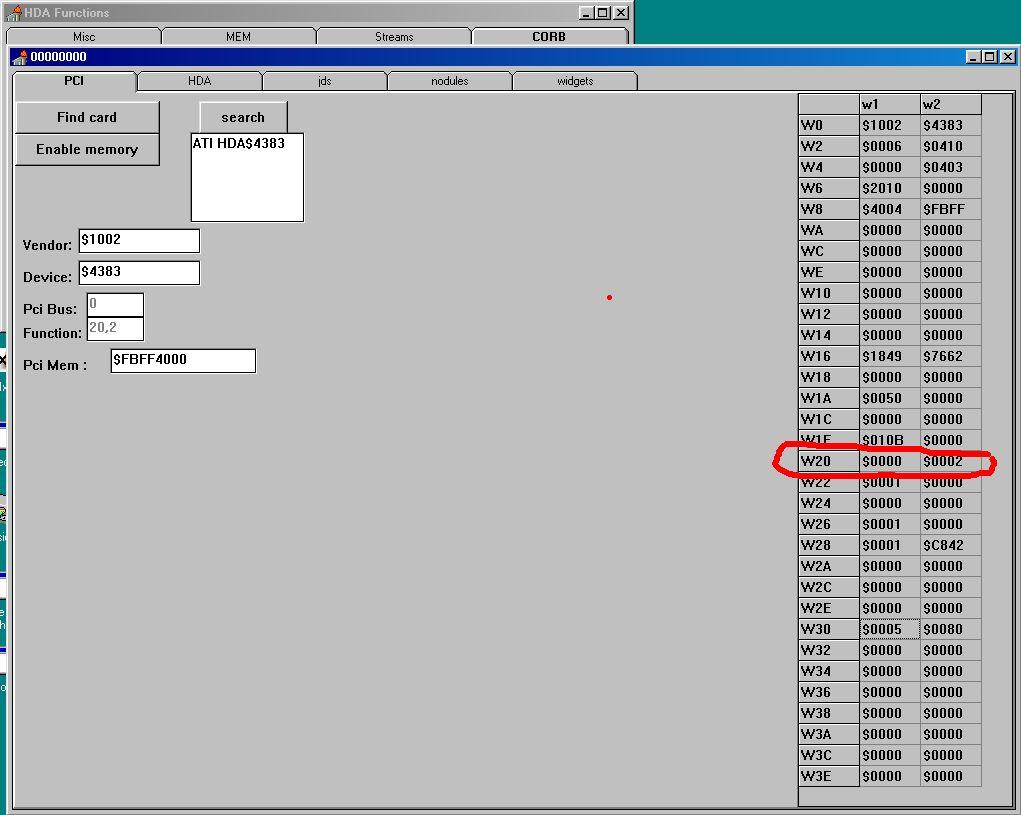
I tested latest version (WDMHDA Alpha-016) on 960GM-GS3 (AMD SB710) with codec ALC662. I got sound if listening to a music WAV-file in Mediaplayer, but first only ONE intermitting 'tone' or 'tic', and sometimes after replay a highly distorted sound, but no music. According to DXDIAG al tests from a software buffer are 'good' (said oke if I heard sound). For High Definition Audio AMD SB710 seems te be same as SB600. First I checked with Watler's tool INTELHDA.EXE (AHDA17O) at pci-level: Except for Pci-Mem same as (working) W20 $0000 $0002: Re: High Definition Audio « Reply #113 on: Dec 2nd, 2017, 4:57pm » QuoteModifyDelete Post Are the chickens happy again? I think I found something interesting with help of AHDA17L. I compared VERB response values and Register values in AHDA17L after starting Windows with and without HDA2.DLL or BUG.BAT (JUDAS21C). On the codec-level I found no real differences when starting Windows with BUG.BAT in comparison with HDA2.DLL only (apart from some minor volume-levels). Also no differences in HD Audio Controller Memory Mapped Registers. In the HD Audio Controller PCI Configuration Space Registers I found one different value in row W20. TEST: AHDA17L NO DRIVER: HDA2.DLL (98E): BUG.BAT (JUDAS21C): PCI W1:$ W2:$ W1:$ W2:$ W1:$ W2:$ W0 1002 4383 1002 4383 1002 4383 W2 0006 0410 0006 0410 0006 0410 W4 0000 0403 0000 0403 0000 0403 W6 2010 0000 2010 0000 2010 0000 W8 4004 F7FF 4004 F7FF 4004 F7FF WA 0000 0000 0000 0000 0000 0000 WC 0000 0000 0000 0000 0000 0000 WE 0000 0000 0000 0000 0000 0000 W10 0000 0000 0000 0000 0000 0000 W12 0000 0000 0000 0000 0000 0000 W14 0000 0000 0000 0000 0000 0000 W16 1849 7662 1849 7662 1849 7662 W18 0000 0000 0000 0000 0000 0000 W1A 0050 0000 0050 0000 0050 0000 W1C 0000 0000 0000 0000 0000 0000 W1E 010B 0000 010B 0000 010B 0000 W20 0000 0000 0000 0000 0000 0002 W22 0001 0000 0001 0000 0001 0000 W24 0000 0000 0000 0000 0000 0000 W26 0001 0000 0001 0000 0001 0000 W28 0001 C842 0001 C842 0001 C842 W2A 0000 0000 0000 0000 0000 0000 W2C 0000 0000 0000 0000 0000 0000 W2E 0000 0000 0000 0000 0000 0000 W30 0005 0080 0005 0080 0005 0080 W32 0000 0000 0000 0000 0000 0000 W34 0000 0000 0000 0000 0000 0000 W36 0000 0000 0000 0000 0000 0000 W38 0000 0000 0000 0000 0000 0000 W3A 0000 0000 0000 0000 0000 0000 W3C 0000 0000 0000 0000 0000 0000 W3E 0000 0000 0000 0000 0000 0000 When starting Windows with HDA2.DLL only and setting W20/W2 to 0002 enables sound immediately when playing a WAV-file in Sound Recorder. Reset to 0000 disables again, etc. When I counted right, this can be Misc Control 2 Register - R/W - 8 bits - [PCI_Reg: 42h] in the AMD SB700/710/750 Register Reference Guide. So I suspected the interface. I believe Watler's driver HDA2.DLL defaults to CORB/RIRB (Verbinterface=$1 in HDACFG.INI), but can be set to Immediate Command (ports). If I try Verbinterface=$0 I get no sound whatever with Watler's driver. So don't know if that will be a solution....