deomsh
Content Type
Profiles
Forums
Events
Everything posted by deomsh
-
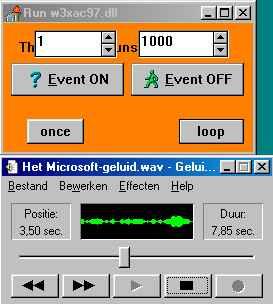
@Dave-H: If the slider of Sound Recorder is moving, there is a stream of sound, I think we can try the next step. Maybe the memory addresses provided by HDATSR are somehow overwritten because of your Windows configuration. My idea is to disable HDATSR and give the driver a memory address just above 1 GB (is working on my System). So temporarily you will have less memory. Can be later fine-tuned if things work. I am not sure if this will conflict with your special memory driver, but don't think so. Configuration: following must be set (some values will be allready there). AUTOEXEC.BAT (.......) REM C:\%WINDIR%\HDATSR SYSTEM.INI (.......) [386Enh] (.......) MaxPhysPage=40000 (.......) HDACFG.INI (.......) [BUSMASTER] myPCIHI=$4012 myPCILO=$0000 myPCI=$40120000 aPCIHI=$4011 aPCILO=$0000 aPCI=$40110000 [HDA_269A8086,948015D9] (.......) Mytimer=0 Verbinterface=$1 wait1=$100 wait2=$100 pcipatchB=$0000 (.......) SleepingWidget=$02 VolumeWidget=$0C OutputWidget=$02 [Volume] PCM=$FFFFFFFF Back in Windows start HDARUN, click "Loop" (no other buttons!) and try to play a WAV file in Sound Recorder (the slider must be moving). Check behaviour of the "HDA Sound" option, and the DMA address of "Audio for HDA Sound 2017" (as you did in your post of 1 April). BTW: before closing HDARUN, first close Sound Recorder, then click "Loop" once again and close HDARUN.
-
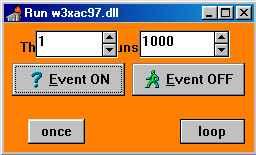
@Dave-H: Did you mean: with the HDACFG.INI-setting Mytimer=0 "the Control Panel "Sounds" applet actually coming to life, in that the test facilities weren't all greyed out, and I could push the test play button on all the system sounds" while with Mytimer=1 everything was grayed out? What about the option "HDA Sound" as Audio Device in Multimedia properties, is that option stable with Mytimer=0, even after a reboot? If this is true, this is a big step forward. In my opinion Windows "Wave device" is in that case delivering sound to the driver. If you open Sound Recorder and start playing a WAV-file, with HDARUN enabled, is the slider moving? If yes, we maybe can ignore your configuration issues in Device Manager for the time being and try next logical step (out of three): to check if the memory address (-range, for a buffer) that the driver needs to send data to the Azalia Controller, is actually "outside the reach of Windows" (this address is different from the one of the cardmemregisters and now shown as the one delivered by HDATSR, somewhere in the 1MB-4MB region). BTW: I think the writing under the HDARUN windows is "This program runs wx3ac97.dll", bad placement, maybe a glitch of the programmer, its not important.

-
@Dave-H: Thanks for all your information! At least your High Definition Audio Controller's memory address is the same as noted in HDACFG.INI. Things are getting more complicated, but more challenging too. You said you "have never been able to resolve these conflicts". Maybe a silly question, but have you already tried a Windows install with SETUP /p i ? I took a look on my own system, but for me its impossible to change settings in Direct memory access controller or System timer, disabling not possible. I am not sure about the first, but as far as I remember Watler told me during our lengthy conversations that some Timer is needed. This (maybe) can be tested with HDARUN.EXE. It must reside in your Windows directory. Included in my INF-File for testing purposes (HDARUN.EXE is ment for Win3.x in Standard Mode, in Enhanced Mode it's not needed). So enable Windows Startup Sound, set "Mytimer=0" in HDACFG.INI and reboot.. Next: try to enable "HDA Sound" as Audio Device in the way you described earlier, but stay in Windows, NO reboot. Then open HDARUN.EXE and click "Event On". If your System timer is the (only) culprit you will be surprised.
-
@Dave-H : The driver is definitely talking to your hardware since CODEC information is received from your hardware. But there is a difference between sending/ receiving Verbs through one of the two possible Verb-interfaces and starting/ sending a continues (PCM-) audio stream. In my opinion (but I may be mistaken) it can be related to the handling of the PCI-memory address on your system in relation to how your chipsets HD Audio Controller is programmed. The reset after reboot of the option in the dropdown menu to select playback devices you described earlier is what bothers me in this respect. Are you sure there is no conflict in the properties of your High Definition Audio Controller in Device Manager? Please deliver the memory address.
-
@Dave-H: MEM looks good, nothing special and Conventional memory only. Your HDACFG.INI gives codec information, so the driver can send/ receive some Verbs (through the HD Audio controller) to/ from your codec. For now I have following ideas: 1) to be sure, check in your bios if everything regarding HD Audio is enabled (not auto, if there is a choice). Your chipset should be somehow capable of ac'97 too. If you find something like that, please disable. 2) Set your VolumeWidget=$0C (according to alc883-datasheet). Don't think that will make any difference now, but try with a reboot. 3) Verbinterface=$0 is the easiest option, if not succesfull reset to $1 please.
-
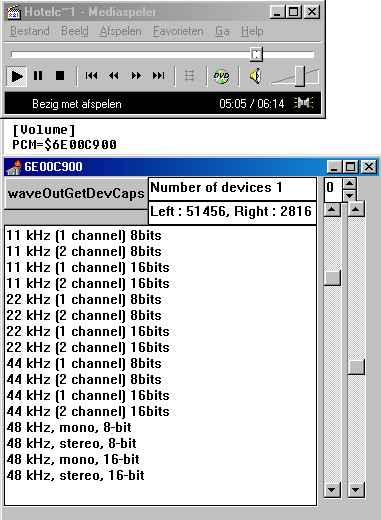
@UCyborg: I virtually do not know anything about VirtualBox, but I am deeply impressed that the Win3.x-16 bit driver connects to your somehow virtual HD Audio. Thanks for testing, I am happy too that my INF-file and my version of Watler's HDAICOUT.HDA are working as intended! Choppy audio with this driver can be an IRQ-issue (is told me). So try to change the IRQ from the "High Definition Audio Controller" to a free one, if that's a simple configuration issue. About your question regarding the volume setting: WAVEOUT.EXE needs the right VolumeWidget in HDACFG.INI. Mine is $02. You can found yours in the datasheet of your (virtual) codec. Volume can be written manually in HDACFG.INI, is set after reboot ( needs the right VolumeWidget too). Use an application with volume control (not there in Win3.x as far is I know, works in Win9x only). HDA Sound (WaveOut) needs the right VolumeWidget too, DirectSound: HDA Sound (emulation) strange enough not. The picture will answer your last question.
-
Thanks. The memory address looks normal if using HDATSR. The ICH10 will be not your controller, but that does'nt matter. I will search for your HD Audio Controller and I will take a look in the source code. Will take some time. In the meantime you can search in your Windows directory for HDACFG.INI. If the file exists, please make a full copy in your reply. Further I will need a full MEM-report. Please open a Command-prompt and enter MEM /A /D > HDADAVEH.TXT Ad this - much bigger - file as an attachment.
-
@Dave-H Sorry, I didn't ment the section "Sound, video and game controllers" in Device Manager. I ment "Sounds and Audio Devices" / "Multimedia" as part of Control Panel (I googled for the right terms for English Win98). My original term "Multimedia properties" was good, it seems to me now So: Control Panel -> Sounds and Audio Devices OR Multimedia -> (gives) Multimedia properties -> Devices -> (gives) Multimedia Drivers -> Audio Devices.
-
@UCyborg Nice that the driver is working in VirtualBox, I have only tested on real hardware. I do not think you have to use HDA. Please can you upload a picture of your "Multimedia properties"? About using this driver in Windows 95: did you install a PCI-bus? Volume control can be done in a number of ways. Do you need some advice? I can try to help if you like
-
Yes, there MUST be an entrance in that section. Maybe the HD Audio Controller of your chipset is not supported by HDA2.DLL. Please give me the VEN/DEV-ID, search in Registry -> HKLM -> ENUM (or use Device Manager of WIN10/XP). BTW this has nothing to do with the ID of your codec.
-
Fine, no problems with my INF-file or virtual memory (not the size of the swapfile matters, but Paging must be enabled as far as I know). But maybe wavehda=hda2.dll is not good on your system, rename to wave1=hda2.dll and reboot. Another option, give (your) full path: wave1=C:\WIN-98\SYSTEM\HDA2.DLL (I have never tried this driver with other WinDir).
-
Yes, its "Sound, video and game controllers" It's "Sounds and Audio Devices" / "Multimedia" as part of Control Panel" (I am using a Dutch version). "TSR loaded" is a good sign for HDATSR, but it seems that HDA2.DLL is not loaded. Please check if its in your System directory, maybe it was not correctly renamed by Windows Setup. Further: what is in the [Drivers] section of your SYSTEM.INI? Last: is Virtual Memory enabled (Swapfile)?
-
The driver is inside SYSTEM.INI and will not be shown in Device Manager. If HDA2.DLL is loaded, there will be a HDA-entry in "Sounds and Audio Devices" / "Multimedia" (as part of Control Panel). 1) Can you see that HDA-entry? Please write down the memory address in Properties. Do NOT change it. 2) Did you hear a soft plopping sound during startup? Best use earphones. This is crucial information! 3) Did you reboot after copying HDAICOUT.HDA to your Windows directory? 4) Is HDATSR loaded? Check with MEM /A /C /P after booting into MS-DOS only (command-prompt with processing of MS-DOS configuration files, mostly number 5. of startup options). The HDAICOUT.HDA I posted is a sort of experimental 'general one', but can be modified for individual codec's, which will take some time seeking and reading documentation.
-
The Win3x HDA-driver is working nice in my WIN98se system, even better than under Windows 3.1 (playback only). You can find the driver here: http://turkeys4me.byethost4.com/programs/ You can install the driver manually, or you can use following INF-file I wrote for easy testing. The INF-file has following functions (quasi Plug&Play): 1. Recognizing a PCI-Card with yellow exclamation-mark in Device Manager as a HDA-controller and name it as such. 2. Copy four files from the folder "HDAFILES" to their respective directories. 3. Write strings for HDA2.DLL and HDATSR.EXE in SYSTEM.INI/AUTOEXEC.BAT. I added an uninstall-string to remove everything related tot this driver. The System Device "High Definition Audio Controller" is not affected by uninstall, it has to be deleted manually in Device Manager (if one prefer the PCI-card with yellow exclamation-mark, but can be left to give information about this specific device). ----------------------------------------------------- GENHDA16.INF ---------------------------------------------------- ;; GENHDA16.INF ;; 2018/03/26 ;; "Watlers World" 16-bit High Definition Audio Driver ;; INF-file Win9x only ;; (c) Copyright 2018 [Version] Signature=$CHICAGO$ Class=System ClassGUID={4D36E97D-E325-11CE-BFC1-08002BE10318} Provider=%W_W% DriverVer=12/23/2017,9j [Manufacturer] %GEN%=GEN.Mfg [GEN.Mfg] %GEN_HDA.DeviceDesc%=HDA2,PCI\CC_0403 [HDA2] DelFiles=HDA2.DelFiles CopyFiles=HDA2DLL.CopyFiles,HDAHLP.CopyFiles,HDA2Inf.CopyFiles UpdateInis=HDA2.UpdateInis UpdateAutoBat=HDA.UpdateAutoBat AddReg=HDA2.AddReg Reboot [SourceDisksNames] 1="HDAFILES",,0 [SourceDisksFiles] hda2.dll=1 hdarun.exe=1 hdatsr.exe=1 genhda16.inf=1 [DestinationDirs] HDA2DLL.CopyFiles=11 HDAHLP.CopyFiles=25 HDA2Inf.CopyFiles=17 HDA2DLL.DelFiles=11 HDAHLP.DelFiles=25 HDA2Inf.DelFiles=17 WATLERInf.DelFiles=17,Other [HDA2.DelFiles] drvidx.bin,,,1 drvdata.bin,,,1 [HDA2DLL.CopyFiles] hda2.dll,,,1 ;;hda2.dll,hda2.dll,hda2.000,1 [HDAHLP.CopyFiles] hdarun.exe,,,1 hdatsr.exe,,,1 [HDA2Inf.CopyFiles] genhda16.inf,,,1 [HDA2.UpdateInis] system.ini,drivers,"wavehda=*",,0 ; deletes existing system.ini,drivers,,"wavehda=hda2.dll",1 ; adds new [HDA.UpdateAutoBat] CmdDelete=HDATSR ; deletes existing CmdAdd=HDATSR.EXE ; adds new [HDA2.AddReg] HKLM,"Software\Microsoft\Windows\CurrentVersion\Uninstall\High Definition Audio 16-bit" HKLM,"Software\Microsoft\Windows\CurrentVersion\Uninstall\High Definition Audio 16-bit",DisplayName,,"High Definition Audio 16-bit" HKLM,"Software\Microsoft\Windows\CurrentVersion\Uninstall\High Definition Audio 16-bit",UninstallString,,"rundll.exe %11%\setupx.dll,InstallHinfSection HDA2.Remove 132 %17%\genhda16.inf" [HDA2.Remove] DelFiles=HDA2DLL.DelFiles,HDAHLP.DelFiles,HDA2Inf.DelFiles,WATLERInf.DelFiles UpdateInis=HDA2.DelInis UpdateAutoBat=HDA.DelAutoBat DelReg=HDA2.DelReg [HDA2DLL.DelFiles] hda2.dll,,,1 ; deleted after reboot [HDAHLP.DelFiles] hdarun.exe hdatsr.exe hdacfg.ini,,,1 ; deleted after reboot hdalog.txt [HDA2Inf.DelFiles] genhda16.inf,,,1 ; deleted after reboot genhda16.pnf [WATLERInf.DelFiles] WATLER~1.INF [HDA2.DelInis] system.ini,drivers,"wavehda=*",,0 ; delete [HDA.DelAutoBat] CmdDelete=HDATSR ; delete [HDA2.DelReg] HKLM,"Software\Microsoft\Windows\CurrentVersion\Uninstall\High Definition Audio 16-bit" [Strings] ;Localized strings W_W = "Watlers_World" GEN = "GENERIC" GEN_HDA.DeviceDesc = "High Definition Audio Controller" SystemClassName = "System Devices" ; ENG ;;SystemClassName = "Systeemapparaten" ; DUT ----------------------------------------------------- By trial and error I found a new 'class' of wave devices accepted by the Drivers-section of SYSTEM.INI, the so called "wavehda"-devices, so other wave-devices remain untouched. Installation: 1) Place the four Sourcedisk files in a directory named "HDAFILES". 2) Go to Device Manager and try reinstalling yellow exclamation marks, mostly named "PCI-Card", by pointing to GENHDA.INF, or delete PCI-Cards and do the installation after reboot while Windows is detecting new hardware. If you hear a plopping noise during startup, the driver is connecting to your codec. If you don't hear the Window s Startup Sound, you have to place HDAICOUT.HDA in your Windows directory. The problem is that the "Widgets" (programmable function blocks) in the codec have default values. HDA2.DLL does not change these values (except a few). This can be done with the textfile HDAICOUT.HDA. If the file exist, HDA2.DLL sent the so called "Verbs" in this file to the addressed Widgets and change values at start-up. Try the one below. Worked for me in case of three different codecs (digital playback only). Copy the file to your Windows-directory and reboot. BTW in case of stability problems set MinFileCache=8192 & MaxFileCache=8192 (or both lower). Latest versions of HDAICOUT.HDA: https://msfn.org/board/topic/178295-audio-driver-for-realtek-hd-audio-hardware/?page=10&tab=comments#comment-1163305
-
@bz07 I do not understand why you want to disable IRQ-steering. As far I as I know, your BIOS will take over and you will loose all control, according what I have red in your laptop's manual about your BIOS Setup. If you want to continue with Audio, better forget all other devices for the time being. You can disable Communication and set the IDE-controller with exclamation mark to "None". Further I suggest temporarily disable following PCI-devices: Video, all USB and Ethernet. Maybe this gives you a free IRQ you can feed to your Audio (but tot be honest I am afraid this will not be the case). If you'r lucky, do not use IRQ9 if you have a choice.
-
Thanks, but Uxteme version you mentioned doesn't export Ordinal 61, so no need tot try.
-
Thanks for your info. In my opinion you must get rid of all Acpi-devices, and have to wait with installing USB/Ethernet/Audio devices until IRQ-problems are solved. As a starter I would suggest following steps. 1) Reboot in Safe mode. 2) rename ALL inf-files newer then the one's of your OS. Latest Viamach.inf to Viamach.inf.new, others to xxxx.inf.old. 3) Rename ALL xxxxx.pnf files to xxxx.pnf.old. 4) In Device Manager delete following devices: all IRQ-holders, both types alike; all USB/Ethernet/Audio devices; and - if still there - ACPI-Bios. 5) Reboot and reinstall your OS with SETUP /p i (watch the space between p and i). 6) During install, say always OK when asked, NEVER point to a driver-directory in this stage. As a result I expect you should have a few yellow exclamation marks in your Device Manager. After this I think it's better to report first, same type of pictures please.
-
Did you copy the DriverVer of Viamach.inf like I said?
-
No problem. Your chipset-driver is old, my idea is first to try the last 9x one: DriverVer=6.0.00.0300. It's inside Via_HyperionPro_524A.zip. You find it on http://download.viatech.com/en/support/driversSelect.jsp > Windows > ME > chipset. Rename your existing Viamach.inf to Viamach.inf.old. Open the zip, go to VIAMACH\DRIVER\WinMe\ and extract the new Viamach.inf. Copy the file to the folder where you found the old Viamach.inf and reboot. If there is still no IRQ for Audio, then go to DeviceManager > Computer > Properties and upload pictures from ALL used IRQ's (three pictures will be needed!). Also one picture for PCI-Bus, tab IRQ-steering please (to see if it's the same as your earlier one).
-
I tested all 31 ROS versions, also an Uxtheme version I downloaded long ago, found on my hard drive. Now I know that's your version. There are no real differences in drawing added toolbars (Toolbar.BMP) in MPC-HC 1.7.5, resizing buttons, or draw buttons that are currently not active. All NOT possible. Just for fun I took Uxtheme (6.00.2900.5512 (xpsp.080413-2105) from my XPSP3 installation, can be used, same results (asks for three other stubs). I can confirm that with your Uxtheme version MPC-HC 1.7.5 is starting without problems (and MPC-BE 1.4.3.5854 too).
-
The IRQ should be there first in my opinion. What's the DriverVer of your Viamach.inf?
-
@jumper My post of Februari 17 was'nt fully accurate. The API's I reported were in fact called by the Uxtheme.dll-version (ReactOS 0.4.3) I started to use after the app I mentioned called Ordinal 61 in Uxtheme. In the meantime I tested all ReactOS versions I could find; from 0.3.8 (first one) up to latest 0.4.11. Here is a list I made with ImportPatcher and Kexports, higher versions needed more stubs to load. Only one stub needed a return-value. IMPORTPATCHER (KernelEx mode VISTA) [Patches needed] Uxtheme.dll=Functions [GDI32.dll] ;SetDCPenColor= ; ROS 0.3.14 - covered since KernelEx 4.5.2 [Ntdll.dll] RtlAllocateHandle= ; ROS 0.4.6 - RtlFreeHandle= ; ROS 0.4.6 - RtlInitializeHandleTable=z1 ; ROS 0.4.6 - "set last error -1" z1 seems to work RtlIsValidHandle= ; ROS 0.4.6 - RtlRaiseException= ; ROS 0.4.11 - ;_vsnprintf=> ; ROS 0.3.3 - covered since KernelEx 4.5.2015.6 ;bsearch=> ; ROS 0.3.4 - covered since KernelEx 4.5.2015.6 ;DbgPrintExWithPrefix=t5 ; ROS 0.3.7 - covered since KernelEx 4.5.2015.4 ;memcmp=> ; ROS 0.3.4 - covered since KernelEx 4.5.2015.6 ;memcpy=> ; ROS 0.2.8 - covered since KernelEx 4.5.2015.6 ;memmove=> ; ROS 0.3.4 - covered since KernelEx 4.5.2015.6 ;memset=> ; ROS 0.2.8 - covered since KernelEx 4.5.2015.6 ;sprintf=> ; ROS 0.2.8 - covered since KernelEx 4.5.2015.6 ;sscanf=> ; ROS 0.2.8 - covered since KernelEx 4.5.2015.6 ;strchr=> ; ROS 0.3.4 - covered since KernelEx 4.5.2015.6 ;strcmp=> ; ROS 0.3.4 - covered since KernelEx 4.5.2015.6 ;strcpy=> ; ROS 0.3.4 - covered since KernelEx 4.5.2015.6 ;strcspn=> ; ROS 0.3.4 - covered since KernelEx 4.5.2015.6 ;wcschr=> ; ROS 0.2.8 - covered since KernelEx 4.5.2015.6 [user32.dll] KillSystemTimer= ; ROS 0.3.14 - PaintMenuBar= ; ROS 0.4.5 - SetSystemTimer= ; ROS 0.3.14 - UnregisterUserApiHook= ; ROS 0.3.14 - BTW: I didn't test the one's already covered by KernelEx.
-
@bz07 In the past I used a P4M800 board, Asus P5vd2-nvm. To find drivers for Windows 9x was a big problem, but finally I succeeded with AC'97 driver (ver:A4.00) from Biostar 8267R: alc850_6240.exe Your VEN/DEV is inside the WDM-inf's as far as I can see in my driver archive (major version only, no SUBSYS/REVisions). It's still available for download (you have to search the link with Google...). You can try if you like BTW: better do not use the setup, but unpack the exe with 7-zip and point during Windows's driver install directly to the WDM folder .
-
KernelEx 2022 (Kex22) Test Versions (4.22.26.2)
deomsh replied to jumper's topic in Windows 9x Member Projects
Somehow I succeeded with roytam1's manifest as a text-file, renamed to GetVersion.exe.manifest My earlier reported Windows 10 (x86) gives now: gv=0x42EE000A gvex=A,0,42EE,2,,0,0,100,1,0 And Windows 8.1 (64 bit): gv=0x25800306 gvex=6,3,2580,2,,0,0,300,1,0 -
KernelEx 2022 (Kex22) Test Versions (4.22.26.2)
deomsh replied to jumper's topic in Windows 9x Member Projects
Windows 7 Ultimate (x86) gv=0x1DB10106 gvex=6,1,1DB1,2,Service Pack 1,1,0,100,1,1E So last character of gvex is different. Regarding testing Windows 8.1: I'd like to help, but my programming skills are rather low. Maybe you can update Getversion or give some instructions? I don't know what to do with information here: https://docs.microsoft.com/en-us/windows/desktop/sysinfo/targeting-your-application-at-windows-8-1