



Skip to content
View in the app

A better way to browse. Learn more.

MSFN

A full-screen app on your home screen with push notifications, badges and more.

To install this app on iOS and iPadOS
  1. Tap the Share icon in Safari
  2. Scroll the menu and tap Add to Home Screen.
  3. Tap Add in the top-right corner.
To install this app on Android
  1. Tap the 3-dot menu (⋮) in the top-right corner of the browser.
  2. Tap Add to Home screen or Install app.
  3. Confirm by tapping Install.

atShelter

Member
  • Joined

  • Last visited

  • Country

    Austria
  1. Install the SDK before and then initiate the symbols download. ok, thx ^^
  2. oh, sry, i saw -.- its this 5, 6 posts befor my, or? should i install the sdk before or after aero-glass?
  3. i dont get it how to install the symbols for Win8.1U1 -.- can pls someone explain me in an easy way? ive installed AeroGlass1.2.1 and now i got allways the error: "Your DWM is incompatible with Aero Glass! Do you want to retry symbols downloading?" it dont matter if i click "retry" or "cancel", i allways get the same error and cant use pc :/ k.r. Rene
  4. hi ^^ is there a solution to deploy glass8? are there silent-instal-commands? would be greate, cause ive about 10 PC's where i want to install it, and its bit annoying to go to all pc's and install it -.- i consider to do that at our rescue agency (non-profit-organization). k.r. Rene
  5. is it maybe possible to have a extra category "USB-Sticks/USB-HD's" or something like that?
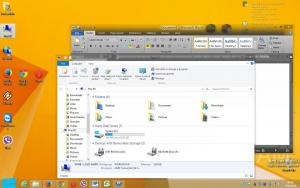
  6. hi ^^ awsome app! well done! ive a feature-request: could you pls add an option so the "ribbon-bar" is also transparent/aero-style? as seen in "MS Office 2010" (maybe so it works then also for other programms with "ribbons" f.e. paint) or an option to move the "adress-bar" above the "ribbon bar" or a combination of that 2 options would be awsome ^^ i hope i could explain what i mean, my english is not the best ^^" k.r. Rene
Account

Navigation

Configure browser push notifications

Chrome (Android)
  1. Tap the lock icon next to the address bar.
  2. Tap Permissions → Notifications.
  3. Adjust your preference.
Chrome (Desktop)
  1. Click the padlock icon in the address bar.
  2. Select Site settings.
  3. Find Notifications and adjust your preference.