-
-
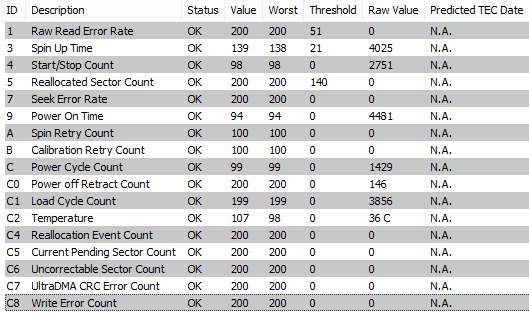
Hi again, I've taken a closer look to my caviar green drive, and it turns out it has bad sectors. So you were right abour a damaged HDD. I'm going to replace it with a non-green drive. Thanks for all your help Edit: Or maybe not. Why are tools inconsistent on this matter? CrystalDiskInfo and Easeus partition manager gave 2 bad sectors (CrystalDisk via S.M.A.R.T., Easeus scanned the whole drive) and WD's own tool (scan) and the one I use before (S.M.A.R.T.) didn't.
-
Ah yes, I have the drive mostly for backup purposes, but with one partition where skydrive syncs to, with the new office also syncing. Just curious though, should the same delay occur when I disconnect the drive? I did, and it did occur. I'll look into the power saving. I'm guessing it should help if I move the O: partition to the caviar black drive? And just for my understanding of the traces: you mention activity before I stopped the trace, this is during the hanging or after?
-
-
Thanks foy your reply. I've checked the caviar, it gave no errors. I can't read SMART, but what I can guess with internet help is that everything's fine. If it's not a boot problem, can you point me in a right direction? Actually, I've traced with only my OS ssd plugged in, same result, it also has most of the programs on it. May I ask why you were suspicious of the caviar drive?
-
Hi MagicAndre, I'm hoping you can help me, I'm kinda lost. Whenever I start windows it gets to the desktop fairly quickly but some programs won't start. IE10 won't start at all and WMP12 start but doesn't respond, but suddenly everything pops up like they were waiting for something to end. Windows explorer, Firefox and most programs that dont need an internet connection don't have this problem. IE10 usually pops up about 10 seconds before the trace ends. I'd appreciate it if you could help. summary_boot.xml