os2fan2
Content Type
Profiles
Forums
Events
Everything posted by os2fan2
-

WFW3.11 won't start with UMB memory driver, even EMM386
os2fan2 replied to keropi666's topic in Windows 9x/ME
There are some things to note about UMBs on modern machines and Windows. 1. You should avoid using UMBs under Windows, since this slows it down somewhat. Have a look at UMBPCI on the web on this. 2. Modern machines use more UMBs then the average 486, so there's less for DOS. UMBPCI will find out what's available. I generally try to avoid WFW311, sticking with Win311. Still, i don't think there's a lot of changes. -
Some of their utilities are neat. They have ctm, a console-mode task mamager, and the freedos command.com (cmd.exe) and edit.com (edit.exe) recompiled to Winnt. You can get things like the device manager and user manager to function without all that other MS legacy attached to it.
-
Multi Manufacturer Pre-Activation
os2fan2 replied to Bezalel's topic in Unattended Windows 2000/XP/2003
I had a look at the IBM thinkpad disks (which are basically recovery disks, but the process can be done from PE). The base copy of Windows is an unmodified source tape. The modifications come between the text-mode install and the gui. You install windows in some sort of other mode from PE., using the switches in winnt32 to point to the correct boot drive. Once the source is in place, you copy over files as needed (usually oembois.*), and then on the reboot, the install happens normally. Usually the OEM toys are added after the setup, which is why you don't find things like OEM bitmaps in Windows or DOS setups. -
Compress v 1.02 and 1.11 will create KWAJ files. These date from 1990 (the WLO10.ZIP file for OS/2 is compressed in these). It's used in DOS 6, and Windows 3.11, it's hard to find. Vers 1.11 is the go, because the default rename is to edlin.ex_ rather than edlin.ex$. I got 1.02 from the fox pro 2.6 redistribution, and 1.11 in the msdos 6 source code package. Compress v2.0 is available in the Windows 3.1 SDK and many other things, that produce SZDD files. The compress in the Windows NT 3.10 reskit produces this file. Compress v2.5 in the resource kits, etc, by default, produce MSCF files (MSZIP), with varying degrees of compression. Look for CABPACK v 1.1 for a DOS version of this. Expand 2.1 (windows 3.11), expands both KWAJ and SZDD, but not MSCF. Other expand utilities work with some subset of SZDD, KWAJ and MSCF. The DIAMOND utility even in the earliest packages, are Win32. You could look for cabpack 1.1 for a DOS version. Needs to have the Runtime 200 fix applied, though.
-
Here are some things ye might like to try. CONFIG.SYS files=50 buffers=30 STACKS=9,256 device=c:\dos\himemx.exe /max=64512 /x REM device=c:\dos\emm386.exe noems i=b000-b7ff /verbose dos=high,umb,NOauto device=c:\dos\cdrom.sys /d:satadvd lastdrive=z You don't really need AUTO here, because you're loading stuff through config.sys Try UMBPCI, http://www.uwe-sieber.de/umbpci_e.html it gives UMB's (ie dos=umb), without loading EMM. AUTOEXEC.BAT @echo off path c:\dos;c:\windows set temp=c:\temp SET TMP=c:\temp PROMPT $p$g lh mscdex /d:satadvd /l:x REM lh ctmouse REM idle If you are just testing whether windows will load, try removing the mouse and idle. Add the line 'pageovercommit=1' to the 386Enh section of System.ini in your windows directory Try using vga driver or vga30 driver, to see if this cures problems. SYSTEM.INI [386Enh] ... PageOverCommit=1
-
You might be able to copy the files through a share from a PC with a working cdrom. You could use cross-over network cables, or even something like 'interlink' cables, which are cross-over patch cables. The alternate is to extract the hard disk, and load the files onto it through an external hard drive. This is how i usually install OS/2 2.x on vm machines (where the cdrom is not seen by the install).
-
BennyLevel is a hack around the DOS errorlevel bug, which treats a two letter errorlevel as 10*h- + l - 11*'a'+11, modulo 256 (c2d('x')*10+c2d('a')-528)//256 (c2d('H')*10+c2d('a')-528)//256 (10*('x'-'0')-('$'-'0'))mod 256 lower case (10*('H'-'0')-('$'-'0'))mod 256 upper case What the batch does here, is test the hex on HA @ECHO OFF choice /n /cABCDEFGHIJKLMNOPQRSTUVWXYZ Choose drive: : FINDCD FOR %%D IN (A B C D E F G H I J K L M N O P Q R S T U V W X Y Z) IF ERRORLEVEL H%%D SET DRIVE=%%D FOR %%D IN (a b c d e f g h i j k l m n o p q r s t u v w x y z) IF ERRORLEVEL x%%D SET DRIVE=%%D ECHO You chose drive %DRIVE% ================================================ Benny Pederson recently discovered an important new batch feature (4th November 2000 in alt.msdos.batch thread "Choice" ), namely that ERRORLEVEL checks can be made with characters other than 0-9. As I posted at the time, the values of the characters run in parallel to their ASCII values (they are their ASCII values less 48 decimal, 30hex). In other words, Command.com _doesn't_ check range on the character, it just subtracts the offset ASCII character 0 (zero = 48 decimal, 30 hex). To distinguish this from ordinary ERRORLEVEL checking, I call this _BennyLevel_ checking. For convenience, throughout the following account, I call ASCII-Value-Of [character] - 48 the BennyValue of the character. All normal keyboard characters can be used (except the five in exception list below): from the character next in ASCII order after [space], namely ! (exclamation 33 decimal, 21hex) through to ~ (tilde 126 decimal, 7Ehex). High ASCII characters (above 127 decimal, 7Fhex) can be used also, but because of code page variations, this is less useful. In the rest of this, I use DECIMAL arithmetic to avoid the constant translations in parentheses. A very small number of characters can't be used because of conflicts. The five characters which can't be used are: comma , semicolon ; less than < equals = greater than > Note that percent (%) _can_ be used (but _beware_ of generating internal script conflicts with environment variables) For combinations of two Benny characters, Command.com just applies the algorithm: if second character present, multiply BennyValue of first by 10, add BennyValue of second. Similarly for three characters: (BennyValue first x 100) + (BennyValue second x 10) + (BennyValue third). To give examples: The BennyValue for A (ASCII 65)= 65 - 48 = 17 decimal, thus IF ERRORLEVEL A is true for ERRORLEVELs >= 17 decimal The BennyValue for a (ASCII 97) is 97 - 48 = 49 decimal, thus IF ERRORLEVEL a is true for ERRORLEVELs >= 49 decimal Also _note_ that ERRORLEVELs work modulo 256, so IF ERRORLEVEL 513 and IF ERRORLEVEL 257 and IF ERRORLEVEL 1 are all equivalent. BennyValues make it very easy to construct high ERRORLEVELs. In my opinion, this is a _very_significant_ and exploitable feature. It (turns out that it) has been a feature of Command.com for the past 14 years (since DOS 3.20) for certain, and almost certainly since DOS 2.0 when the IF command and ERRORLEVEL checking were both introduced. As far as I know Benny Pederson was the first to discover this feature in all this time. Simple example showing calculation to simplify Choice menus: The first of the two example batch scripts I posted was: ::====BENNYDRU.BAT @ECHO OFF choice /n /cABCDEFGHIJKLMNOPQRSTUVWXYZ Choose drive: FOR %%D IN (A B C D E F G H I J K L M N O P Q R S T U V W X Y Z) DO IF ERRORLEVEL H%%D SET DRIVE=%%D ECHO You chose drive %DRIVE% ::==== Only four lines in the above (watch for accidental line wrap). In this script, BennyLevel checking is used with an offset (calculated as below) to make the Choice letter result and the corresponding BennyLevel check letter from the FOR IN DO loop become the same letter in each case. To make this work, you need the ERRORLEVEL resulting from each Choice entry to match the BennyLevel check by that letter. Choice is not case sensitive, but BennyValue _IS_, of course, case sensitive, because it derives from the ASCII value. In this example I work with an Upper Case BennyLevel check The BennyValue of A is 17 (ASCII 65 - 48). A (or a) in Choice in the above returns ERRORLEVEL 1. To make them match, we use ERRORLEVEL overflow - remember ERRORLEVEL works modulo 256. Also remember the algorithm Command.com uses for character pairs is 10 x BennyValue(first) + BennyValue(second) So we match ERRORLEVELs 17 and 1 by solving the following equation in integers m and n: 10m + 17 = 256n + 1 and it's easily seen that m = 24 and n = 1 will solve this. The important part of the solution is the m value. The character whose BennyValue is 24 = H . Therefore, the BennyLevel check: IF ERRORLEVEL HA is the same as IF ERRORLEVEL 1 and similarly HB is the same as 2 and so on. Hence, the offset H in the above Uppercase Benny check. Similarly, we can produce a lower case result as in the second script: ::====BENNYDRL.BAT @ECHO OFF choice /n /cABCDEFGHIJKLMNOPQRSTUVWXYZ Choose drive: FOR %%D IN (a b c d e f g h i j k l m n o p q r s t u v w x y z) DO IF ERRORLEVEL x%%D SET DRIVE=%%D ECHO You chose drive %DRIVE% ::==== Only four lines in the above (watch for accidental line wrap). Here the BennyValue of a is 49 (ASCII 97 - 48), so the equation to solve becomes: 10m + 49 = 256n + 1 We easily see that n = 3 and thus m = 72 solve this. If you can't see this quickly, all I am doing is finding the first multiple of 256 that when you add 1 gives a last digit of 9. Then I know that when I subtract 49 I will get a multiple of 10 (in this case 720). Again, the important value is m = 72. We need the character whose BennyValue is 72 = x (ASCII 120 - 48). Hence the offset x will allow a simple FOR IN DO lowercase Bennycheck of the ERRORLEVEL from Choice without any padding characters. All the padding can be done with a BennyValue offset prefix to the ERRORLEVEL check. You would use the first version of the script (with Upper Case list in FOR IN DO loop and offset H) if you wanted to return an Upper Case result. You would use the second version of the script (with Lower Case list in FOR IN DO loop and offset x) if you wanted to return a Lower Case result. The case of the Choice list doesn't matter in either version, of course, since Choice is not case sensitive. Further note on characters prior to ASCII 0 ( = 48): =================================================== Characters prior to ASCII character 0 (=ASCII 48) work as follows: Take example of ! (exclamation = ASCII 33 decimal). The BennyValue of ! is 33 - 48, but Command.com works modulo 256 so this is translated to 33 - 48 + 256 = 241 Thus: IF ERRORLEVEL ! is equivalent to IF ERRORLEVEL 241 and, because of the properties of modulo arithmetic, these characters work in combinations with other characters, too: thus, !A is the BennyLevel for 123, so IF ERRORLEVEL !A and IF ERRORLEVEL 123 are equivalent. Work this out as follows: BennyValue of ! (ASCII 33) = (33 - 48) -15 = 241 (mod 256), (to get the value mod 256, just add 256 to -15) and BennyValue A (ASCII 65) = 65 - 48 = 17: hence: 10 x 241 +17 = 2427 = 123 (mod) 256 ====== And all this has been in Command.com since DOS 3.20 and probably since DOS 2.0. All thanks to the original programmer nearly 20 years ago who _didn't_ put in an entirely unnecessary range check<G>. -- William Allen This works under command.com, but not under 4dos.com.
-
DOS findings by os2fan2 Here are some interesting things i found and collected of dos. Drivers Emm Ram Smart Pk Himem 386 Drive Drv Mouse Mscdex MSD Win286 2.11 C 880527 1.0 2.04 1.05 Win386 2.10 C 880907 2.04 2.10 2.10 DR-DOS 3.40 C 890630 ? R1.01 MS-DOS 4.01 C 890407 2.04 4.00 2.12 2.10 DRDOS 5.00 900814 OS/2 2.11 940129 2.10 4.00 (9.01) MS-Win 3.00 2.60 4.10 3.04 3.03 7.04 B PDS 7.10 U 900624 2.60 3.04 3.03 MS-Win 3.01 S 901031 2.60 4.10 3.04 3.06 7.04 MS-WMM 3.07 C 911001 2.60 4.10 3.04 3.06 1.10 IBMDOS 5.00 S 910509 2.77 4.20 3.06 3.13 7.04 OS/2 NT (2.77) (8.00) (2.21) 2.00 MS-DOS 5.00 S 911111 2.78 4.33 3.06 3.13 IBMDOS 5.02 S 920901 2.78 4.33 3.06 3.13 8.20 2.00 MSC 7.00 K 920305 2.78 4.33 3.06 4.00 8.20 2.00 b 068 3.10 920203 3.03 4.41 3.06 4.00 8.20 2.00 x MASM 6.11 K 920305 3.07 4.44 3.06 4.00 8.20 MS-Win 3.10 S 920310 3.07 4.44 3.06 4.00 8.20 2.00 MS-WfW 3.30 S 921001 3.07 4.44 3.06 4.00 8.20 2.21 2.00a DR-DOS 6.00 C 920407 MS-Win 3.11 K 931231 3.07 4.44 3.06 4.00 2.00 MS-DOS 6.00 K 930310 3.07 4.45 3.06 4.10 8.20 2.22 2.01 IBMDOS 6.00 K 930629 3.09 4.45 3.06 4.10 8.20 PC-DOS 6.10 K 931116 3.09 4.45 3.06 4.10 8.20 MS-Fix 6.0a Z 930601 4.20 PC-DOS 6.30 K 931231 3.09 4.48 3.06 5.00 9.01 2.23 MS-DOS 6.07 C 940101 3.10 5.00 3.07 5.00 2.22 2.01 MS-DOS 6.20 K 930927 3.10 4.48 3.07 5.00 8.20 2.23 2.01 MS-DOS 6.21 K 940213 3.10 4.48 3.07 5.00 2.23 2.01 MS-WfW 3.31 K 931101 3.10 4.48 3.07 5.00 2.23 2.10 MS-DOS 6.22 K 940531 3.10 4.49 3.07 5.01 8.20 2.23 2.11 DR-DOS 7.00 C 940126 PC-DOS 7.00 P 941117 3.15 4.50 3.10 5.10 8.20 2.25 DR-DOS 7.03 C 980107 PC-DOS 7.10 C 031002 3.15 3.10 5.10 2.25 Win-95 3.95 X 950711 3.95 4.95 3.06 5.00 (8.30) 2.25 2.13 Win-98 3.98 X 990423 3.95 4.95 3.06 5.02 (8.30) 2.25 2.14 Win-ME 3.99 (3.99) 4.95 3.06 5.02 (8.30) 2.25 2.14 Windows 3.01 and 3.07 are 3.00a and 3.00 mme respectively. Wfw 3.30 and 3.31 are vers 3.10 and 3.11. MS-DOS 6.07 is MS-DOS 7.0 beta 1. It is largely based on MS-DOS 6.00, but has drivers of version 6.20 vintage. None of these drivers seem to be dos dependent, save for MS-fix for smartdrv,exe 4.20, which had an artificial check for DOS 6.0 or greater. It actually requires DOS 3.3 A number of utilities that ship with DOS can be used with other versions of dos. 1 deltree, move and choice do not check for dos versions, and work with DOS 5 2, acalc, backup, crc, dynaload, internk/intersvr, msd, qconfig, xdf, xdfcopy, work with any version of DOS. Many of these come from PC-DOS 7 (which largely have the versioning removed) 3. DOS-free versions packages that work with DOS. defrag and scandisk complain for versions of dos less than 6.0 m=msdos, p=pcdos. m63=msdos 6.21, m64=ms-dos 6.22, p52 = pcdos 5.02 ADOS m60 m62 m63 m64 CPBACKUP p60 p61 p63 p70 CPCOMMON p60 p61 p63 p70 DBLSPACE m60 m61 m62 DOSSHELL m50 p50 p52 m60 m61 m62 m63 m64 p60 p61 p63 p70 DRVSPACE m64 m70 m71 E3-DOS p60 p61 p63 p70 EDITv2 m70 m71 FILEUP p70 IBMAV p60 p61 p63 p70 MEMMAKER m60 m61 m62 m63 m64 m70 MSAV m60 m61 m62 m63 m64 MSBACKUP m60 m61 m62 m63 m64 m70 NETWORK m60 m62 m63 m64 PCMCIA p60 p61 p63 p70 PENDOS p60 p61 p63 p70 QBASIC 1.0 m50 p50 p52 QBASIC 1.1 m60 m61 m62 m63 m64 m70 m71 REXX p70 SSTOR p61 p63 STACKER p70 VIEW p70
-
I'm currently working on a rxloop script for the post rollup fixpack. This consists of a csv-style table, which is run to generate the output. A possibility is to read the [Files] section in dosnet.inf etc to get the assorted working lists. Because rxloop allows you to build scripts, you can keep the hotfixes in their original order, and select the files directly from unpacked hotfixes. At the moment, i am halfway through the rxloop table. There are several different setup routines, some of which have registry patches. These are being saved as well. I am not sure whether to write these as registry files or prepare a rexx registry processor to do this. The rexx registry has the advantage of being able to read registry, and also write reg_expand_sz strings without having to do unicode binary stuff. The data file could look like this. cdd also will make the folder if it does not exist. it depends on w32utils.dll behaviour. cdd hklm\system\.... dword name=value (decimal or hex) string name=value none name delete name expand name=string
-
In windows 3 and 4, the registry is stored in a prototype, which can be loaded into registry, So there is a file in there that becomes the default, system, software keys. This is already known, the plan is to write a rexx command processor to handle this, something like cdd [key] dword name=value expand name=value etc
-
If it's a cpl icon, you can make a shortcut to it, and it really does open the dialog box for you.
-
I've revived the old tapes saved to cdrom. I've been off line some what, and the system had a few crashes. still it was all on a diskette some time back, so that's good, too. MODS: most searches point to this thread, so it's best to allow me to revive it - rather than locking it out because it's old. Please don't lock it! The current intent is to build a post-rollup, for which one expands the sp6a and the rollup, and then run assorted supplied scripts to integrate all of the stuff into the winnt source files. There's a couple of extra fixen existing, which are part of DOS (like the phatcode qbasic fix), which i plan to sneak in as well. They're mostly fixes, not new functionality, although some consideration to be given to EDIT along with QBED (edit.com v 1.0 or 1.1). Maybe even a DOS help file for Windows nt4! And, yes, it really does work without having to apply sp6a or anything.
-
Are you suggesting heading back to the Windows 2.x 3.0 days, where the control panel was unified? A lot of the control panels can be accessed from elsewhere. None the same, you will eventually find what you are looking for in the control panel. I can't see the advantages of integrating 'file-tools-options' of every installed application into the control panel. Some programs do have a place there. In my control panel, there are some 'hidden' cpls, some driver and application installed applications, and a number of home-made options (the three registry programs). A number of cpls are downloadable from msft, (desktop themes, directx, text services, and tweakui). None the same, the control panel is still stuck in the windows 3.1 progman days. Worse, actually. You can't create a folder in the control panel, and move icons there. Even if you do manage to get things into admin tools, if they're .cpls, they still show in the control panel. You can't for example, create a folder 'input options', or 'woofies' or 'driver icons'. Some installs add icons to the panel, while others add extra tabs to the icons, or replace the icon concerned. I suppose this was the intent of GUID's, but some ridiculous things have GUIDs. Still 'folder options' on a guid is pretty awful, when it would be better served by folder.cpl or something. The MMC (microsoft management console) in my view, is a fairly silly idea. OS/2 went that way (where FDISKPM was replaced by a java app!). The idea is that you need to load some large app to do things like manage users and disks, the whole set is not user managable. User management is now scattered over three or four different applications, none of which gives complete service. It's better to have one icon.

-
Hivefix.inf is activated through txtsetup.sif. This is SI.TXT, the instructions for adding files to win2k, and how to activate additional INF files. You really do need to edit SETUPREG.HIV. This is the registry for the boot system. It won't see your fixed disk correctly elsewise. This batch file does that. You edit the second line of this batch file to where your win2k source lives, including the cd file. You run the batch file, and it corrects the setupreg.hive, without modifying anything else. setlocal set winsource=c:\win2kcd\i386 attrib -r -a -s -h %winsource%\setupreg.hiv reg load HKLM\Setup %winsource%\setupreg.hiv set regkey=ControlSet001\Services\atapi\Parameters reg add HKLM\Setup\%regkey% /v EnableBigLba /t reg_dword /d 00000001 /f reg unload HKLM\Setup set winsource= set regkey= endlocal This is a sample text file, used to modify both dosnet.inf and txtsetup.sif. The items are in order, so all you have to search for is the beginnings of each section. All the bits go to the end of the current section (ie before the next square bracket), unless you're modifying the default directory. We add a number of files here. You should delete matching entries from both dosnet.inf and txtsetup.inf if these are not included. All of the stuff is from the resource kit, except themes.cpl, which you can download from microsoft as an NT4 fix. It allows you to access the win98 style themse from the control panel. The first two entries in txtsetup.sif create extra 'hidden' controls for hotplug and console. We add a number of rk files to the default install, wie WINXP et al. The Windows bitmaps live in webvw.dll, so we add the Win9x stuff there. Setup.bmp lives in the system32 directory, installs from setup_w.bm_ ------ dosnet.inf --------------------------------------------- d1,hivefix.inf d1,directx.cpl d1,diskpart.exe d1,fsutil.exe d1,kill.exe d1,linkd.exe d1,list.exe d1,msvcp60.dll d1,oeminfo.ini d1,oemlogo.bmp d1,reg.exe d1,runext.dll d1,sc.exe d1,schtasks.exe d1,setx.exe d1,shortcut.exe d1,takeown.exe d1,themes.cpl d1,tlist.exe d1,tweakui.cnt d1,tweakui.cpl d1,tweakui.hlp d1,where.exe ------ txtsetup.sif -------------------------------------------- [SourceDisksFiles] console.dll = 1,,,,,,,2,0,0,console.cpl hotplug.dll = 1,,,,,,,2,0,0,hotplug.cpl hivefix.inf = 1,,,,,,,20,3,3 directx.cpl = 2,,,,,,,2,0,0 diskpart.exe = 2,,,,,,,2,0,0 fsutil.exe = 2,,,,,,,2,0,0 kill.exe = 2,,,,,,,2,0,0 linkd.exe = 2,,,,,,,2,0,0 list.exe = 2,,,,,,,2,0,0 msvcp60.dll = 2,,,,,,,2,0,0 oeminfo.ini = 2,,,,,,,2,0,0 oemlogo.bmp = 2,,,,,,,2,0,0 reg.exe = 2,,,,,,,2,0,0 runext.dll = 2,,,,,,,2,0,0 schtasks.exe = 2,,,,,,,2,0,0 sc.exe = 2,,,,,,,2,0,0 setx.exe = 2,,,,,,,2,0,0 shortcut.exe = 2,,,,,,,2,0,0 takeown.exe = 2,,,,,,,2,0,0 themes.cpl = 2,,,,,,,2,0,0 tlist.exe = 2,,,,,,,2,0,0 tweakui.cnt = 2,,,,,,,21,0,0 tweakui.cpl = 2,,,,,,,2,0,0 tweakui.hlp = 2,,,,,,,21,0,0 where.exe = 2,,,,,,,2,0,0 ; setup_w.bmp = 2,,,,,,,1,0,0,setup50.bmp ; add these to the end to make hivefix.inf work. [HiveInfs.Fresh] DelReg = hivefix.inf,AddReg AddReg = hivefix.inf,AddReg [HiveInfs.Upgrade] DelReg = hivefix.inf,AddReg AddReg = hivefix.inf,AddReg ; These have not really changed, so... [SetupData] SetupSourcePath = "\" DefaultPath=\FENSTER --------------------------------------------------------------------- WEBVW.DLL Add bitmaps to resource table, using reshack.exe This is a working version of HIVEFIX.INF. It is placed after the other INF files in txtsetup.sif [Version] Signature = "$Windows NT$" ClassGUID={00000000-0000-0000-0000-000000000000} DriverVer=11/14/1999,5.00.2183.1 ; vers 2195/1 [AddReg] ; homegrown ; flags: see 'windows registry guide', p276 HKCU,"Console","InsertMode",0x00010001,1 HKCU,"Console","QuickEdit", 0x00010001,0 HKLM,"Software\Microsoft\Command Processor","CompletionChar",0x00010001,9 HKLM,"Software\Microsoft\Command Processor","PathCompletionChar",0x00010001,9 HKLM,"SOFTWARE\Microsoft\Windows NT\CurrentVersion\Winlogon","ParseAutoexec",0x00000000,"0" HKCU,"SOFTWARE\Microsoft\Windows NT\CurrentVersion\Winlogon","ParseAutoexec",0x00000000,"0" ; HiveCLS.inf HKCR,"batfile","",0x00000002,"%MS_DOS_BATCH_FILE%" HKCR,"comfile","",0x00000002,"%MS_DOS_APPLICATION%" ; Hivesft.inf HKLM,"SOFTWARE\Microsoft\Windows NT\CurrentVersion\ProfileList","ProfilesDirectory",0x00020002,"%DEFAULT_PROFILES_DIR%" HKLM,"SOFTWARE\Microsoft\Windows NT\CurrentVersion\ProfileList","AllUsersProfile",0x00000002,"%ALL_USERS%" HKLM,"SOFTWARE\Microsoft\Windows NT\CurrentVersion\ProfileList","DefaultUserProfile",0x00000002,"%DEFAULT_USER%" ; fix for ejecting removable disks HKLM,"SOFTWARE\Microsoft\Windows NT\CurrentVersion\Winlogon","allocatedasd",0x00000002,"2" ; HiveSys.inf HKLM,"SYSTEM\CurrentControlSet\Control\Nls\Language","InstallLanguage",,"%INSTALL_LANGUAGE%" HKLM,"SYSTEM\CurrentControlSet\Control\Nls\Locale","(Default)",,%INSTALL_LOCALE% ; UKINT keybd HKLM,"SYSTEM\CurrentControlSet\Control\Keyboard Layout\DosKeybCodes","0001089",0x00000002,"uk" HKLM,"SYSTEM\CurrentControlSet\Control\Keyboard Layouts\00010809","Layout File",0x00000002,"KBDUKINT.DLL" HKLM,"SYSTEM\CurrentControlSet\Control\Keyboard Layouts\00010809","Layout Id",0x00000002,"0087" HKLM,"SYSTEM\CurrentControlSet\Control\Keyboard Layouts\00010809","Layout Text",0x00000002,"%UK_INTERNATIONAL%" ; Hivedef.inf ; International Settings HKLM,"SYSTEM\CurrentControlSet\Control\Nls\Locale","(Default)",0x00000002,"00000C09" HKCU,"Control Panel\International","iCalendarType",0x00000000,"%INTL_ICALENDAR%" HKCU,"Control Panel\International","iCountry",0x00000000,"%INTL_ICOUNTRY%" HKCU,"Control Panel\International","iCurrDigits",0x00000000,"%INTL_ICURRDIGITS%" HKCU,"Control Panel\International","iCurrency",0x00000000,"%INTL_ICURRENCY%" HKCU,"Control Panel\International","iDate",0x00000000,"%INTL_IDATE%" HKCU,"Control Panel\International","iDigits",0x00000000,"%INTL_IDIGITS%" HKCU,"Control Panel\International","iFirstDayOfWeek",0x00000000,"%INTL_IFIRSTWEEKDAY%" HKCU,"Control Panel\International","iLZero",0x00000000,"%INTL_ILZERO%" HKCU,"Control Panel\International","iMeasure",0x00000000,"%INTL_IMEASURE%" HKCU,"Control Panel\International","iNegCurr",0x00000000,"%INTL_INEGCURR%" HKCU,"Control Panel\International","iTime",0x00000000,"%INTL_ITIME%" HKCU,"Control Panel\International","iTLZero",0x00000000,"%INTL_ITLZERO%" HKCU,"Control Panel\International","Locale",0x00000000,"%INTL_LOCALE%" HKCU,"Control Panel\International","s1159",0x00000000,"%INTL_S1159%" HKCU,"Control Panel\International","s2359",0x00000000,"%INTL_S2359%" HKCU,"Control Panel\International","sCountry",0x00000000,"%INTL_SCOUNTRY%" HKCU,"Control Panel\International","sCurrency",0x00000000,"%INTL_SCURRENCY%" HKCU,"Control Panel\International","sDate",0x00000000,"%INTL_SDATE%" HKCU,"Control Panel\International","sDecimal",0x00000000,"%INTL_SDECIMAL%" HKCU,"Control Panel\International","sLanguage",0x00000000,"%INTL_SLANGUAGE%" HKCU,"Control Panel\International","sList",0x00000000,"%INTL_SLIST%" HKCU,"Control Panel\International","sLongDate",0x00000000,"%INTL_SLONGDATE%" HKCU,"Control Panel\International","sShortDate",0x00000000,"%INTL_SSHORTDATE%" HKCU,"Control Panel\International","sThousand",0x00000000,"%INTL_STHOUSAND%" HKCU,"Control Panel\International","sTime",0x00000000,"%INTL_STIME%" HKCU,"Control Panel\International","sTimeFormat",0x00000000,"%INTL_STFORMAT%" ; Marquee Settings HKCU,"Control Panel\Screen Saver.Marquee","Font",0x00000000,"%SCREEN_SAVER_MARQUEE_FONT%" HKCU,"Control Panel\Screen Saver.Marquee","Text",0x00000002,"%SCREEN_SAVER_MARQUEE_TEXT%" ; TempDir HKCU,"Environment","TEMP",0x00020000,"%TEMP_DIR%" HKCU,"Environment","TMP",0x00020000,"%TEMP_DIR%" ; Shell Folders HKCU,"Software\Microsoft\Windows\CurrentVersion\Explorer\User Shell Folders","AppData",0x00020002,"%U_SHELL_FOLDERS_APPDATA%" HKCU,"Software\Microsoft\Windows\CurrentVersion\Explorer\User Shell Folders","Desktop",0x00020002,"%U_SHELL_FOLDERS_DESKTOP%" HKCU,"Software\Microsoft\Windows\CurrentVersion\Explorer\User Shell Folders","Favorites",0x00020002,"%U_SHELL_FOLDERS_FAVORITES%" HKCU,"Software\Microsoft\Windows\CurrentVersion\Explorer\User Shell Folders","NetHood",0x00020002,"%U_SHELL_FOLDERS_NETHOOD%" HKCU,"Software\Microsoft\Windows\CurrentVersion\Explorer\User Shell Folders","Personal",0x00020000,"%U_SHELL_FOLDERS_PERSONAL%" HKCU,"Software\Microsoft\Windows\CurrentVersion\Explorer\User Shell Folders","PrintHood",0x00020002,"%U_SHELL_FOLDERS_PRINTHOOD%" HKCU,"Software\Microsoft\Windows\CurrentVersion\Explorer\User Shell Folders","Programs",0x00020002,"%U_SHELL_FOLDERS_PROGRAMS%" HKCU,"Software\Microsoft\Windows\CurrentVersion\Explorer\User Shell Folders","Recent",0x00020002,"%U_SHELL_FOLDERS_RECENT%" HKCU,"Software\Microsoft\Windows\CurrentVersion\Explorer\User Shell Folders","SendTo",0x00020002,"%U_SHELL_FOLDERS_SENDTO%" HKCU,"Software\Microsoft\Windows\CurrentVersion\Explorer\User Shell Folders","Start Menu",0x00020002,"%U_SHELL_FOLDERS_START_MENU%" HKCU,"Software\Microsoft\Windows\CurrentVersion\Explorer\User Shell Folders","Startup",0x00020002,"%U_SHELL_FOLDERS_STARTUP%" HKCU,"Software\Microsoft\Windows\CurrentVersion\Explorer\User Shell Folders","Templates",0x00020002,"%U_SHELL_FOLDERS_TEMPLATES%" HKCU,"Software\Microsoft\Windows\CurrentVersion\Explorer\User Shell Folders","Cookies",0x00020000,"%U_SHELL_FOLDERS_COOKIES%" HKCU,"Software\Microsoft\Windows\CurrentVersion\Explorer\User Shell Folders","My Pictures",0x00020000,"%U_SHELL_FOLDERS_MYPICTURES%" HKCU,"Software\Microsoft\Windows\CurrentVersion\Explorer\User Shell Folders","Local Settings",0x00020000,"%U_SHELL_FOLDERS_LOCAL_SETTINGS%" HKCU,"Software\Microsoft\Windows\CurrentVersion\Explorer\User Shell Folders","Local AppData",0x00020000,"%U_SHELL_FOLDERS_LOCAL_APPDATA%" HKCU,"Software\Microsoft\Windows\CurrentVersion\Explorer\User Shell Folders","Cache",0x00020000,"%U_SHELL_FOLDERS_CACHE%" HKCU,"Software\Microsoft\Windows\CurrentVersion\Explorer\User Shell Folders","History",0x00020000,"%U_SHELL_FOLDERS_HISTORY%" ; runext.dll HKCR,CLSID\{%CSID00%},,,"%NAME%" HKCR,CLSID\{%CSID00%}\InProcServer32,,,"runext.dll" HKCR,CLSID\{%CSID00%}\InProcServer32,"ThreadingModel",,"Apartment" HKCR,*\%SHEX%,,,"%RUNEXTKEY%" HKCR,*\%SHEX%\%RUNEXTKEY%,,,"{%CSID00%}" HKCR,Folder\%SHEX%,,,"%RUNEXTKEY%" HKCR,Folder\%SHEX%\%RUNEXTKEY%,,,"{%CSID00%}" ; TweakUI HKLM,"Software\Microsoft\Windows\CurrentVersion\Run",,,"RUNDLL32.EXE TWEAKUI.CPL,TweakMeUp" [Strings] ; Hivecls.inf MS_DOS_APPLICATION="PC-DOS Application" MS_DOS_BATCH_FILE="PC-DOS Batch File" ; Hivesys.inf INSTALL_LANGUAGE="0C09" ; International INTL_ICALENDAR="1" INTL_ICOUNTRY="61" INTL_ICURRDIGITS="2" INTL_ICURRENCY="0" INTL_IDATE="2" INTL_IDIGITS="2" INTL_IFIRSTWEEKDAY="6" INTL_ILZERO="1" INTL_IMEASURE="1" INTL_INEGCURR="1" INTL_ITIME="1" INTL_ITLZERO="1" INTL_LOCALE="00000C09" INTL_S1159="AM" INTL_S2359="PM" INTL_SCOUNTRY="Australia" INTL_SCURRENCY="$" INTL_SDATE="/" INTL_SDECIMAL="." INTL_SLANGUAGE="ENA" INTL_SLIST="," INTL_SLONGDATE="dddd, d MMMM, yyyy" INTL_SSHORTDATE="yyyy/MM/dd" INTL_STHOUSAND="," INTL_STIME=":" INTL_STFORMAT="HH:mm:ss" ; Marquee SCREEN_SAVER_MARQUEE_FONT="Georgia" SCREEN_SAVER_MARQUEE_TEXT="Windows 2000 Professional" ; Shell Folders DEFAULT_PROFILES_DIR="%SystemDrive%\USERS" DEFAULT_USER="Default" ALL_USERS="Public" TEMP_DIR="%USERPROFILE%\Temp" U_SHELL_FOLDERS_APPDATA="%USERPROFILE%\AppData" U_SHELL_FOLDERS_DESKTOP="%USERPROFILE%\W\Desktop" U_SHELL_FOLDERS_FAVORITES="%USERPROFILE%\Favorites" U_SHELL_FOLDERS_NETHOOD="%USERPROFILE%\NetHood" U_SHELL_FOLDERS_PERSONAL="%USERPROFILE%\Personal" U_SHELL_FOLDERS_PRINTHOOD="%USERPROFILE%\PrintHood" U_SHELL_FOLDERS_PROGRAMS="%USERPROFILE%\Start Menu\Programs" U_SHELL_FOLDERS_RECENT="%USERPROFILE%\Recent" U_SHELL_FOLDERS_SENDTO="%USERPROFILE%\SendTo" U_SHELL_FOLDERS_START_MENU="%USERPROFILE%\Start Menu" U_SHELL_FOLDERS_STARTUP="%USERPROFILE%\Start Menu\Programs\Startup" U_SHELL_FOLDERS_TEMPLATES="%USERPROFILE%\Templates" U_SHELL_FOLDERS_COOKIES="%USERPROFILE%\Cookies" U_SHELL_FOLDERS_MYPICTURES="%USERPROFILE%\Personal\Pictures" U_SHELL_FOLDERS_LOCAL_SETTINGS="%USERPROFILE%\Local" U_SHELL_FOLDERS_LOCAL_APPDATA="%USERPROFILE%\AppData" U_SHELL_FOLDERS_CACHE="%USERPROFILE%\Temporary Internet Files" U_SHELL_FOLDERS_HISTORY="%USERPROFILE%\History" ; runext.dll NAME="Run shell extension" RUNEXTKEY="RunExt" SHEX="shellex\ContextMenuHandlers" CSID00=2AD91900-A873-11cf-9A80-00AA00C16E65
-
It installs for SP1, but you can trick it to install on SP4. I didn't find it all that interesting, but i have the install tape for it somewhere, both modified and regular.
-
This is the code for 'civhack'. I used to run it under quercus rexx, but most modern rexx processers (regina), should run it. You start civ (at the desired level), and just do nothing on the first move. Then you save the game and exit. You then run the script over the game, to get the deisired result (with or without settlers) - i think this is the 'eight settlers only' version. You can modify the army with veteran tanks, etc. Just add extra units to the 'units' line. Now, when you start the game from loaded, you will have eight settlers all on the same spot. The file format is for CIV for DOS. It does handle german and french versions (which came on the cdrom - german is ZIV, french is XYV: i had no fewer than five different DOS versions in the same directory, for example, and each looked after its own version files. The german and french games had longer unit-names, hence the file-differences. There's an alternate patch to read the civ files and produce 4DOS descriptions for them (eg 'Chief Leo of the Germans AD 500'), as well as one to line slop in (ie copy over) files to create my 5-version system from a simple one-version civ set. The Science bitmap helps you set what technologies one needs. You can tinker the bitmap in the variable directly under it 'science =' consists of hex values. The rest of it is pretty straight forward. civhack.rex or civhack.rex /? both give the embedded help. I never tried it under the pc-dos rexx processor, i think. quercus was the order of the day (it cost 15/-, i think closer to £5 or so) at the time. /*# REXX Civhack */ /*! About CIVHACK This file is used to patch CIV saved games. Civhack is used to alter the startup budget and technology, and optionally add settlers. It only works with the DOS version of the game. The command format is CIVHACK civil0.SVE Alter the technology and budget CIVHACK civil0.SVE /! Also add settlers. CIVHACK /? Bring up this screen The added technologies are Pottery, Bridge Building, Railways, Robotics Literacy, Cerimonial Burial and Labour Union. The Budget is revised to 29952 coins. If the setters are selected, the army is increased to eight veteran settler units. */ ttyend = 22 /* End of the TTY Screen */ /* # Define the Science Bitmap ÚÄÄÂÄÄÄÄÄÄÄÄÂÄÄÄÄÄÄÄÄÂÄÄÄÄÄÄÄÄÂÄÄÄÄÄÄÄÄÂÄÄÄÄÄÄÄÄÂÄÄÄÄÄÄÄÄÂÄÄÄÄÄÄÄÄÂÄÄÄÄÄÄÄÄ¿ ³ ³ 80 ³ 40 ³ 20 ³ 10 ³ 08 ³ 04 ³ 02 ³ 01 ³ ÃÄÄÅÄÄÄÄÄÄÄÄÅÄÄÄÄÄÄÄÄÅÄÄÄÄÄÄÄÄÅÄÄÄÄÄÄÄÄÅÄÄÄÄÄÄÄÄÅÄÄÄÄÄÄÄÄÅÄÄÄÄÄÄÄÄÅÄÄÄÄÄÄÄÄ´ ³0 ³mapping ³astron ³monarch ³democ ³atomtec ³curren ³laws ³alphab ³ ³1 ³electrn ³magnets ³univers ³enginer ³physics ³medicn ³maths ³navigat ³ ÃÄÄÅÄÄÄÄÄÄÄÄÅÄÄÄÄÄÄÄÄÅÄÄÄÄÄÄÄÄÅÄÄÄÄÄÄÄÄÅÄÄÄÄÄÄÄÄÅÄÄÄÄÄÄÄÄÅÄÄÄÄÄÄÄÄÅÄÄÄÄÄÄÄÄ´ ³2 ³steamE ³writing ³computr ³invent ³BRIDGES ³iron ³bronze ³masonry ³ ³3 ³horses ³LITERCY ³relign ³philos ³nucphys ³mystic ³CERBURY ³trade ³ ÃÄÄÅÄÄÄÄÄÄÄÄÅÄÄÄÄÄÄÄÄÅÄÄÄÄÄÄÄÄÅÄÄÄÄÄÄÄÄÅÄÄÄÄÄÄÄÄÅÄÄÄÄÄÄÄÄÅÄÄÄÄÄÄÄÄÅÄÄÄÄÄÄÄÄ´ ³4 ³advFlt ³flight ³combust ³chem ³indust ³gunpdr ³wheel ³feudal ³ ³5 ³theCorp ³rockets ³constru ³republ ³communi ³pottery ³massprd ³spacefl ³ ÃÄÄÅÄÄÄÄÄÄÄÄÅÄÄÄÄÄÄÄÄÅÄÄÄÄÄÄÄÄÅÄÄÄÄÄÄÄÄÅÄÄÄÄÄÄÄÄÅÄÄÄÄÄÄÄÄÅÄÄÄÄÄÄÄÄÅÄÄÄÄÄÄÄÄ´ ³6 ³refine ³electy ³banking ³steel ³gravity ³nucpowr ³RAILS ³metals ³ ³7 ³ROBOTS ³chivly ³recycle ³plastic ³genetic ³automob ³suprcon ³explose ³ ÃÄÄÅÄÄÄÄÄÄÄÄÅÄÄÄÄÄÄÄÄÅÄÄÄÄÄÄÄÄÅÄÄÄÄÄÄÄÄÅÄÄÄÄÄÄÄÄÅÄÄÄÄÄÄÄÄÅÄÄÄÄÄÄÄÄÅÄÄÄÄÄÄÄÄ´ ³8 ³ ³ ³ ³ ³ ³nucfusn ³LABORUN ³conscpt ³ ÀÄÄÁÄÄÄÄÄÄÄÄÁÄÄÄÄÄÄÄÄÁÄÄÄÄÄÄÄÄÁÄÄÄÄÄÄÄÄÁÄÄÄÄÄÄÄÄÁÄÄÄÄÄÄÄÄÁÄÄÄÄÄÄÄÄÁÄÄÄÄÄÄÄÄÙ */ sciences = '0000 0842 0004 0280 02'x parse arg hackfile commandline call hacktest file = stream(hackfile,'c','open') /*# Patching the Civilization Saved Games */ /* # Get the player number */ player = c2d(charin(hackfile,3,1)) /* # Hack the budget */ dollars = player*2+c2d('013a'x) call charout hackfile,'t',dollars /* # hack science */ learnt = 10 * player + c2d('04e8'x) + 1 known = charin(hackfile,learnt,9) known = bitor(known, sciences) call charout hackfile, known, learnt /* # duplicate the number of settlers */ if commandline = '/!' then call settlers /* # CleanUp */ call stream hackfile, 'c' , 'close' exit /* # Settler routine */ settlers: /* Duplicate settlers */ army = c2d('26c0'x) + player * c2d('0600'x) + base /* Here test for XYV and ZIV. The offset is later in the file, at an additional 38x after the english versions, thus the germans are at 38f8x, not 38c0x. We use the file size to do this because the english versions are all 37856 bytes and the foreign versions are 37912. This test will neatly exclude the Windoze versions as well. Base is one for English and 57 for foreign versions. */ unit = charin(hackfile, army, 24) /* check to see if we've caught a settler! */ unittype = c2d(substr(unit,4,1)) if unittype = 0 then do /* we have a settler */ unitstatus = substr(unit,1,1) unitstatus = bitor(unitstatus, '20'x) unit = overlay(unitstatus, unit, 1) /* See if there is anything else there! */ unittype = c2d(substr(unit,16,1)) if unittype = 0 then do /* we have a second settler! */ unitstatus = substr(unit,13,1) unitstatus = bitor(unitstatus, '20'x) unit = overlay(unitstatus, unit, 13) end else do /* Overlay what's there with a second settler */ unit = left(unit,12) unit = unit || unit end units = unit || unit || unit || unit call charout hackfile, units, army end return hacktest: /* # Error handler for File size and version */ if hackfile = '/?' then call ttyhelp if hackfile = '' then call ttyhelp size = stream(hackfile,'c','query size') base = 0 select when size = '' then do Say 'I can not see 'hackfile' here!' exit end when size = 37856 then base = 1 when size = 37912 then base = 57 otherwise say "I don't know this format. I only hack DOS Civilization SVE files." say say "Thank you!" end return ttyhelp: /* TTY Help */ do ttylines = 2 to ttyend say sourceline(ttylines) end exit return /* End of Script */
-
You can specify a path to msbatch.inf, like setup a:\ms2222.inf Run setup /? for details.
-
This is a run of the IBM EWS crc utility, over the two directories. The [bASE] and [TGT] are directory prompts, not parts of commands. You need to be in that directory. You run first [bASE:] CRC -l -s * > c:\crc.txt The file contains crcs in the form as follows, for all files in the tree below BASE: 1268 0x7FC9C8FA "SLOADER.LST" 2404 0x25AF02D1 "TMC/ACCESS.HTM" You then run [TGT:] CRCCHK c:\crc.txt. It produces messages for missing and changed files, as below. To completely compare two directories, you have to go both ways, since it won't tell you that the file is present in the target directory. For the cdrom, BASE is the root directory of the disk, ie O:\ The cdrom has additional files in TMC and the file FILEWISE are missing from the download, but the bulk of the other files are identical in both releases. See table below. Using WIN98 sampler as base, and the reskit as TGT, the only error message is cannot access file 'RESKIT.INF'. BASE = ftp site download TGT = cdrom crcchk: length mismatch for file: TMC/WIN98TMC.DLL crcchk: length mismatch for file: SETUP/RESKIT.INF crcchk: length mismatch for file: SETUP/RESKIT.STF crcchk: length mismatch for file: HELP/WIN98RK.CHM BASE = 98 reskit cdrom; TGT = ftp site download crcchk: Cannot access file 'TMC/ACCESS.HTM'. crcchk: Cannot access file 'TMC/CONFIG.HTM'. crcchk: Cannot access file 'TMC/CONSOLE.GIF'. crcchk: Cannot access file 'TMC/DEPLOY.HTM'. crcchk: Cannot access file 'TMC/DESKTOP.HTM'. crcchk: Cannot access file 'TMC/DOCUMENT.GIF'. crcchk: Cannot access file 'TMC/DXTSHOOT.HTM'. crcchk: Cannot access file 'TMC/FILETOOL.HTM'. crcchk: Cannot access file 'TMC/GUI.GIF'. crcchk: Cannot access file 'TMC/HELP.GIF'. crcchk: Cannot access file 'TMC/HELPBOOK.GIF'. crcchk: Cannot access file 'TMC/HTML.GIF'. crcchk: Cannot access file 'TMC/NETADMIN.HTM'. crcchk: Cannot access file 'TMC/NTDISK.GIF'. crcchk: Cannot access file 'TMC/NTTILE.GIF'. crcchk: Cannot access file 'TMC/PC32.GIF'. crcchk: Cannot access file 'TMC/PERFORM.HTM'. crcchk: Cannot access file 'TMC/POWERTOY.HTM'. crcchk: Cannot access file 'TMC/REGTOOL.HTM'. crcchk: Cannot access file 'TMC/SCRIPTOL.HTM'. crcchk: Cannot access file 'TMC/SERVICE.GIF'. crcchk: Cannot access file 'TMC/TMCTKPAD.DLL'. crcchk: length mismatch for file: TMC/WIN98TMC.DLL crcchk: length mismatch for file: SETUP/RESKIT.INF crcchk: length mismatch for file: SETUP/RESKIT.STF crcchk: length mismatch for file: HELP/WIN98RK.CHM crcchk: Cannot access file 'DIAGNOSE/FILEWISE.EXE'.
-
I recently acquired some flash screen-savers, which give a message "class not registered". It seems that if you hunt down flash10.ocx as a loose file, then register it by way of regsvr32, it works quite well under win2k. You can find it loose on google.
-
Autopatcher was killed off by Microsoft's genuine software thingie.
-
In the standard win98 se dos disk, edit.com is in ebd.cab. You're supposed to unpack this into a ram disk and run edit from there. Alternately, you could use t.exe (tinyedit), which is only 9k.
-
[Solved] Adding a boot to DOS option to a dual boot PC
os2fan2 replied to aurgathor's topic in Windows 9x/ME
You could use something like BOOTPART.EXE from http://www.winimage.com, You can add a DOS boot into the main menu from there. -
It depends on which memory is being talked about. DOS does not page XMS, so this is limited to RAM by himem.sys. On the other hand, Windows does page XMS, so ye have access to more memory than is installed on the box. It's this trick i got DOOM to work in less than required memory.
-
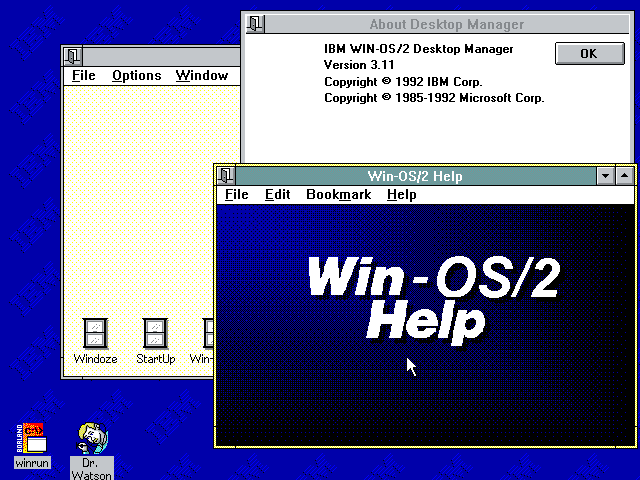
Would you please kindly elaborate? I hadn't heard of using OS/2 files in Win up to now. Most of what's in \OS2\MDOS\WINOS2 is an IBM compile of Microsoft's Windows 3.10 code. It has a handful of DOS files in it, and some icon changes (including winoldap). It's pretty easy to work out the hacked files, since OS/2 for Windows adds such files to a Windows 3.1 setup. These have different names, and use different functions to the standard DOS features. There are proggies that can add files from MS-Windows to Win-OS/2 to have the same effect. Some of the files, like write.exe are identical. Others like progman and calc.exe, are different (the OS/2 version does not have the bugs). Winfile works quite well under both, i suppose. The help about dialog lives in 'shell.dll', so when you call this up, you get 'win-os/2 3.11' under my Windoze soup. After 1994/01/01 the IBM/Msft joint agreement went into another stage, and Wfw 3.11 was brought out with some modification that adds incompatibilities to OS/2 for Windows. IBM did fix this up, in a later release. In any case, you can run Wfw 3.11 under standard mode, (since wfw 3.10 does), but you have to lift some files from win 3.11 or 3.10 to do it. On the other hand, setup in wfw 3.11 does not handle standard mode things, even though space exists for it. You have to manage these adjustments manually. Still, nearly all of the utilities from OS/2 i have used under DOS, Winfile and Printman comes from Wfw and other files lifted elsewhere. If you put shell.dll and the two ole*.dll files, Windows will tell you that it's win-os2. Note in the picture it says 'win-os2 version 3.11'. It's running under DOS, there never was a win-os2 3.11.
-
When you run something like DOS under WINOLDAP (win 3.1/9x) or DOSKRNL (OS/2) or DOSVM (WinNT), the DOS code does not run in the VM. Run for example, MSD under Windows NT or OS/2, and you will see that things like MSCDEX and Mouse take up a lot less code than under native DOS. This is because the calls are reflected out of the VM down to the host. Even functions of DOS could be reflected down to the kernel. OS/2's DOS emulation gives something like 630 KB of ram, with DOS loaded low, because the DOS calls are not dealt with in the VM. The 10 KB is the DOS data. All dos needs to do is update the data tables, not be present itself. Likewise, a newer OS can introduce things that the old OS does not know about. Running things like WP and Lotus 123 in Windows VM's allows the prints to be spooled even if they start printing together. Running 32-bit proggies in 64 bits might allow each 32-bit system to run in its own space, even if the underlying 32-bit OS is shared. In other words, you run the base 32-bit OS in one VM as a DLL, and then run each application in its own VM, with a very tiny bit calling the master VM in the way that proggies in the main system calls DLLs.