Photek
Content Type
Profiles
Forums
Events
Everything posted by Photek
-
I think the answer is in the fifth post here: http://www.administrator.de/wissen/powershell-windows-10-modern-apps-startmenü-anheften-entfernen-pin-unpin-287368.html
-
I've compared Enterprise and Enterprise N, all files I've checked are identical on both except for settings.dat and settings.dat.LOG1, located in C:\Users\{USERNAME}\AppData\Local\Packages\Microsoft.Windows.ContentDeliveryManager_cw5n1h2txyewy\Settings Both files are 32 kB in Enterprise (and Pro), and 8 kB in Enterprise N. Edit: They're just shortcuts to the Store now. IIRC, before the official launch of 1511 it actually installed the apps when connected to internet, but not anymore.
-
Maybe this can be of help, 10586 Enterprise N lacks these pending apps, the regular Enterprise got them. http://forums.mydigitallife.info/threads/66640-How-to-Make-a-Windows-10-quot-Super-LTSB-quot-ISO
-
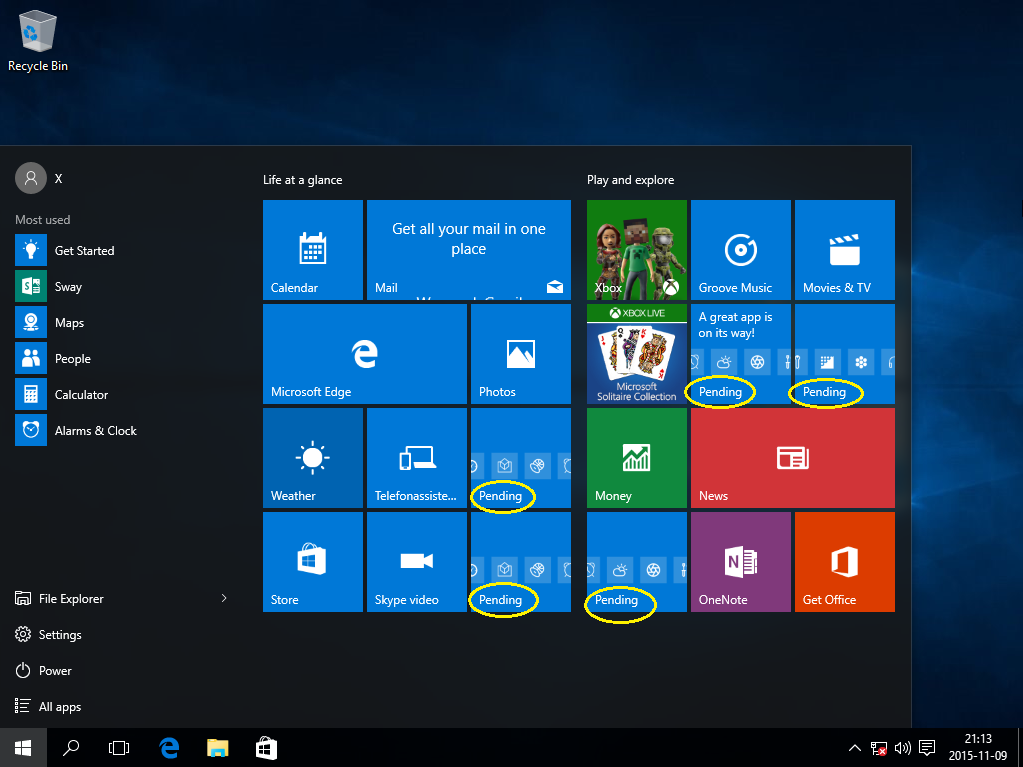
There are 5 uninstalled apps (Twitter, Minecraft, Flipboard, Wunderlist and Candy Crush Saga) in build 10586 that starts installing when internet is connected. They can not be uninstalled until they have finished installing. Removing Microsoft.Windows.ContentDeliveryManager in NTLite results in an install without the pending apps, but I don't know if this causes any issues. It would be great if it was possible to remove these pending apps in NTLite.

-
Wasn't the original meaning of a Service Pack to just include all updates and hotfixes in a one package which can be either installed or slipstreamed? Sure, but the difference between now and then is that it's not a matter of life and BSOD anymore. Who said anything about components? Well that's what I said, right? I guess we're all a bit spoiled by the overall stability of W7 RTM compared to older versions. W7 RTM is 3 years old now, and still usable. Of course we all use W7 with SP1 now, but RTM is still usable. Imagine using XP RTM in 2004, it was a whole different story.. You can't compare it like that First check size of system files in NT 4.0 and W8. And that's my point, you can't compare six service packs for NT 4.0 from an era when MS couldn't even expect everyone to have a dial up connection, to today when MS makes a 170 MB update to W8 before launch. Without the internet, that update alone would have been a service pack.
-
That list doesn't reflect the reality, which is: 1 - The need for service packs depends partly on how half baked the RTM was. Seriously, how many of those versions were usable and stable from day one? W7 was far better out of the box than Vista, XP or 2000 was. Dunno about NT 4.0 or NT 5.2 since I never used the RTM versions of them. 2 - How much better did W7 actually get with SP1? Sure, you didn't have to install loads of updates, but the overall impression was the same as with RTM. W7 RTM was stable. 3 - The reason why XP SP3 exists, why Vista was delayed, and why Vista RTM sucked was all because MS dropped the ball back then, simply put. 4 - The reason for why there are six service packs for NT 4.0 is partly because back then you didn't update the OS over internet the way we do it today. You used floppies or a CD with the service pack to update, the service packs were much smaller and came more often. SP1 was 1.4 MB large and came SEVEN WEEKS after the launch of NT 4.0.. As a contrast, W8 got a 170 MB large cumulative update this week from WU, before launch. That update alone is larger than all the service packs for NT 4.0 combined! I expect one more SP for W7, at most.
-
Licensing is also a reason. Lots of people will have a W8 license, how many will have W8TC?
-
Do I need to have WAIK for Windows 7 installed when using RT 7lite? I'm running WAIK Vista SP1 now. Edit: Seems like I need a new WAIK..
-
Kullenen_Ask: I saw your total disk usage, but how large is C:\Windows ? Thanks.
-
1 - Have you tried splitting the ISO with vlite? http://www.vlite.net/help/iso.html Read the documentation next time before posting, or use google. 2 - Use a USB memory. http://www.msfn.org/board/forum/157-install-windows-from-usb/
-
It wouldn't work anyway. http://superuser.com/questions/179550/change-windows-7-professional-to-windows-7-professional-n
-
An alternative is to download a different copy from Microsoft with WMP included.
-
I used RT7lite to remove features, and after that vlite to remove winsxs. Surprisingly, the installation never stopped, no need for oobe.exe. KB947821 have been updated august 23. It didn't show up at WU, but can be downloaded: http://catalog.update.microsoft.com/v7/site/Search.aspx?q=kb947821%20%22windows%207%22 Unlike earlier version, this one can be installed manually, just start the MSU.
-
Nope, not if it's done the right way, see link above. I have used it and it worked. It's not totally removed, it's reduced to about 200 MB (32 bit) with vlite. If you just delete the folder you'll just get a BSOD. WU can't install all updates, but that's expected since so many functions are removed (it's impossible to update something that isn't there, after all), and that occurs even if winsxs is left untouched.
-
No, it's possible to make it 1.3 GB installed. Dunno how much functionality is gone tho. I managed to make a 1.24 GB ISO for W7 Professional 32 bit. When installed in VMWare it uses 3.7 GB (pagefile excluded). I followed the guide for what's safe to remove, so it's not anything extreme. If I had removed winsxs it should've been 2.2 GB. [OS Name= Windows 7 PROFESSIONAL] [Date= 9/9/2010 8:57:11 PM] [Microsoft .NET FrameWork= 3.5] [Version: Release Candidate 1.4.0] Blackviper=Safe [Update] [Driver] [Language] [Application] [Components] Ease of Access Center=True Character Map=True Disk CleanUp=True InboxGames=True Chess=True FreeCell=True Hearts=True Shanghai=True Minesweeper=True More Games=True Internet Games=True Internet Backgammon=True Internet Checkers=True Internet Spades=True PurblePlace=True Solitaire=True SpiderSolitaire=True Infrared File Transfer Application=True Mobility Center=True On-Screen Magnifier=True People Near Me=True Projector Connectivity=True Speech Recognition=True Welcome Center=True Windows Contacts=True WindowsGadgetPlatform=True WindowsSideShow=True Wordpad=True Write=True 1394 Driver=True D_ATI Technologies=True D_Intel Corporation=True D_NVIDIA=True Creative Technology=True 1394 Desktop Camera=True M_AFA Technologies=True M_ATI Technologies=True M_Aver Media Technologies=True M_Conexant=True M_Hauppauge=True M_Luminate-Angel Devices=True M_ViXS=True M_Windows SideShow Driver=True MO_Agere Systems=True MO_AIWA=True MO_Anchor Datacom BV=True MO_Archtek Telecom=True MO_ARN=True MO_Askey and Cardinal=True MO_ATI Technologies=True MO_Banksia,Meastro=True MO_Boca Research=True MO_Brother=True MO_BSB Datentechnik=True MO_Compaq=True MO_Conexant=True MO_Creative Labs=True MO_Creatix Polymedia=True MO_CPV-Stollmann Datensysteme=True MO_Digicom=True MO_Dynalinks and Todos=True MO_Eiger Labs=True MO_E-Tech=True MO_ELSA=True MO_Fujtisu=True MO_Gateway 2000=True MO_GSM Cellular=True MO_Haeussler DK & NO=True MO_Hayes Accura=True MO_Hayes=True MO_Hot Line Export AB=True MO_I-O DATA DEVICE=True MO_Infotel=True MO_Intertex=True MO_Ke Kommunikations Elektronic=True MO_KORTEX=True MO_LASAT COMMUNICATIONS=True MO_Lucent=True MO_Megasoft=True MO_Megahertz Corporation=True MO_Metricom=True MO_Microcom=True MO_MICRO Research=True MO_Motorola=True MO_Modular Technology=True MO_Multitech Systems=True MO_NEC=True MO_Neuhaus Telekommunikation=True MO_NISSEI=True MO_Nokia=True MO_Novalink Technologies=True MO_NTT Docomo=True MO_OLITEC=True MO_OMRON=True MO_OPTION International=True MO_Ositech Communications=True MO_Pace=True MO_Panasonic=True MO_Penril Datability Networks=True MO_Practical Peripherals=True MO_Psion Dacom=True MO_Racal-Airtech=True MO_Rockwell & Cirrus=True MO_Sierra Semiconductor=True MO_SONY=True MO_Sony Ericsson=True MO_Sony Ericsson and Motorola-Bluetooth Modem=True MO_Suntac=True MO_Supra Corporation=True MO_TDK Corporation=True MO_TOSHIBA=True MO_Texas Instrument=True MO_TKR=True MO_TRON B.V. Datacommunicatie=True MO_U.S. Robotics-France=True MO_U.S. Robotics-Europe=True MO_U.S. Robotics-Sportster=True MO_U.S. Robotics,Telepath,IBM=True MO_V.DOT=True MO_Xircom=True MO_Zoom Telephonics=True MO_Zypcom=True MO_ZYXEL=True N_Atheros=True N_Atheros and Gigabyte=True N_AVM=True N_IBM=True N_Marvell Yukon=True N_Nvidia=True N_Realtek=True N_SiS=True N_VIA Technologies=True P_Brother=True P_Canon=True P_Epson=True P_Fuji Xerox=True P_Gestetner=True P_Hewlett-Packard=True P_Infotec=True P_KONICA MINOLTA=True P_Kyocera=True P_Lanier=True P_Lexmark International=True P_Microsoft=True P_Okidata=True P_Ricoh=True P_Samsung=True P_Savin=True P_Sharp=True P_Sony=True P_TOSHIBA=True P_Xerox=True Scanners=True S_Brother=True S_Canon=True S_Epson=True S_Hewlett-Packard=True S_Kyocera Mita=True S_Lexmark=True S_Microsoft=True S_Ricoh=True S_Samsung=True S_Xerox Corporation=True TV Tuners=True TV_ADS Technologies=True TV_ASUSTEK Computer=True TV_Aver Media Technologies=True TV_Bitland=True TV_Creatix=True TV_Compro Technology=True TV_Hauppauge=True TV_KNC ONE GMBH=True TV_KWorld=True TV_NXP Semiconductors=True TV_Philips Semi-Conductors=True TV_Pinnacle Systems=True TV_Terratec Electronic GmbH=True TV_VidZ Media=True Diva Client=True Fax=True Floppy Drive=True Language Packs=True ar-SA=True bg-BG=True zh-CN=True zh-TW=True zh-HK=True hr-HR=True cs-CZ=True da-DK=True nl-NL=True et-EE=True fi-FI=True fr-FR=True de-DE=True el-GR=True he-IL=True hu-HU=True it-IT=True ja-JP=True ko-KR=True lt-LT=True lv-LV=True nb-NO=True pl-PL=True es-ES=True pt-BR=True pt-PT=True ro-RO=True ru-RU=True sr-Latn-CS=True sk-SK=True sl-SI=True th-TH=True tr-TR=True uk-UA=True Mobile PC Presentation=True Sample Music and Videos=True Sample Pictures=True Screensavers=True Windows Codec Packages=True OpticalMediaDisc=True Windows ISO Burn=True MediaCenter=True WindowsMediaPlayer=True Windows Sounds=True Windows wallpapers=True Connect To Network Projector=True TelnetClient=True TelnetServer=True Windows Mail=True SensrSvc=True BDESVC=True Fax=True WPCSvc=True TabletInputService=True WerSvc=True ehRecvr=True ehSched=True WMPNetworkSvc=True Natural Language=True Narrator=True On-Screen Keyboard=True TabletPCOC=True Windows Anytime Upgrade=True Windows Easy Transfer=True Windows Help=True Zip Folder=True [Features] MediaPlayback=False [Control Panel Remove] [Control Panel Add] Registry=Add Group Policy=Add User Account 2=Add Control panel view=Small icon [Desktop] Menu Show Delay=8 [Desktop Taskbar] Aero peek=Disable Taskbar buttons=Never combine DoNot Clean TaskBar=Disable [Explorer Shortcuts] [Explorer Context] Open With Notepad=Enable Open In New Window=Enable God Mode=Enable System Properties=Enable [Explorer Views] Show Hidden Files and Folders=Enable Hide File Extensions=Disable hide Drives with No Media=Disable Show Super Hidden Operating System Files=Enable [Security] Anti spyware=Disable UAC=Disable Windows Firewall=Disable [Services] Application Management=Disable Background Intelligent Transfer Service=Manual Bluetooth Support Service=Disable BranchCache=Disable Certificate Propagation=Disable Distributed Link Tracking Client=Disable Function Discovery Resource Publication=Automatic IP Helper=Disable Microsoft iSCSI Initiator Service=Disable napagen=Disable Netlogon=Disable Offline Files=Disable Remote Procedure Call (RPC) Locator=Disable Remote Registry=Disable Security Center=Automatic(Delayed Start) Smart Card=Disable Smart Card Removal Policy=Disable SNMP Trap=Disable Software Protection=Automatic(Delayed Start) Windows Connect Now - Config Registrar=Disable Windows Defender=Automatic(Delayed Start) Windows Modules Installer=Manual Windows Update=Automatic(Delayed Start) [System] Full Information During Shutting Down=Enable Hibernation=Disable Set Mouse Pointer Speed Maximum=Enable [Visual Effects] Avalon effects=Enable [Internet Explorer] Default Search Page=www.google.com Show full URL=Enable [Media Center] CustomReg= [Un-Attended] Skip product key=True Skip Auto Activation=True Accept EULA=True Setup Language=sv-SE Logon count=1 Network location=Home Protect your computer=Do not Install Selective Updates Hide EULA page=True Hide Wireless setup in OOBE=True Specify=True Keyboard=Swedish Currency and date format=Swedish (Sweden) UI Language=sv-SE Timezone=(UTC+01:00) Amsterdam, Berlin, Bern, Rome, Stockholm, Vienna [Screen Saver] Wallpaper position=Fill [Themes] C:\Users\YOU\AppData\Local\Temp\RT_Mount\Windows\Resources\Themes\aero.theme(Already installed)= C:\Users\YOU\AppData\Local\Temp\RT_Mount\Windows\Resources\Themes\architecture.theme(Already installed)= C:\Users\YOU\AppData\Local\Temp\RT_Mount\Windows\Resources\Themes\characters.theme(Already installed)= C:\Users\YOU\AppData\Local\Temp\RT_Mount\Windows\Resources\Themes\landscapes.theme(Already installed)= C:\Users\YOU\AppData\Local\Temp\RT_Mount\Windows\Resources\Themes\nature.theme(Already installed)= C:\Users\YOU\AppData\Local\Temp\RT_Mount\Windows\Resources\Themes\scenes.theme(Already installed)= Theme frame=Sky [WallPaper] Default logon screen=C:\Windows\System32\oobe\info\backgrounds\backgroundDefault.jpg [Gadgets] C:\Users\YOU\AppData\Local\Temp\RT_Mount\Program Files\Windows Sidebar\Gadgets\Calendar.Gadget(Already installed)= C:\Users\YOU\AppData\Local\Temp\RT_Mount\Program Files\Windows Sidebar\Gadgets\Clock.Gadget(Already installed)= C:\Users\YOU\AppData\Local\Temp\RT_Mount\Program Files\Windows Sidebar\Gadgets\CPU.Gadget(Already installed)= C:\Users\YOU\AppData\Local\Temp\RT_Mount\Program Files\Windows Sidebar\Gadgets\Currency.Gadget(Already installed)= C:\Users\YOU\AppData\Local\Temp\RT_Mount\Program Files\Windows Sidebar\Gadgets\MediaCenter.Gadget(Already installed)= C:\Users\YOU\AppData\Local\Temp\RT_Mount\Program Files\Windows Sidebar\Gadgets\PicturePuzzle.Gadget(Already installed)= C:\Users\YOU\AppData\Local\Temp\RT_Mount\Program Files\Windows Sidebar\Gadgets\RSSFeeds.Gadget(Already installed)= C:\Users\YOU\AppData\Local\Temp\RT_Mount\Program Files\Windows Sidebar\Gadgets\SlideShow.Gadget(Already installed)= C:\Users\YOU\AppData\Local\Temp\RT_Mount\Program Files\Windows Sidebar\Gadgets\Weather.Gadget(Already installed)= [Documents] [Sample Musics] [Sound] Windows Balloon=Default= Windows Battery Critical=Default= Windows Battery Low=Default= Windows Critical Stop=Default= Windows Default=Default= Windows Ding=Default= Windows Error=Default= Windows Exclamation=Default= Windows Feed Discovered=Default= Windows Hardware Fail=Default= Windows Hardware Insert=Default= Windows Hardware Remove=Default= Windows Information Bar=Default= Windows Logoff Sound=Default= Windows Logon Sound=Default= Windows Minimize=Default= Windows Notify=Default= Windows Recycle=Default= Windows Restore=Default= Windows Shutdown=Default= Windows Startup=Default=
-
You ask for features that's already in at least one of your links: http://classicshell.sourceforge.net/ (execpt rename (F2) and select all (Ctrl A)) Install only Classic Explorer, not Classic Start. In Explorer, click View and enable Classic Explorer Bar. You find some settings by right clicking the up button. I still prefer using the keyboard for that, the only reason I install Classic shell is the up button.
-
An alternative is to use the built in system image feature. Yes, you still need to do all settings on all computers once, but since you only have to do it on two it's not that much of a deal. The good thing is that you don't have to spend time learning how to use WAIK. After making a system image, you can just use it to get back to a fresh install very easily, with or without installed programs. Keeping the users folders on a different partition is a must. Sorry if I'm posting the obvious here.
-
Using Remote Desktop instead of Remote Assistance for a remote helpdes
Photek replied to clivebuckwheat's topic in Windows 7
This is something I've been wanting for a long time. I've tried Server 2003 and used the Shadow command, but it gave me choppy pictures on BOTH displays. Basically, I want the same functionality as Apples Remote Desktop, where you can use your laptop to control the HTPC that's connected to a TV, where only the RD on the laptop is lagging, which is the important thing since you want a lag free TV output. I wouldn't be surprised if the functionality is there somewhere, even if it has to be a server OS, but I just fail to find the info about it. AFAIK, Server 2008 doesn't work like 2003 when it comes to the Shadow command (and lots of other things). I wouldn't care if I have to run 2003, 2008 or 2008 R2, since I can get them from my university. The question is, is it possible? -
Thanks for the replies. I have a pretty fast boot, so it's not really a problem. I was just curious if I'd miss any important by using it, since Andromeda43 suggested it. I'd do it just to get rid of the logo, not for improving speed as I don't think it makes much of a difference for me. I like Windows, but I tend to remove many logos in the OS, just like I remove all stickers from a new laptop. Ideally there would be an option with No Gui being canceled if there's anything unusual happening, ie any messages. But I don't think that will happen.
-
I used No GUI Boot on XP, and it worked well until one day when scandisk kicked in. The screen stayed black until it was finished, and I had no idea about its progress, or even what was going on at that time. (Yeah maybe I should've disabled scandisk, but that's not the point..) So my question is: Will I miss any important system messages in Windows 7 by using No Gui Boot?
-
This thread is not a sticky, but it describes the easiest way to install Windows 7 on a USB device. You just run a .cmd and answer a few questions! http://www.boot-land.net/forums/index.php?showtopic=10126
-
I can get all updates EXCEPT KB971468, I've tried both automatic and manual install. I get Error: 80073712, which triggers KB947821 to run again but that doesn't help. It's not a problem for me really, integration would probably work. I just wonder if I'm the only one? Have anyone succeeded?
-
aviv00: You're right. I thought it was only needed when upgrading.
-
I got WUpdate working! Tried to get the KB947821 from microsoft catalogue, but that didn't work. Everybody said WU wasn't working so I didn't see a reason to try it.. Almost a catch 22. Anyway, the winsxs is never empty or gone, and KB947821 adds 5500 folders but but the number of files stays the same. Not interested in integrating since it only makes it complete until the next update comes, so I prefer a working WU. aviv00: just one more question, can you see something wrong with this .ini? It can't find a driver when starting install process. Too much.ini
-
Exactly, that update isn't important, but the thing is that every time you update W7 for the first time you get a few updates first, and after a successful install and restart you'll see maybe 15 more updates. I'm stuck at the very first updates. Thank you aviv00 for helping me!