Photek
Content Type
Profiles
Forums
Events
Everything posted by Photek
-
-Is audit.exe supposed to do anything else (visually) than complaining that something isn't working? I've used your .ini, but it still doesn't work. 1 - Use vlite with 7_new.ini, apply and shut down. 2 - Use vlite and remove winsxs, create .iso. 3 - Install Windows, installation stops, run msoobe.exe, run audit.exe, restart. 4 - Install KB947821, restart. 5 - Start WU, installs KB977165 and Malicious Software Removal Tool, but KB976098 fails. 6 - Restart, but the last update won't install. 7 - Manually download the missing update, but it still won't install. Not that the last update is crucial, but without installing the first updates that shows there's no way to get the other fifteen updates that shows up later on after a restart.
-
Yep, from my MSDNAA account. Can it have something to do with what you have under [Protection]?
-
Thanks, I will try it later on. Here's my .ini no go.ini no go.ini
-
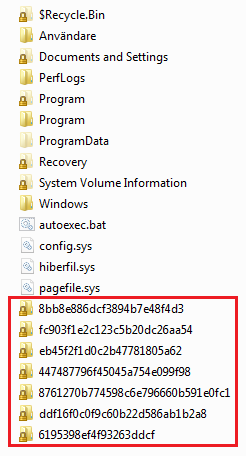
Thank you for your help. I have restarted several times, but there are five of them that I can't install. Also, can someone confirm that KB947821 is supposed to be installed in seven different folders directly in C:\ , see attachment. It just looks strange.

-
Hi! first post here, been using vlite/nlite for many years, but never been able to reduce winsxs to a realistic size. Tried this with 32-bit Ultimate, nothing extreme. Removed winsxs, languages, tablet, speech, drivers. ISO size 1.5 GB, C:\windows is 2.5 GB. I have tried installing it twice in VMWare. Some updates work, not all. I think I'm doing something wrong with KB947821 (28.9 MB). It's a folder with 8 .exe files, which I have manually started, and that makes them extract .cab files to separate folders in C:\ , which now looks pretty cluttered... Am I using the right KB, and am I supposed to just start all 8 .exe files?