jaclaz
Content Type
Profiles
Forums
Events
Everything posted by jaclaz
-
@dencorso The "label" in the bootsector is in practice ignored by most OS's, what counts is the label (as an effect of the label command or similar) that is - and here comes one of the ifs you appreciate could be 0x08 or 0x28 depending on the specific OS formatting the filesystem. https://msfn.org/board/topic/154648-dos-format-b-and-label/?tab=comments#comment-984466@Mathwiz @Mathwiz There is a post I made to try and clear the matter ( the good MS guys sometimes are not being capable to write plain English): http://reboot.pro/topic/16783-rmprepusb-faster-fat32-write-access-on-flash-memory-drives/?p=153550 The point about the label applies only if the label is applied first thing after (or during) formatting (or however before the number of files entries fill cluster 2), it applies in the case of RMPREPUSB, but if you do not use the label or apply it after having copied to the filesystem a sufficient number of files of course it won't be inside first cluster (of the file and directory data region). About FAT size/alignment, there is no rule written in stone that the FAT area must actually correspond EXACTLY to the amount of FAT entries needed. Imagine a (completely hypothetical) filesystem with 1000 clusters. You will need no less than 1000 32 bit (or 4 bytes) entries in (each) FAT. So roughly (for the sake of simplicity let's ignore the leading "lost" bytes) you need 1000x4 bytes 4000 bytes for the FAT, but you cannot have less than 8 sectors, i.e. 7*512=3584 < 4000 < 8x512 = 4096, which means that you have 96 more bytes than needed. What if instead of an 8 sectors FAT you use instead a 9 sector (one)? Nothing, i.e. you will have 512+96=608 excess cluster address space (that will be ignored just like the 96 in the previous example) and the volume/filesystem will work just fine. So, if the "normal" format will produce - say - a 785 sectors sized FAT, nothing prevents you from "extending" it to - still say - 800 sectors, thus making it an exact multiple of 8 sectors. This way, if the "Reserved sectors" are already a multiple of 8 sectors, the first FAT is also a multiple of 8 sectors and so is the second FAT, with the result that everything, including the "file and directory data region" are aligned to 8 sectors. But, since there are 2 FATs, you can only have cluster 2 aligned (and not cluster 3, i.e. jumping over the cluster where the "label" and the actual "virtual" root directory is), the only way would be to create a given number of (fake/empty) directories to fill cluster 2 and 3 and have the actual files start on cluster 4 (which would result in a "mess"), of course if cluster size is compatible with the alignment that doesn't matter. jaclaz
-
Well, to be picky as usual, no. In theory the "perfect alignment" in FAT32 (in volume) needs TWO "corrections": 1) Number of reserved sectors to align the first FAT 2) Size of FAT 1 (multiple of alignment) to align 2nd FAT and contents What is still up to debate is whether to align contents or "contents - Label" when both are not aligned with the same value and the actual alignment value to choose (that may offer better performance if aligned to the "erase page size" of the specific device. With exFAT, the equivalent of #1 is represented by the FatOffset Field (i.e. both touching the reserved sectors in FAT32 and putting a value in the FatOffset field in exFAT result in shifting the beginning of the FAT) And the equivalent of #2 is the ClusterHeapOffset. Still in theory in exFAT there is ONLY one FAT (in TexFAT there are two, as well as two bitmaps): How actually that is implemented in practice might be an entirely different topic. jaclaz
-
I don't think anyone tested this approach on exFAT, where most probably it is not needed (as it is not needed for NTFS, though for dfferent reasons). But from these tests here: https://www.flexense.com/fat32_exfat_ntfs_usb3_performance_comparison.html it's not like there are any sensible increases in speed with exFAT. And BTW we don't know if the FAT32 in those tests were "properly" aligned or not,, most probably they were not, so if you take into account the recorded increases in speed obtained by properly aligning the FAT32 volume, the exFAT will come out as slower than FAT32 (and it has already been found slower than NTFS in most cases). As a side-side note the specifications for exFAT were just released by MS: https://docs.microsoft.com/en-us/windows/win32/fileio/exfat-specification Since there is actually a FatOffset Field and a ClusterHeapOffset Field : it is very likely that (at least using MS tools) exFAT volume contents are properly aligned already. Most we had till now was some reverse engineering (just for the record): https://www.sans.org/reading-room/whitepapers/forensics/reverse-engineering-microsoft-exfat-file-system-33274 that (understandably) didn't enter in the actual use of the alignment fields and areas. Also a filesystem that may be worth a couple tests is the rarely mentioned UDF, which is built-in since Vista, it seems like noone ever properly tested it against FAT/exFAT, the only one I could find: https://www.sami-lehtinen.net/blog/exfat-extended-file-allocation-table-vs-udf-universal-disk-format-file-system-for-flash-drives seems leading to much faster reads but slower writes, so I guess using the one or the other really depends on a case by case basis. jaclaz
-
Yep, what you report is on the "high" side but in any case the improvement is substantial. In the topic that more or less started it all JFYI: pointertovoid registered smaller increases, though at the time he did it manually, whilst with Steve6375 (Author of RMPRPUSB) several slightly different approaches were tested at the time (and of course the fastest one chosen), again JFYI: http://reboot.pro/topic/16783-rmprepusb-faster-fat32-write-access-on-flash-memory-drives/ jaclaz
-
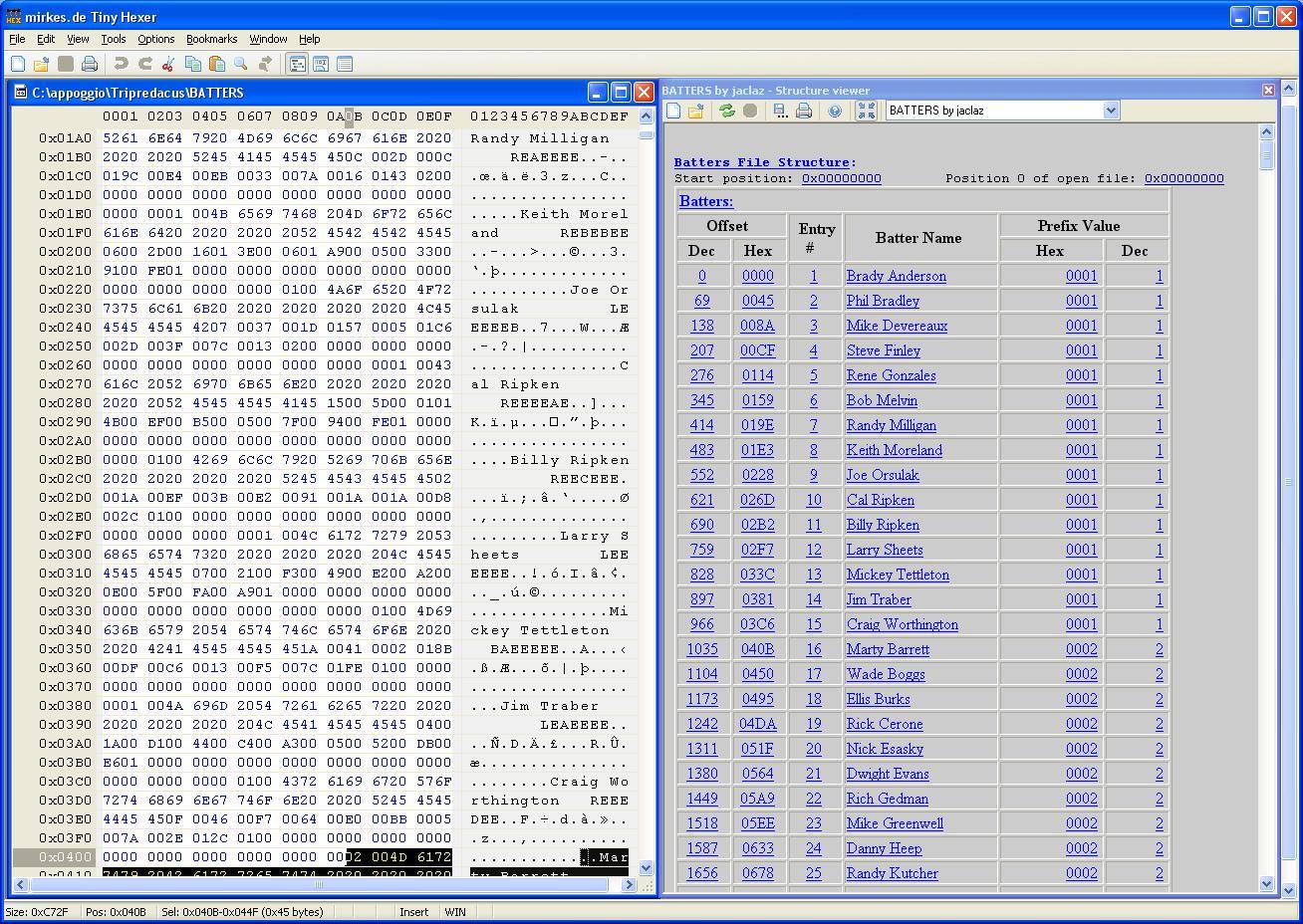
 I put together the usual half-@§§ed set of batches+spreadsheet, find the whole stuff attached, create a new folder, and uncompress the contents of the archive to it (to work with new data you will need to copy the pitlist.mps and batlist.mps to the TinyHexer scripts\Structure Viewer folder) In folder "NewFiles" there are: Batters2019 Pitchers2019 Address2019 files which I re-generated to see if the procedures work. Basically I took "Address2016" and regenerated, re-ordering them according to their position in Address2016 the Batters2019 and Pitchers2019, then re-created a new Address2019 file re-indexing the new Batters2019 and Pitchers2019. In practice the result should be the same teams as in the 2016 files, but "more ordered", let's call the new files "defragmented" . At first sight the files seem correct (though due to the way the cmd generated by the spreadsheet there are still some "holes") but the only way to know is to try the files in the program. I split the Batters and Pitchers (both the "old" and the "2016" versions) in single entries (single files, stripped of the "prefix" or Team#) and the spreadsheet "MkNewFiles" creates a batch (in column N, copy and paste to MkNewFiles.cmd) that reassembles them and creates in column J the new address file (copy and Paste to New in TinyHexer selecting "Hex text"). jaclaz Trip_Baseball.7z
 -
The Solution for Seagate 7200.11 HDDs
jaclaz replied to Gradius2's topic in Hard Drive and Removable Media
No, meaning that there is no "direct" link between an upgrade/update and a hard disk failing. What may happen, in the case of a "huge" update/upgrade, could be that the hard disk works continuously for some time and heats up, but the same happens if you cause *any* "sustained" hard disk activity, like - say - a whole disk defrag (if the filesystem is seriously fragmented) or creating a whole disk or volume backup/image. Not to say that definitely it in your cases they were coincidences, but they actually were coincidences. If the machine is the same where another 2 hard disk failed in 2015, you may want to check the temperatures the hard disks reach[1], as often there is a correlation between hard disk failures and their (high) operating temperatures, but again it is little more than a statistical correlation, hard disks largely tend to fail "suddenly" for "unknown" and "random" reasons (in 99.99% of the cases noone spends the huge amount of money needed to examone a failed disk, and even if the disk is actually examined to attempt to recover data, rarely the actual cause is investigated and a definite reason why found). jaclaz [1] in some cases adding a fan bringing some "fresh" air to the drives bays is a good idea -
What Eve Wang (MSFT CSG) wrote, is (blatantly) incorrect AND the article she linked to contains NO detail whatsoever about the possibility to redistribute a PE (let alone differentiating between commercial and non-commercial purposes). In the same thread Tripredacus replied, stating correctly the situation: in simpler words, a PE has NEVER been redistributable, but it was available for a few years in a "special" redistribution agreement (for a fee) intended to allow selected Commercial software firms to redistribute it as part of their install/recovery/whatever software. Since several years this special redistribution agreement program is over. Provided that the MS' EULA is an actually enforceable and legally valid document (which is something I personally doubt, BTW) it is the document that regulates the license of the software, and the EULA explicitly states how ONLY the "samples" in the ADK are redistributable. But I will make anyway an example of how I personally read the reply by Eve Wang (MSFT CSG) : Q: Do elephants fly? A; Yes, but only on wednesdays, if there is a full moon, and here is a nice poem about elephants: https://www.poemhunter.com/poems/elephant/page-2/36807454/ jaclaz
-
@bphlpt Good , and do you believe that a Windows 10 PE [1] is actually redistributable? I mean, all these years spent with Bart's PEBuilder and Winbuilder, were them totally wasted? Now would you tend to trust more Eve Wang (MSFT CSG)[2] or - say - Tripredacus?: https://social.technet.microsoft.com/Forums/Lync/en-US/050e7a61-4ca6-42eb-865d-7eaddff90ddb/is-windows-pe-for-windows-10-redistributable?forum=winserversetup Of course the moment the EULA for the ADK (or a separate one for PE) will have something to the effect of "You are free to re-distribute any of the binaries included" or a REDIST.TXT with a full list of the files, things will change, right now the relevant part is: https://forum.acronis.com/sites/default/files/comment_attachments/2016/11/397321-134896.pdf jaclaz [1] or - for that matters - *any* Microsoft binary not expressely released as redistributable [2] you will find many similar questions on social.msdn.microsoft.com invariably replied to with non-answers or answers by clueless people (RCSAKIT PHART), I pointed you to one answered by someone we can trust
-
Very good (though obviously I only understand half of the baseball terminology ). But the point is (now that we have defined and know exactly what those data are) do we (actually you) *need* to edit them? Or they can be treated like if they were - say - a block of data representing the date of birth of the player (which you won't change/touch at all )? Now that we know how the contents is arranged in records, Managing them with a spreadsheet and a couple command line tools should be straightforward (maybe slow, but simple enough) Jaclaz
-
No need to ban you on request, simply forget your password. jaclaz
-
Add portable apps to Windows XP Setup
jaclaz replied to WS7_6608's topic in Unattended Windows 2000/XP/2003
It means that some specific "apps" (let's call 'em "programs", OK? "apps" are the things - with feathers - on the Microsoft Store) are (easily) scriptable/automatable other ones need anyway user interaction. For these latter programs, all you want/need is a batch file running their setup. For the former programs there may already be known available scripts, tricks, methods, etc. So - example only - if you ask: How can I automate the install of 7-zip right after the installation of XP? You might get valid, specific answers (or you may be told that you cannot, etc.) Right now you are instead asking: How do I install *any* app program right after the installation of XP? Which will get you either answers like "it depends" or more plainly stupid answers, likely to not actually solve your problem. However there is a "generic" (and hopefully non-stupid) answer, which is "use RunOnceEx (or cmdlines.txt, svcpack.inf, and GuiRunOnce): https://web.archive.org/web/20080724013742/http://gosh.msfn.org:80/using_runonceex.htm https://web.archive.org/web/20080323172855/http://support.microsoft.com/kb/232509 jaclaz -
Getting my popcorn and taking a sit on the couch, this is gonna be fun to watch ... jaclaz
-
Change Windows XP Setup Texts
jaclaz replied to WS7_6608's topic in Setup Billboard Screens for Windows
jaclaz -
Good. if needed I can extend the Pitchers and Batters parsers to parse the "rest" of the data, So, for pitchers (let's take the Jeff Ballard example) this is not correct: Since in other fields were used "words" the data should be: Next 14 are stat based data: 12 00 08 00 57 01 3D 00 40 00 08 01 66 00 And these likely translate to 7 fields: PStatField #1 0x0012 -> 18 PStatField #2 0x0008 -> 8 PStatField #3 0x0157 -> 343 PStatField #4 0x003D -> 61 PStatField #5 0x0040 -> 64 PStatField #6 0x0108 -> 264 PStatField #7 0x0066 -> 102 Which BTW creates a nice, symmetrical situation with the batters (that is as well not correct, probably a typo): As there are 20 Bytes, so for Brady Anderson that would be: Next 20 is stats based data 04 00 10 00 CF 00 80 00 B5 00 DA 00 24 00 49 00 D3 00 F8 02 BStatField #1 0x0004 -> 4 BStatField #2 0x0010 -> 16 BStatField #3 0x00CF -> 207 BStatField #4 0x0080 -> 128 BStatField #5 0x00B5 -> 181 BStatField #6 0x00DA -> 218 BStatField #7 0x0024 -> 36 BStatField #8 0x0049-> 73 BStatField #9 0x00D3 -> 211 BStatField #10 0x02F8 -> 760 If you find these values in the visualization of the game statistics we can assign the right field name to each . jaclaz
-
Yep , but what is next? I mean. it seems like the "Address" is a "plain" enough database, with 50 or so records (possibly 52), one for each team, Then both the "Batters" and "Pitchers" are as well plain enough databases with respectively 739 and 477 records, corresponding *roughly* to 50*15=750 and 50*10=500, with the names and the characteristics of each player. If they were my files I would probably put together an Excel spreadsheet and write a couple (half-@§§ed as always) batches to "translate" forth and back the contents. jaclaz
-
You are right, I was *somehow* parsing the same range twice , but the record size is correct, 50 bytes. What throws off manually viewing the file is that some entries have 00's, i.e not all entries are "populated". Attached the corrected Address.MPS, replace the old one with this (no more the "whatever" field ) Now, in "Address" Entry # should be the Team #, whilst in "Batters" and "Pitchers" the "Prefix" should be the Team #. I.e. in Batters, Batter #589 Roy White should belong to Team #42 (value of "Prefix"). And in Address, in Entry # 42 there is (last filled entry in Batters) #589. As well, in Pitchers, Pitcher #387 Mike Torres should belong to team #42 (value of "Prefix"). And in Address in Entry #42 there is (last filled entry in Pitchers) #387. jaclaz ADDRESS.mps
-
Plugging in second monitor causes XP x64 to BSOD
jaclaz replied to asdf2345's topic in Windows XP 64 Bit Edition
Yep, only for the record it is also in the post by Tal Aloni here: https://hardforum.com/threads/windows-xp-x64-nvidia-driver-fix-page_fault_in_nonpaged_area-when-two-monitors-are-connected.1972152/ (but the actual dowload link is the same): http://vm1.duckdns.org/Public/Nvidia/368.81-PAGE_FAULT_IN_NONPAGED_AREA-fix/nv4_mini.sys jaclaz -
The Solution for Seagate 7200.11 HDDs
jaclaz replied to Gradius2's topic in Hard Drive and Removable Media
The answer is yes and no (and no ), the disk detected as 3.86 GB can be the common symptom of different issues. So: 1) Yes (if it is one of the fixable ones) 2) No (if it is not one of the fixable ones) 3) and No, nothing that you can do yourself, besides the serial connection some specialized tools are needed and it is NOT an easy to do procedure, you have to ask a professional Here is an example of a recovery: but more often than not the issue is due to head(s) gone bad, which implies going to a reliable data recovery firm (with the appropriate tools and knowledge to perform platter/heads swap and recalibration). A software only data recovery should be in the hundreds of dollars, if a platters/heads swap is needed you are likely crossing the border to thousands. jaclaz -
Try the attached ADDRESS.mps and PITCHERS.mps. jaclaz ADDRESS.mps PITCHERS.mps
-
Ok, in the meantime get TinyHexer from here: https://www.softpedia.com/get/Others/Miscellaneous/tiny-hexer.shtml Put the attached ,mps in the \mirkes.de\Tiny Hexer\scripts\Structure Viewer folder and use it on the BATTERS file. There is a little glitsh as the single quote character in the batter name makes things "go green", but it is only a visual one. Of course I need BOTH the "stock" and the "modified" files to go on. jaclaz BATTERS.mps

-
And where is "PITCHERS"? jaclaz
-
Well, the rule of the thumb is that (speaking of consumer products, not "bulk") if the manufacturer cannot afford a "proper" package for their products, then I cannot afford[1] their products, judging from the e-bay listing they had "one box fits all", that thingy, besides the current low cost on e-bay, must have been really "el cheapo"[2] even at the time. jaclaz [1] meaning that I can, obviously, but that I cannot afford the issues they will provoke. [2] which in itself may mean little, as an example I have found in my experience no real differences in the lifetime of PSU's between "good name" and "el cheapo" ones, nor the cheap ones ever caused any particular issues
-
Well as said if any of the power rails is shorted to ground the PSU will simply not power on, it could be really anything, including some (conductive) dirt in a connector. Try re-adding cards one at the time, check that connectors are clean. If you are "lucky" when you add one of the PCI cards, you will have the same symptoms, if you can re-add all the cards without issue, then it will be a problem as you won' t know what made it happen. jacla
-
Can you post the actual files? This: Is not accurate, 00 is - as said above - not a delimiter, it is more likely the higher value byte of a two byte numbering, Good, this explains why second grouping stops at 0x00A0. jaclaz
-
Well, to give you some (non-random but not necessarily meaningful) data, I fiddle around with PC's since the early 1990's and (maybe luck/case, maybe not) in these almost thirty years I replaced on the various computers I manage, partly mine partly of friends/relatives: 1) a large number of failed hard disks (tens of them) 2) much more than that, I would say "countless" failed PSU's 3) a handful of motherboards, maybe 3 or 4 that were beyond meaningful repair[1] (out of a total of - say - 7 or 8 total failed ones) 4) a handful of graphic cards, maybe 3 or 4 Anyway modern PSU's have a protection circuit and if any of the rails are shorted to ground they won't simply power on, so - to all practical effects - a shot TVS diode on the +12 V or on the +5 V has the same effect, but the same symptoms may be shown for a whole lot of other reasons. jaclaz [1] i.e. with very minor issues, one or two capacitors to be replaced, a shot PS/2 diode a couple broken solder points/connectors, an on-board network adapter gone beserk, and similar.