-
Yup... that would work too... tho in same cases the cookies were not enabled a/o did not have activex controls in place. Thanks Paul Cheers Ty
-
Arie, Sorry about the lack of information... You are right i am exporting a certain file from Internet Explorer, which i am trying to import in Excel... IE 6.0.2900.xpsp_sp2_gdr.0702272254CO MS Excel 2003 (11.8146.8132) SP2 I am exporting site details from a sharepoint site into excel, like usage details , number of frequent users etc into excel. Thanks, Ty
-
Hey all I seem to be getting this error when i try and generate/export a report into excel " Your browser does not support scripts or has been configured not to allow scripts." any idea what i am supposed to enable/install to have this resolved? Thanks Ty
-
Thanks .. i got a reply to this post, if any one is interested it can be found at... http://www.appdeploy.com/messageboards/tm.asp?m=20873This thread can now be closed... Ty
-
Hey, Anyone know to which catalogfile the dot4.inf file is related to? im tryin to intall a hp Lj 1300 and calls this inf, i want to deploy this silently.. maybe if i mention the catalogfile in the dot4.inf this just might work... any ideas or suggestions.. greatly appreciated.. Thanks Ty
-
here yea go bro.. you can get most common and older system dlls here... http://www.dll-files.com/dllindex/dll-files.shtml?iphlpapi cheers... Tyron
-
Chances are you have bad clusters, the more you try to access the more the bad clusters you may get, i had this problem, and i am hoping your file system is ntfs (better chances of recovery), use getbackdata for ntfs to recover your files while you still can. Seagate should have some tools as well.. Else you could also try reading the hdd by hooking it up to another PC
-
File sharing should be enabled in your network settings and simple file sharing should be unchecked in folder view options..
-
you gotta be more descriptive about your problem, were there any beeps and stuff like that?
-
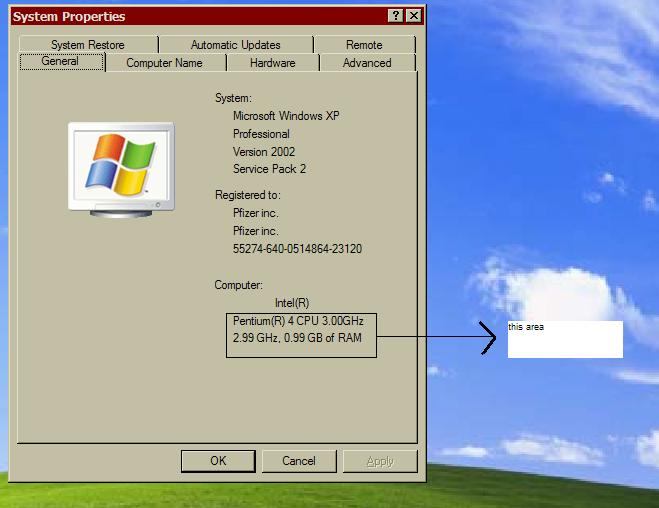
Is there any way i could get this to display the correct RAM on the box? Regards Tyron
-
lol.. sounds like a motherboard problem.. then again im guessin its can be a combo, between ur motherboard n processor. try the processor on a different mobo and see if it works and vice.. anre you bios settings on default as well?
-
What are your default jumper setting? keep it on those.... if you cutomize your boot it would throw up an error, not restart automatically... see if this link helps you out.. http://www.computerhope.com/issues/ch000689.htm
-
Its usually one of two things Your system is over heating.. so check if you Processor is plugged in properly or you RAM is messed up, try using different sticks..
-
o.. ok.. thans for the reply.. i know where to change the other stuff inc the processor details, but its showing the wrong amount of RAM..
-
Heya all hope everyone is doing great.. i was jus wondering if any one knew how to edit the hardware info on the system properties tab? check attachment for exact area.. any info would be greatly apprciated:) Regards Tyron