




-
The exexutable's original name was 'yt-dlp_linux' (which incorporates a python-3.10+ runtime) so there's no need to build/brew the python-3.12.5 runtime here (which i did for testing - but only on one development disk). And yes, i'm planing an upgrade to bookworm/trixie/forky later this year (but not very enthusiastic tbh. )
-
I'm getting too old for much of the new stuff too - a 1GB+ build environment would definitely be unacceptable for me. Btw.: your yt-dlp (version 2026.01.29.071857) runs flawlessly here since end of january (on "Bullseye")
-
Congratulations @Dietmar! And meanwhile i think that Linux is really much superior to Windows (XP or 7): Lately found a Kingston mSATA ssd in the attic and - without any other application for it - had the idea to use it as transport media from the pc to the notebook utilizing this mSATA-USB3-adapter - mainly to avoid lost file attributes when transferring files to Linux. Had to wait about 2 weeks for the shipping from ShenZhen ($ 2.50 shipping costs? ) so i had enough time to wonder if i could additionally apply some OS's on that stick. After assembly i (MBR-) partitioned the 'disk': A first ntfs system partition for XP, an Extended (ntfs) partition (with Data + Win-7 sub-partitions) and a third ext4 partition for linux. This is what happened: Win XP: xxCloned mbr + bootrecord + the system from a standard ssd (like a dozend times before) in 3 minutes: really fast - but booting from the usb/mSATA resulted in a 07B bsod (0xB84C3524,...). Win 7: it presented all the partitions of the mSATA stick accurately - but stated immediatly that it's uncapable to install on a "scsci" media. Deplorable! Linux: installed flawlessly. Without any single issue. No noticeable performance difference compared to a standard ssd. Fun-fact: GRUB found the first Win-XP partition as bootable and offeres it in it's boot-menu...
-
Excuse me, is this the crap-message what you get there too: "Turnstile Failed Despite Passing All Checks"? And "All browser compatibility checks passed, but Turnstile couldn't complete successfuly". Tested just out of curiosity, on linux with Basilisk 64 - Luckyly never saw that before on the sites i visit:
-
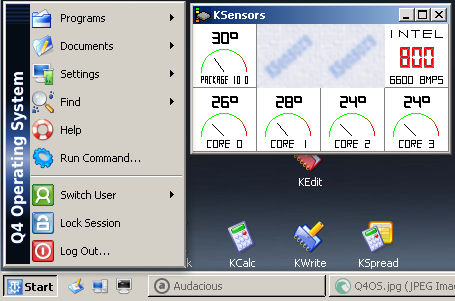
I'd like to underline that suggestion to Q4OS Trinity (+ some minimal tweaks). Ok, it remains a Linux, but hey:
-
Lately i found out, that TinyWall 3.2.5 isn't compatible to .NET 4.5 in Win7 - the admin-panel wasn't accessible, clicking on the admin-item in the menu caused TW stop working. After un-installing the two .NET 4.5 packages (.NET 2.0.x remained) the issue was resolved.
-
Hello, as regularly i did some backup to an ssd lately. It has the following (MBR) partitioning (The drive letters are as seen in Win-7): 1. (X:) Win-XP: System, Primary Partition 2. Extended Partition: (D:) Data: Logical drive (C:) Win7: Startpartition, Logical drive (F:) Free: Logical drive 3. Active Primary Linux (ext4) Partition The BCD resides in X:\boot\. As usual in my setup, there is no additional 100MB System Partition on the disk. This setup works perfectly on several disks. Now, yesterday after the backup, i booted successfully in all the three OS'es consecutively (for some configuration tasks): into Linux, then in Win-XP and finally into Win 7. Everything fine. Then, by chance, i opened the Visual BCD Editor - but it didn't start: "Run Applicatin with Admin privileges" error message. Just like described here. Though, it is possible to start Visual BCD Editor with "X:\boot\BCD" as argument from the commandline - but it can't Backup/Save it then. There is no Registry Hive HKLM\BCD00000000 in the registry (See here). However, it's possible to mount the BCD (from the Win-XP primary partition X:) with reg load HKLM\BCD00000000 X:\boot\BCD But that doesn't change anything for (Visual) BCDedit: bcdedit /enum BOOTMGR The Memory for the Startconfiguration couldn't be opened The System can't find the specified file bcdedit /enum OSLOADER The Memory for the Startconfiguration couldn't be opened The System can't find the specified file What strange kind of amnesia is this: Win-7 can (dual-) boot perfectly, but it lost the information, where the BCD is? Where does it believe that the BCD is? And, more importantly: how can i tell him, that it's in X:\boot? Edit: Please don't bother! After cloning the first (X:) Win-XP partition, i forgot to remove the existing X:\Boot folder. So Win7, while installing, obviously was aware of another Windows on the System. After deleting the existing X:\Boot folder, a fresh installation went flawlessly...
-
XP + Win7 + Q4OS in a convenient 3-boot setup here, on pc & notebook (and several backup disks)
-
Oh NICE, thank you, yes they do work! Tbh, i simply ignored them until now, as the plain yt-dlp executable always did the job. Edit: Now, as i wanted to copy/deploy Python-3.12.5 from my dev-disk to the main System i discovered, that i didn't only ,brew' the executable (of about 36MB) but also an additional Python-3.12 folder in /usr/local/lib - of about 287 MB! So i decide to utilize this (now even more appreciated) Py-integrated version in the nearer future. And i'm wondering a bit, how the new XP-Version can be so small in size!
-
For the latest version of yt-dlp (2025.10.23) i had to update even my oldstable Debian 11 system (from 3.9 to 3.12.5 - as described nicely here). A little bit complicated and CPU-intense, but it seems to work: yt videos now downloading again without the 403/permission error. Cordial thanks @nicolaasjan and all the other developers!
-
Well, we've been cautioned betimes : https://msfn.org/board/topic/184368-who-here-has-a-youtube-dl-compile-for-winxp/page/14/#findComment-1277080
-
i do hook up with Mr. Thornton! Since there was an update to FF 128.10 a week ago (with some "high impact" security fixes) i'd like to ask you @K4sum1 whether / when there will follow updated releas(es) of r3dfox 128. Thank you!
-
Neither Basilisk/Palemon do, nor Firefox 102. At least Firefox 115 here.
-
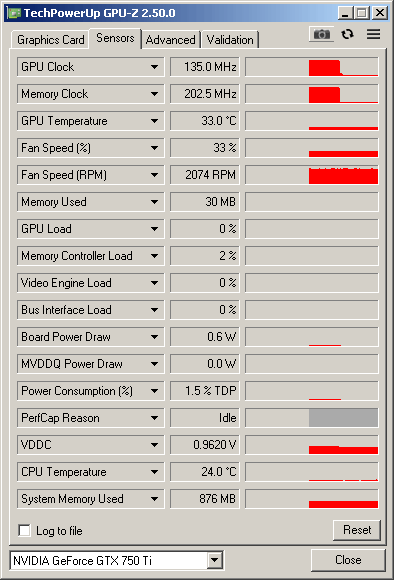
Many thanks again @Saxon, ok, but 1.5 % of 60 W TDP = 0.9 W (in my case!) is far less than the 11W shown in HW-Monitor & Core Temp, the GPU load is 0%, and GDDR5 memory + fan won't suck the remaining 10W... But please don't bather, since this is a 710 thread i will shut up now
-
Many thanks, @Saxon, i promise to do so! Yes, and that's exactly what what i meant: in my (750 Ti) case i's 1.5 % of 60 W TDP, but it does schow 11-12 W in HW Monitor (and in Core Temp too). Could you please state, what the consumption is in absolute, in your case (GTX 780 - 28nm as well). Thanks!