
-
It just doesnt work for me in stock Vista so I thought it doesnt support Vista anymore.
-
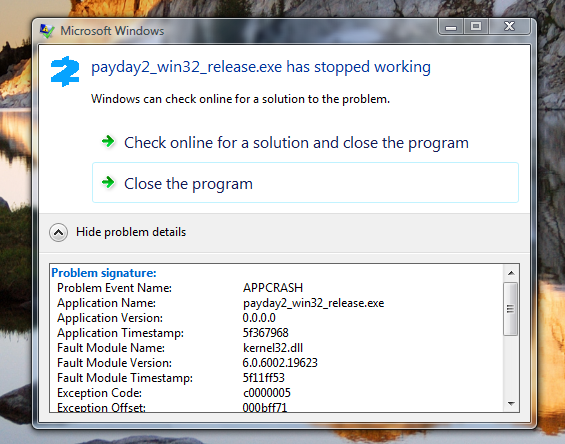
Can't take a screenshot of the entire "View details" thing but I can copy every single information in there: " Problem signature: Problem Event Name: APPCRASH Application Name: payday2_win32_release.exe Application Version: 0.0.0.0 Application Timestamp: 5f367968 Fault Module Name: kernel32.dll Fault Module Version: 6.0.6002.19623 Fault Module Timestamp: 5f11ff53 Exception Code: c0000005 Exception Offset: 000bff71 OS Version: 6.0.6002.2.2.0.256.1 Locale ID: 1033 Additional Information 1: 3234 Additional Information 2: 2dfcfbd32f33f3fdaa0d0937222cb9c3 Additional Information 3: 3234 Additional Information 4: 2dfcfbd32f33f3fdaa0d0937222cb9c3" Hope this helps
-
Hello! Just wanted to report that both "Garrys Mod" and "Euro Truck Simulator 2" work perfectly fine with Oct 2nd 2019 Steam build.
-
Hello. Tried to run Euro Truck Simulator 2 and Garrys Mod (with Oct 2nd 2019 Steam build -which requires Ex-Kernel-) and they work absolutely fine. However when I try to run Payday 2 it just crashes like "payday2_win32_release.exe stopped working" and when I view extra details it has something to do with "kernel32.dll" Maybe you should take a look. Much much regards.
-
C9_Slips changed their profile photo
-
Can you make Windows 7 drivers run on Vista? It doesnt matter when, all it matters that if it is possible. I really want to use vista but my GPU doesnt let me.