nicolaasjan
Content Type
Profiles
Forums
Events
Everything posted by nicolaasjan
-

My Browser Builds (Part 3)
nicolaasjan replied to roytam1's topic in Browsers working on Older NT-Family OSes
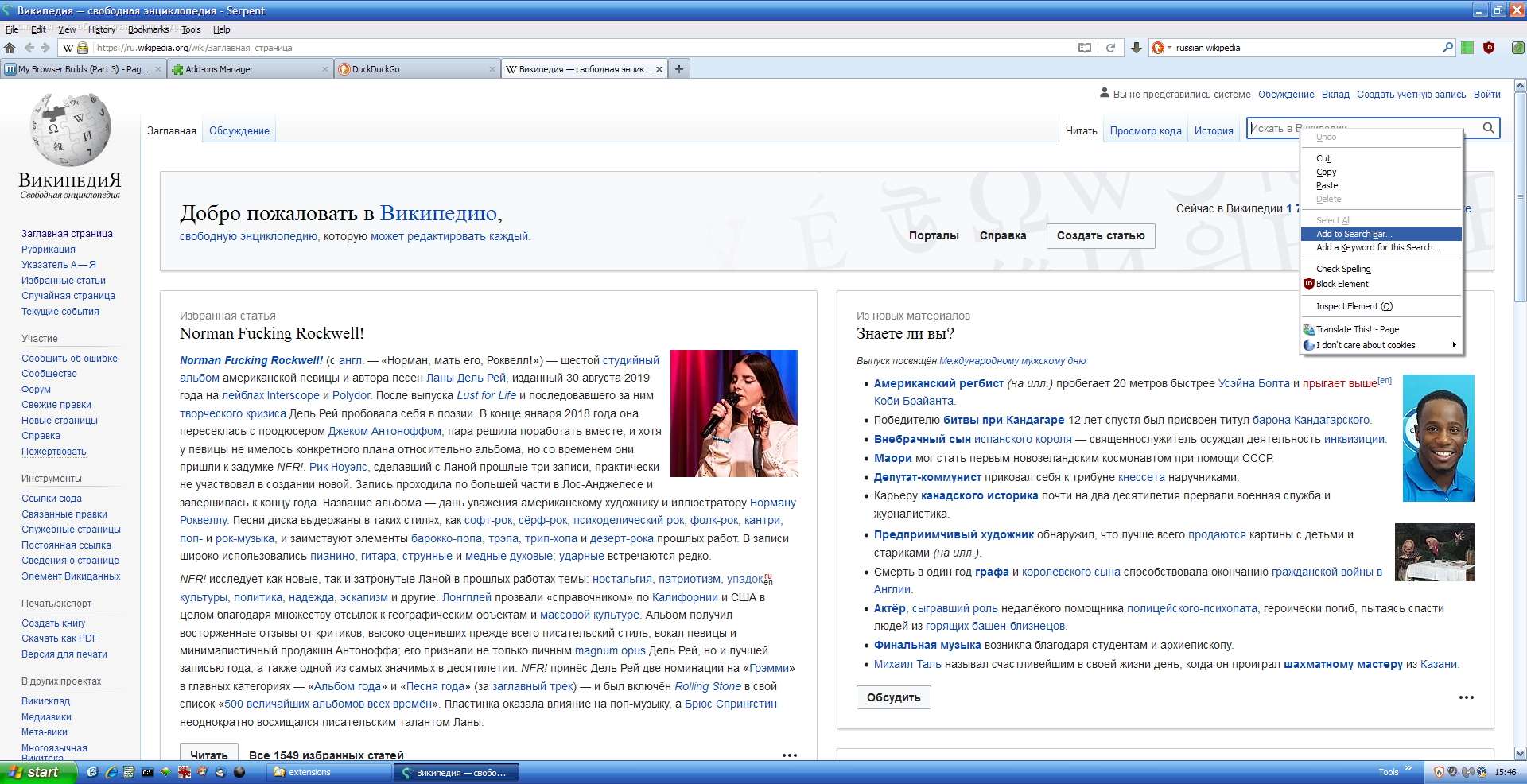
Strange... What you can try as well, is the extension "Add to Search Bar". I have a modified version here, which should install in Basilisk: Add-to-Search-Bar-2.9.zip When installed, right-click in a search box to add search engine. Screenshot:
-
My Browser Builds (Part 3)
nicolaasjan replied to roytam1's topic in Browsers working on Older NT-Family OSes
Same issue as @baluw had I guess. See: https://msfn.org/board/topic/182647-my-browser-builds-part-3/page/65/?tab=comments#comment-1207849 -
My Browser Builds (Part 3)
nicolaasjan replied to roytam1's topic in Browsers working on Older NT-Family OSes
Have you tried changing the useragent for addons.basilisk-browser.org in 'about:config'? New string: general.useragent.override.addons.basilisk-browser.org Mozilla/5.0 (Windows NT 6.3; Win64; x64; rv:68.0) Gecko/20100101 Goanna/4.8 Firefox/68.0 Basilisk/52.9.2021.07.19 That allows you to install extensions from there as well (or at least download them and then edit 'instal.rdf' with the appropriate min and max version). -
My Browser Builds (Part 3)
nicolaasjan replied to roytam1's topic in Browsers working on Older NT-Family OSes
Yes, it would be enlightening for him to witness a real terrorist attack... Also, in my opinion, he has a narcissistic personality disorder. If the Pale Moon team allows him to go on like this, I fear that even the few people that still use this browser will leave. -
My Browser Builds (Part 3)
nicolaasjan replied to roytam1's topic in Browsers working on Older NT-Family OSes
Haha. Pale Moon on 4chan: /g/ - Pale Moon's love letter to community - Technology - 4chan They don't like the devs either... -
My Browser Builds (Part 3)
nicolaasjan replied to roytam1's topic in Browsers working on Older NT-Family OSes
I tried with "DownThemAll!" (5 parallel downloads); 9MB/sec (my max speed): -
My Browser Builds (Part 3)
nicolaasjan replied to roytam1's topic in Browsers working on Older NT-Family OSes
And now the Classic Addons Archive's files are gone as well... See: https://old.reddit.com/r/waterfox/comments/phgle9/classic_ad_on_archive_unfortunately_has_been_shut/ https://github.com/JustOff/ca-archive/issues/100 The complete archive is still accessible via this URL (or via the Internet Archive): https://cdn.waterfox.net/AMO/caa20190306.tar.xz ( 14GB compressed ! ) (file list) -
My Browser Builds (Part 3)
nicolaasjan replied to roytam1's topic in Browsers working on Older NT-Family OSes
Thanks! -
My Browser Builds (Part 3)
nicolaasjan replied to roytam1's topic in Browsers working on Older NT-Family OSes
Don't know if they're breaking the licence (I'm not a lawyer), but it's a shady loophole for sure. -
My Browser Builds (Part 3)
nicolaasjan replied to roytam1's topic in Browsers working on Older NT-Family OSes
(offtopic) For people under oppressive regimes, dissidents, journalists, the military, etc. it's a valid and legal option. From Wikipedia: Sure, there are people who abuse it for nefarious purposes. But there are enough that have a good reason to make use of it. -
My Browser Builds (Part 3)
nicolaasjan replied to roytam1's topic in Browsers working on Older NT-Family OSes
In the good old days it was straightforward to clone the GitHub Pale Moon repo and build yourself. I see it is now on repo.palemoon.org and you need an account. With the TOR browser you get: 403 Forbidden And now this: I can't call this open source any more... -
My Browser Builds (Part 3)
nicolaasjan replied to roytam1's topic in Browsers working on Older NT-Family OSes
Yeah, I see now (didn't check yesterday...). Sorry. These are downloadable: https://web.archive.org/web/20210901082440/https://www.mypal-browser.org/release/?C=M%3BO%3DD You mean the youtube-dl project that got hit by the RIAA? Their repo got reinstated with help of the EFF, but at the moment they're not doing very well again, because there hasn't been an update since 2021-06-06... Luckily there's the yt-dlp fork, which is actively maintained. -
My Browser Builds (Part 3)
nicolaasjan replied to roytam1's topic in Browsers working on Older NT-Family OSes
Yeah, it's gone... Last "usable" version: https://web.archive.org/web/20210815103613/https://github.com/Feodor2/Mypal/releases -
My Browser Builds (Part 3)
nicolaasjan replied to roytam1's topic in Browsers working on Older NT-Family OSes
I use uBlock Origin/uBlock-for-firefox-legacy (and uMatrix/eMatrix), which don't have that shady behaviour. I fully trust the maintainers of these. -
My Browser Builds (Part 3)
nicolaasjan replied to roytam1's topic in Browsers working on Older NT-Family OSes
But...,but..., how do you cope with all the ads? -
My Browser Builds (Part 3)
nicolaasjan replied to roytam1's topic in Browsers working on Older NT-Family OSes
My pleasure! But maybe extensions have to be downloaded first and then you have to edit the `install.rdf` file in it? -
My Browser Builds (Part 3)
nicolaasjan replied to roytam1's topic in Browsers working on Older NT-Family OSes
Workaround: general.useragent.override.addons.palemoon.org ---> Mozilla/5.0 (X11; Linux x86_64; rv:68.0) Gecko/20100101 Goanna/4.8 Firefox/68.0 PaleMoon/29.4.0.2 Before: After: But there's a real possibility that they come up with something more "clever" (JavaScript?). -
My Browser Builds (Part 3)
nicolaasjan replied to roytam1's topic in Browsers working on Older NT-Family OSes
Saved in the webarchive. https://web.archive.org/web/20210901082440/https://www.mypal-browser.org/release/?C=M%3BO%3DD -
My Browser Builds (Part 3)
nicolaasjan replied to roytam1's topic in Browsers working on Older NT-Family OSes
VLC plays local files fine here on the XP VM (3.5GB RAM, 2 processors, video memory 128MB). But you can always try ffplay (no GUI whatsoever) from: https://rwijnsma.home.xs4all.nl/files/ffmpeg/?C=M;O=D [Edit] (Offtopic) To play YouTube video's through ffplay: youtube-dl --ignore-config -o - 4aXi3lOmICI | ffplay -i - Limited to 720p; I could only get 1080p working with the following command using the yt-dlp fork of youtube-dl (x86 version doesn't work on XP!): yt-dlp --ignore-config -o - -f "bv*[height<=1080][ext=mp4]+ba[ext=m4a]/b[ext=mp4]" --downloader ffmpeg --external-downloader-args "ffmpeg:-movflags dash" 4aXi3lOmICI | ffplay -i - Note that ffmpeg must be compiled with: --enable-demuxer=dash --enable-libxml2 -
My Browser Builds (Part 3)
nicolaasjan replied to roytam1's topic in Browsers working on Older NT-Family OSes
2015-09-23 did absolutely nothing (not even audio played). You mean I have to install a codec pack from there and if so, which one should I install? -
My Browser Builds (Part 3)
nicolaasjan replied to roytam1's topic in Browsers working on Older NT-Family OSes
Didn't see anything special in FileMon (only "SUCCESS"). MPV has hardware acceleration on Linux as well here (only h264): mpv https://www.youtube.com/watch?v=gfhiLIktIzA (+) Video --vid=1 (*) (h264 1920x1080 60.000fps) (+) Audio --aid=1 --alang=eng (*) (aac 2ch 44100Hz) Subs --sid=1 --slang=en 'vtt' (webvtt) (external) Subs --sid=2 --slang=pt 'vtt' (webvtt) (external) Cannot load libcuda.so.1 Using hardware decoding (vaapi). AO: [pulse] 44100Hz stereo 2ch float VO: [gpu] 1920x1080 vaapi[nv12] You have to turn on hardware acceleration in the config (hwdec=auto). I think I have to give up trying to get MPV working properly in this VM, haha. (it's working in a Vista and Windows 7 VM though) -
My Browser Builds (Part 3)
nicolaasjan replied to roytam1's topic in Browsers working on Older NT-Family OSes
Yeah, I got it from: https://web.archive.org/web/20160610143950/https://mpv.srsfckn.biz/ Didn't work here at all (see edit above). [Edit] I could open a mp4 video, but got only sound and no interface. Are there maybe codecs I need? -
My Browser Builds (Part 3)
nicolaasjan replied to roytam1's topic in Browsers working on Older NT-Family OSes
+1 I play video's through MPV as well (also with the help of "Open With"), but haven't been able to find a version of MPV that works in my XP Virtual Machine... Do I have to look here: https://www.videohelp.com/software/mpv-media-player/old-versions ? And if so, which version works? [Edit] Version mpv-i686-20151029 is supposed to be the latest working on XP, but did absolutely nothing when attempting to start... -
My Browser Builds (Part 3)
nicolaasjan replied to roytam1's topic in Browsers working on Older NT-Family OSes
I'm a Linux user (XP in a VM), and I can say their Linux instruction worked for me, when I built Pale Moon a few times in the past. Added this compiler flag: ac_add_options --enable-optimize="-march=native -g -O2" Don't do that any more however, because it's a burden for my HD and CPU. In general, compiling on Linux is much more straightforward and faster than building on Windows. -
My Browser Builds (Part 3)
nicolaasjan replied to roytam1's topic in Browsers working on Older NT-Family OSes
Ah, that must be it. The thought indeed crossed my mind. Do you remember who made that. I can't find it. [Edit] Found it. Thanks!