Skip to content
View in the app

A better way to browse. Learn more.

MSFN

A full-screen app on your home screen with push notifications, badges and more.

To install this app on iOS and iPadOS
  1. Tap the Share icon in Safari
  2. Scroll the menu and tap Add to Home Screen.
  3. Tap Add in the top-right corner.
To install this app on Android
  1. Tap the 3-dot menu (⋮) in the top-right corner of the browser.
  2. Tap Add to Home screen or Install app.
  3. Confirm by tapping Install.

Matias Groen

Member
  • Joined

  • Last visited

  • Country

    Netherlands
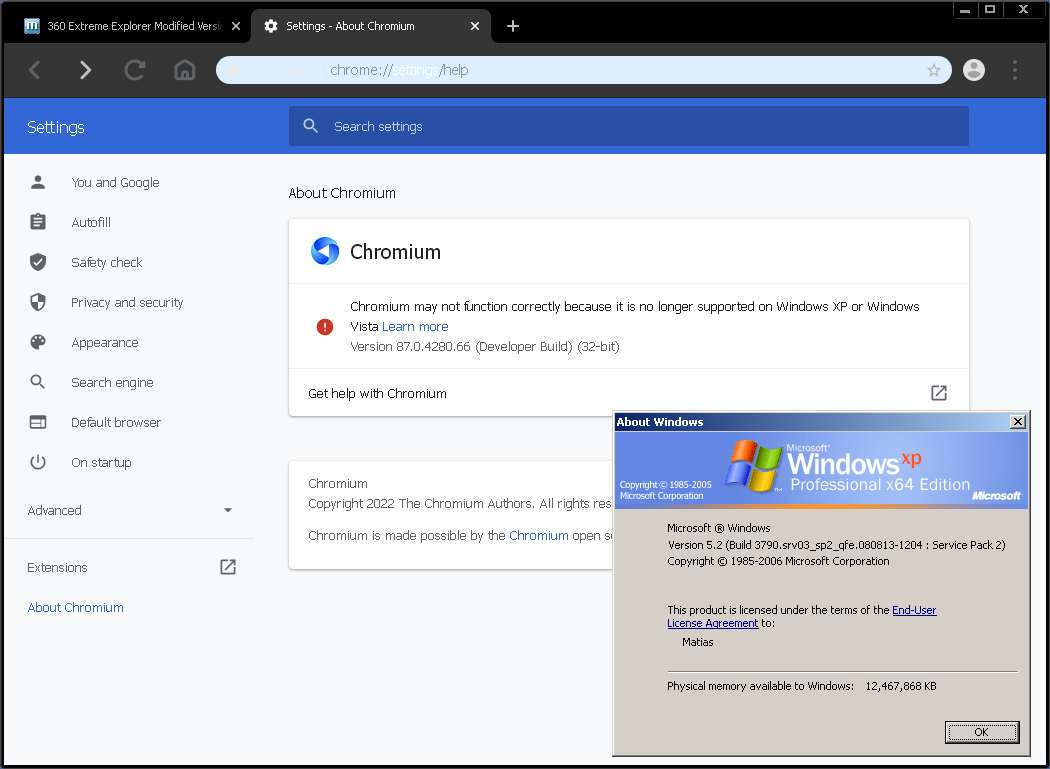
  1. Can confirm that both of them work. It seemed to do that on my XP32 machine as well, not sure what it is. I've been running XP64 24/7 on my Sandy Bridge server since August 2019 and have yet to run into any major issues.
  2. Yes it does! I only discovered the newer version today but I tried both.
  3. I have gotten MiniBrowser working on XP64 by renaming the missing SetProcessDEPPolicy function in MiniBrowser.exe and chrome.dll to a random existing function (in my case I used SetLastError) using PE Tools.


Account

Navigation

Configure browser push notifications

Chrome (Android)
  1. Tap the lock icon next to the address bar.
  2. Tap Permissions → Notifications.
  3. Adjust your preference.
Chrome (Desktop)
  1. Click the padlock icon in the address bar.
  2. Select Site settings.
  3. Find Notifications and adjust your preference.