deomsh
Content Type
Profiles
Forums
Events
Everything posted by deomsh
-
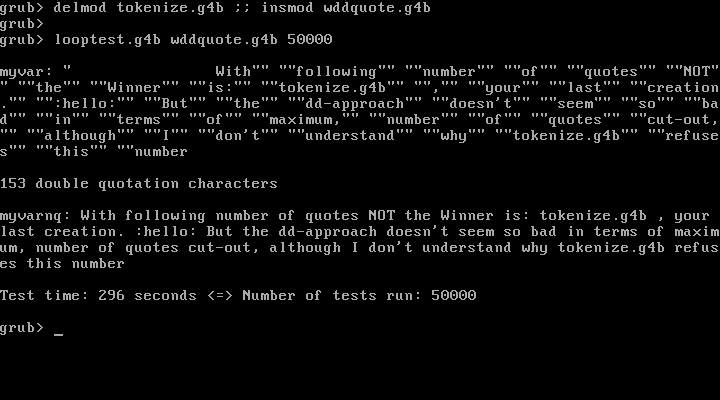
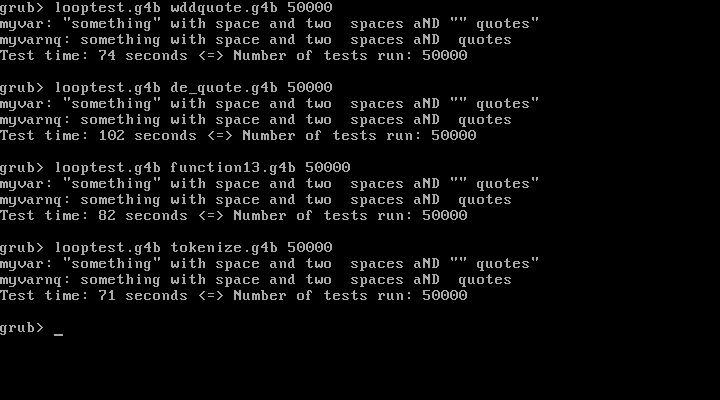
Sounds logical, here are the tests. To raise the number of qoutes I invented a user who wants to be sure: every word, and every space between quotes. I changed myvar a bit, so the second double-qoute character is after the 16th position. Indeed, difference has become huge. With a high number of qoutes my dd-approach is much slower then your tokenize-approach. But sometimes weakness is strength: the number of characters to cut-out is virtual unlimited with the dd-approach. Print-screen's this time in reverse order. Watch the last word in myvar and myvarnq: The tokenize-approach seems to have a limit I first didn't understand, until I saw the memory-addresses (somehow I counted with two hex digits memory - but that's max 255 of cause) + one space - : In a real filesystem this number of qoutes will of cause (almost) never exist, but there may be other uses. Yep, same reason why I am using insmod. In the mean time I counted the difference between two tests of quote-removing approaches, without or with insmod is approximately the same number of seconds (always ±1 second, because of the use of %@time% ! See print-screen´s in my post of last Monday 11:43).

-
I do not understand why my dd-approach should loop more times than number of quotes in the variable. Each quote needs one :noquotes-loop (unless you mean inside the dd-command because I set bs=1). However, see the print-screens Because 50.000 tests gave only a small difference (last digit is ±1 second), I raised the number of tests to 500.000 So the ´statement´ in variable myvarnq still holds approximately. With ONE double-quote character in myvar (instead of five), the calculated difference will be around ½ second per 50.000 runs.
-
Speed is your ultimate goal, but what about your problem of max AGP4x? What is shown by the 77.72 Geforce Display property tab?
-
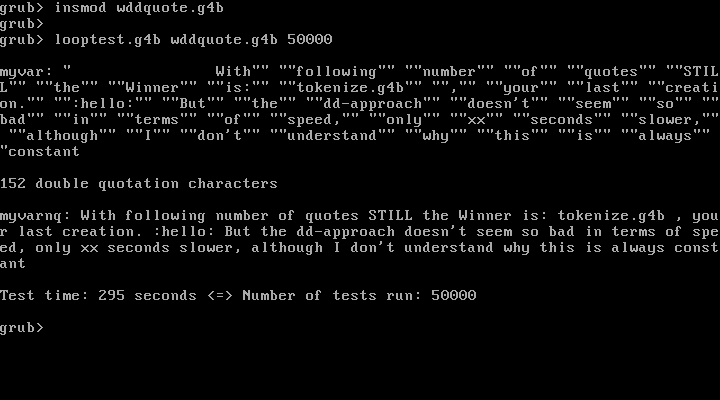
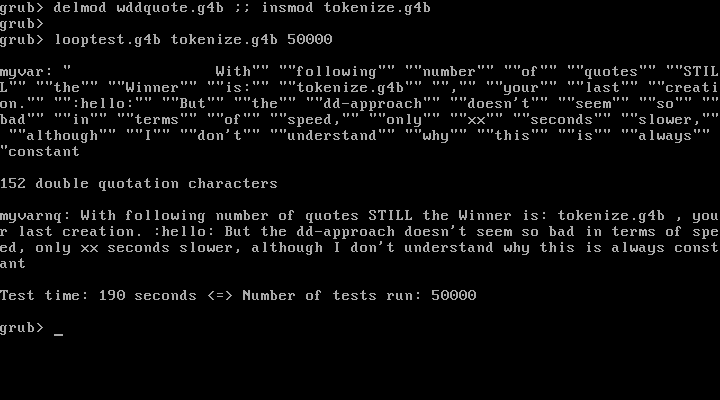
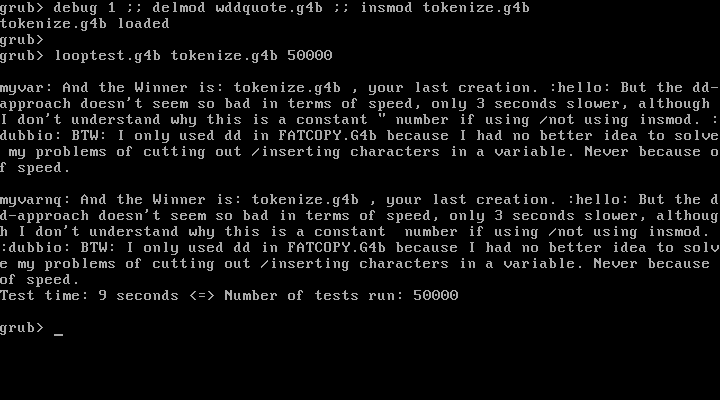
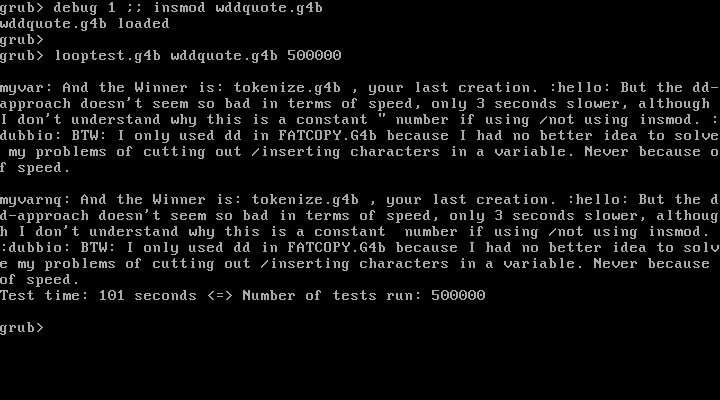
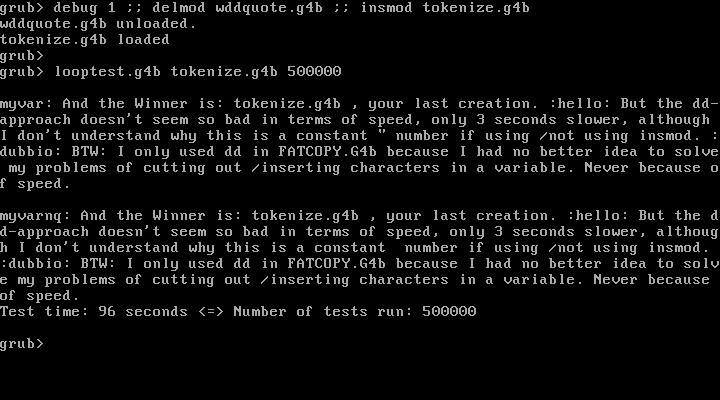
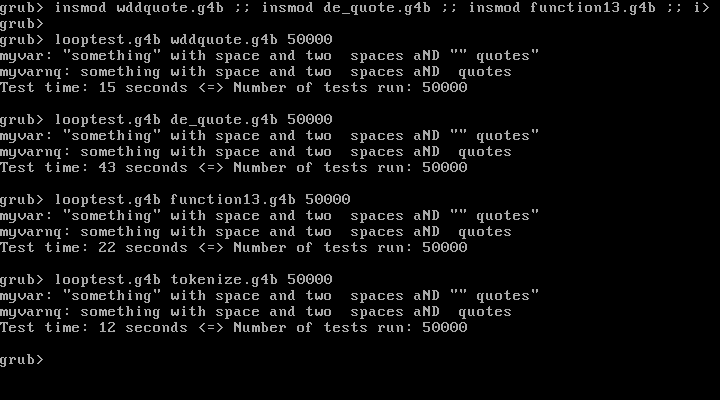
I didn´t ment it being a problem, only that two more double-quote characters has to be removed. See first print-screen. BTW I changed variable to an example which can easily led to an odd number of quotes on the FATCOPY.G4b command-line (latest double-quote character AFTER last slash). First run is your original Function13-batch, in the second run myvar is set between extra double-quotes, third run is the batch with my dd-approach, but already including your write (md)%mdmem%+1 %myvar%\0 I'm impressed, cat --skip=%start% (md)%mdmem%+1 | set myvarnq=%myvarnq% is a great idea! It's working nice. I made a small timing-batch. Variable myvar is centralized (in the four called batch-files above temporarily commented out) and writing to screen in LOOPTEST.G4B only. I took out a part of my FATCOPY.G4B-timer, so don't use around midnight. I gave the four different approaches to remove double-quotes some nice names. WDDQUOTE.G4B is my dd-approach, but with your use of write and also your use of cat --locate=\x22 (md)%mdmem%+1 > nul || goto :eof to locate a double-quote character, used to run /not run the sub-routine (instead of mine - which is more complicated). Your three batches are in historical order. ---------------------------------------------------------------------------------------------------- looptest.g4b ---------------------------------------------------------------------------------------------------- !BAT set=* debug off pager off set testg4b=%1 if not exist testg4b && echo && echo command-line: looptest.g4b FILE.G4B NUMBER && echo && goto :eof set /a numtest=%2 > nul if not exist numtest && echo && echo command-line: looptest.g4b FILE.G4B NUMBER && echo && goto :eof if %numtest%==0 && echo && echo command-line: looptest.g4b FILE.G4B NUMBER && echo && goto :eof set myvar="something" with space and two spaces aND "" quotes" #set "myvar=something with space and two spaces aND quotes" if exist myvar && echo myvar: %myvar% set time0=%@time% set /a loopnums=0 > nul :testloop if %loopnums%>=%numtest% goto :timing set /a loopnums=%loopnums% + 1 > nul set myvarnq= setlocal && call %testg4b% endlocal && set myvarnq=%myvarnq% goto :testloop :timing set time1=%@time% set /a "timesec0=%time0:~0,2% * 3600 + %time0:~3,2% * 60 + %time0:~6,2%" > nul set /a "timesec1=%time1:~0,2% * 3600 + %time1:~3,2% * 60 + %time1:~6,2%" > nul set /a "copytime=%timesec1% - %timesec0%" > nul echo myvarnq: %myvarnq% echo Test time: %copytime% seconds <=> Number of tests run: %loopnums% echo ---------------------------------------------------------------------------------------------------- --------------------------------------------------------------------- wddquote.g4b --------------------------------------------------------------------- !BAT #set myvar="something" with space and two spaces aND "" quotes" set /A mdmem=0x3000 > nul echo -n > (md)%mdmem%+1 write (md)%mdmem%+1 %myvar%\0 cat --locate=\x22 (md)%mdmem%+1 > nul || goto :eof call :noquotes goto :eof :noquotes set seekbyt= cat --locate=\x22 --number=1 (md)%mdmem%+1 | set seekbyt= if not exist seekbyt && cat (md)%mdmem%+1 | set myvarnq= && goto :eof set seekbyt=0x%seekbyt% set /A seekbyt=%seekbyt% set /A "skipbyt=%seekbyt% + 1" dd if=(md)%mdmem%+1 of=(md)%mdmem%+1 bs=1 skip=%skipbyt% seek=%seekbyt% goto :noquotes ----------------------------------------------------------------------------------------------------- ---------------------------------------------------------------- de_quote.g4b ---------------------------------------------------------------- !BAT #set myvar="something" with space and two spaces aND "" quotes" set myvar=%myvar% echo %@retval% | set myvarl= set myvarnq= set /a counter=0 > nul call :de_quote goto :eof :de_quote call set thischar=%^myvar:~%counter%,1%: set /a counter=%counter%+1 > nul if not \%thischar%==\": set myvarnq=%myvarnq%%%thischar:~0,1% if ":"=="%thischar:~0,1%" set myvarnq=%myvarnq:~0,-1% if %counter%==%myvarl% goto :eof goto :de_quote ---------------------------------------------------------------- ---------------------------------------------------------------- function13.g4b ---------------------------------------------------------------- !BAT set /A mdmem=0x3000 > nul set /A myskip=0x600000 > nul #set myvar="something" with space and two spaces aND "" quotes" echo -n > (md)%mdmem%+1 write (md)%mdmem%+1 %myvar%\0 > nul cat --locate=\x22 --replace=: (md)%mdmem%+1 set myvar= call :Function13 set myvarnq=%myvar% goto :eof :Function13 call Fn.13 %myskip% ":" set /A myskip=%@retval% > nul cat --skip=%myskip% (md)0+0x3001 | set mytoken=: set /A myskip=%myskip%+%@retval% > nul set myvar=%myvar%%%mytoken:~1% call Fn.11 %myskip% ":" && goto :Function13 goto :eof ---------------------------------------------------------------- ---------------------------------------------------------------- tokenize.g4b ---------------------------------------------------------------- !BAT set /A mdmem=0x3000 > nul set /A myskip=0x600000 > nul #set myvar="something" with space and two spaces aND "" quotes" set myvarnq= set myoffets= echo -n > (md)%mdmem%+1 write (md)%mdmem%+1 %myvar%\0 > nul cat --locate=\x22 (md)%mdmem%+1 | set myoffsets= cat --locate=\x22 --replace=\x00 (md)%mdmem%+1 cat (md)%mdmem%+1 | set myvarnq=%myvarnq% if not ""=="%myoffsets%" call :tokenize %myoffsets% goto :eof :tokenize set /A start=0x%1+1 > nul cat --skip=%start% (md)%mdmem%+1 | set myvarnq=%myvarnq% if not ""=="%2" shift && goto :tokenize goto :eof ---------------------------------------------------------------- Tests are all run in VBox 6.0.18 r136238. First print-screen below is testing while each batch-file has to be read from disk, so each run again. I also tried loading the four batches with insmod (using insmod with LOOPTEST.G4B was only about one second faster). Load-order or loading all batches at once made no difference. And the Winner is: tokenize.g4b , your last creation. But the dd-approach doesn't seem so bad in terms of speed, only 3 seconds slower, although I don't understand why this is a constant number if using /not using insmod. BTW: I only used dd in FATCOPY.G4b because I had no better idea to solve my problems of cutting out /inserting characters in a variable. Never because of speed.
-
Interesting, but I will have to study the used Fn calls to understand more of it. Your latest approach seems to work, but only if the variable begins and end with a double-quote character! In my dd-approach this is not needed (and remaining double-quotes if used on the FATCOPY.G4B command-line will be not at begin or end of the variable containing the source path). Are there more precise timing possibities with GRUB4DOS? My timer in FATCOPY.G4B has a minimum of whole seconds, which is far to much for comparisons needed here.
-
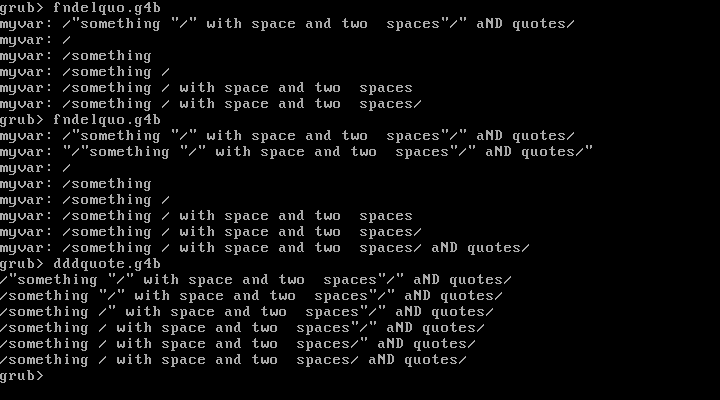
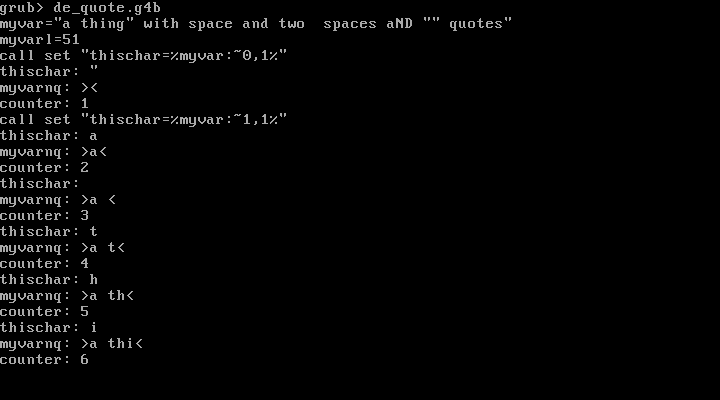
@jaclaz Thanks a lot I am VERY happy to have a working example with call expanding %^var:~s,n% with a loop! I've red everything about it in Steve's documents I could find, but still didn't grasp the whole 'thing'. In my understanding of your batch-file the double-quote character " can be evaluated with if %var%== if between two 'supported' characters. I believe the colon you included in set thischar=%^myvar:%counter%,1%: is needed because of the spaces. But I found out the colon can be left outside if double-qoutes are used during setting thischar, then if not \%thischar%:==\" : is always working (and will the line if ":"=="%thischar:~0,1%" set myvarnq=%myvarnq:~0,-1% be unnecessary). To fit in one print-screen I changed 'something' in myvar too. Also substituting spaces with the needed ls-spaces ("\ ") is easygoing with your approach expanding variables with call. But I think your idea to use write to get even a variable containing an odd number of double-quotes into (md), together with my use of dd will be a bit faster. Only a fistful of spaces need to be cut out, instead rewriting the whole variable. Or am I wrong?
-
Of cause, but my idea was IF the 77.72 driver gave better performance than with the 8x.xx drivers (both for your 6800), it could be worthwile to 'dig deeper' with the 7xxx AGP cards on Win98 regarding drivers /Registry.
-
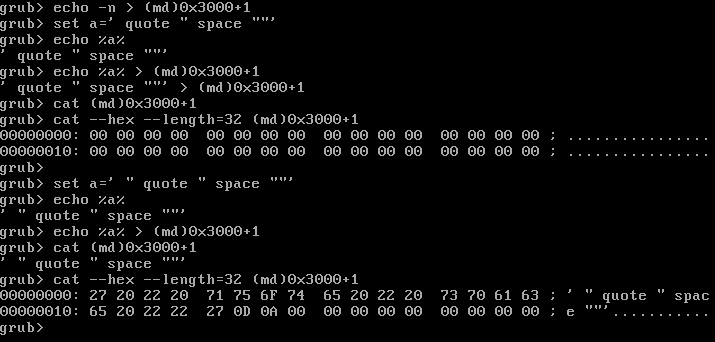
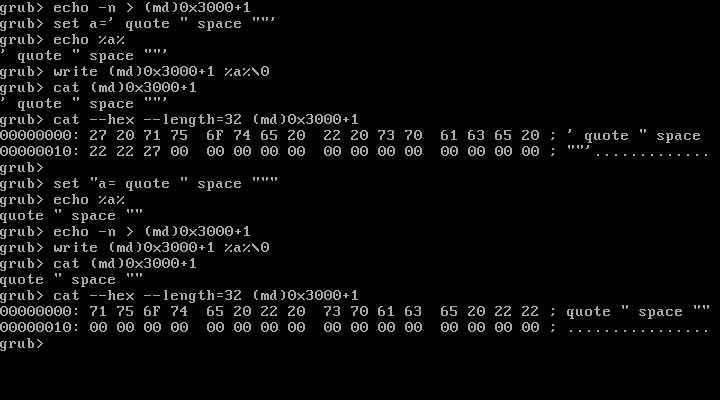
@Wunderbar98 Thanks! I just tested your Unix-suggestion, but doesn't seem to make any difference (see the print-screen below). Only the odd er even number of double-quotes seems to count in echo %a% > (md)0x3000+1. First part: variable with odd number of double-quotes inside single-quotes. Second part: variable with even number of double-quotes inside single-quotes But at least I learned a single-quote is 27h Jaclaz' solution to use write seems to work (see second print-screen). Only termination is different, without 0D 0A, but can be added if needed.
-
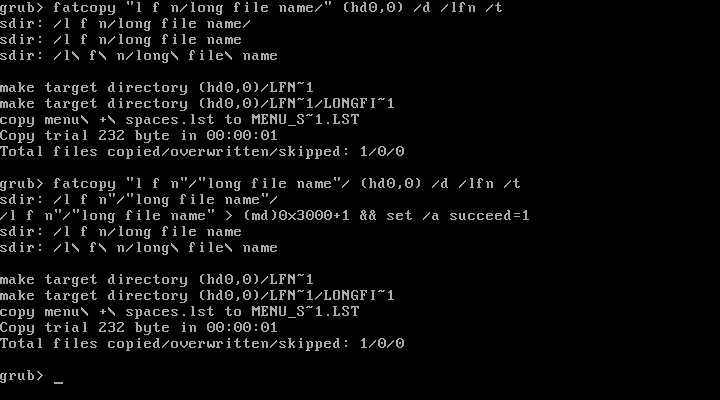
My problem is to identify an odd number of quote-signs inside a variable, with the purpose to get rid of them with help of (md). Quotes are only used on the FATCOPY.G4B command-line in case of spaces in PATH and /or FILE. So only used in case of LFN's. An example is in the picture below. Last five lines are normal copy-output, first three / four lines after fatcopy are written to screen for clarification. If only two outside quotes are used, they are already removed by the %~1-readout of PATH (in the example DEVICE is root and FILE is not specified). But if each directory in PATH is surrounded by quotes, an odd number of quote-signs remains in the variable %sdir% after the readout. In this case the echo %sdir% > (md)0x3000+1 line is written to screen only, together with a part of my 'dirty' workaround: if exist sdir && set /a succeed=0 # %mdmem% is normally 0x3000 if exist sdir && echo -n > (md)%mdmem%+1 if exist sdir && echo %sdir% > (md)%mdmem%+1 && set /a succeed=1 if exist sdir && if %succeed%==0 && set sdir=%sdir%" if exist sdir && echo %sdir% > (md)%mdmem%+1 && set /a succeed=1 if exist sdir && if %succeed%==0 && echo && echo Use of qoutes is not valid && goto :eov set quotes= # " = 22 hex if exist sdir && cat --locate=\x22 (md)%mdmem%+1 > nul echo %@retval% | set quotes= if exist sdir && if %quotes%>=1 && set quotes= && setlocal && set file=%sdir% && call :noquotes if exist sdir && endlocal && set sdir=%file% && set file= set quotes= Once the variable containing quote-signs is written to (md)0x3000+1 I call following sub-routine to remove the quote-signs: :noquotes set seekbyt= # " = 22hex cat --locate=\x22 --number=1 (md)%mdmem%+1 | set seekbyt= #%mdmem% is normally 0x3000 if not exist seekbyt && cat (md)%mdmem%+1 | set file= && goto :eof set seekbyt=0x%seekbyt% set /A seekbyt=%seekbyt% set /A "skipbyt=%seekbyt% + 1" dd if=(md)%mdmem%+1 of=(md)%mdmem%+1 bs=1 skip=%skipbyt% seek=%seekbyt% goto :noquotes Afterwards I use set sdir=%file% to get the source directory without quote-signs. Third / fourth line in the picture above is after replacing all spaces in PATH by ls-spaces ("\ "), needed for proper operation. Everything is working as needed, only the echo of my dirty workaround bothers me, and because of its non-specific character. Thanks for your solution to use write to write a variable to (md). I did some first tests and I think my problem is solved, but I have to rewrite some parts of my batch-file, because even set file=%sdir% && call :noquotes is not working if the variable contains an odd number of quote-signs.
-
I solved my problem using quotes & spaces on the FATCOPY.G4B command-line. It appears that outside-quotes are removed if %~d1 / %~p1 / %~nx1 are used to read out DEVICE1 / PATH1 / FILE1 etcetera. So different from GRUB4DOS commands like ls, where a quote-sign before a DEVICE gives an error. To avoid undesirable results because of remaing spaces in variables, all I had to do was an earlier call to my subroutine that changes normal spaces the the GRUB4DOS "\ "-spaces representation. If quotes are used around PATH and /or FILE (or -superflous- even around DEVICE) things became more complicated if only one quote-sign is left after the readout (or three). It appears that a variable containing an odd number of quotes, regardless their position inside the variable, can not be written into memory with echo %var% > (md)0xMMMM+1. In this case the whole command-line is echo'd on screen, nothing happens further. I found a sort of workaround to add one quote-sign to the variable if this happens, but I am not fully satisfied, because the workaround in fact doesn't detect an odd number of quotes in the variable, only that writing a variable to (md) didn't happen. Also quotes can't be detected by %var:~s,n% , although they are counted by echo %@retval% after set var=%var% Any ideas?
-
What about the 77.72 drivers? Should work with a GF6800.
-
Links Web Browser Community Edition for DOS with TLS 1.2
deomsh replied to Wunderbar98's topic in Windows 9x Member Projects
If you have a modem/router, there will be a hardware firewall onboard. About Links: once setting are saved, history will be saved too. Can be browsed with "g" and up/down arrows. My 1900x1200 LCD needs aspect calibration: ratio 0,87 with 1600x1200 video mode. -
Links Web Browser Community Edition for DOS with TLS 1.2
deomsh replied to Wunderbar98's topic in Windows 9x Member Projects
While in Win9x there many Windows browsers usable, for Windows 3.1 this is not true. In my experience best is Netscape 3.04, but browsing is only more or less comfortable with a webproxy like proxycrime.com. I tested Links 2.21 for dos in a Windows 3.1 MS-DOS window, and I think this is possibly an asset for Windows 3.1 browsing. Also the video possibilities are great. While using a XGA 640x480 16 colors driver, inside Links for dos 1600x1200x16M32 (full color!) is no problem with the right video card /monitor. DPMI is delivered by Windows, if mouse-services are a problem a compatible mouse driver can be loaded in Real mode before Windows is booted (in my case CTMOUSE.EXE is not compatible with Windows 3.1, but LMOUSE.COM gave no problems with my USB-legacy mouse). Links for dos can also be used as a viewer for htm (I assume html = htm in 8+3 Short File Names), jpg, png, gif, but NOT bmp. With FileManager the neccesary associations with LINKS.BAT can be made (LINKS.PIF gives LINKS working in text-mode only for me). To get this result I am using following LINKS.BAT in my system: C:\DOS\LINKS\LINKS221.EXE -mode 1600x1200x16M32 %1 LINKS.BAT is most convenient placed in the Windows directory. LINKS.PIF can be made and edited (seems not critical). If used, better disable Alt+Enter and Alt+Tab (Switching to other programs works for me only if Links video-mode is exactly equal to Windows video-mode). I was surprised that a real packet driver (RTSPKT.COM for my RTL8139 NIC) together with WINPKT.COM is working in a Windows 3.1 MS-DOS window, this after the problems with Win9x. -
Links Web Browser Community Edition for DOS with TLS 1.2
deomsh replied to Wunderbar98's topic in Windows 9x Member Projects
@Wunderbar98 Thanks @sweaterfish did a good job, he solved most of his problems with the 16-bits HDA2.DLL. I still hope he will publish a final configuration-file for Thinkpad X61, so I have less work next time. I am lucky you won't go further with packet driver networking in a MS-DOS window. Lately I solved the bootup problem on my H61-motherboard by adding DEVICE=C:\WINDOWS\NDISHLP.SYS in CONFIG.SYS (see the earlier described Netbind-setup), AND adding to PROTOCOL.INI: [ndishlp$] DriverName=ndishlp$ Bindings=XXXX$ (for XXXX substitute the name-part of the NDIS2-drivers file-name). With this addition my NDIS5-driver is still installed according to Network Neighborhood, but will not load if NETBIND.COM has been running before Windows starts. Only the NDIS2-driver seems to be used in this case, also while connecting to the internet with a Windows browser. Choice can be easily introduced with Menu items in CONFIG.SYS/AUTOEXEC.BAT -
Links Web Browser Community Edition for DOS with TLS 1.2
deomsh replied to Wunderbar98's topic in Windows 9x Member Projects
Running Links for dos in Real mode MS-DOS will be faster at least (so far). Just for the record: I do not consider myself as a Win9x driver expert. My driver experiments are all about using 16-bits drivers in a Win9x environment. Still needed if there are no native Win9x drivers available. -
Links Web Browser Community Edition for DOS with TLS 1.2
deomsh replied to Wunderbar98's topic in Windows 9x Member Projects
So far I have experimented with four NIC's: RTL8139C, Accton EN1207D, Compaq NC3121 (PCI-cards), and RTL8168 (onboard). For the Realtek NIC's there is only a NDIS2-driver available for use in Win9x). The other two cards have Win9x-drivers too. I found running NDIS2 + packet driver shim's inside a MS-DOS window NOT possible with Win9x-drivers installed (on my second test-motherboard Windows 98SE even refuses to start in case of the NETBIND-setup). But both Win95 drivers have the possibility to switch to their 16-bits NDIS2-driver (using the Adapter-properties in Network Neighborhood). After a full reboot PROTOCOL.INI in the Windows directory can be edited to add the packet driver binding (same as earlier). By trial and error I found that DIS_PKT.DOS (or DIS_PKT9.DOS) can be loaded by editing the Transport-key in the Real Mode entry in the Registry. Just search for Transport and add ",dis_pkt.dos" to the value of the key (without qoutes, the comma is the separator). Further DIS_PKT.DOS must be copied to the Windows directory. Afterwards a full reboot is needed! In this setup there are no NDIS-related lines in CONFIG.SYS anymore. In AUTOEXEC.BAT Windows Setup will add C:\WINDOWS\NET start WINPKT 0x60 (same value as used in PROTOCOL.INI) should be added AFTER the "NET start" entry (is working on two motherboards). If you want to try: I found a Win95 Linksys-driver with (as it seems to me) the same possibility: http://www.opendrivers.com/download/driver-14852.html (LNE100TX.INF -signature="$WINDOWS 95$"- in lne100w2.exe, only the backup server is still working). -
Links Web Browser Community Edition for DOS with TLS 1.2
deomsh replied to Wunderbar98's topic in Windows 9x Member Projects
Last week I tested a real packet driver, available for a RTL8139 NIC: RTSPKT.COM. The packet driver is NOT working in a MS-DOS window! So it seems only the NDIS2-driver setup with the two shims DIS_PKT.DOS (or DIS_PKT9.DOS) and WINPKT.COM is possible. Which is sad, because the real packet driver is about 50% faster in Real mode MS-DOS! I searched the 'whole' internet to find a solution, but find nothing regarding running a real packet driver in a MS-DOS window. So, even wanted, no assistance available. -
Links Web Browser Community Edition for DOS with TLS 1.2
deomsh replied to Wunderbar98's topic in Windows 9x Member Projects
Just like Arachne 1.97, I found Links-2.21 is running in Windows 98SE MS-DOS window (mouse services and DPMI are already delivered by Windows). Needed: a packet driver setup. Further the virtual packet driver WINPKT.COM, must be loaded AFTER the Real mode packet driver is loaded, but BEFORE booting Windows. At last WATTCP.CFG, placed in the Links-directory. Values needed in WATTCP.CFG can be found in Real mode with help of DHCP.EXE, coming with the mTCP-suite (see @Wunderbar98's other thread). First: SET MTCPCFG=[drive:][path]TCP.CFG (normally same directory where DHCP.EXE is located). Than copy SAMPLE.CFG to TCP.CFG. The line packetint should have the right interrupt, if not set earlier to another value, normally packetint 0x60 Only static IP's are working in a DOS window. A good domain name server should be added, I found 9.9.9.9 fastest. My WATTCP.CFG (bold=local LAN-specific values!) ----------------------------------------------- WATTCP.CFG ----------------------------------------------- my_ip=192.168.2.25 netmask=255.255.255.0 nameserver=9.9.9.9 nameserver=192.168.2.254 gateway=192.168.2.254 ----------------------------------------------- Really amazing is that almost all video modes are possible in a DOS window, even with the Standard VGA 640x480 16 color driver! With my 1920x1200 LCD, highest mode possible in LINKS.BAT is 1600x1200X16m32 (my monitor refuses 1920x1200!). Speed is much lower than in Real mode, but for many sites acceptable. During scrolling through a webpage, pictures are loaded in the background. So not really disturbing (except wallpaper-sizes). First time: just run LINKS.BAT, later LINKS.PIF will be found and can be edited. -
Links Web Browser Community Edition for DOS with TLS 1.2
deomsh replied to Wunderbar98's topic in Windows 9x Member Projects
@Wunderbar98 nice the setup is working for you. Sorry to hear about your low speed, with both DOS-setups. I tested DIS_PKT9.DOS too, no difference on my system. After downloading 33MB of the 100MB.ZIP, Links reported an average speed of 180KB/sec. But my ISP seams to be faster than yours, in Windows 10 & Firefox I downloaded the file with 7MB/sec (on another machine). I can't explain the difference with Windows 98SE & Opera 12.02. I found another nice speedtest loading pictures. If I change the homepage in LINKS.BAT to https://www.reuters.com/news/pictures it took 5-6 seconds from start to the OK-message in Links. During the loading of the 2.4MB I saw Links reporting speeds up to 800KB/sec. The pictures seems to be on different servers. -
In a MS-DOS window Arachne can't connect to the Real mode packet-driver, unless a virtual packet-driver is installed (installation in Real mode too, before booting Windows - same intvec as the real packet driver, so in most cases the command will be: WINPKT 0x60). WINPKT.COM delivers virtual mode packet services. Arachne will find now a packet-driver, with the Arachne packet-driver setup. That's all, no external TCP-stack needed, further just like in Real mode! Can't find my setup anywhere - connecting Arachne to a virtual packet-driver in a Win9x MS-DOS window - it's experimental. The famous Winsock 3.0 TCP uses WINPKT too. Winsock is still no-nag shareware, but WINPKT.COM is free - as far as I know. Arachne really needs browsing with a web-proxy like proxycrime.com. Without you're lost. Most stable without pictures; pictures sometimes seem to load indefinitely. But after fizzling with the Setup options, things are much better. Posting on msfn goes through a textbox with nice green fonts. No such limits like Links-2.21. By the way: I found Links-2.21 is running in a Windows 98SE MS-DOS window too, needs more modifications. I will report in your Links-thread when I'm finished.
-
Links Web Browser Community Edition for DOS with TLS 1.2
deomsh replied to Wunderbar98's topic in Windows 9x Member Projects
I can't compare, but downloading with Links-2.21 in dos with NDIS2+shim is about 200KB/sec. In my Windows 98SE setup, where I have to use NDIS2 for RTL8168 (only NDIS2-driver possible, no shim involved of course) my download speed with Opera 12.02 is about 450 KB/sec. I use always following url for testing: http://speedtest.tele2.net/100MB.zip -
Test: posting with Arachne 1.97 with help of proxycrime.com Running in a fullscreen Windows 98SE DOS window. Needed a DOS packet-driver as described by Wunderbar98. Further "WINPKT.COM 0x60" (no quotes) loaded before Windows starts.
-
Links Web Browser Community Edition for DOS with TLS 1.2
deomsh replied to Wunderbar98's topic in Windows 9x Member Projects
MSClient is needed to provide Network services like TCP/IP. Not needed here. The MSClient-installer has a bug, to connect to the internet additional files have to be copied manually (I learned the hard way during a project to connect Windows 3.1 to the internet using MSClient). You can test the packet driver on your NIC if there is a NDIS2-driver available. Don't forget to REM-out your current packet-driver in LINKS.BAT. PROTMAN.DOS is using 6KB conventional memory, DIS_PKT.DOS 3KB and my NDIS2-driver 42KB. NETBIND.COM is unloaded afterwards. By the way, your color-setting gave a scrambled screen on my 24" 1900x1200 LCD, but 1024x768x16m32 is quite acceptable for pictures. Regarding load-speed: on my Gub4Dos Memdrive loading CONFIG.SYS and AUTOEXEC.BAT took 4 seconds, 2 seconds for LINKS.BAT up to the homepage. -
Links Web Browser Community Edition for DOS with TLS 1.2
deomsh replied to Wunderbar98's topic in Windows 9x Member Projects
I am using RTGND.DOS, with other NDIS2-drivers I believe only the file name has to be substituted everywhere (untested)! Relevant entries (directory as you like) -------------------------------------------------------------- CONFIG.SYS -------------------------------------------------------------- . . DEVICE=C:\DRIVERS\NDIS2PKT\PROTMAN.DOS /I:C:\DRIVERS\NDIS2PKT DEVICE=C:\DRIVERS\NDIS2PKT\RTGND.DOS DEVICE=C:\DRIVERS\NDIS2PKT\DIS_PKT.DOS . . . -------------------------------------------------------------- -------------------------------------------------------------- AUTOEXEC.BAT -------------------------------------------------------------- C:\DRIVERS\NDIS2PKT\NETBIND.COM . . REM AFTER YOUR PATH STATEMENT (PATH ...., or SET PATH=.... ) set Path=C:\DRIVERS\NDIS2PKT;%PATH% . . -------------------------------------------------------------- -------------------------------------------------------------- PROTOCOL.INI -------------------------------------------------------------- [protman$] DriverName=protman$ [RTL8168] DriverName=RTGND$ Medium=_auto Interrupt=11 IOBase=0xe800 [PKTDRV] DriverName=PKTDRV$ IntVec=0x60 ChainVec=0x65 BINDINGS=RTL8168 -------------------------------------------------------------- In PROTOCOL.INI instead of [RTL8168] AND BINDINGS=RTL8168 the right NIC-code should be used twice, but is not necessary in my opinion, as long they are identical. Needed is to substitute the name-part of the filename of the NDIS2 driver in DriverName=RTGND$ ($ at the end, no extension!). Do NOT change the [PKTDRV] entries. For other NDIS2 driver-specific entries needed in PROTOCOL.INI study the INF/INI/NIF-files coming with the NDIS2-driver, or take a look in %WINDIR%\PROTOCOL.INI if NDIS2-driver is installed in Windows 9x (for my NIC RTGND$ uses: Medium=_auto / Interrupt=11 / IOBase=0xe800). Shim in use is DIS_PKT.DOS 4733 Bytes 05/01/1998 The files PROTMAN.DOS and NETBIND.COM are part of MSClient. How to get them and the shim see: http://wiki.freedos.org/wiki/index.php/Networking_FreeDOS_-_NDIS_driver_installation Although the wiki states otherwise, the PROTMAN.DOS /I switch, pointing to the directory where all files reside, is needed - in my setup at least. BTW: don't install MSClient. Further: I am not sure if the path-entry is needed, my setup is already 2½ years old. Update: the PATH-entry isn't needed on my system! -
Links Web Browser Community Edition for DOS with TLS 1.2
deomsh replied to Wunderbar98's topic in Windows 9x Member Projects
Nice! Because my (BIOS Legacy USB1.1)USB flash drive was a bit slow, I tested running from a 420MB 502MB Grub4Dos Memdrive. With LINKS.BAT loadtime for duckduckgo homepage is only 2 seconds. Do you want me to add my RTL8168 NDIS2/shim setup in this thread?