
Everything posted by Dreamweaver01
-
Thank you for all you do! Don't know what happened to the old post, so I will do another. -DW
-
Those of you that are having programs that are intermittently leaving residual artifacts on the desktop after the app windows closes, try this. Untic as shown below.
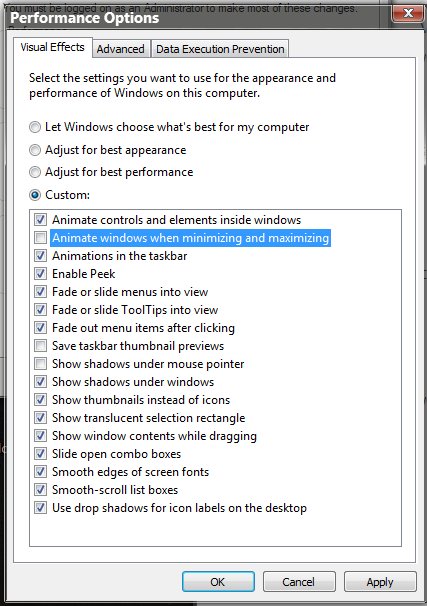
-
Need a new change log for: Aero Glass for Win8.1+ v1.5.7 Thanks, -DW BigMuscle has completed the change log. Thanks, -DW
-
Translation: Why do I have when INSTALLING Windows 1.5.7 AERO GLASS 10 1709 artifacts remain in Windows Explorer and programmes
-
It's working just great. I'm using the Win7 theme atlas. Thanks again for all the fine work by just keeping up with all the MS build updates. -DW
-
Thanks Nutrynion for letting me know. It looks like you put a lot of work into it. -DW
-
Thanks Nutrynion, please keep me posted on your progress. -DW
-
Nutrynion, Did you make a theme atlas or the whole theme? And are you sharing? It's looking good from what I can tell. -DW
-
You didn't read all the posts... He was only kidding. -DW
-
I guess DavidHuynh94 was right. I thought I had a sense of humor but maybe I don't. Anyway, keep up the good work. -DW
-
Why Never bigmuscle? What about the experimental build that is working so well? We don't need Application Frame (Modern Frame). Please make the experimental build into a final build. Thanks, DW
-
Thanks for the reply Bigmuscle. I guess if I had to choose between the two I'd choose fluent design. I never did like what Application Frame did to Microsoft Edge anyway. -DW
-
That was quoted for AeroGlass build 1.5.6, this is build 1.5.6 1109. -DW
-
Thanks bigmuscle for the experimental build for Win10 16299.15+ It's working very well for me with a nice blur and transparency effect. I'm assuming that the Application Frame is not working in this build, right? -DW debug.log
-
both ways -DW
-
Way to go! Persistence pays off, I like that. -DW
-
Ah, Windows 98 which I was a beta tester. -DW
-
You can adjust the thickness of the border by adjusting WindowMetrics in the registry which you may have done already. I get the lazy part as I'm that too. -DW
-
Why do you want autohotkey? You would have to make it hit cancel. Is it so hard to just click it?
-
I still get the warning but you must hit cancel and not try again. Then just play with the GUI until you get the effect you like. -DW
-
You're welcome. We can also add to the list builds 16299.15 and 17004 which get symbols and therefor transparency -DW
-
Looks like we can have our cake and eat it too We got symbols today and therefor transparency. -DW Win10 16296 w/ Aero Glass 1.5.6
-
-
I guess all good things must come to an end -DW
-