-
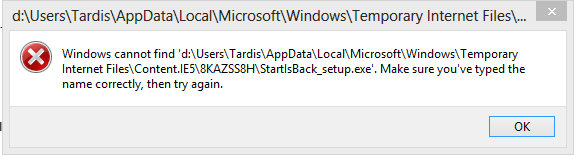
Do you get that when running setup? Try right clicking the setup and running as administrator. Whether run, download and user or administrator. Windows 8 treats StartIsBack as "beware" type software and have to hit "Run anyway". Always falls over at error message as uploaded. Using my Start8 licence until I can get StartIsBack to work on my second computer PS: Why does "Preview" in this forum constantly fall over and lose my edits?
-
Getting this error, but only on one computer. Both have User Profiles on drive D.
-
If I buy a five user licence, can I activate two licences now and the remaining three at a later date?
-
Not sure whether anyone else has their User Profiles on a drive other than C. Mine is working fine with files under D:\Users\Username\Appdata\Local\StartIsBack. Also, like the fact that pulling the mouse down from the top of the screen switches to MS App Mode if I really should want it.
-
Great. I can finally rename Folders and Filenames within the Start Menu. Please advise when I can purchase your great product.