Everything posted by GideonK
-
-
As always, Thanks again Steven. MSFN lost a whole lot of comments and files. However, this is what I'm getting trying to download the latest ulz files: Internal Server Error The server encountered an internal error or misconfiguration and was unable to complete your request. Please contact the server administrator at webmaster@msfn.org to inform them of the time this error occurred, and the actions you performed just before this error. More information about this error may be available in the server error log.
-
Added the Convenience Rollup Update KB3125574-v4-x86 to my slipstream package and what do you know? Windows update discovers 60 additional fixes. Is this the new normal? It's around 6 pm here but where you live it's already your birthday so, happy birthday to you and all the best, health above all. Welcome back.
-
-
-
-
-
-
-
-
-
-
-
Hi Steven. I just installed the latest version of your updates file. Letting Windows7 check for updates it came up with 2 not present in your collection which it proceeded to install: kb2904266 - 9/12/2013 kb2908783 - 7/4/2014 Also, kb2835174 seems to be for Polish installation only. Not sure why it's included in the mainstream collection of updates. As always, Thank you.
-
-
Ponch, I'm baffled. The situation is unchanged for me. Downloaded on Sunday Dec.15 at 22:00pm EST and the posted zip file stil contains another zip file by the same name, without the zip extention. Any Ideas? This is where I get it from: http://xdot.tk/updates.html The file corrupt or invalid error came about because my default app for zip files was the internal windows tool. Once I used 7Zip to open it the error was gone.
-
-
-
Greetings Steven. I was trying to remove my last post because a. I solved the my problem and b. No one was responding but alas I never found out how delete one's own post. too late now since you have responded. I solved the issue by not using the IE11 .exe file but instead downloaded and used the Cabinet file mentioned on page 1. Why didn't I have this problem prevoiously? Previously for IE10 the 'Optional Updates' group did have the cabinet file included (10/09/13 for instance). Unbeknownst to me and for reasons that mystifies me the current offering for IE11 dropped the cab file and replaced it with the executable file. I havn't done this in a few months and I forgot what works and what doesn't. At any rate, other than this minor glitch, the updates worked as flawlessly as in the past and as always I'm appriciative of your effort. Best regards, Gideon.
-
Help, This silent installer is very silent but it wont install. I'm not sure how to proceed to solve this issue. I'm using WinToolkit, the arguement for the silent install is: /quiet /norestart /update-no and i'm loading the prerequsites mentioned by Steven at the top of page 1 (Incidentally the list varies somewhat from Microsoft's list of 11/18/13 at link http://support.microsoft.com/kb/2847882 ). Eyeballing the progress, IE 11 seems to be installing properly but when the installation concludes I find IE 8 as the browser and the following troubleshooting link on the desktop: http://support.microsoft.com/kb/2872074 Any ideas and suggestions would be greatly appreciated. Gideon.
-
-
Hi -X-, using the post SP3 fixes from your latest list (http://xdot.tk/updates.html) I'm successfully installing Windows XP except for one high priority fix IE8-WindowsXP-kb2879017-x86-ENU.exe which is in your list but is not integrating and still is being asked for by Windows update. I therefore moved up to the top of the list the following fix: IE8-WindowsXP-x86-ENU.exe. Hey, it worked. the aforementioned fix is now integrating successfully. Could you please change the order in your list? Am I the only one who has to make this change to the list? Best regards, Gideon.
-
-
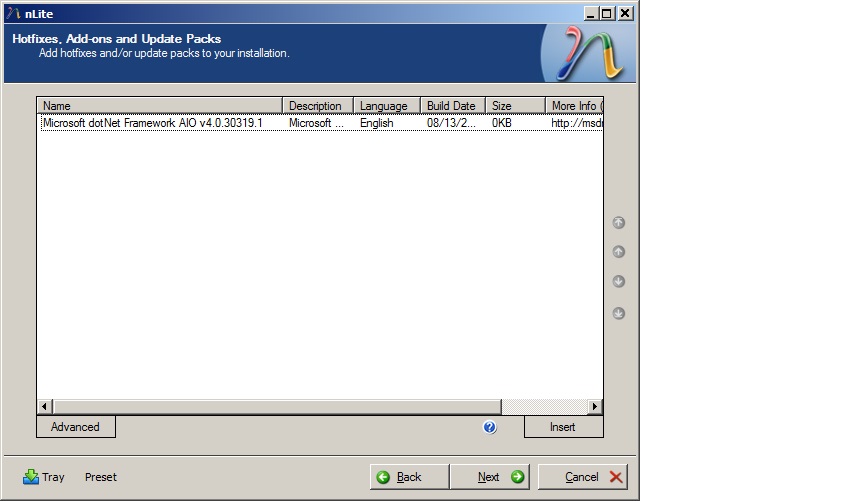
Thanks for the very quick reply, X. I tried several times before and again after posting, No luck. I re-downloaded and installed the latest nLite and also re-downloaded the add-on. Here are my screen shots: The first screen is at insert time and clearly shows size as zero (0) Second shot is after integration, no increase in size. Any other suggestions? Thanks, Gideon.
-
I've been succesfuly integrating the Addon Microsoft.Net AIO ROE using the previous version (1.4.9.1). The addon is found here: http://www.ryanvm.net/forum/viewtopic.php?t=8728 After integration source folder grew by 57.24 MB. Installing the latest version (1.4.9.3) this same addon will not integrate and upon completion the message is: Source reduced by 0.09 MB So something ain't right here, Is this a bug or am I missing something? Thanks, Gideon.