




Everything posted by jassenna
-
I also use Notepad
-
Thank you for replying.
-
Another question: What is a modern browser in the context of this list ?
-
billmect said: | I have been using the 125 version for several weeks on Win 7, I also have the CustomCSSforFx I thought 115 esr was the last version frme Mozilla that worked under Windows 7. Are you using some unofficial build ?
-
I downloaded Zulu JRE for 32-bit Windows. It comes as a .zip file without an installer. I understood that I must set the JAVA_HOME and PATH variables to to the JRE directory in order that programs that need Java can see it, but I don´t know how to do so in Windows. Would anyone here explain ? O/S Windows 7 Home 32-bit
-
Tripredacus said: | No. In fact, if you create a shortcut to cmd and go to the properties, you'll see you cannot set options on it either as it's a "special" | | executable in Windows. Running as Administrator is not allowed to be done automatically on certain binaries, and cmd.exe is one of | them. But this is exactly what I did years ago and it works. Perhaps because this is a single-user installation of Windows 7 Home
-
What I was worried about did happen. Until recently, there were only routers besides the machine I was reporting about in the LAN, and I could see and access them now, I set another desktop computer, also runnnig Win7 and they do not talk to one another. Both automatically get IP addresses and ipconfig, and netstat show their acitivity, but the first one, about which I wrote in my february 3 post, still says "Not Connected - No connections available" in the lower right corner of the screen and neither one cannot access the other under Windows. The second computer shows the LAN in the lower right corner icon, but does not show the first computer in the network map.
-
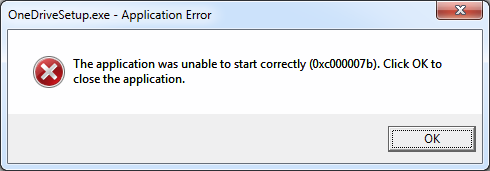
On 2/15/2022 Ivanbutto posted a message about this error when attempting to run OneDrive : I got this same error attempting to run a program named PdfEdit. It is a Win32 program, the date of the .exe is 05-26-2014. What does this error code mean ? My P/S is Win7 AMD-64 Pro.
-
-
-
J.D.Draker asked: | What about the condition of the system HDD? It has 300 GB capacity, about half-full and so far working without problems.
-
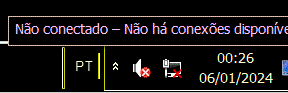
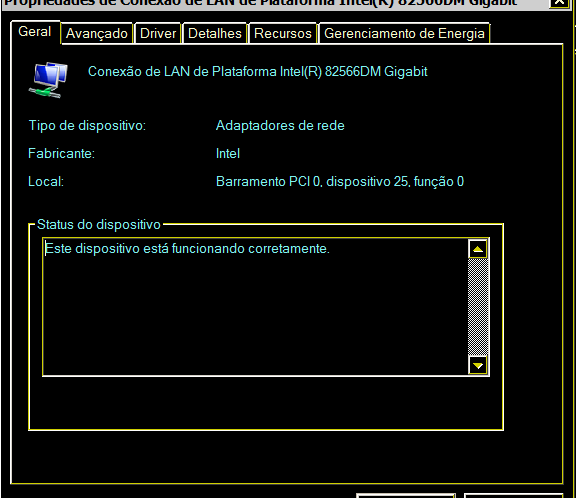
Now a worry: Shortly after reinstalling, the rght hand lower corner of the desktop begin to appear as in WHTISTHS.GIF, with three red crosses on the icons. I usually disable the sound board, so no worry here. I shall give more info about the notifications in another post. The current worry is that the network icon is also crossed out, and on click shows the message "Not connected - No available connections" as in NOCONN.GIF. However, I can connect to any other machine in the LAN and access the Internet through the gateway without problems. I am worried because , if it really stops connecting, there would be no clue about what happened. The Ethernet adapter properties screen does not show anything wrong - see ADAPREDE.GIF. The message says: "This device is working correctly"

-
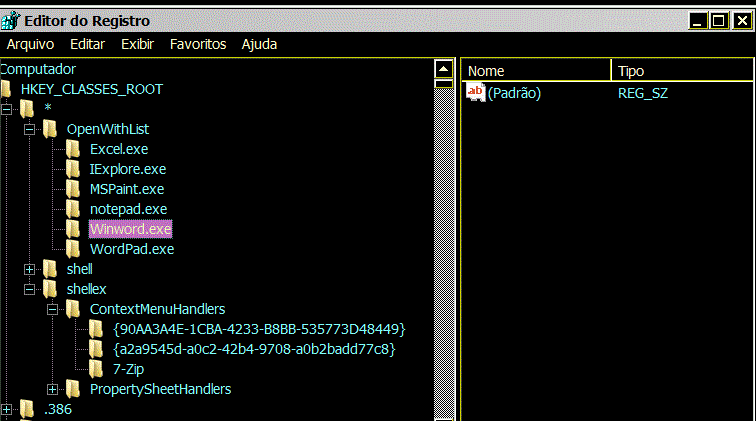
A question: I did not change the OpenWithList key from that displayed on the December 16 image, but the options that appear in the "Open With.." menu are not the same. Where Windows gets the list ?
-
To vinifera: I tried that, and it made no difference. Sorry. To Jaclaz: I tried your solution, and it worked nicely. Thank you. BTW: That site is another good Windows information site I did not know of.
-
See the attached REGEDIT screen. All keys have their default value only. I don´t know what value they should have in order to appear in the menu.
-
I think this title is less aggressive. This topic is a continuation of "Restoring the Registry", presenting other things that did not work as they should. First, the easiest to explain: When I right-click on a file name, a menu appeared with several options - Open, Move, Delete, etc. One of them was "Open with...", that allowed selecting a non-standard program to open the file. This option disappeared after reinstalling Windows, I do not know why. I can still use a non-standard program to open the file, but I must do it by launching the program, then selecting "Qpen" and navigating directories until I find the file. Not really bad, but I would like to know whether I can restore the Right-click menu as it was.
-
I think I solved all the problems with the registry by now. Again, thank you for the help. There are, however, several other strange things happening, so I may open another thread to ask about them, perhaps with a name like "Reinstalling Windows 7 - Annoyances and Grievances." Would it be OK ?
-
Yes, it was a REG_LINK. But this was the contents of the key. What I found strange is that both regedit and reg seem to try to open the key linked to the key containing that type, So, how would the key containing a REG_LINK be deletetd without deleting also the linked key ? BTW, I thought a key was a name for a data structure.
-
Actually, it was not the space. I found other keys with spaces in name that could be opened. I looked the hivesh page, but it offers compiled versions only for Debian and Ubuuntu, After some searches, I found this page: https://pogostick.net/~pnh/ntpasswd/ That program is in a small bootable CD image Linux, and can be used to edit registry keys. It worked for me. The odd thing was that the key contained a link to another key that no longer existed. I did not know about symlink keys in Windows.
-
Ed_Sin said: | Any Firefox browser, as well as its forks, Waterfox, Palemoon, can easily be made portable. |To do this, make a cmd file in the browser folder with the following line: firefox.exe -Profile |"username" If there will be another browser, then accordingly: waterfox.exe -Profile |"username" Would you please explain what this shall do ?
-
I saw that the changes made to OLD_SOFT had been saved to the SOFTWARE hive in the backup directory when I unloaded the hive. I was unable to substitute it for the SOFTWARE hive in the current using the load hive/unload hive commands. However, I used import command and it worked. The backup SOFTWARE hive replaced the current SOFTWARE hive. When I rebooted, things were ok until the opening screen. Then I could not log on to any user account, but I could log on in safe mode, and the user proffiles seemed OK. After more attempts, I ran Windows from the DVD and it worked. The problem was caused by Windows trying to auto run in the background some programs I did not keep from the old installation. Then I scanned the hive and deleted every key associated with those programs (some 20 keys, in quite unexpected places) . Now, Windows boots normally and the software settings I had in the old installation are restored. I thank you for the patience. A funny thing I noticed: There was one key that neither regedit nor reg could open nor delete, because the process that created it put an space inside its name. If I was dealing with a directory, I would have deleted it but, as you told, the registry is not a directory. The key seems to be doing nothing, but I still would like to delete it. Do you know how ?
-
Well, as I said, when I tried some days ago , no dialog box did appear, but today it did. I loaded the old SOFTWARE hive with the name OLD_SOFT and it appeared in the registry, I could edit it without clicking "Edit hive" . Now, a confirmation (or not) that I understood the method: If I select the OLD_SOFT hive, click "Load hive" , then select the SOFTWARE hive and click "Unload hive", the OLD_SOFT will replace the SOFTWARE hive ? I noticed that some keys in SOFTWARE cannot be deleted. If one hive replaces the other, wouldn´t these keys cause problems as when I imported the old SOFTWARE hive over the BCD000000 hive ?
-
That was the first thing I tried, clicking "Load hive" in the regedit menu. but no dialog box appeared and no "hives" folder. BCD000000 did exist in current HKLM before I imported a hive from the old installation? I did not notice it.
-
I tried the option #1 and things did not happen as expected. I opened the current registry with regedit and expanded HKLM. then I tried to open the old registry software hive C:\Windows.old\Windows\System32\config\SOFTWARE using regedit, but it failed to open, saying SOFTWARE was not a register file. I returned to the first regedit window and tried to import the old SOFTWARE hive under HKLM. This worked, and regedit gave the new hive the name BCD000000. I checked it was the old SOFTWARE hive and edited its keys as I wanted. I selected the BCD000000 hive and clicked "Load hive", then selected the current SOFTWARE hive and clicked "Unload hive". regedit warned the BCD00000 hive would completely replace the current SOFTWARE hive, which was not what I wanted - I thought it would add the new keys to the existing hive - so I canceled the operation. I tried to delete BCD000000. regedit would not do it. So, I exited regedit and rebooted. The computer would not reboot. I had to boot from the installation DVD and start "Repair the computer". When the repair was finished, the computer booted normally. I opened again the current registry and found BCD000000 was still there, but contained only two keys that could not be deleted. I tried again importing the old SOFTWARE hive to BCD00000, which worked. This time, I edited its keys so it could (I think) replace the current SOFTWARE hive. I tried again the load hive/unload hive. regedit would not perform the unload. I had again to reboot from DVD and repair and the registry has now a hive named BCD00000 under HKLM that cannot be deleted and none of the keys I wanted to add to the SOFTWARE hive. Can I at least return the registry to its state before the editing attempt ?
-
In the topic: "Access registry by moving system drive to another computer" Jaclaz said: >There are several ways (to edit an offline registry manually) Would you please point some to me ? My story: I reinstalled 64 bit Windows 7 in a computer. The installer kept a copy of the old system in a file named Windows.old in the HD. I would like to copy the many of the old registry settings to the new installation, but don´t know how to do it. If I open the registry with the old regedit, it opens the new registry , not the old.