jaclaz
Content Type
Profiles
Forums
Events
Everything posted by jaclaz
-
OT , sometimes I wonder if people actually READ what they write. I mean the good guys that wrote the BIOS "illustrating" string. Would this imply that there is a possible setting for : and one for : jaclaz
-
As often happens, OT but not much . http://www.codeproject.com/Articles/8688/Extracting-files-from-a-remote-ZIP-archive jaclaz
-
Hmmm. From: http://www.supremecourt.gov/opinions/10pdf/09-893.pdf I would guess that IF some 17 million indivduals get really angry against MS, no matter if they will receive or not any indemnification and whether they will be allowed a class-action arbitration or litigation , MS will have it's share of issues.... jaclaz
-

Barracuda LP (no, not a 7200.11, nor a 7200.12)
jaclaz replied to Eurgene's topic in Hard Drive and Removable Media
...and thus you will most probably get a "wrong" converter, working at 5V TTL and NOT at 3.3V TTL , I see how the read-me-first: besides NEVER being read FIRST , is NOT actually read at all! . Commas are parameter separators, two consequently commas simply mean that the parameter between them is omitted. DO NOT EVEN THINK of experimenting with seagate terminal commands. Your ONLY choice is to find a set of commands and issue them EXACTLY, even a very minor change may make your driive not only "bricked" but also IRRECOVERABLE. DO NOT try inventing a new set of commands. There is a "manual" for Seagate commands linked to in the "main" thread, though, here: AND read these: http://forum.hddguru.com/seagate-terminal-commands-t6411-40.html http://forum.hddguru.com/seagate-7200-terminal-commands-t11926.html jaclaz -
owww , come on . So, the disk is visible and as soon as a letter is manually assigned to the volume on it, by sheer magic the missing mass storage controller materializes itself from thin air? @ragsboss WHO are the "we"? <-this is just curiosity WHICH PE is it? <- I mean is it a PE 3.x i.e. made form windows 7 or another earlier version? WHICH VM is it? <- Some detail might help HOW exactly was the PE built? <-WAIK or some builder, if the latter which one? From WHICH device is the PE booted? <-like cirtual CD/iso, seconf hard disk like device, etc. A possible workaround, NOT a solution, could be to autoexecute a program like the ones discussed here: http://reboot.pro/10169/ If i were you I would check the PE Registry, namely checking first thing the Mounteddevices / Dosdevices and the Nodrives key, see: http://diddy.boot-land.net/firadisk/files/mounteddevices.htm http://www.wisdombay.com/hidedrive/index.php What is the output of MOUNTVOL? And the one from dd --list (see the linked thread on reboot.pro)? jaclaz
-
Sure they don't. (I mean people actually runnning the telemetry ) They tend to get to a web site and read the title, and possibly the incipit of an article, at this point all their neurons are already busy with the overflow of information contained in a few sentences and they click away to some other site, while senselessly twitting a random thought about the news they didn't actually read, let alone understood. jaclaz
-
Barracuda LP (no, not a 7200.11, nor a 7200.12)
jaclaz replied to Eurgene's topic in Hard Drive and Removable Media
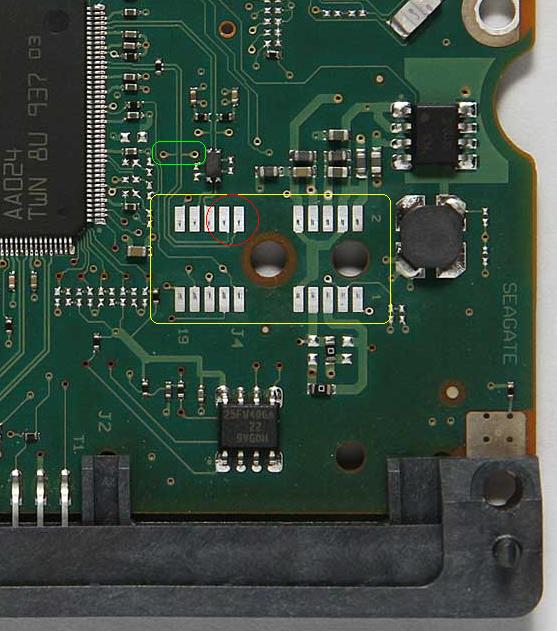
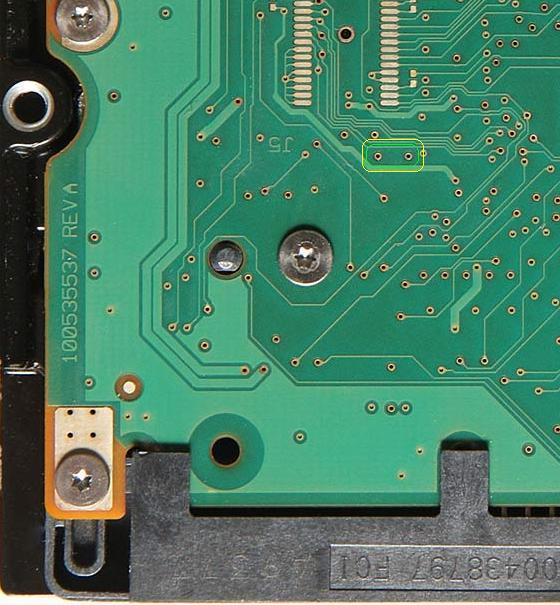
Let's see if the attached images help you (and BTW is a good example how the information is - even when disclosed - actually "retained"). First one is a crop of the image you posted ("under" side) of the PCB. Can you see the contacts "circled" in yellow? They are the "head" contacts, four sets of five contacts. Can you see the two contacts circled in red, they are the read channel. (this should be "common" to "all", the .11 and .12, ES2 and LP) Since you have to short it, the first occurrence that you can do it "from the upper side" is circled in green. As you may have noticed, most (BTW nice ) posts indicating where to short only give you the "upper side" of the specific PCB, so you cannot get a "general rule", the given post is an exception, in the sense that they give you the "under side" position (but you have to find yourself what the points are on the "upper side"). The second image attached (also a crop, this time from your second posted image) circles in green/yellow the (hopefully) same two points, but do check them with a multimeter . Nothing you can do (AFAIK) at home, without some dedicated hardware/software (please read as PC-3000 UDMA), mind you I presume that it could be done at home also through far more econoomical means BUT you would need a number of informations and an amount of training that are far beyond your capabilities/knowledge (NO offence intended ) but worst than that far beyond my capabilities/knowledge (and I would guess beyond those of any non-professional). More or less all the info we "amateurs" get are the crumbs that the guys at hddguru and on a selected number of places, mostly Polish, Russian of Chinese (and thus with the aggraviation of google translate or similar) leave behind them or simply feel - from time to time - exceptionally "good" and give as "charity" to the poors. The usual caveat applies, it all depends on HOW MUCH you value your data (and are prepared to spend for them) and/or HOW MUCH you like gambling. Only you can decide if it is the case of forgetting a DIY attempt and pay a pro or risk on an all or nothing bet . jaclaz
-
Seagate Barracuda ES.2 HP branding
jaclaz replied to martinlink's topic in Hard Drive and Removable Media
Forget about *any* .iso or .img modifying tool such as poweriso or ultraiso. 7-zip has (obviously) limited capacity in editing anything but .zip or .7z (and a few other types) archives. it won't do anything to .img's and .iso's (or to files contaqined in them). Get IMDISK: http://www.ltr-data.se/opencode.html/ http://reboot.pro/forum/59/ use 7-zip to EXTRACT the Bootable_1.44M.img to a directory on your disk. mount the "on disk" Bootable_1.44M.img to drive A: or B: through IMDISK do the whatever changes you want to do unmount the IMDISK drive If you want to recreate the .iso, get IMGBURN: http://www.imgburn.com/ and make it following this guide: http://forum.imgburn.com/index.php?showtopic=1779 jaclaz -
Barracuda LP (no, not a 7200.11, nor a 7200.12)
jaclaz replied to Eurgene's topic in Hard Drive and Removable Media
Yep , I earned it, rest assured : http://reboot.pro/2764/#entry18795 http://reboot.pro/3078/#entry20899 http://reboot.pro/3096/ http://reboot.pro/8710/#entry74627 http://reboot.pro/8840/#entry76073 http://reboot.pro/12527/#entry109689 Now, back to topic, let's see if we can find a compromise, let's call the stupid thingy a So that I may be able to ask a Mod/Admin to split this thread from post #36 onwards to a new thread aptly titled ..... jaclaz -
Yes, but "traditionally" all good (and most evil ) have come from "Server" or however "Professional/Corporate" solutions, that in the years have been forced to "innocent" end customers. Just think of the use your mom or grandmother makes of features like: NTFS quotas file permissions transactional filesystem fast user switching .... on her netbook (that she uses to read some news, find some cook recipes and write/receive e-mails to/from her friends/relatives, besides keeping a spreadsheet with home expenses). With regards to your quote: I will translate it in plain English: We conducted a market research on a non-casual sample of users representing no more than 7% of the market. Instead of realizing that any sample - if not casual - is meaningless metrics, we tried to enlarge the sample size still keeping it non-casual, i.e . having a bigger volume of meaningless data instead of attempting to have an even minimal volume of meaningful data. Then we learned that the reason why the sample was so meager in size was connected to the fact that Enterprise Servers (i.e. something designed to keep possibly sensitive data either of private or commercial nature) were on purpose shielded by firewalls and similar devices in order to prevent information from escaping them . Those correspond, respectively, to lesson #1 and #2 in statistics, and to lesson #3 in computer science (Lesson #1 being "turn on the PC", Lesson #2 being "turn the monitor on, too"), the good MS guys must have had some more interesting things to do instead of attending class . jaclaz
-
Yep, at it's vey basic you need to: make sure that the "right directory" is chosen make sure that the epstopdf.exe program is found translate that one-liner in a batch (basically doubling the % in the FOR loop variable Basically: @ECHO OFF CD /D %~dp0 SET Program="C:\My program directory\eps to pdf\epstopdf.exe" for %%A in (*.eps) do %Program% %%A this assumes that you copy the small batch to the directory and that you have the program in a "fixed" directory, in the example "C:\My program directory\eps to pdf\epstopdf.exe". The %~dp0 will expand to the drive and path of the item 0 of the command line (the batch file itself). jaclaz
-
But you should see the good guys at MS like a (BTW very gifted in their self-esteem) doctor. In their own words: http://blogs.technet.com/b/windowsserver/archive/2012/05/17/improved-server-manageability-through-customer-feedback-how-the-customer-experience-improvement-program-makes-windows-server-2012-a-better-product-for-it-professionals.aspx If you do not forfait all your data to them, NOW, you are actually holding them back from helping other people, you little selfish bastard! I do prefer the short version: jaclaz
-
Well, I got you exactly where I wanted you to be , also grub4dos has this feature (and many others), see here (be warned it is advanced-advanced ): http://reboot.pro/7138/ (and take into account that since the above thread, quite a few new tricks can be done with latish releases of grub4dos ) See you when you are back . jaclaz
-
Barracuda LP (no, not a 7200.11, nor a 7200.12)
jaclaz replied to Eurgene's topic in Hard Drive and Removable Media
Sure , no doubt about this, BUT BEFORE that he should see if it actually gets the LED:000000CC state (or *whatever* error) BEFORE attempting to short the two pins, THEN he must know WHICH pins to short, the picture in the thread you referenced is about a board 100617465 REV A, and NOT about the one he has (which is a 100535537 REV A), so we are back to square #1 . I may produce which pins are to be shorted (if needed) on the 100535537 REV A Board, but if I were Eurgene I wouldn't do anything so d@mn dangerous without further data: Here: http://forum.hddguru.com/st31500541as-led-error-pins-short-t23079.html ??? It was a retaliation against Eurgene's original post. What was posted: ST31500341AS http://www.newegg.com/Product/Product.aspx?Item=N82E16822148337 What it is really: ST31500541AS http://www.newegg.com/Product/Product.aspx?Item=N82E16822148412 Comparison: ST31500341AS ST31500541AS jaclaz -
Barracuda LP (no, not a 7200.11, nor a 7200.12)
jaclaz replied to Eurgene's topic in Hard Drive and Removable Media
Well, as i see it, the LP should be part of the 7200.12 family, but of course there are NO certainties, the usage of "child" for the LP actually reinforces my impression of it belonging to the 7200.12 family..... The good guys at Seagate have of course far too few neurons connected to actually provide a senceful naming scheme, so it could be *anything*, the model "ST31500541AS" corresponds also to a "normal" 7200.11 7200 rpm disk, so you may be perfectly right, and the LP couls be any of (PSEUDO-NUMBERS): 7200.11.1 7200.12.1 7200.13 8745.42sx Mark III jaclaz -
Yep , same happens on RJ connectors, if you remove the "pin", since it is the pin itself that perforates the wire insulation. Though it is usually quite difficult to remove a single "pin" from a RJ connector. Point is/was that "better be safe than sorry" unless you know that *nothing* is connected to the pin #5 of the RJ12 receptacle, and besides there is no data to know if the "N/C" wire on the RJ45 receptacle would go on which among pins #4, #5 and #8 (you should remove all three of them, but usually, if on the RJ45 socket there are all 8 contacts, the ones that find the "hole" where the "pin" shoud be won't "like it" much and will tend to bend/stuck the connector ), cutting the cable shorter on the RJ45 side is the faster and safer way. There is also another (remote) possibility, that on the RJ12 side the pin #5 is connected to a ground of some kind, in which case having a 6 wire cable with one wire connected to pin 5 on the RJ12 side and cut 2 or 3 millimeters shorter on the RJ45 side would provide a form of "shielding". jaclaz
-
Barracuda LP (no, not a 7200.11, nor a 7200.12)
jaclaz replied to Eurgene's topic in Hard Drive and Removable Media
Would you agree on a 7200.12 LP? You know, like : http://www.hdd-parts.com/barracuda-720012.html http://www.hdd-parts.com/10113001.html @Eurgene Check this also: http://www.microsofttranslator.com/bv.aspx?ref=Internal&from=ru&to=en&a=http://hddhelp.com.ua/7200-12.htm jaclaz -
This is the one you want MBR Utility, file mbr.zip: page__view__findpost__p__769544 OR, forget about it and get OS-BS rectius mbldr instead: http://reboot.pro/334/ page__st__105?do=embed' frameborder='0' data-embedContent> BTW this info is in the thread you were ALREADY pointed to: (there are reasons why a link is given ) jaclaz
-
Barracuda LP (no, not a 7200.11, nor a 7200.12)
jaclaz replied to Eurgene's topic in Hard Drive and Removable Media
The "traditional" unbricking works normally by EITHER: detach the PCB from the hard disk and re-connect it while powered, after some initial commands <- the original method, now superseded for the 7200.11 by one of the following ones insulate only the Motor contacts with a slip of paper and remove it when powered, after some initial commands <- on some disks this works, on other you need the following insulate only the Head contacts with a slip of paper and remove it when powered, after some initial commands <- on some disks this works, on other you need the previous The issue at hand is that some models or only some units will produce a LED:000000CC message that prevents sending further commands. To stop the message above and have enough time to issue the commands the shorting of two pins may work. It is only logical to try FIRST if you get to the LED:000000CC state BEFORE attempting to short the two pins. I would guess that that would count as the "BOTH" in my request . Your board is a 100535537 REV. A. From the little I know then your drive is NOT a 7200.11, but a 7200.12 . From the little info we know: http://computersciencelabs.blogspot.it/2011/02/seagate-720012-sim-error-firmware-fault.html http://www.facebook.com/note.php?note_id=152456431478526 there is no need to short pins on this. jaclaz -
Or a "tighter" compressor. (PAQ8 family or WinRK or nanozip) @anthoyaudi NO, there is NO magic app that does miracles , there are good compressors, better compressors and worse compressors, but that's all. There is a trade off between "compression time", "decompression time" and "compression ratio" (and memory used/needed) most common compressors (and decompressors) tend to be more or less "symmetrical" and "efficient enough", if you have "infinite time" to compress (and also to decompress) you can have "tighter" compression. From time to time someone comes out with a "miracle" compressor, that as soon as it is tested, it is found to be a joke. If you have exceptional results, it meas that your source is a very compressible one like - as -X- pointed out - something with lots of 00's or anyway repeated data, a good example is empty disk images. Go here: http://www.maximumcompression.com/index.html and take some time studying the basics . jaclaz
-
Seagate Barracuda ES.2 HP branding
jaclaz replied to martinlink's topic in Hard Drive and Removable Media
Here, kid , let me take your hand so that you can UN safely cross the road .... Open the .iso with 7-zip. You will see: [BOOT] Drivedetect.exe README.txt Open from within 7-zip [bOOT] You will see: Bootable_1.44M.img Open from within 7-zip Bootable_1.44M.img You will see something LIKE: AUTOEXEC.BAT COMMAND.COM CONFIG.SYS ES2SN16C.ZIP HIMEM.EXE KERNEL.SYS RDISK.EXE TDSK.EXE unzip.exe Open from within 7-zip ES2SN16C.ZIP You will see something LIKE: CHOICE.EXE FDAPM.COM fdl464.exe flash.bat LIST.COM README.TXT seaenum.exe SN16c.lod sn16ccfg.txs jaclaz -
As often happens, OT , but not much : http://www.digitalwpc.com/GetInvolved/MSPartnerPerspectives/KarlNoakes/Pages/You-Spoke-We-Listened-The-New-MPN-Brand.aspx#fbid=ECa4Zu_QDFo Every comment is superfluous. jaclaz
-
NO, I cannot , (or not so easily , compare with http://reboot.pro/2246/#entry14607 ) but Daniel B. Sedory (aka the Starman) seemingly can and he is so nice as to publish his results. jaclaz
-
Yep . See here: http://thestarman.narod.ru/asm/mbr/MSWIN41.htm and here: http://thestarman.narod.ru/asm/mbr/ntFAT32BR.htm jaclaz
-
N/C is the conventional name for Not Connected. In this case it means that the RJ45 (that has 8 contacts) is used on a 6 wire cable of which one (the one connected to the Pin #5 on the RJ12) is cut SHORTER than the others and is NOT connected to ANY receptacle on the RJ45 side )or you can use a 5 wire cable, if you find one). The schematics is evidently drawn by one of those nice guys that like to make things more complex than actually needed . Usually it is "etiquette" to NEVER change the pin order on either side of a cable schematics. Here are a couple examples of more "clear" schematics: http://buzzdavidson.com/?p=24 http://ltxfaq.custhelp.com/app/answers/detail/a_id/328/~/cable-to-connect-a-dec-vt-terminal's-mmj-to-a-lantronix-rj45-serial-port @Tripredacus, a wire marked N/C must NOT be connected to any pin/receptacle. jaclaz