



Skip to content
View in the app

A better way to browse. Learn more.

MSFN

A full-screen app on your home screen with push notifications, badges and more.

To install this app on iOS and iPadOS
  1. Tap the Share icon in Safari
  2. Scroll the menu and tap Add to Home Screen.
  3. Tap Add in the top-right corner.
To install this app on Android
  1. Tap the 3-dot menu (⋮) in the top-right corner of the browser.
  2. Tap Add to Home screen or Install app.
  3. Confirm by tapping Install.

zorbas

Member
  • Joined

  • Last visited

  • Country

    United States
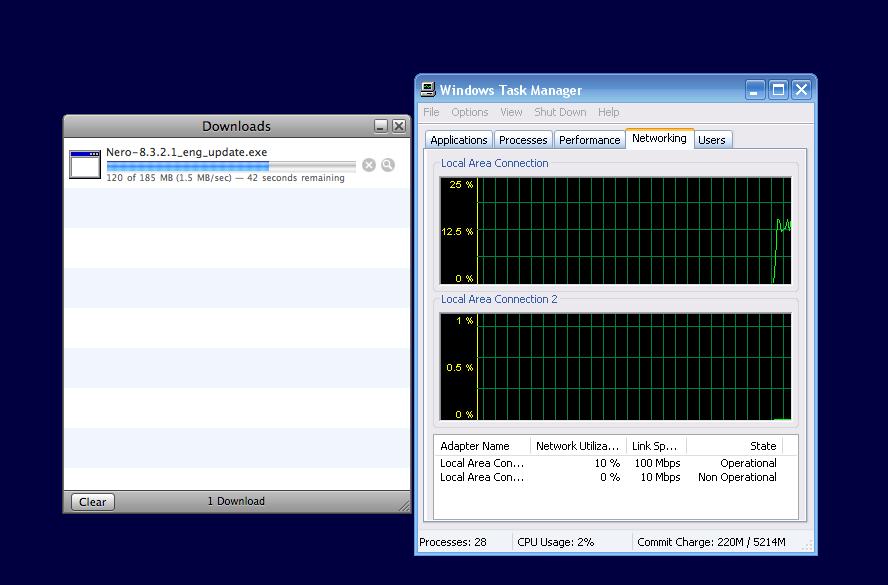
  1. Your mixing up to terms MB/s and Mb/s they are diffrerent by a factor of 8. 1.5 MB/s is shown as the speed ur downloading , that is equal to 12Mb/s which is 12% of your 100Mb/s connection to your rotuer (NOT to your ISP), which is then connected to your ISP There will then always be other bits of trafic flowing which will effect the speed a bit, but there is nothing strange happening here so technically i can only transfer around 15MB/s across my network? is that the truth?
  2. When I download anything from anywhere, with windows Xp AND with windows Vista.. I have noticed something strange. Why is it that I am downloading at 1.6mb/s and it shows that I am using 15% of my 100Mbps connection? see the attached photo for more details.
Account

Navigation

Configure browser push notifications

Chrome (Android)
  1. Tap the lock icon next to the address bar.
  2. Tap Permissions → Notifications.
  3. Adjust your preference.
Chrome (Desktop)
  1. Click the padlock icon in the address bar.
  2. Select Site settings.
  3. Find Notifications and adjust your preference.