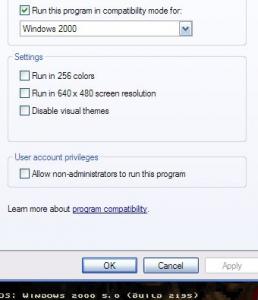
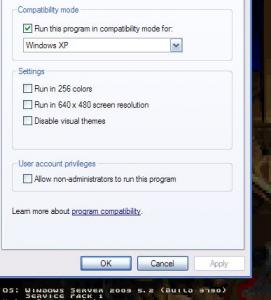
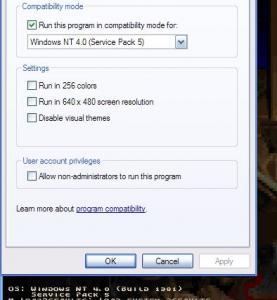
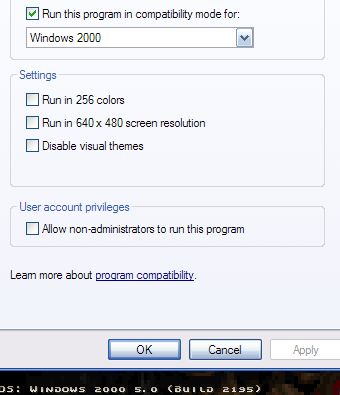
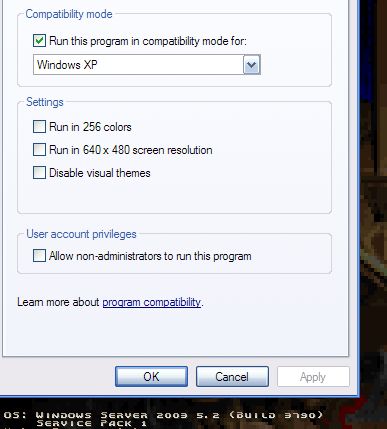
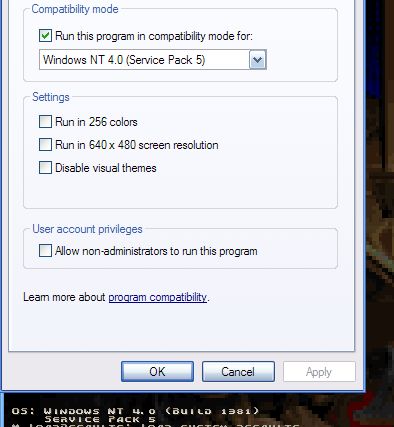
Having a problem with this build when used with Server 2003 and SP1/SP2 beta's, when running some progs in XP compatibility mode, xp mode is ignored and some apps say "Failed: Redirecting Filesystem" in the error box. an example app to use is http://www.stud.ntnu.no/~skara/files/UsbRate.rar or Logitech's Setpoint, both apps work on 2k3 in XP compatibility mode with previous builds of nLite edit: Found one of my apps that shows os version when ran, changed compatibility mode to 2000 and it lists correct, changed to xp mode and it still reads as 2003, causing the above apps to fail even in compatibility mode. somehow nlite is messing up the settings somewhere. [Main] Env = 1.3 - 2.0.50727.42.Microsoft Windows NT 5.2.3790 Service Pack 1 Target = Windows Server 2003, Enterprise SP:2 - 5.2.3790.2825 - English (United States) [Tasks] Unattended Setup Integrate Drivers Hotfixes and Update Packs Tweaks Options [Components] ;# Compatibility # [KeepFiles] msconfig.exe [RemoveFiles] clock.avi [Options] ClassicSetup BlackSetupBack ProfilesDir = "%SystemDrive%\Users" TargetPath = "Windows" temp_dir = %USERPROFILE%\Local Settings\Temp AdvTweaks NoISOPreset [Patches] TcpIp = 512 DoUxTheme [Services2] Themes,2 AudioSrv,2 [Tweaks] Boot and Shutdown-Auto-End tasks immediately Boot and Shutdown-Auto-Kill hung applications immediately Boot and Shutdown-Auto-Kill hung services immediately Boot and Shutdown-Ctrl-Alt-Del at logon-Disabled Boot and Shutdown-Disable automatic restart on System Failure Boot and Shutdown-Disable logging on System Failure Boot and Shutdown-Disable saving Last Good state at boot Boot and Shutdown-Disable Shutdown Tracker Boot and Shutdown-Do not Parse Autoexec.bat Boot and Shutdown-Logon Page-Classic Boot and Shutdown-Numlock-On Boot and Shutdown-Setup Prefetch-Cache-Applaunch and Boot enabled Boot and Shutdown-Status Messages-Extended Desktop-Show Windows version on Desktop Explorer-Advanced Search: preconfigure options Explorer-Classic Control Panel Explorer-Disable Accessibility keyboard shortcuts Explorer-Disable Autorun Explorer-Disable Prefix: Shortcut to Explorer-Disable shortcut arrow Explorer-Display the contents of system folders Explorer-Launch folder windows in a seperate process Explorer-Show Statusbar in all windows Explorer-Show the full path in the Address Bar Explorer-Show the full path in the Title Bar Internet Explorer-Disable Download Complete notification Internet Explorer-Disable information bar when popup is blocked Internet Explorer-Disable Market Place bookmark Internet Explorer-Disable Media Player 6.4 created bookmarks Internet Explorer-Disable Password-Caching Internet Explorer-Disable sound when popup is blocked Internet Explorer-Enable Google URL-Search Internet Explorer-Keep IE URL-History for-1 Day Internet Explorer-Set Homepage-www.google.com Internet Explorer-Set IE-Cache limit to-20 MB Internet Explorer-Set Internet Explorer to accept 10 connects at a time Internet Explorer-Set popup-blocker to high My Computer-Add Device Manager to Context Menu My Computer-Add Services to Context Menu My Computer-Remove Search from Context Menu My Computer-Remove Shared Documents Network-Allow receiving Remote Assistance-Disable Network-Disable administrative shares Network-Disable automatic search for network folders and printers Network-Disable DCOM protocol bindings Network-Disable DNS failure cache Network-Disable extra SMB notify-change traffic Network-Disable LAN-Manager from caching passwords Network-Disable LM HOSTS lookup Network-Disable Microsoft-DS (close port 445 TCP/UDP) Network-Disable restoring mapped network drives on logon Network-Disable Simple File Sharing Network-Hide PC in Workgroups/Domains Network-Remote Desktop-Disable Network-Remove remote-computer NameSpace Performance-Disable Optimize harddisk when idle Performance-Disable paging of kernel and core-os Performance-Disable Tracking of Broken Shortcut Links Performance-Do not cache thumbnails Performance-Processor scheduling-Programs Performance-Run 16-bit Windows applications in a separate process Privacy-Disable Driver Update Internet prompt Privacy-Disable File MRU-List Privacy-Disable Tracking of most used programs Privacy-Remove Alexa Security-Always show Updates under Software Security-Disable DCOM Security-Disable Web Open With prompt Security-Screensaver Password-Protection-Enabled Start Menu-Add Administrative Tools menu Start Menu-Clear most recently opened documents list on logoff Start Menu-Control Panel-Display as a link Start Menu-Disable Highlight newly installed programs Start Menu-Disable popup on first boot Start Menu-Do not use Personalized Menus Start Menu-My Computer-Display as a link Start Menu-My Documents-Display as a link Start Menu-My Music-Display as a link Start Menu-My Network Places-Don't display this item Start Menu-My Pictures-Display as a link Start Menu-Network Connections-Link to Network Connections folder Start Menu-Number of programs on Start menu-10 Start Menu-Printers and Faxes-Don't display this item Start Menu-Reduce popup delay Start Menu-Remove Help and Support Start Menu-Remove Search For People from Search Start Menu-Remove Search the Internet from Search Start Menu-Remove Set Program Access and Defaults Start Menu-Remove Windows Catalog shortcut Start Menu-Scroll Programs Taskbar-Lock the Taskbar-Yes [Unattended] UnattendMode = 1 ComputerType = Default HibernationNo FirewallOff OOBEOff CustomLocales Resolution = 1024x768 BitsPerPel = 32 bit (True Color) Vrefresh = 75 Hz DisableSRestore MaximumDataStorePercentOfDisk = 12 RestorePointLife = 30 DesktopTheme = Default|| PerServer,50 IISInstall = 2 SCWInstall = 2 DataExecProt = 2 AutoUpdates = 3 AutoUDay = 5 AutoUHour = 15 AUElevate AUMinor ProgFilesPath = "\Program Files" CustomNetwork NOMS_MSClient NOMS_SERVER NOMS_PSched [GuiRunOnce] [Drivers] C:\Documents and Settings\Lemonzest\Desktop\Drivers\2KXP_INF\CX_41238.inf,0 C:\Documents and Settings\Lemonzest\Desktop\Drivers\913N\SM910N.inf,0 C:\Documents and Settings\Lemonzest\Desktop\Drivers\amdk8\amdk8.inf,0 C:\Documents and Settings\Lemonzest\Desktop\Drivers\AVS_T200\atirt2xp.inf,0 C:\Documents and Settings\Lemonzest\Desktop\Drivers\camera\NvtCam.inf,0 C:\Documents and Settings\Lemonzest\Desktop\Drivers\Ethernet\nvenetfd.inf,0 C:\Documents and Settings\Lemonzest\Desktop\Drivers\MSGR\lvMSGRc.inf,0 [Hotfixes] C:\Documents and Settings\Lemonzest\Desktop\Add Ons\Kels_ClearType_addon_v1.1.CAB C:\Documents and Settings\Lemonzest\Desktop\Add Ons\Kels_RoyalMod_Addon_v1.3.cab