Everything posted by hlc
-
Why i get error while installing the windows 7 after using vlite with this session above?
-
I only allowed the superfetch to read the startup programs, and then, after it fetched once, I will disable it.
-
It seems like that you have deleted all components including Aero and Component Cache which are necessary for some functions. You may have to unselect them in vlite.
-
You may not turn the monitor off on detecting one specified service, the problem has been discovered in XP that perhaps it's an automatical monitor surveilling overall system events of services. But it's also harmless, or you can turn down the monitor for all services at once, yet you will never get any events in event viewer. Try to turn the service of Windows Event Log off after you make sure events are useless.
-
I am using Chinese IME normally by reducing Vista under version 0.9..I preserve the Chinese Simplification & Tradition Components while deleting language support.
-
NOD32 absolutely........
-
Multimedia Class Scheduler Service cannot be disabled or you don't want to hear any sounds from your computer......
-
Could vlite developer make the snipping tool apart from the Tablet Component in future version? I want to use this tool but don't need others contained in Tablet component. Thanks.
-
I have removed the tablet support and used the office 2007 in normal.
-
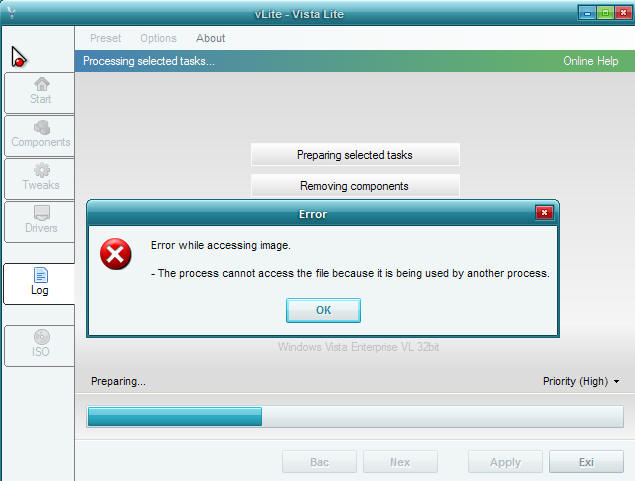
I finally solve the rebuilding problem( can't access the image). I just disable the index service and it's successful to rebuild it. However, i enable this service later, it still can rebuilt it without any problems. Anyone can confirm about that?
-
Thanks,man, the crash is really caused by the Antivir...But there's another problem...Look at the pic...
-
When i load the vista setup direction in vlite, it will crash my xp to blue screen, does it only work under Vista? But when i use it under my vista, while appling the changes, vlite indicates that some files are used by other applications and cannot apply the changes. Besides, it cannot create the iso as well. I really don't know what's going on. By the way, i use vlite to change the vista enterprise version.